
소개
This manual provides essential information for the installation, operation, and maintenance of your ASUS Prime A520M-A II/CSM microATX Commercial Motherboard. Designed for 3rd Gen AMD Ryzen processors, this motherboard offers a robust platform with enhanced features for stability and reliability.

Figure 1: ASUS Prime A520M-A II/CSM Motherboard and Retail Packaging.
설정
1. 물리적 설치
Before beginning installation, ensure your workspace is static-free. Refer to your PC case manual for specific mounting instructions.
- CPU 설치: Carefully align your AMD AM4 processor with the socket on the motherboard. Ensure the golden triangle on the CPU matches the triangle on the socket. Lower the CPU gently into the socket and secure it with the retention arm.
- RAM 설치: This motherboard supports DDR4 memory. Open the clips on the DIMM slots, align the memory modules with the notches, and press firmly until the clips snap into place. This motherboard features four DDR4 RAM slots.
- M.2 SSD 설치: Locate the M.2 slot. Insert your M.2 SSD at an angle and secure it with the provided screw. This motherboard includes one 32Gbps M.2 slot.
- 그래픽 카드(GPU) 설치: Insert your graphics card into the primary PCIe x16 slot. Ensure it is seated firmly and secure it with the case latch or screw.
- 전원 공급 장치 연결: Connect the 24-pin ATX power connector and the 8-pin CPU power connector from your power supply to the corresponding ports on the motherboard. Connect SATA power cables to storage devices as needed.
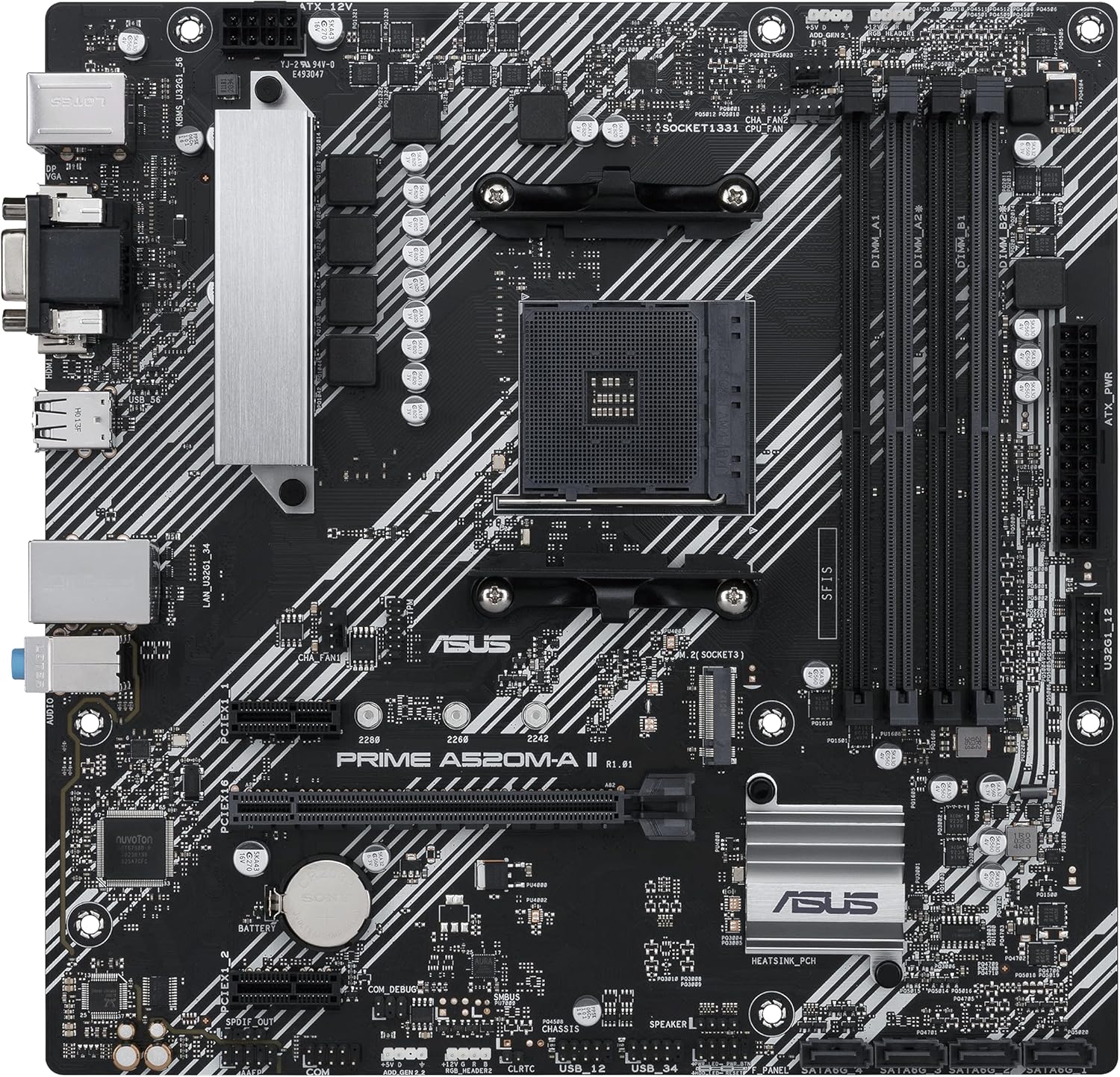
그림 2: 상향식 view highlighting CPU socket, RAM slots, and M.2 slot.
2. 초기 부팅 및 BIOS 구성
After all components are installed and connected, power on your system. Access the BIOS/UEFI setup by pressing the designated key (usually DEL or F2) during startup. Here you can:
- Verify detected components (CPU, RAM, storage).
- 운영 체제 설치 미디어의 부팅 순서를 구성하십시오.
- Adjust memory profiles (XMP/DOCP) for optimal RAM performance.
운영
1. 드라이버 설치
After installing your operating system, install the latest drivers for your motherboard's chipset, audio, LAN, and other integrated devices. These can typically be found on the ASUS support web귀하의 특정 모델에 대한 사이트입니다.
2. 소프트웨어 유틸리티
- ASUS Control Center Express (ACCE): This utility simplifies IT endpoint management, offering comprehensive system protection and monitoring for commercial environments.
- 오라 동기화: Utilize the onboard RGB headers and addressable Gen 2 headers to synchronize RGB LED strips and other Aura Sync-capable hardware for customized lighting effects.
3. 연결성
후면 I/O 패널에는 외부 장치 연결을 위한 다양한 포트가 제공됩니다.
- 비디오 출력: HDMI 2.1 (4K@60Hz), D-Sub, and DisplayPort for connecting monitors.
- USB 포트: Multiple USB 3.2 Gen 1 Type-A ports for high-speed peripherals.
- 이더넷: 1Gb Ethernet port for network connectivity.
- 오디오 잭: Standard audio jacks for speakers, headphones, and microphones.
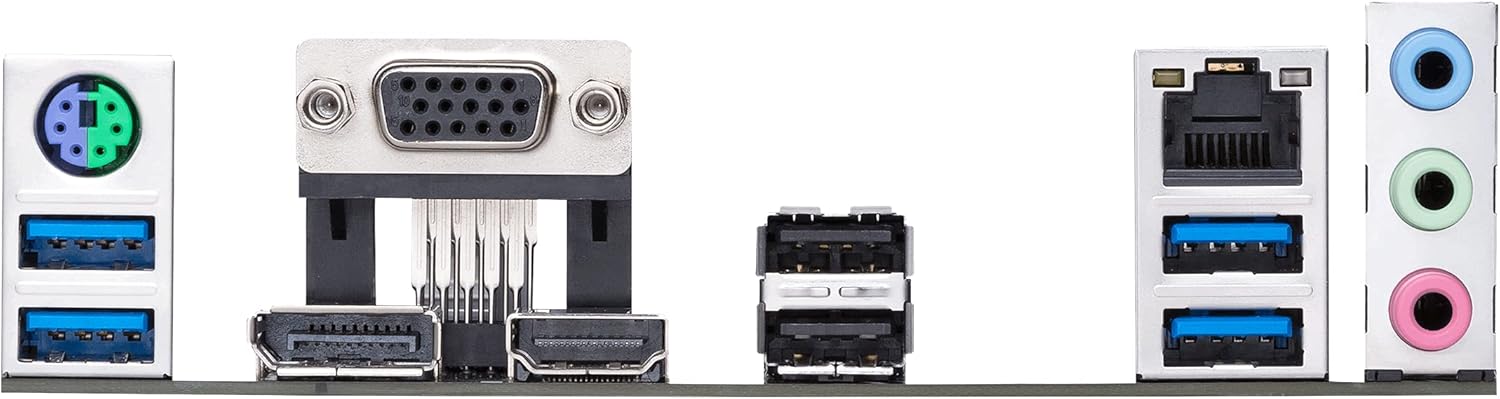
그림 3: 상세 view of the motherboard's rear input/output panel.
유지
- 청소: 압축 공기를 사용하여 마더보드와 부품의 먼지를 정기적으로 청소하십시오. 청소하기 전에 시스템 전원이 꺼져 있고 플러그가 뽑혀 있는지 확인하십시오.
- BIOS 업데이트: 정기적으로 ASUS 지원을 확인하세요 website for BIOS updates. Updates can improve compatibility, stability, and performance. Follow the provided instructions carefully when updating the BIOS.
- 구성 요소 검사: 모든 케이블이 단단히 연결되어 있고 구성 요소가 제대로 장착되었는지 확인하십시오. 눈에 보이는 손상이나 느슨한 연결 부분이 있는지 검사하십시오.
문제 해결
- 전원 없음/POST 불가:
- Verify all power connections (24-pin ATX, 8-pin CPU).
- RAM 모듈을 다시 장착하십시오. RAM 스틱을 하나씩만 꽂아서 부팅해 보십시오.
- CPU가 올바르게 장착되었는지, CPU 쿨러가 제대로 설치되었는지 확인하십시오.
- Check for any loose cables or short circuits within the case.
- 부팅 실패:
- BIOS/UEFI에서 부팅 순서를 확인하십시오.
- Ensure storage devices (SSD/HDD) are properly connected and detected.
- If using a new M.2 SSD, ensure it is initialized and formatted in Disk Management.
- 주변 장치 감지 문제:
- Ensure drivers for the motherboard and peripherals are up to date.
- Test peripherals in different USB ports.
- BIOS 설정에서 USB 포트 활성화 여부를 확인하십시오.
명세서
| 특징 | 세부 사항 |
|---|---|
| CPU 소켓 | AMD AM4 (3rd Gen Ryzen with Radeon Graphics Processors) |
| 칩셋 | AMD A520 |
| 메모리 | 4 x DDR4 DIMM slots, up to 4400 MHz (OC), ECC Memory Support |
| 저장 | 1 x M.2 slot (32Gbps), 4 x SATA 6Gb/s ports |
| 확장 슬롯 | 1 x PCIe 3.0 x16, 2 x PCIe 3.0 x1 |
| 비디오 출력 | HDMI 2.1 (4K@60Hz), DisplayPort, D-Sub |
| USB 포트 | USB 3.2 1세대 타입 A, USB 2.0 |
| 랜 | 1Gb 이더넷 |
| 오디오 | 고화질 오디오 코덱 |
| 폼 팩터 | microATX (10.75 x 10.5 inches) |
| 특별 기능 | ASUS Corporate Stable Model (CSM), ASUS Control Center Express (ACCE), 5X Protection III, Aura Sync RGB headers |
보증 및 지원
The ASUS Prime A520M-A II/CSM motherboard is part of the ASUS Corporate Stable Model (CSM) program, offering a guaranteed long product life cycle and reliable sourcing. This includes up to a 36-month supply, End-of-Life (EOL) notices, and Engineering Change Notice (ECN) control.
자세한 보증 정보, 기술 지원 및 드라이버 다운로드는 ASUS 공식 지원 웹사이트를 방문하십시오. web대지: www.asus.com/support/