
소개
The Poly DA75 is a versatile USB-A/USB-C digital adapter designed to connect Poly Quick Disconnect (QD) headsets to computers. It ensures clear audio quality for call center environments, supporting both USB-A and USB-C connections for compatibility with various systems. This adapter is engineered to work seamlessly with platforms such as Avaya, Genesys, and Cisco, providing a reliable audio solution for professionals.
주요 특징은 다음과 같습니다.
- 범용 연결: Equipped with both USB-A and USB-C connectors on the cable for broad compatibility with new and legacy equipment.
- Intelligent Headset Recognition: Automatically adjusts audio performance to the specific Poly Quick Disconnect headset for optimized call quality.
- Acoustic Protection: Incorporates features to manage safe volume levels, protecting user hearing.
- 플랫폼 통합: Fully compatible with leading call center platforms including Avaya, Genesys, and Cisco.
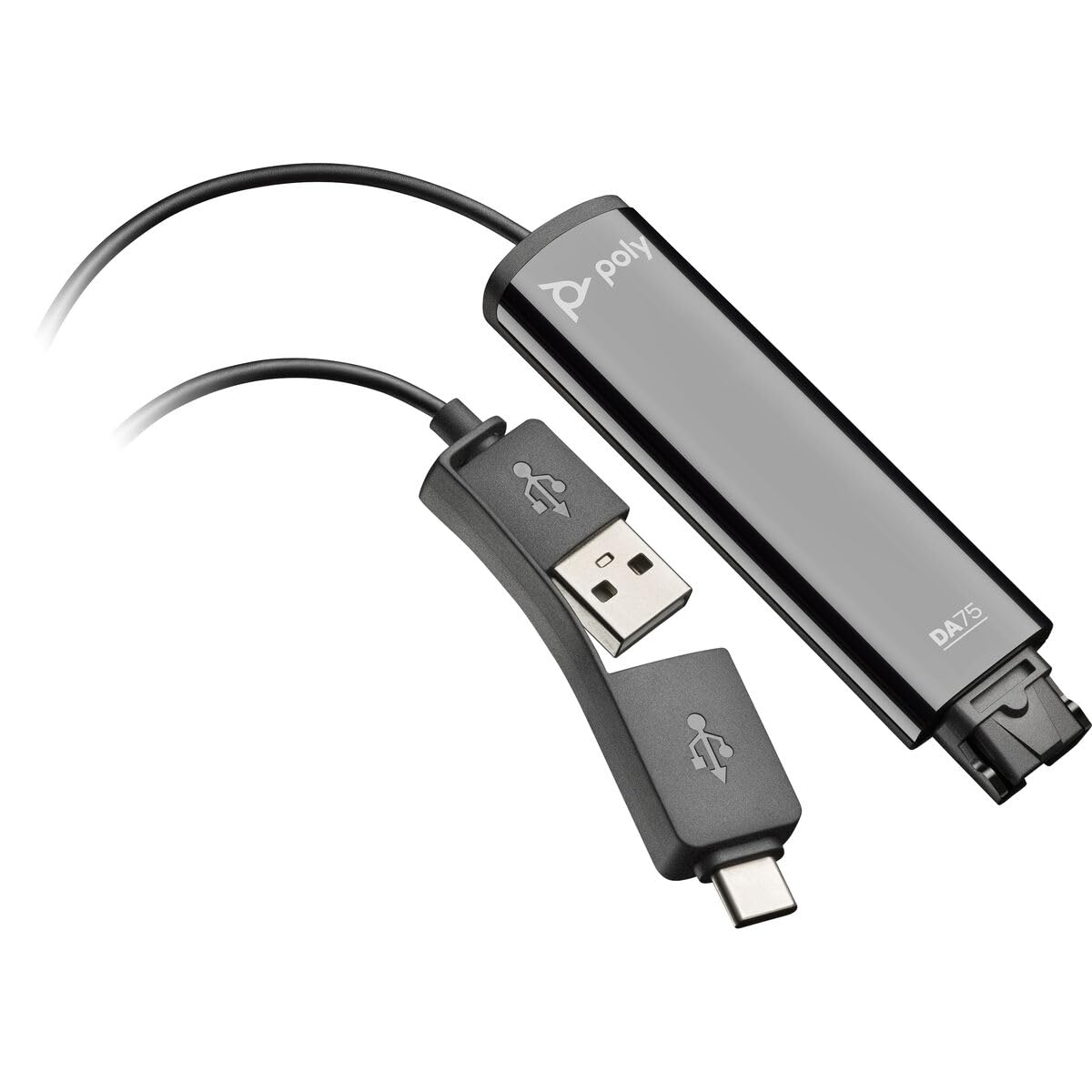
Image: The Poly DA75 USB-A/USB-C Digital Adapter, showing its dual USB-A and USB-C connectors and the Quick Disconnect port for headsets.
상자 안에 무엇이 들어있나요?
The Poly DA75 package typically includes the following items:
- Poly DA75 USB-A/USB-C Digital Adapter
- 문서(빠른 시작 가이드, 안전 정보)
Note: Headsets are sold separately and are not included with the DA75 adapter.
설정
Follow these steps to set up your Poly DA75 Digital Adapter:
- 헤드셋 연결: Connect your Poly Quick Disconnect (QD) headset to the QD port on the Poly DA75 adapter. Ensure the connection is secure.
- 컴퓨터에 연결:
- If your computer has a USB-A port, use the USB-A connector on the DA75 cable.
- If your computer has a USB-C port, use the USB-C connector on the DA75 cable.
Plug the appropriate USB connector into an available USB port on your computer.
- 드라이버 설치: The DA75 is a plug-and-play device. Your operating system (Windows, macOS) should automatically detect the device and install the necessary drivers. This process may take a few moments.
- 장치 인식 확인:
- 윈도우: 이동하다 설정 > 시스템 > 사운드 or 제어판 > 소리. The Poly DA75 should appear as an audio input and output device.
- 맥 OS : 이동하다 시스템 설정 > 소리. The Poly DA75 should appear as an input and output device.
Select the Poly DA75 as your default communication device for both playback and recording.
- 소프트웨어 구성 : If you are using communication software (e.g., Avaya, Genesys, Cisco, Microsoft Teams, Zoom), ensure that the Poly DA75 is selected as the audio device within the application's settings.
작동 지침
The Poly DA75 adapter facilitates audio communication through your connected Poly QD headset. Its operation is primarily managed through your computer's operating system and communication software.
- 전화 걸기/받기: Use your communication software to initiate or answer calls. The audio will be routed through your connected Poly QD headset via the DA75 adapter.
- 볼륨 조절: Adjust the listening volume using your computer's system volume controls or the volume controls within your communication application.
- 마이크 음소거: Mute and unmute your microphone using the controls provided by your communication software.
- Audio Optimization: The DA75 automatically optimizes audio for your specific Poly QD headset. No manual adjustments are typically required for audio profiles.
유지
To ensure the longevity and optimal performance of your Poly DA75 Digital Adapter, follow these maintenance guidelines:
- 청소: Gently wipe the adapter with a soft, dry, anti-static cloth. Do not use liquid cleaners or abrasive materials.
- 저장: 어댑터는 직사광선과 극한의 온도를 피해 서늘하고 건조한 곳에 보관하세요.
- 손질: 케이블, 특히 커넥터 부근을 과도하게 구부리거나 비틀지 마십시오. 내부 손상을 방지할 수 있습니다.
- 연결성: Ensure the Quick Disconnect (QD) connection and USB connections are clean and free of debris before connecting.
문제 해결
If you encounter issues with your Poly DA75 Digital Adapter, refer to the following troubleshooting steps:
| 문제 | 가능한 원인 | 해결책 |
|---|---|---|
| 헤드셋에서 소리가 나지 않음 |
|
|
| 마이크가 작동하지 않습니다 |
|
|
| Adapter not recognized by computer |
|
|
명세서
| 특징 | 세부 사항 |
|---|---|
| 모델 번호 | 218266-01 |
| 상표 | 폴리 |
| 커넥터 유형 | USB-A, USB-C (dual connector) |
| 호환 장치 | Poly Quick Disconnect (QD) Headsets |
| 특정 용도 | PC, Call Center Platforms (Avaya, Genesys, Cisco) |
| 색상 | 검은색 |
| 품목 치수(L x W x H) | 0.98 x 0.39 x 2.95 인치 |
| 품목 무게 | 30그램 |
| 포트 수 | 2 (USB-A/USB-C to QD) |
| 한국어: | 197029650054, 017229175112 |
보증 및 지원
보증 정보: The Poly DA75 Digital Adapter comes with a 2년 제조사 제한 보증. 본 보증은 정상적인 사용 환경에서 발생하는 재료 및 제조상의 결함에 적용됩니다. 보증 청구를 위해 구매 증빙 서류를 보관해 주십시오.
기술 지원: For technical assistance, product inquiries, or warranty service, please contact Poly customer support. Visit the official Poly website for the most up-to-date support contact information, FAQs, and additional resources.
온라인 리소스: 폴리 서포트 Web대지