
소개
This manual provides detailed instructions for the setup, operation, and maintenance of your Brydge 11 MAX+ Wireless Keyboard Case. Designed to enhance your iPad experience, this keyboard case features a multi-touch trackpad, a magnetic SnapFit case, and Bluetooth 5.0 connectivity for seamless integration.
상자 안에 무엇이 들어있나요?
- 1 x Brydge 11 MAX+ Keyboard Case
- 1 x 사용자 설명서
- Charging Cable (USB-C, may be included depending on region/bundle)

설치를 진행하기 전에 모든 구성품이 있는지 확인하십시오.
호환성
The Brydge 11 MAX+ Wireless Keyboard Case is compatible with the following iPad models:
- iPad Pro 11-inch (1st, 2nd, 3rd, & 4th generations)
- iPad Air 11-inch (4th, 5th generations, & M2)
메모: This keyboard case is not designed for use with the 11-inch iPad Pro (M4).
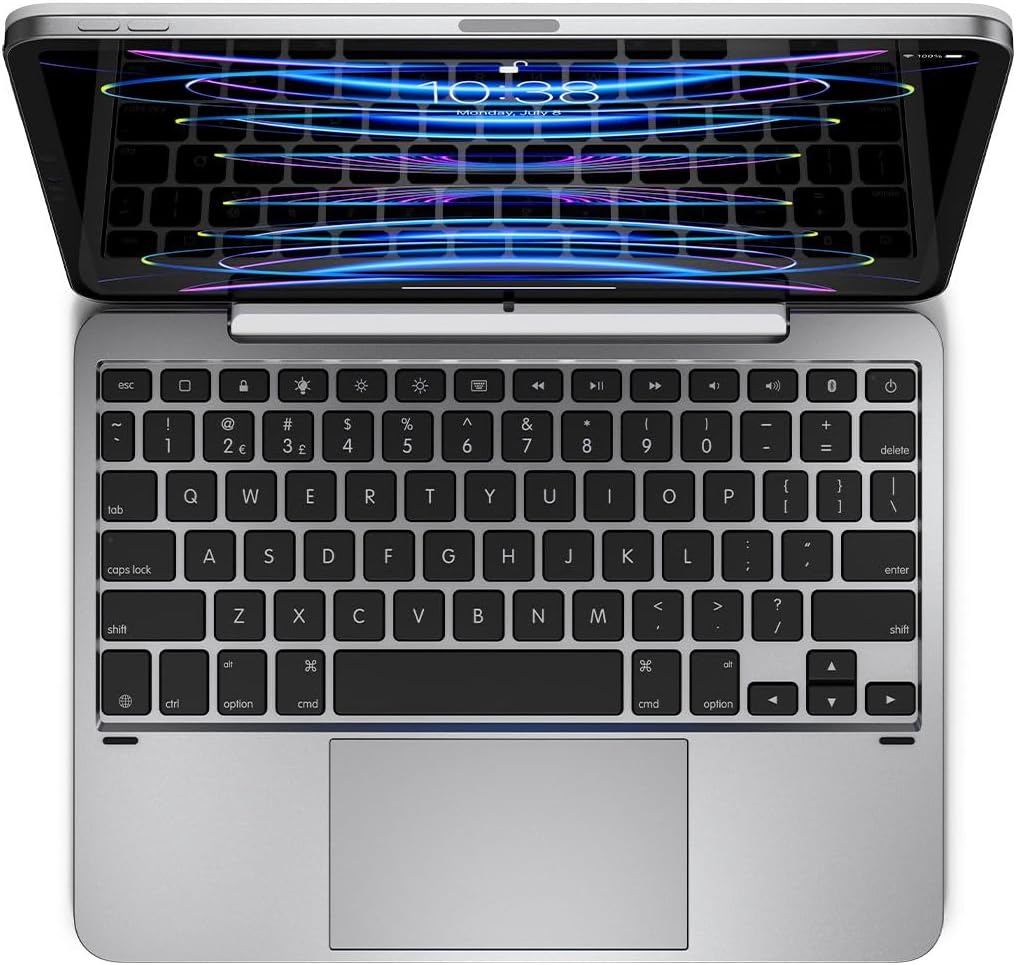
설정
1. iPad 연결
- Align your iPad with the magnetic back cover of the Brydge 11 MAX+ case.
- The iPad will securely snap into place due to the integrated magnets.
- Ensure the iPad is firmly attached before use. The magnetic connection allows for easy attachment and removal, enabling quick transitions between laptop and tablet modes.

2. 블루투스 페어링
- Turn on your Brydge 11 MAX+ keyboard.
- iPad에서 다음으로 이동하세요. 설정 > 블루투스.
- Select "Brydge 11.0 MAX+" from the list of available devices.
- 메시지가 표시되면 페어링 코드를 확인하세요.

3. 펌웨어 업데이트
To ensure optimal performance and access to the latest features, regularly check for firmware updates using the Brydge Connect app. Download the app from the App Store on your iPad.
작동 지침
1. Using the Multi-Touch Trackpad
The integrated multi-touch trackpad supports various iPadOS gestures for efficient navigation. Refer to your iPad's iPadOS settings for a complete list of supported gestures and customization options.

2. Adjusting Backlit Keys
The keyboard features adjustable backlit keys with three brightness levels. Use the dedicated backlight keys on the top row of the keyboard to cycle through the brightness settings or turn the backlight off.

3. 배터리 수명 및 충전
The Brydge 11 MAX+ offers extended battery life, providing up to 3 months of use on a single charge. When the backlight is used consistently, battery life is approximately 40 hours. To charge the keyboard, connect a USB-C cable to the charging port located on the side of the keyboard.

4. 조정 View잉 앵글
The keyboard case allows for a 135° screen rotation, providing flexible viewing angles for various tasks, from typing to media consumption.

유지
To maintain your Brydge 11 MAX+ Wireless Keyboard Case, follow these guidelines:
- 부드러운 d로 외부 표면을 닦으십시오.amp 천으로 닦으세요. 강한 화학 물질이나 연마성 세제는 피하세요.
- Keep the keyboard free from dust and debris. Use compressed air to clean between keys if necessary.
- 장치를 극한의 온도나 직사광선에 장기간 노출시키지 마십시오.
문제 해결
If you encounter issues with your Brydge 11 MAX+ keyboard case, consider the following:
- 키보드가 연결되지 않음: Ensure Bluetooth is enabled on your iPad and the keyboard is powered on. Try unpairing and re-pairing the keyboard.
- 트랙패드가 응답하지 않음: Check that the keyboard is fully charged. Restart your iPad and the keyboard. Ensure no settings are disabling trackpad functionality in iPadOS.
- 키가 작동하지 않습니다: Verify the keyboard is charged and connected. If specific keys are unresponsive, try cleaning around them.
- 배터리가 빠르게 소모됨: Reduce backlight brightness or turn it off when not needed. Ensure the keyboard is fully charged before use.
For further assistance, refer to the official Brydge support resources.
명세서
| 제품 치수 | 9.75 x 7.34 x 0.66인치(9.8인치 길이 x 7.3인치 너비 x 0.7인치 높이) |
| 품목 무게 | 1.65파운드 |
| 제조업체 | 브리지 |
| 품목 모델 번호 | BRY4033 |
| 배터리 | 1개의 리튬 이온 배터리 필요(포함) |
| 연결 기술 | 블루투스 5.0 |
| 특별 기능 | Backlit, Multi-Touch Trackpad |
| 키보드 백라이트 색상 지원 | 단색 (3단계 밝기 조절) |
| 화면 회전 | 최대 135° |
보증 및 지원
The Brydge 11 MAX+ Wireless Keyboard Case comes with a 1-year limited hardware warranty. For detailed warranty information, product support, FAQs, and contact options, please visit the official Brydge web대지.
공식 제품 비디오: