
1. 서론
Thank you for choosing the COMHOMA Ergonomic Office Chair CH153. This manual provides essential information for the safe assembly, operation, and maintenance of your new office chair. Please read these instructions carefully before use and retain them for future reference.
The COMHOMA CH153 is designed to provide comfort and support for extended periods of sitting, featuring a breathable mesh design, adjustable components, and a robust construction.
2. 안전 정보
- 최대 중량 용량: This chair is designed to support a maximum weight of 158.76 kg (350 lbs). Do not exceed this limit to prevent damage or injury.
- Ensure all screws and bolts are securely tightened before initial use and periodically check for tightness.
- 의자 위에 서거나 의자를 발판으로 사용하지 마십시오.
- 조립 중에는 어린이와 애완동물이 의자에 접근하지 못하도록 하세요.
- Use the chair on a level and stable surface.
- 의자를 직사광선이나 극한 온도에 장시간 노출시키지 마십시오.
3. 패키지 내용
All necessary components for assembly are included in the package. Please ensure all parts are present and undamaged before beginning assembly. If any parts are missing or damaged, contact customer support.
4. 조립 설명서
Assembly of the COMHOMA CH153 office chair is designed to be straightforward and can typically be completed within ten minutes. Follow the detailed instructions provided in the included assembly guide. A general overview 조립 과정은 다음과 같습니다.
- 의자 받침대에 바퀴를 부착하세요.
- 가스 리프트 실린더를 의자 받침대 중앙에 삽입하십시오.
- 좌석 메커니즘을 좌석 쿠션 아래쪽에 부착하십시오.
- 조립된 좌석을 가스 리프트 실린더에 올려놓습니다.
- Attach the backrest to the seat mechanism.
- 팔걸이를 좌석과 등받이에 고정하십시오.
- 헤드레스트를 등받이 상단에 설치하세요.
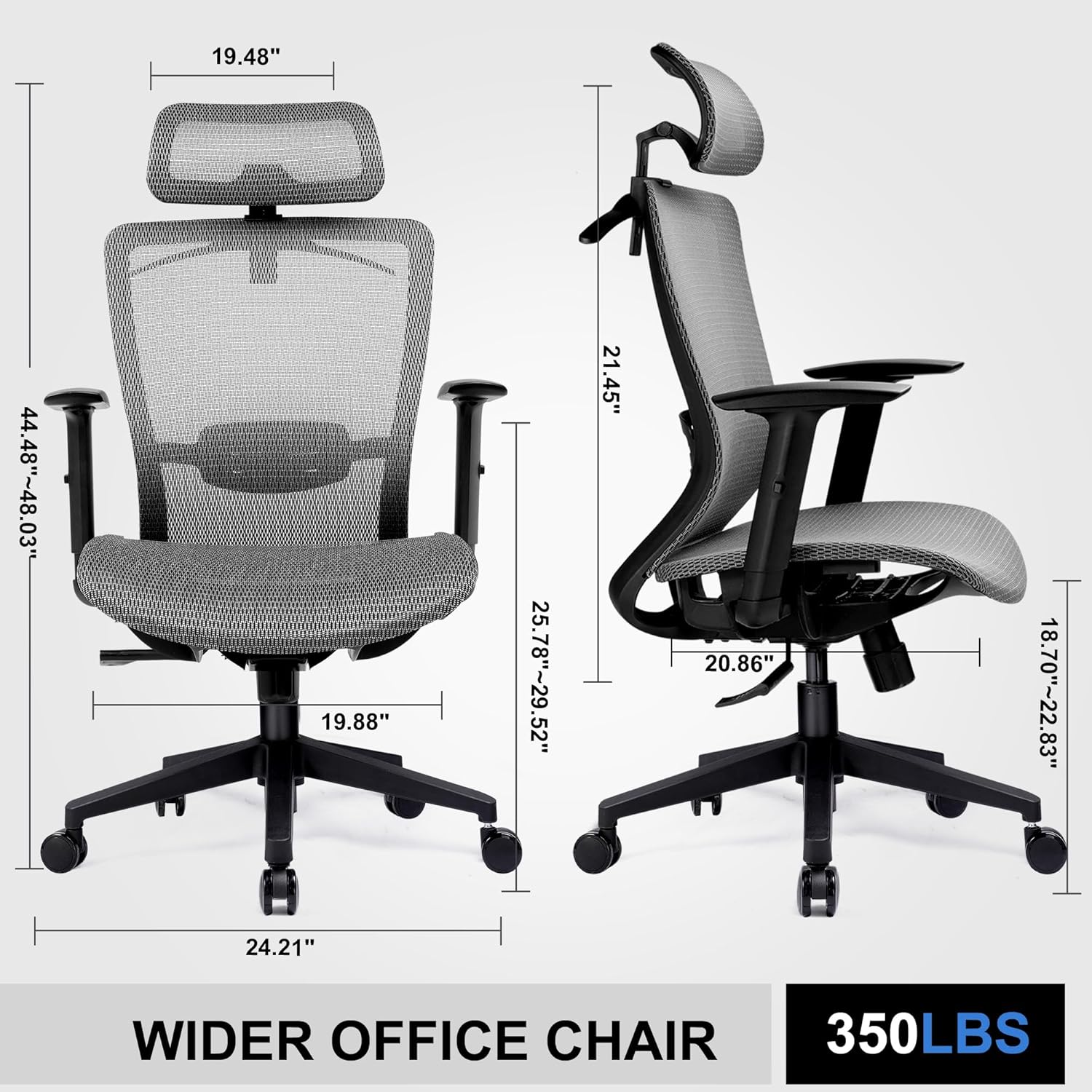
Image: Chair dimensions and overall structure, useful for assembly reference.
5. 사용 설명서
Your COMHOMA CH153 office chair features multiple adjustment options to customize your seating experience:
- 의자 높이 조정: Locate the lever under the seat on the right side. Pull the lever up while seated to lower the chair, or pull it up while standing to raise the chair. Release the lever to lock the height.
- 등받이 기울기 조절 및 고정: The chair offers 3 lockable recline angles: 90°, 120°, and 130°. Use the lever under the seat to adjust the recline angle. Push the lever in to lock the backrest at your desired angle, and pull it out to allow for rocking motion.
- 요추 지지대 조정: The adaptive lumbar support can be adjusted vertically to fit the curve of your lower back. Gently push or pull the lumbar support mechanism on the backrest to find your optimal position.
- 머리받침 조정: The 3D headrest can be adjusted up and down by approximately 4 inches and rotated up to 45° to provide neck and head support.
- 팔걸이 조정: The armrests are adjustable. Locate the buttons or levers on the side of the armrests to raise or lower them to your preferred height.
- 옷걸이: A convenient clothes hanger is integrated into the back of the chair to prevent outerwear from wrinkling.

이미지: 이상view of multi-adjustable features.

Image: Reclining angles and controls.

Image: Clothes hanger feature.
6. 유지관리 및 관리
Proper care will extend the life and appearance of your office chair:
- 청소: 광고로 깨끗이 닦아내세요amp cloth. Avoid using abrasive cleaners or harsh chemicals, as these can damage the mesh and frame materials.
- 정기 검사: 모든 볼트와 나사가 단단히 조여져 있는지 정기적으로 점검하세요. 필요하면 다시 조이세요.
- 캐스터 관리: 바퀴에 머리카락이나 이물질이 끼지 않도록 하여 원활한 이동을 보장하십시오.
- 메쉬 관리: The high-density mesh is resistant to abrasion. For deeper cleaning, a mild soap solution can be used, followed by wiping with a clean, damp cloth. Ensure the mesh is completely dry before use.

Image: Breathable mesh seat construction.
7. 문제 해결
If you encounter any issues with your COMHOMA CH153 office chair, refer to the following common solutions:
- 의자 높이 조절이 안 돼요: 가스 리프트 레버가 필요에 따라 완전히 체결되거나 해제되었는지 확인하십시오. 가스 리프트 실린더가 베이스 및 시트 메커니즘에 제대로 장착되었는지 확인하십시오.
- 의자 삐걱거리는 소리: Check all bolts and screws for tightness and re-tighten if loose. A small amount of silicone lubricant can be applied to moving parts if necessary, avoiding contact with mesh or fabric.
- 캐스터가 원활하게 굴러가지 않음: Inspect casters for accumulated hair, dust, or debris and clean them thoroughly. Ensure the chair is on a suitable surface (hard floor recommended).
- 등받이가 뒤로 젖혀지거나 고정되지 않습니다. Verify that the recline lock lever is correctly positioned. Check for any obstructions in the reclining mechanism.
If problems persist, please contact COMHOMA customer support for assistance.
8. 사양
| 특징 | 사양 |
|---|---|
| 상표 | 코모마 |
| 모델명 | CH153 |
| 색상 | 회색 |
| 재료 | Mesh (Seat and Back) |
| 프레임 소재 | 합금강 |
| 제품 크기(D x W x H) | 53D x 50.5W x 101.6H 센티미터(21D x 24W x 48H 인치) |
| 품목 무게 | 14.8kg |
| 최대 중량 권장 사항 | 158.76kg(350파운드) |
| 백 스타일 | 솔리드 백 |
| 특별 기능 | Adjustable, Flexible, Resistant |
| 제품 관리 지침 | 닦아내십시오 |
| 리클라이닝 포지션 카운트 | 3개(90°, 120°, 130°) |
| 필요한 조립 | 예 |
| 표면 추천 | 단단한 바닥 |
| 한국어: | 810170301940 |
9. 보증 및 지원
COMHOMA provides a 1-year free after-sales service from the date of purchase for this office chair. This warranty covers manufacturing defects and issues arising from normal use.
For any assistance, questions, or to report issues, please do not hesitate to contact COMHOMA customer support. We are committed to customer satisfaction and will respond to your inquiries promptly.
Please refer to your purchase documentation or the COMHOMA official web구체적인 연락처 정보는 해당 사이트를 참조하세요.