
1. 중요 안전 지침
Before operating the Yasola M9 GPS Drone, please read and understand all safety instructions. Failure to follow these guidelines may result in injury, damage to the drone, or property damage.
- 비행 환경: 드론은 사람, 동물, 건물, 전력선에서 멀리 떨어진 탁 트인 공간에서 조종하십시오. 강풍이나 악천후 시에는 비행을 피하십시오.
- 배터리 안전: 승인된 배터리와 충전기만 사용하십시오. 배터리를 과충전하거나 구멍을 뚫지 마십시오. 배터리가 부풀어 오르거나 손상된 흔적이 보이면 사용을 중단하십시오.
- 프로펠러 안전: Keep hands, face, and loose clothing away from rotating propellers. Ensure propellers are correctly installed and free from damage before each flight.
- 통신수 책임: The operator is responsible for safe operation and compliance with local regulations. Maintain visual line of sight with the drone at all times.
- 장애물 회피: While the drone features obstacle avoidance, it is not foolproof. Always exercise caution and maintain awareness of surroundings.
2. 패키지 내용
아래 나열된 모든 품목이 패키지에 포함되어 있는지 확인하세요. 품목이 누락되었거나 손상된 경우 고객 지원팀에 문의하세요.

Image: Complete package contents of the Yasola M9 GPS Drone.
- Yasola M9 GPS Drone
- 리모컨
- Intelligent Flight Batteries (2x 3000mAh)
- 예비 프로펠러
- USB 충전 케이블
- 드라이버
- 사용 설명서 (본 문서)
- 가방을 기내
- 장애물 회피 모듈
3. 구성 요소 식별
Familiarize yourself with the main components of your Yasola M9 GPS Drone.

Image: Key components of the Yasola M9 GPS Drone.
- 360° Laser Obstacle Avoider: Detects obstacles in all directions.
- GPS 모듈 : Provides precise positioning and navigation.
- EIS Anti-Shake Chip: Enhances image and video stability.
- 4K HD 카메라: 고해상도의 사진과 비디오를 촬영합니다.
- 3축 기계식 짐벌: 부드러운 촬영을 위해 카메라를 안정화합니다.tage and allows remote control of camera angle.
- 브러시리스 모터: Provide efficient and quiet flight.

이미지: 앞면 view of the Yasola M9 GPS Drone.
4. 설정 가이드
4.1 배터리 충전 및 설치
Charge the intelligent flight batteries using the provided USB charging cable. The battery indicator lights will show charging status. Once fully charged, slide the battery into the drone's battery compartment until it clicks securely into place.

Image: Modular battery design and capacity.
4.2 프로펠러 설치
Attach the propellers to the corresponding motor shafts. Ensure that propellers marked 'A' are installed on 'A' motors and 'B' on 'B' motors. Use the provided screwdriver to secure them firmly. Incorrect installation can affect flight stability.
4.3 Obstacle Avoidance Module Attachment
The obstacle avoidance module can be attached to the top of the drone. Align the module with the designated slot and press down until it is securely fastened. This module enhances flight safety by detecting obstacles.

Image: 360-degree obstacle avoidance system.
4.4 리모컨 설정
Insert batteries into the remote controller. Power on the remote controller, then power on the drone. The remote and drone should automatically pair. Refer to the remote controller's specific instructions for detailed button functions.
4.5 모바일 앱 연결
Download the official Yasola drone application from your device's app store. Connect your smartphone to the drone's Wi-Fi network (usually named "Yasola-M9-XXXX"). Open the app to view the live camera feed and access advanced flight features.
5. 사용 설명서
5.1 비행 전 체크리스트
- 배터리가 완전히 충전되었는지 확인하세요(드론과 리모컨).
- Check propellers for damage and secure attachment.
- Verify obstacle avoidance module is correctly installed.
- 야외 비행 전에 GPS 신호 수신 여부를 확인하십시오.
- Check for clear flight path and safe operating environment.
5.2 이륙 및 착륙
After powering on and pairing, place the drone on a flat, open surface. Use the one-key take-off button on the remote or the mobile app to initiate flight. To land, use the one-key landing button or manually descend the drone slowly.
5.3 비행 제어
The remote controller uses standard drone control schemes. The left joystick typically controls altitude and yaw (rotation), while the right joystick controls forward/backward and left/right movement. Refer to the remote's diagram in the app for specific functions.
5.4 Camera Operation and Gimbal Control
The 4K HD camera captures high-quality aerial footage. The 3-axis mechanical gimbal provides stabilization and allows for remote adjustment of the camera's vertical angle (up to 90 degrees). Use the dedicated buttons on the remote or controls within the app to take photos or record videos.

Image: 4K HD Camera and 3-Axis Gimbal details.
5.5 GPS Positioning Features
The Yasola M9 drone utilizes GPS for stable flight and advanced features:
- Auto Return Home: The drone can automatically return to its take-off point in case of low battery, loss of signal, or manual activation.
- 나를 따르기 모드: The drone can track and follow the remote controller or a designated subject.
- 웨이포인트 비행: Plan a flight path on the app, and the drone will follow it autonomously.

Image: Remote control and image transmission range.
5.6 Obstacle Avoidance System
The 360° laser obstacle avoidance system scans for obstacles within approximately 20 meters (60 feet). If an obstacle is detected, the remote control will alert you, and the drone will attempt to avoid it. For advanced users, the obstacle avoidance module can be removed.
5.7 제스처 제어
The drone supports gesture recognition for taking photos or recording videos. Face the aircraft camera and perform the specified gestures (e.g., V-sign for photo, open palm for video) for approximately 3 seconds to activate the function.
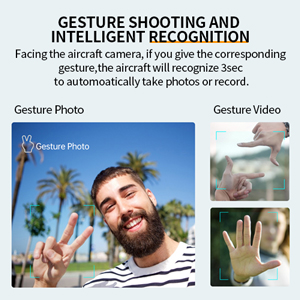
Image: Gesture shooting and intelligent recognition.
5.8 Optional Accessories (Thrower & Megaphone)
The Yasola M9 drone supports modular accessories such as a thrower and a megaphone. These can be attached to the top of the drone for specialized tasks. Refer to the accessory's individual manual for installation and operation details.
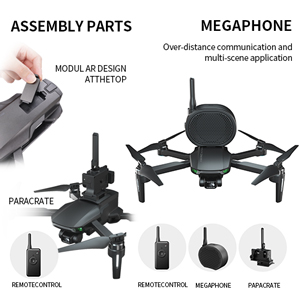
Image: Drone with optional thrower and megaphone attachments.
Video: Demonstration of Yasola GPS Drone features including 3-axis gimbal, obstacle avoidance, and optional accessories like the thrower and megaphone.
6. 유지관리
- 청소: Regularly clean the drone body, camera lens, and sensors with a soft, dry cloth. Avoid using harsh chemicals.
- 프로펠러 검사: Inspect propellers for cracks, bends, or chips before each flight. Replace damaged propellers immediately.
- 배터리 관리 : Store batteries in a cool, dry place. Do not store fully charged or fully depleted for extended periods. Charge to about 50-60% for long-term storage.
- 펌웨어 업데이트: Check the official Yasola website or app for available firmware updates to ensure optimal performance and access to new features.
7. 문제 해결
| 문제 | 가능한 원인 | 해결책 |
|---|---|---|
| 드론의 전원이 켜지지 않습니다. | 배터리가 방전되었거나 잘못 설치되었습니다. | Charge battery fully. Reinstall battery securely. |
| 앱 내에서 영상 피드를 제공하지 않습니다. | Wi-Fi에 연결되어 있지 않거나 앱이 열려 있지 않습니다. | Ensure phone is connected to drone's Wi-Fi. Restart app. |
| 드론이 비행 중에 표류합니다. | Improper calibration or strong winds. | Perform IMU and compass calibration. Fly in calm conditions. |
| 장애물 회피가 작동하지 않습니다. | Module not installed or sensor obstructed. | Ensure module is correctly attached. Clean sensors. |
| Remote controller not pairing. | Remote or drone not powered on, or out of range. | Power cycle both devices. Ensure they are close during pairing. |
8. 사양
| 특징 | 세부 사항 |
|---|---|
| 상표 | Yasola |
| 모델명 | M9 |
| 제조업체 부품 번호 | M9-맥스 |
| 비디오 캡처 해상도 | 4K (Video Capture Format) / 1080p (Live Feed) |
| 연결 기술 | Wi-Fi (5G FPV) |
| 기술 수준 | Novice, Intermediate |
| 품목 무게 | 450그램(약 15.9온스) |
| 배터리 용량 | 3000mAh (11.1와트시) |
| 비행 시간 | 배터리 1개당 최대 23분 (배터리 2개 사용 시 46분) |
| 제어 유형 | 원격 제어 |
| 최대 범위 | 1200 Meters (Control), 1000 Meters (Image Transmission) |
| 재료 | 플라스틱 |
| 짐벌 | 3-Axis Mechanical Self-stabilizing Gimbal |
| 장애물 회피 | 360° Laser Obstacle Avoider (detects within 20 meters) |
| 모터 유형 | 무브러시 모터 |
| 제품 치수 | 6.89 x 4.53 x 2.95인치(접힌 상태) |
| 한국어: | 613706182347 |
9. 보증 및 지원
The Yasola M9 GPS Drone comes with a standard manufacturer's warranty. For detailed warranty information, technical support, or to purchase replacement parts, please visit the official Yasola web해당 사이트를 방문하거나 고객 서비스 부서에 문의하세요. 구매 증빙 자료로 구매 영수증을 보관하세요.
온라인 지원: Visit the Yasola Store on Amazon