
1. 제품 오버view
The ProCase Rugged Shockproof Cover Case (Model PC-08363001) is designed to provide comprehensive protection for your Apple iPad Pro 11-inch. This case is compatible with the 4th Gen 2022 (A2759, A2435, A2761, A2762), 3rd Gen 2021 (A2377, A2459, A2301, A2460), 2nd Gen 2020 (A2228, A2231, A2068, A2230), and 1st Gen 2018 (A1980, A2013, A1934, A1979) models. It features a multi-layer construction, a 360-degree rotatable kickstand, an ergonomic hand strap, and a built-in Apple Pencil holder.
This case is engineered to protect your device from accidental drops, shocks, and scratches, making it ideal for various environments and uses.
2. 패키지 내용
- ProCase Rugged Shockproof Case for iPad Pro 11-inch
- 사용 설명서 (본 문서)
3. 설정 및 설치
Proper installation ensures maximum protection for your iPad. Follow these steps carefully:
- 케이스를 분해하세요: Carefully separate the three layers of the case: the hard PC front cover, the hard PC inner cover, and the shock-absorbing TPU shell. Begin by peeling back the TPU outer layer from the corners, then unclip the hard PC inner frame.
- Insert iPad into Inner Frame: Place your iPad Pro 11-inch into the hard PC inner cover, ensuring all edges are securely seated.
- Attach Front Cover: Snap the hard PC front cover onto the inner frame, making sure all clips engage properly around the iPad's screen.
- Reinstall TPU Shell: Carefully wrap the shock-absorbing TPU outer shell around the assembled inner frame and iPad. Ensure all ports, buttons, and camera cutouts align correctly and the TPU layer is snug around the entire device.

그림 1: 폭발 view illustrating the three protective layers of the ProCase Rugged Shockproof Case.
Video 1: Demonstration of installing a similar ProCase shockproof case. The installation process for the iPad Pro 11-inch case is comparable.
4. 작동 특징
4.1 360-Degree Rotatable Kickstand
The integrated kickstand allows for versatile viewing and typing angles. Rotate the kickstand to achieve horizontal or vertical orientations. Extend the stand to prop up your iPad for hands-free use, whether for watching videos, typing, or video calls.

Figure 2: The 360-degree rotatable kickstand provides flexible viewing and typing positions.
4.2 Ergonomic Hand Strap
The comfortable back handle allows you to securely grip your tablet with one hand, reducing the risk of accidental drops. The strap is adjustable for various hand sizes, providing stability and ease of use while on the go.
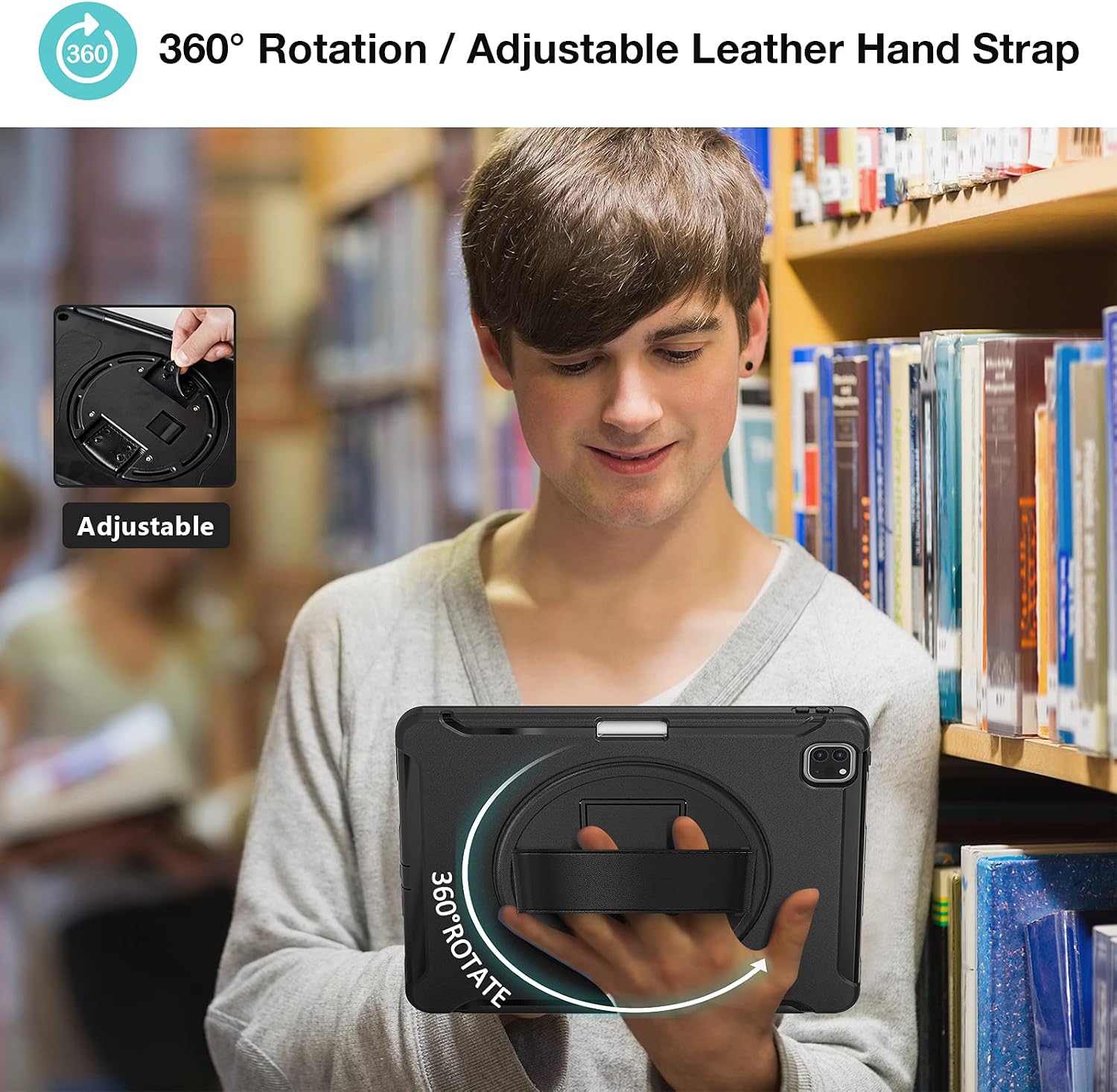
Figure 3: The adjustable hand strap offers a secure and comfortable grip for your iPad.
4.3 Built-in Apple Pencil Holder
The case includes a dedicated slot for your Apple Pencil (1st Generation), ensuring it is always at hand and securely stored. This design supports magnetic attachment and wireless charging features for compatible Apple Pencil models.
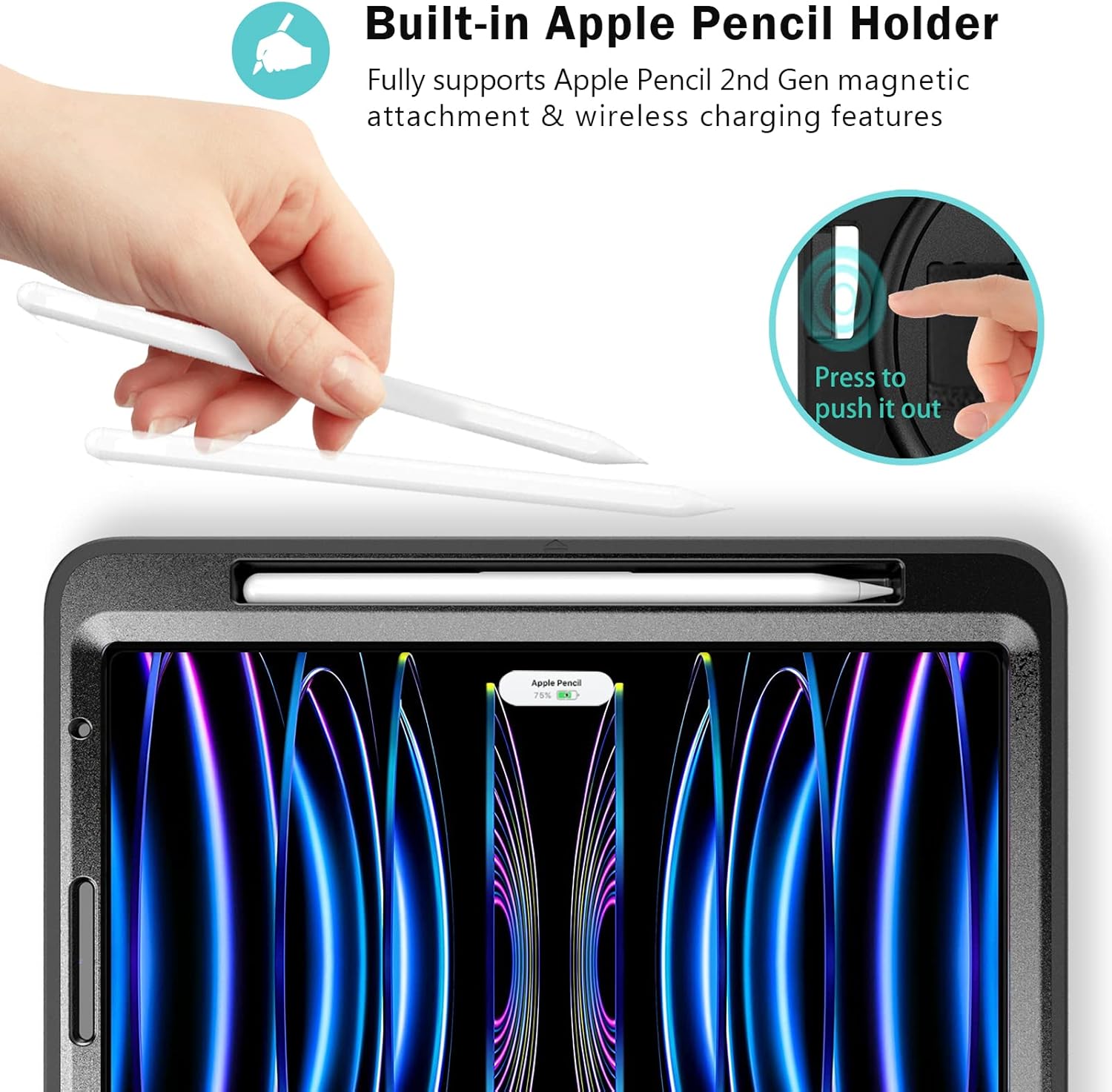
Figure 4: The integrated Apple Pencil holder keeps your stylus secure and accessible.
4.4 Precise Cutouts and Button Access
The case features precise cutouts for all ports, buttons, speakers, and cameras, ensuring full access to all iPad functionalities without needing to remove the case.

Figure 5: Precise cutouts ensure full access to all iPad features.
5. 유지관리
To ensure the longevity and effectiveness of your ProCase Rugged Shockproof Case, follow these maintenance guidelines:
- 청소: 케이스는 부드러운 천으로 정기적으로 닦아주세요.amp cloth to remove dust and grime. For stubborn stains, use a mild soap solution and rinse thoroughly. Ensure the case is completely dry before re-installing your iPad.
- 가혹한 화학 물질을 피하세요: Do not use abrasive cleaners, solvents, or strong chemicals, as these can damage the material and finish of the case.
- 정기적으로 검사하세요: Periodically check the case for any signs of wear, cracks, or damage, especially after significant impacts. Replace the case if its protective integrity is compromised.
- 저장: 사용하지 않을 때는 케이스를 직사광선을 피해 서늘하고 건조한 곳에 보관하십시오.
6. 문제 해결
If you encounter any issues with your ProCase Rugged Shockproof Case, consider the following:
- 설치/제거에 어려움: The case is designed for a snug fit to provide maximum protection. Ensure you follow the disassembly/assembly steps carefully, applying gentle but firm pressure. Do not force components, as this may cause damage.
- 버튼이 응답하지 않음: Verify that the iPad is correctly seated within the case and that the case's button covers are aligned with the iPad's physical buttons. Re-adjust if necessary.
- Ports Not Accessible: Check for proper alignment of the case with the iPad's ports. If a port is obstructed, the case might not be fully seated or correctly assembled.
- Kickstand or Hand Strap Issues: Ensure the kickstand is fully extended and locked into position for stability. For the hand strap, ensure it is adjusted to a comfortable tension.
If problems persist, please contact ProCase customer support for assistance.
7. 사양
| 특징 | 세부 사항 |
|---|---|
| 모델 번호 | PC-08363001 |
| 호환 장치 | iPad Pro 11" (4th Gen 2022, 3rd Gen 2021, 2nd Gen 2020, 1st Gen 2018) |
| 재료 | Polycarbonate, Silicone, Thermoplastic Polyurethane (TPU) |
| 색상 | 검은색 |
| 제품 치수 | 24.89 x 18.03 x 3.48cm |
| 품목 무게 | 349g |
| 특별 기능 | Shockproof, 360° Rotatable Kickstand, Hand Strap, Built-in Pencil Holder |
8. 보증 및 지원
ProCase products are designed for durability and performance. For specific warranty information regarding your ProCase Rugged Shockproof Case, please refer to the product packaging or the official ProCase website. If you require technical support, have questions about installation, or need assistance with any product-related issues, please contact ProCase customer service through their official channels.
제조업체: 프로케이스
연락처 정보: Please visit the official ProCase website or your retailer's support page for current contact details.