
소개
Thank you for choosing the Hbada Ergonomic Gaming Chair. This manual provides essential information for the safe and efficient assembly, operation, and maintenance of your new chair. Please read these instructions carefully before use and retain them for future reference.

Image: The Hbada Ergonomic Gaming Chair in a modern gaming environment, showcasing its design and presence.
안전 정보
- 조립하기 전에 모든 구성품이 있는지, 손상되지 않았는지 확인하십시오. 부품이 누락되었거나 파손된 경우 사용하지 마십시오.
- Follow the assembly instructions precisely. Incorrect assembly can lead to instability and injury.
- 의자 위에 올라가지 마십시오. 앉을 때만 사용하십시오.
- 최대 하중 용량을 초과하지 마십시오(사양 참조).
- 조립 중에는 어린이와 애완동물이 의자에 접근하지 못하도록 하세요.
- 의자 소재의 손상을 방지하기 위해 직사광선이나 극한 온도에 노출시키지 마십시오.
제품 치수
Understanding the dimensions of your chair is important for proper placement and comfortable use. Below are the key measurements:
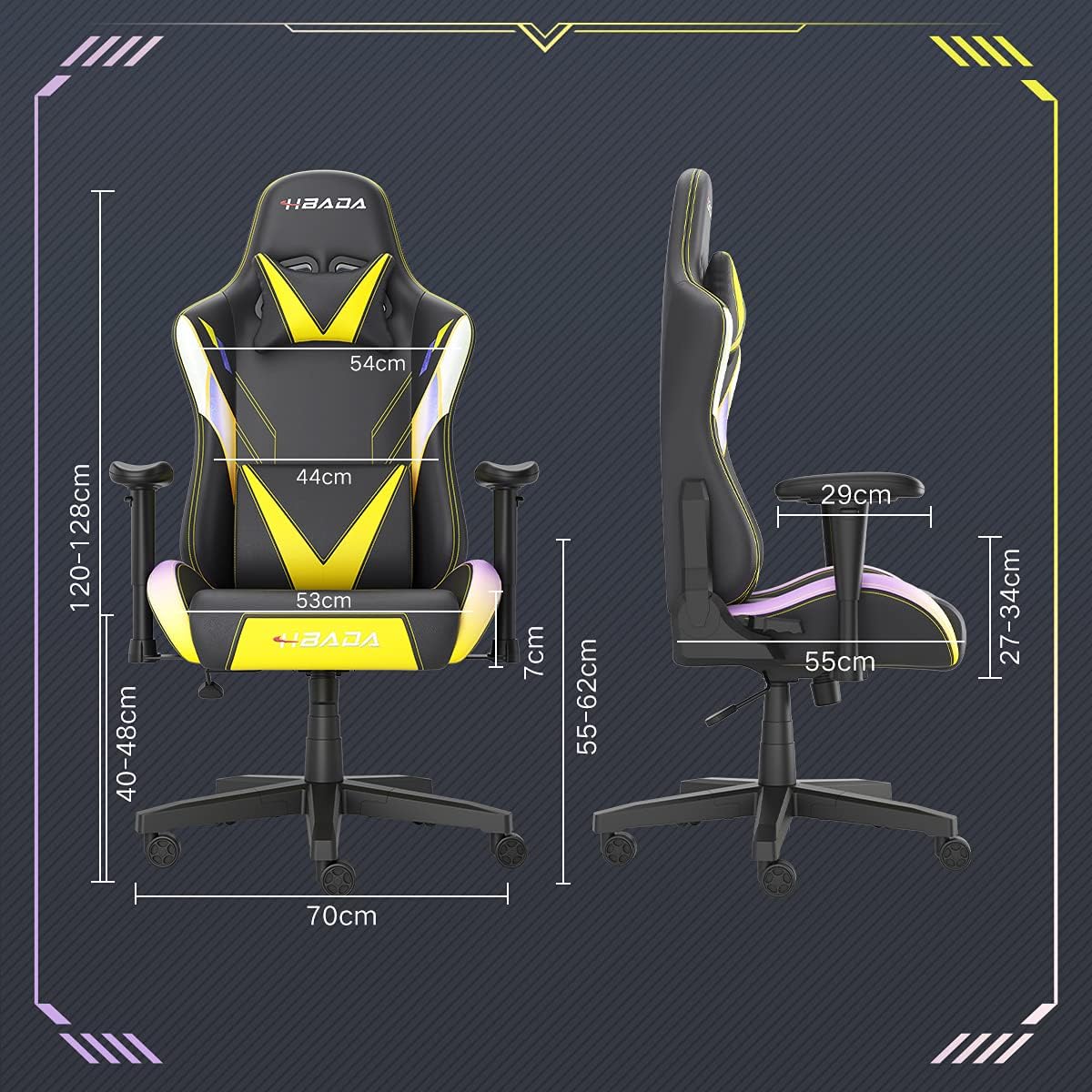
Image: A detailed diagram illustrating the various dimensions of the Hbada Gaming Chair, including height, width, and depth measurements.
- 전체 높이: 120~128cm (조절 가능)
- 좌석 높이: 40~48cm (조절 가능)
- 좌석 폭 : 53cm
- 좌석 깊이: 55cm
- 등받이 너비: 54 cm (shoulder area), 44 cm (lumbar area)
- 팔걸이 높이(좌석 기준): 7cm (조절 가능)
- 기본 직경: 70cm
설정 및 조립
Please follow these steps carefully to assemble your Hbada Gaming Chair. It is recommended to have a clear, spacious area for assembly.
조립 단계:
- Step 1: Assemble the Base and Wheels
Insert the five casters into the holes on the star base. Then, place the gas lift cylinder into the center hole of the base.

Image: Illustration of attaching the five casters to the chair's star-shaped base and inserting the gas lift cylinder.
- Step 2: Attach the Seat and Backrest
Connect the backrest to the seat using the provided screws and mounting plates. Ensure all screws are tightened securely.

Image: Diagram showing the process of securing the backrest to the seat cushion using screws and brackets.
- 3단계: 팔걸이 설치
Attach the armrests to the sides of the seat using the designated screws. Make sure they are firmly attached.

Image: Visual guide for attaching the armrests to the chair's seat base.
- 4단계: 시트를 받침대에 연결하기
Carefully place the assembled seat onto the gas lift cylinder, ensuring it is properly seated and stable.

Image: Depiction of lowering the assembled seat onto the gas lift cylinder, connecting the upper and lower parts of the chair.
- Step 5: Attach Headrest and Lumbar Pillow
Secure the detachable headrest and lumbar support pillow to the chair as desired for optimal comfort.

Image: Instructions for attaching the headrest and lumbar support pillows to the gaming chair.
작동 지침
Your Hbada Gaming Chair is designed with several adjustable features to provide personalized comfort and support.
Key Adjustable Functions:
- Adjustable Sitting Height: Use the lever located under the seat on the right side to raise or lower the chair. Pull the lever up to adjust the height, then release it at your desired position. The seat has an 8 cm elevation range.
- Reclining Backrest (90° to 155°): The backrest can be reclined from 90 degrees (upright) to 155 degrees (nearly flat). Use the recline lever on the side of the chair to adjust the angle. Lean back to your preferred position and lock the lever.
- 조정 가능한 팔걸이: The armrests can be adjusted in height by 7 cm. Locate the button or lever on the side of each armrest to unlock, adjust, and then lock them into your desired height.
- 360° Free Swivel: The chair features a full 360-degree swivel function, allowing for easy movement and access to your surroundings without needing to move the entire chair.
- Detachable Headrest and Lumbar Support: The chair includes a removable headrest pillow and lumbar support cushion for enhanced ergonomic comfort. Adjust their positions or remove them based on your preference.

이미지: 오버view of the chair's ergonomic systems, highlighting adjustable sitting height, armrests, 155° reclining, 360° swivel, cool racing casters, and durable base.

Image: The Hbada Gaming Chair demonstrated in its 155-degree reclined position, illustrating the recline controller.
유지
Regular maintenance will help prolong the life and appearance of your Hbada Gaming Chair.
- 인조 가죽 청소 방법: 인조가죽 표면은 부드러운 천으로 닦아주세요.amp 깨끗한 천으로 닦아주세요. 잘 지워지지 않는 얼룩은 순한 비눗물에 적신 후 깨끗한 천으로 닦아내세요.amp 천으로 닦으세요. 강한 화학 물질이나 연마성 세제는 소재를 손상시킬 수 있으므로 사용하지 마세요.
- 캐스터 관리: Periodically check the casters for accumulated dust or hair. Clean them with a brush or vacuum cleaner to ensure smooth movement and prevent damage to your flooring.
- 프레임 및 구성 요소: Regularly inspect all screws and bolts to ensure they are tight. Re-tighten if necessary to maintain stability.
- 직사광선을 피하세요: Prolonged exposure to direct sunlight can cause the PU leather to fade and crack. Position your chair away from direct sunlight when possible.
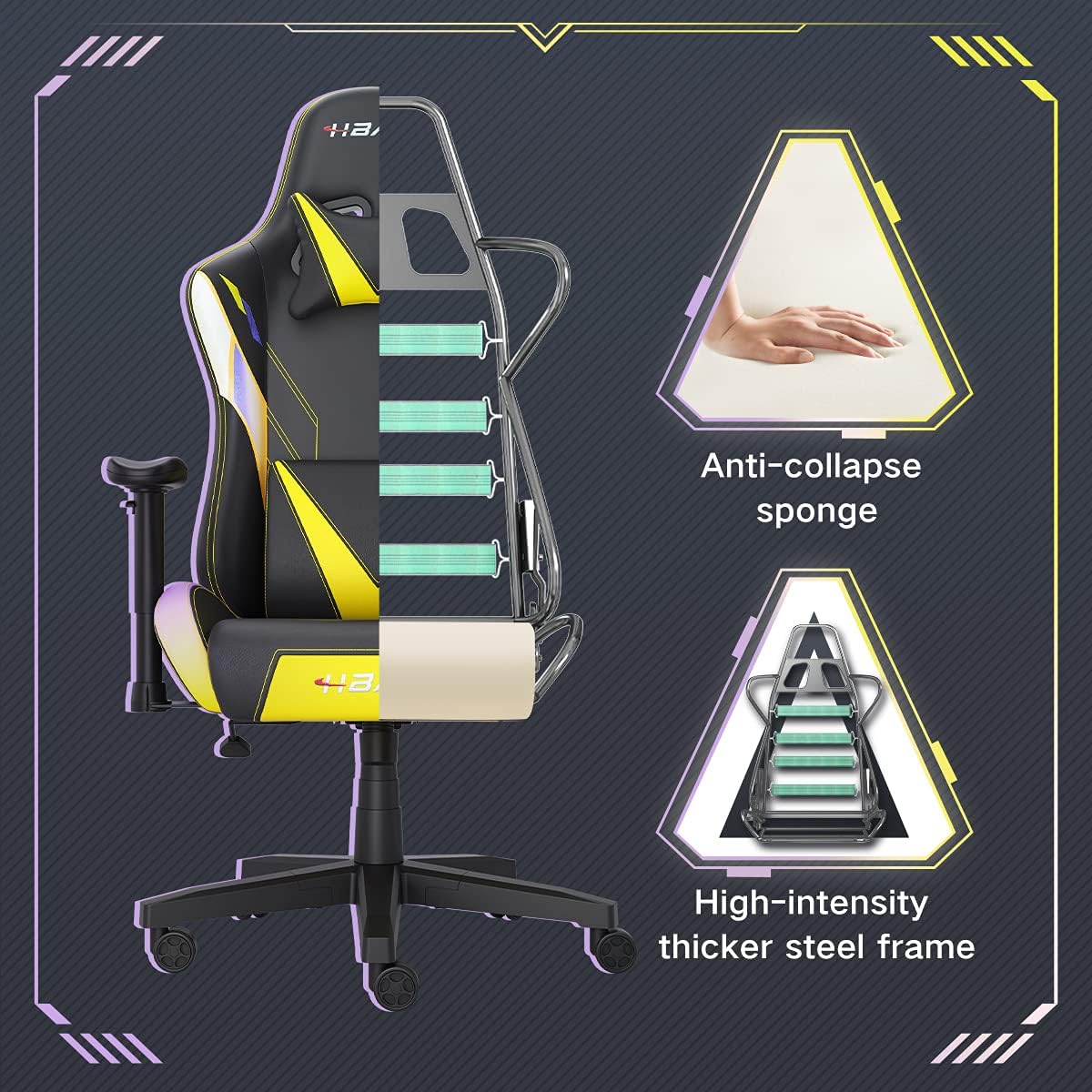
이미지: 컷어웨이 view of the chair's internal structure, highlighting the anti-collapse sponge padding and the high-intensity thicker steel frame, indicating durable construction.
문제 해결
If you encounter any issues with your Hbada Gaming Chair, refer to the following common problems and solutions:
| 문제 | 가능한 원인 | 해결책 |
|---|---|---|
| 의자는 높이 조절이 되지 않습니다. | 가스 리프트가 제대로 작동하지 않거나 레버가 작동하지 않습니다. | 높이 조절 레버가 완전히 고정되었는지 확인하십시오. 문제가 지속되면 가스 리프트를 교체해야 할 수 있습니다. 고객 지원 센터에 문의하십시오. |
| 의자가 흔들리거나 불안정합니다 | 나사가 느슨하거나 조립이 잘못되었습니다. | Check all assembly screws and bolts, and tighten them securely. Refer to the assembly instructions. |
| 바퀴가 부드럽게 굴러가지 않습니다 | 바퀴에 끼인 이물질(머리카락, 먼지) | 의자를 뒤집어 바퀴에 묻은 이물질을 제거하십시오. |
| 등받이가 뒤로 젖혀지거나 고정되지 않습니다. | 등받이 조절 장치가 걸렸거나 레버가 제대로 작동하지 않습니다. | 등받이 각도 조절 레버가 완전히 고정되었는지 확인하십시오. 작동 메커니즘 주변에 장애물이 없는지 점검하십시오. |
명세서
| 특징 | 세부 사항 |
|---|---|
| 상표 | 흐바다 |
| 모델 번호 | W203YMA/EU |
| ASIN | B095PSFLKX |
| 색상 | 노란색 |
| 재료 | PU Leather, Metal Frame |
| 제품 치수 | 70 x 70 x 128 cm (길이 x 너비 x 높이) |
| 제품 무게 | 22 킬로그램 |
| 특별 기능 | Ergonomic, Swivel, Casters, Headrest Support, Adjustable Recline (90°-155°), Adjustable Seat Height (8cm range), Adjustable Armrests (7cm range) |
| 단위 수 | 1.0 카운트 |
보증 및 지원
Your Hbada Gaming Chair comes with a 1년 보증 구매일로부터. 본 보증은 정상적인 사용 중 제조상의 결함 및 재료상의 결함에 적용됩니다.
If you experience any issues during use, including problems with installation, damage, or missing parts, please do not hesitate to contact Hbada customer service. We are committed to providing reliable service and can offer free exchanges for covered issues.
For support, please visit the official Hbada web사이트를 방문하거나 판매점에 문의하세요.