
소개
Thank you for choosing the PILOT 720p Vehicle Dash Cam. This manual provides detailed instructions for the proper installation, operation, and maintenance of your new dash camera. Please read this manual thoroughly before use to ensure optimal performance and longevity of the device.
This dash cam is designed to record video footage while driving, offering features such as 720p HD resolution, a wide viewing angle, motion detection, and loop recording. It comes with an 8GB Micro SD card and a universal window mount for convenient setup.
패키지 내용
아래 나열된 모든 품목이 패키지에 포함되어 있는지 확인하세요.
- 대시캠 유닛
- 8GB 마이크로 SD 카드
- 석션 컵 마운트
- USB 차량용 충전기
- USB Charger and Sync Cable
- 사용 설명서 (본 문서)
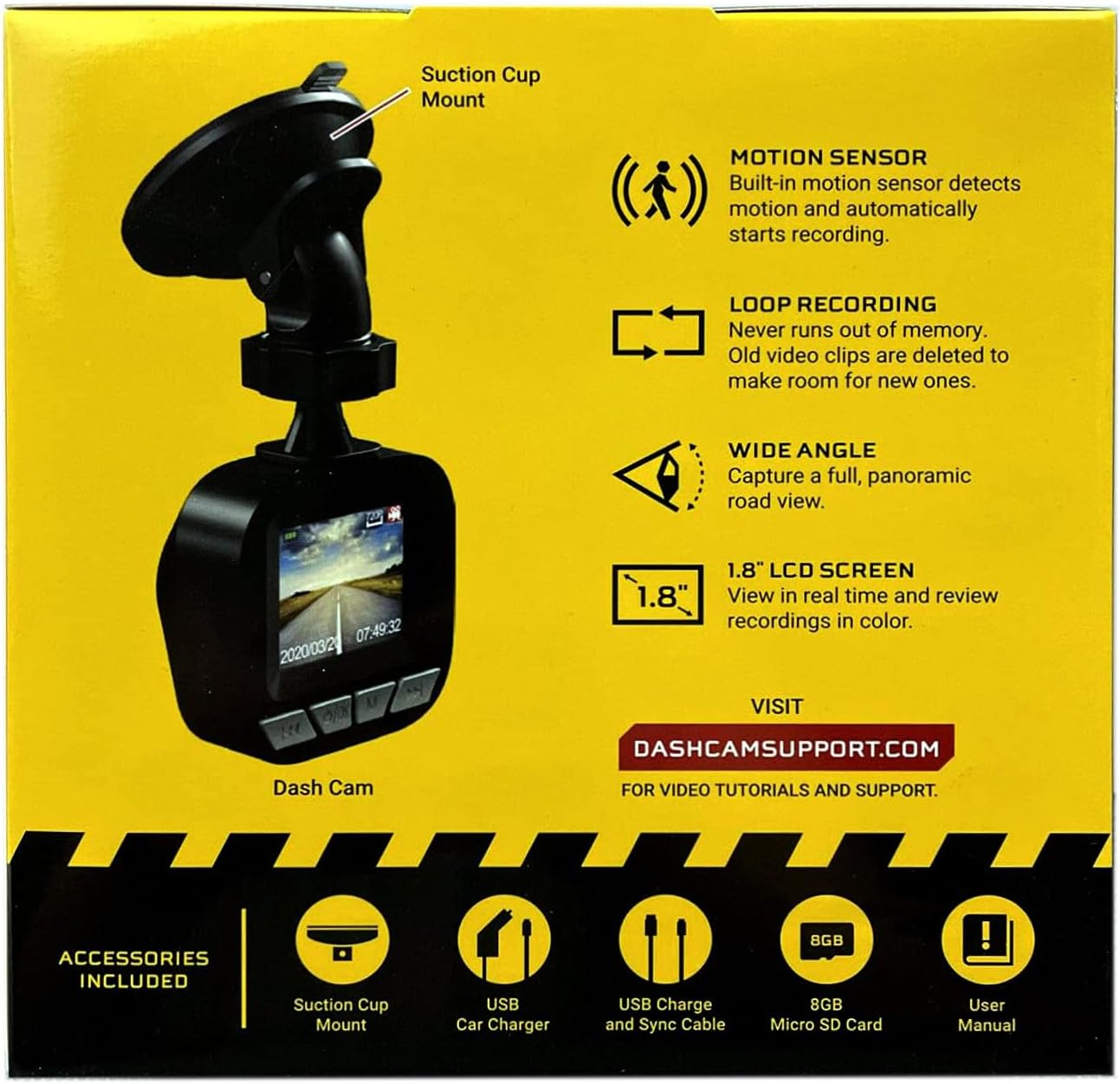
Image: The dash cam unit, suction cup mount, USB car charger, USB charge and sync cable, 8GB Micro SD card, and user manual are shown, along with a summary of key features like motion sensor, loop recording, wide angle, and 1.8" LCD screen.
제품 특징
- 해결: 720p HD 비디오 녹화.
- 화면 크기: 1.8-inch LCD display for real-time view녹음 및 재생.
- View각도: Wide-angle lens to capture a broad road view.
- 모션 센서: Built-in sensor detects motion and automatically initiates recording.
- 루프 녹음: Automatically overwrites older video clips when the memory card is full, ensuring continuous recording.
- 마이크로폰: 오디오 녹음 기능이 내장되어 있습니다.
- 저장: Supports Micro SD cards up to 32GB (8GB card included).
- 힘: Built-in rechargeable Lithium-ion battery and USB 2.0 port for charging.
설치 가이드
1. 마이크로 SD 카드 삽입
Locate the Micro SD card slot on the side or bottom of the dash cam. Gently insert the included 8GB Micro SD card into the slot until it clicks into place. Ensure the card is inserted correctly to avoid damage. The dash cam supports cards up to 32GB.
2. 대시캠 장착
- Clean the desired area on your vehicle's windshield where you intend to mount the dash cam. Ensure the surface is dry and free of dust.
- 흡착식 거치대를 블랙박스 본체에 부착하세요.
- Press the suction cup firmly against the windshield and flip the lever to secure it in place.
- 대시캠 각도를 조정하여 깨끗한 화면을 확보하세요. view of the road ahead, avoiding any obstructions.

이미지: 클로즈업 view of the front of the PILOT dash cam, showing the camera lens and the "PILOT" brand logo. This illustrates the main unit for mounting.
3. 전원 연결하기
Connect the USB car charger to your vehicle's 12V power outlet (cigarette lighter socket). Then, connect the USB charger and sync cable from the car charger to the USB port on the dash cam. The dash cam will typically power on automatically when the vehicle starts and power is supplied.
작동 지침
전원 켜기/끄기
- 오토매틱: The dash cam will power on and begin recording automatically when connected to a power source and the vehicle ignition is turned on. It will power off automatically when the vehicle is turned off and power is disconnected.
- 수동 : To manually power on or off, press and hold the power button (usually located on the side or bottom of the unit) for a few seconds.
녹화 모드
- 연속 루프 녹음: The dash cam records video in continuous loops (e.g., 1, 3, or 5-minute segments). When the Micro SD card is full, the oldest unlocked files will be overwritten by new recordings. This ensures you always have the most recent footage.
- 모션 감지 녹화: When enabled in the settings, the dash cam will automatically start recording if it detects motion in front of the camera while the vehicle is parked and the dash cam is powered on. This feature is useful for monitoring your vehicle when stationary.
View녹음을 하다
The 1.8-inch LCD screen allows you to view 라이브 푸tag전자와 재view recorded videos directly on the device. Use the navigation buttons (typically labeled 'Menu', 'Up', 'Down', 'OK') to browse through the menu options and playback recorded files. Refer to the on-screen interface for specific navigation prompts.
날짜 및 시간 Stamp
Ensure the date and time are set correctly in the dash cam's settings menu. This is crucial for accurate record-keeping of video footage.
유지
- 렌즈 청소: 깨끗한 화질을 유지하려면 부드럽고 보풀이 없는 천으로 카메라 렌즈를 정기적으로 닦으세요. 연마재나 강한 화학 물질은 사용하지 마세요.
- SD 카드 관리 : It is recommended to format the Micro SD card periodically (e.g., once a month) within the dash cam's settings menu. This helps maintain card performance and prevents data corruption. Back up any important footag서식을 적용하기 전에 e를 입력하세요.
- 배터리 관리 : The built-in Lithium-ion battery is primarily for emergency recording and saving settings. For continuous operation, keep the dash cam connected to the vehicle's power supply. Avoid exposing the device to extreme temperatures for extended periods.
- 펌웨어 업데이트: Check the manufacturer's support web사이트 (DASHCAMSUPPORT.COM) periodically for any available firmware updates to improve performance and add new features.
문제 해결
| 문제 | 가능한 해결책 |
|---|---|
| 대시캠 전원이 켜지지 않습니다. |
|
| Dash cam turns off frequently during driving. |
|
| 비디오 푸tage는 흐릿하거나 불분명합니다. |
|
| 블랙박스가 녹화 중이 아닙니다. |
|
명세서
| 특징 | 세부 사항 |
|---|---|
| 해결 | 720p HD |
| 화면 크기 | 1.8인치 |
| View잉 각도 | Wide Angle (135 Degrees Field Of View) |
| 모션 센서 | 내장형 |
| 루프 녹음 | 내장형 |
| 마이크로폰 | 내장형 |
| USB 포트 | USB 2.0 |
| 배터리 | 내장형 충전식 리튬이온 |
| 메모리 카드 지원 | 최대 32GB 마이크로 SD 카드 지원 (8GB 기본 제공) |
| 품목 무게 | 8 온스 |
| 연결 기술 | USB |
| 장착 유형 | 창 마운트 |
지원하다
For additional assistance, video tutorials, or further support, please visit the official support web대지:
Please have your product model information ready when contacting support.