
1. 서론
Thank you for choosing the PROXTEND X502 Full HD Webcam. This manual provides detailed instructions to help you set up, operate, and maintain your webcam for optimal performance. The X502 is designed to deliver clear 1080p video at 30 frames per second, featuring an omni-directional microphone and automatic low light correction for various lighting conditions.
2. 패키지 내용
패키지에 모든 품목이 들어 있는지 확인하세요.
- PROXTEND X502 풀 HD Webcam (PX-CAM007)
- Integrated Universal Mounting Clip
- 사용 설명서 (본 문서)
3. 설정
Follow these steps to set up your PROXTEND X502 Web캠:
- 장착 Web캠:
그만큼 webcam features an integrated universal mounting clip. You can place the web카메라를 컴퓨터 모니터, 노트북 화면 또는 평평한 표면 위에 놓으세요. 클립을 조절하여 카메라를 단단히 고정하세요. webcam in position. The webcam also supports mini tripod mounting (tripod not included).
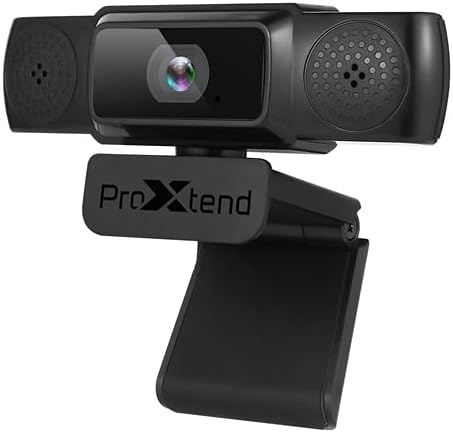
Image: The PROXTEND X502 Full HD Webcam shown with its universal mounting clip, suitable for monitors or flat surfaces.
- 컴퓨터에 연결하기:
USB 케이블을 연결하세요 web카메라를 컴퓨터의 사용 가능한 USB 포트에 연결하세요. webcam is plug-and-play, meaning your operating system should automatically detect and install the necessary drivers. No additional software installation is typically required.
- Driver Installation Verification:
After connecting, allow a few moments for your computer to recognize the device. You can verify successful installation in your operating system's Device Manager (Windows) or System Information (macOS) under 'Cameras' or 'Imaging Devices'.
4. 사용 설명서
일단 webcam is set up, you can begin using it with various applications:
- 선택 Web캠:
Open your preferred video conferencing, streaming, or recording application (e.g., Zoom, Microsoft Teams, Skype, OBS Studio). Navigate to the application's video and audio settings. Select "PROXTEND X502" as your camera and microphone input device.

이미지: 앞면 view of the PROXTEND X502 Full HD Webcam, highlighting the lens and integrated microphones.
- 비디오 품질:
그만큼 webcam automatically adjusts for optimal image quality, including auto-focus and auto low light correction. Ensure adequate lighting for the best video performance. The 1920x1080p resolution at 30fps provides clear and smooth video.
- 오디오 품질 :
The integrated omni-directional microphone captures sound from all directions. Position yourself appropriately to ensure your voice is clearly picked up. Most applications allow you to adjust microphone input levels in their audio settings.
5. 특징
Key features of the PROXTEND X502 Full HD Webcam include:
- 1 / 2.7”CMOS 이미지 센서
- 2메가픽셀
- Resolution: 1920x1080 at 30 frames per second
- 무 지향성 마이크
- 범용 장착 클립
- Mini Tripod Support
- 자동 저조도 보정
6. 사양
Detailed technical specifications for the PROXTEND X502 Full HD Web캠:

Image: A visual representation of the PROXTEND X502 Full HD Webcam's key features and technical specifications.
| 특징 | 사양 |
|---|---|
| 이미지 센서 | 1/2.7" CMOS Image Sensor |
| 메가픽셀 | 2 MP |
| 최대 해상도 | 1920x1080 |
| 비디오 해상도 | 1920x1080 |
| 최대 FPS | 30fps |
| 비디오 디코딩 형식 | H.264/MJPG |
| 노출 모드 | 자동차 |
| 화이트 밸런스 | 자동차 |
| 얻다 | 자동차 |
| 저조도 보상 | 자동차 |
| View잉 각도 | 77° |
| 초점거리 | 10cm ~ 무한대 |
| 초점 유형 | 자동차 |
| 마이크로폰 | 전 방향 |
| 오디오 Samp링율 | 1 채널 16 비트 16K 32K 44.1K 48K |
| 오디오 포맷 | PCM, 호환 UAC 1.0 |
| 인터페이스 | USB 2.0 |
| 케이블 길이 | 1.5분 |
| 호환 OS | Windows XP, Windows 7 (32bit/64bit), Windows 8, Windows 10, Android V5.0 or higher OS, MAC OS 10.6 or higher |
| 제품 치수 | 12.7 x 7.62 x 5.08cm |
| 제품 무게 | 453.59g |
7. 문제 해결
If you encounter issues with your PROXTEND X502 Web캠, 다음 해결 방법을 시도해 보세요.
- 이미지/비디오 없음:
- USB 케이블이 두 곳에 모두 안전하게 연결되어 있는지 확인하십시오. web캠과 컴퓨터.
- 컴퓨터의 다른 USB 포트를 사용해 보십시오.
- 컴퓨터를 다시 시작하세요.
- Check your application's settings to ensure the PROXTEND X502 is selected as the video input.
- Verify that no other application is currently using the web캠.
- 오디오 없음/마이크 작동하지 않음:
- Ensure the PROXTEND X502 is selected as the microphone input in your application's audio settings.
- 컴퓨터의 소리 설정에서 마이크가 활성화되어 있고 음소거되어 있지 않은지 확인하십시오.
- Adjust the microphone input level in your system or application settings.
- 낮은 비디오 품질:
- Ensure sufficient lighting in your environment.
- 청소하다 web부드럽고 보푸라기가 없는 천으로 캠 렌즈를 조심스럽게 닦으세요.
- Check your internet connection speed if streaming, as bandwidth can affect video quality.
8. 유지관리
수명과 최적의 성능을 보장하려면 web캠:
- 청소: 살살 닦아주세요 webcam lens with a soft, dry, lint-free cloth. Avoid using harsh chemicals or abrasive materials.
- 저장: 사용하지 않을 때는 보관 web카메라는 극한 온도와 직사광선을 피해 깨끗하고 건조한 곳에 보관하십시오.
- 손질: 떨어 뜨리지 마십시오 web캠을 사용하거나 강한 충격을 가하는 것.
9. 보증 및 지원
The PROXTEND X502 Full HD Web캠에는 다음이 포함됩니다. 7년 보증, ensuring peace of mind regarding your purchase. For warranty claims, technical support, or any inquiries not covered in this manual, please refer to the contact information provided with your product packaging or visit the official PROXTEND web대지.
10. 준수 정보
This device complies with relevant regulatory standards for electronic equipment. For detailed compliance information, please refer to the product packaging or the official PROXTEND web대지.


