
1. 서론
Thank you for choosing the MEDION X64060 Party Speaker. This manual provides essential information for the safe and efficient use of your device. Please read it thoroughly before operating the speaker and keep it for future reference.
The MEDION X64060 is a versatile party speaker designed for various entertainment needs, featuring powerful audio output, integrated DJ and karaoke functions, and dynamic light effects.
2. 안전 지침
- 사용하기 전에 모든 지침을 주의 깊게 읽으세요.
- 스피커를 물, 습기, 극한 온도로부터 멀리하세요.
- 환기구를 막지 마십시오.
- 제품에 포함된 전원 코드만 사용하십시오.
- 기기를 직접 수리하려고 하지 마십시오. 모든 서비스는 자격을 갖춘 전문가에게 맡기십시오.
- Ensure the speaker is placed on a stable, level surface to prevent tipping.
- 청력 손상을 방지하려면 높은 볼륨 레벨에 장기간 노출되지 마십시오.
3. 패키지 내용
다음 품목이 패키지에 포함되어 있는지 확인하세요.
- MEDION X64060 Party Speaker
- 1 x 마이크
- 전원 코드
- 사용 설명서 (본 문서)
4. 제품 오버view
Familiarize yourself with the main components and controls of your MEDION X64060 Party Speaker.

이미지: 제어판view
This image displays a close-up of the speaker's top control panel, showing various knobs and buttons for audio adjustments, DJ functions, and input selections.

Image: Speaker Dimensions and Connections
This image illustrates the overall dimensions of the speaker (980mm height, 350mm width, 340mm depth) and highlights the available connection ports: 1x USB, 2x Microphone (6.3 mm), 1x Guitar (6.3 mm), 1x Audio Input (3.5 mm), and 1x Audio Input (RCA).
4.1 전면 패널
- 스피커: Two main speakers with integrated LED lighting.
- 조명 효과: 음악에 맞춰 움직이는 다이내믹한 LED 조명.
4.2 상단 제어판
- 전원 버튼: 스피커를 켜거나 끄려면.
- 볼륨 컨트롤: Main volume, microphone volume (MIC1 VOL, MIC2 VOL), guitar volume (GUITAR VOL), and echo volume (ECHO VOL).
- 이퀄라이저(EQ): 5-band equalizer for sound adjustment.
- 입력 선택기: Buttons for Bluetooth, USB, AUX.
- DJ Functions: Cross-fader, scratch wheel, drum pads (HI-HAT, SNARE, BASS DRUM, CYMBAL, TOM1, TOM2), and record function.
- USB 포트: USB 재생용.
- 마이크 입력 : Two 6.3 mm jack inputs.
- 기타 입력: One 6.3 mm jack input.
- 보조 입력: 3.5 mm jack input.
4.3 후면 패널
- 전원 입력: 전원 코드를 연결합니다.
- RCA 오디오 입력: Additional audio input.
4.4 이동성 기능
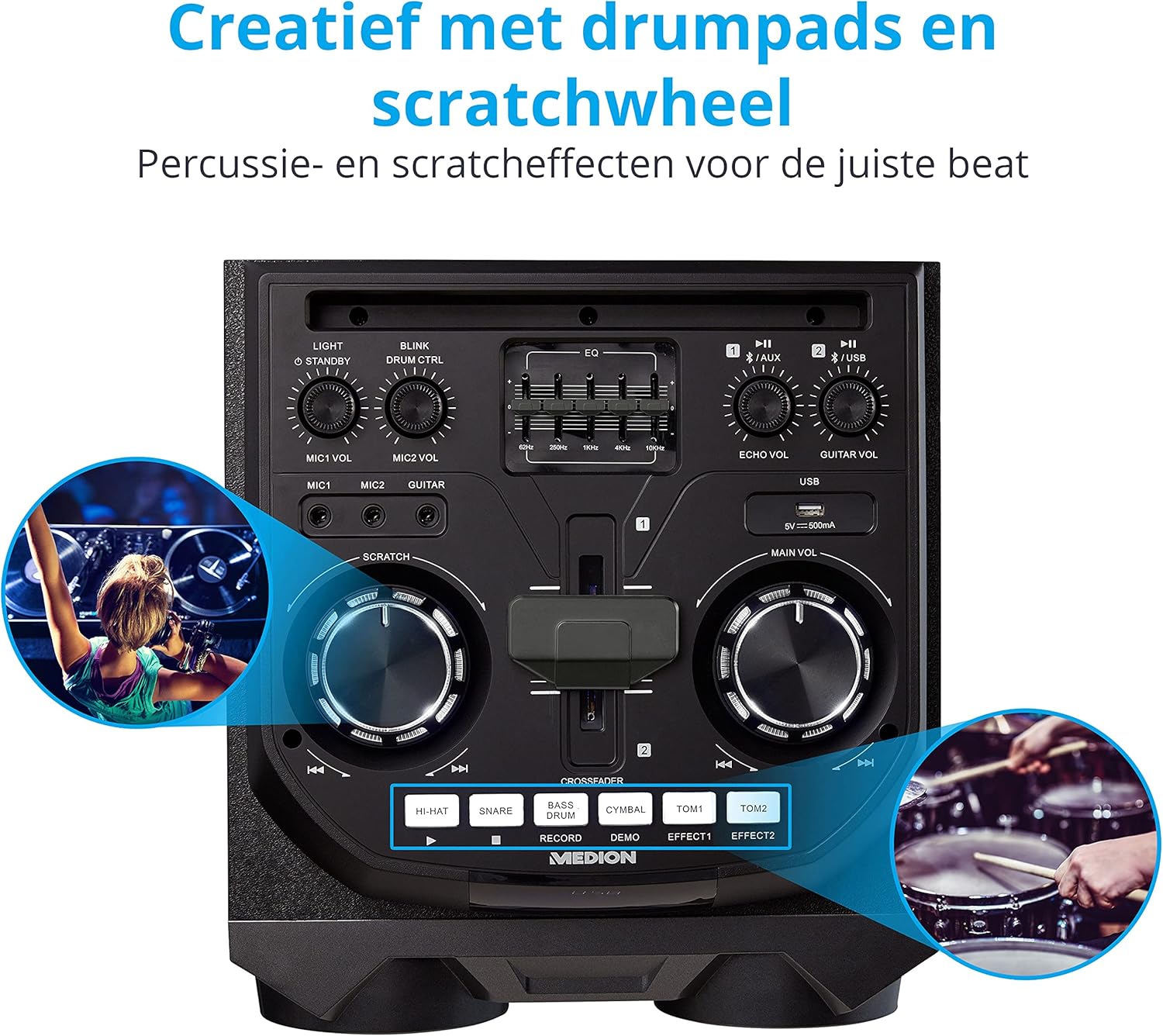
Image: Integrated Wheels for Portability
This image shows the back of the speaker, highlighting the integrated wheels at the bottom, designed for easy transport.
- 일체형 바퀴: For easy transportation of the speaker.
- 핸들: Ergonomic handles for lifting and moving.
5. 설정
5.1 초기 배치
스피커를 안정적이고 평평한 표면에 놓으십시오. 제품 주변에 충분한 통풍이 이루어지도록 하십시오. 열원 근처나 직사광선이 비치는 곳에 두지 마십시오.
5.2 전원 연결
- Connect the supplied power cord to the power input on the rear of the speaker.
- 전원 코드의 다른 쪽 끝을 적절한 벽면 콘센트에 꽂습니다.
- Press the power button on the top control panel to turn on the speaker. The LED lights will illuminate.
5.3 마이크 또는 기타 연결
For karaoke or live instrument performance:
- Plug your microphone(s) into the MIC1 or MIC2 6.3 mm jack inputs on the top panel.
- Plug your guitar into the GUITAR 6.3 mm jack input on the top panel.
- Adjust the respective volume knobs (MIC1 VOL, MIC2 VOL, GUITAR VOL) and ECHO VOL to your preference.
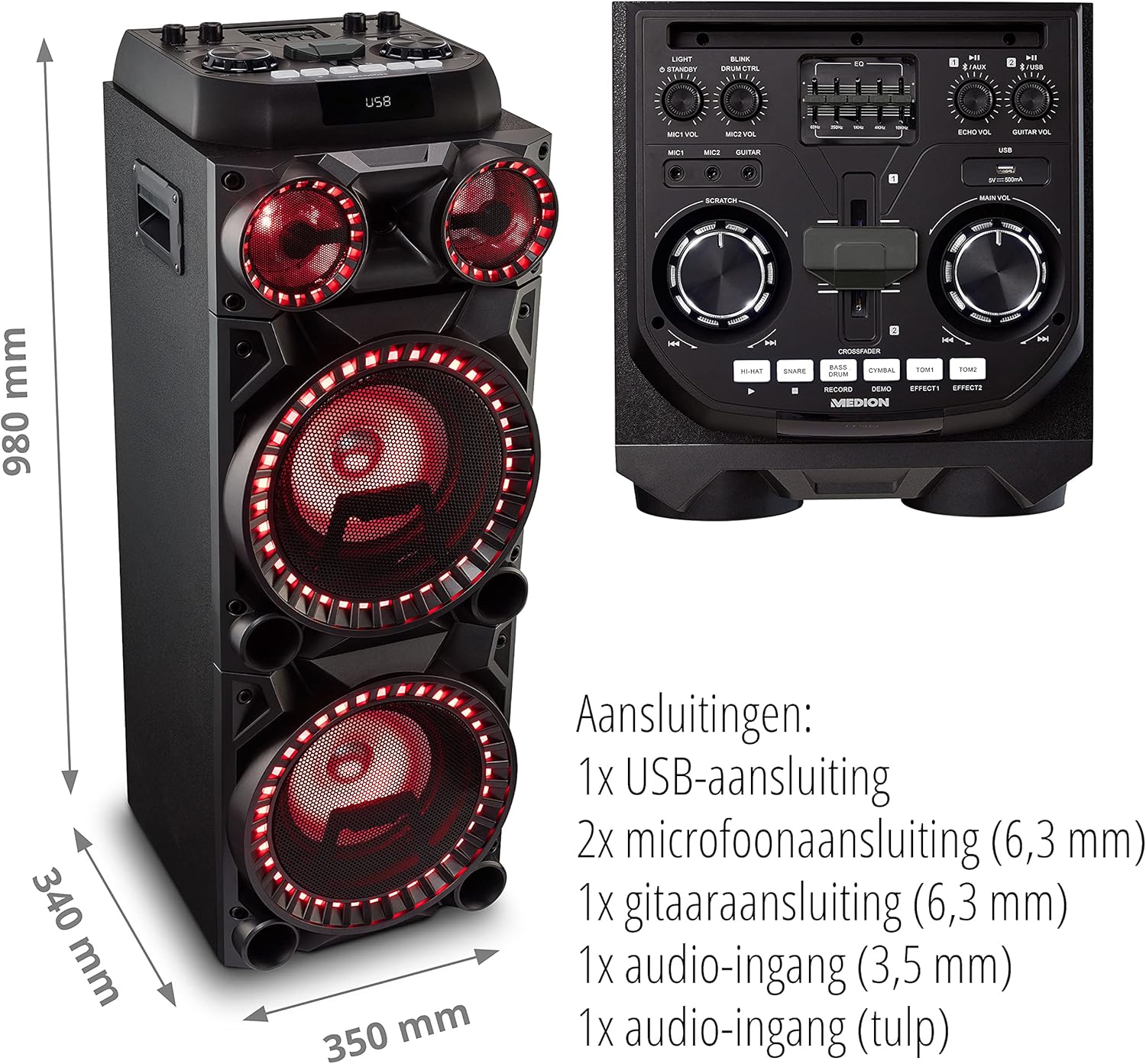
Image: Microphone and Guitar Connection for Karaoke
This image shows individuals enjoying karaoke, demonstrating the use of a microphone connected to the speaker for singing.
6. 사용 설명서
6.1 블루투스 연결
- 를 누르세요 블루투스 button on the control panel. The Bluetooth indicator will blink.
- 스마트폰, 태블릿 또는 기타 오디오 장치에서 Bluetooth를 활성화하세요.
- 검색 "MEDION X64060" in your device's Bluetooth settings and select it to pair.
- Once connected, the Bluetooth indicator will stop blinking and remain solid. You can now play music wirelessly.

Image: Bluetooth Music Playback
This image shows a smartphone displaying a music application, indicating a wireless Bluetooth connection to the speaker for audio streaming.
6.2 USB 재생
- 오디오가 포함된 USB 플래시 드라이브를 삽입합니다. files into the USB port on the top panel.
- 를 누르세요 USB 버튼을 눌러 USB 모드를 선택합니다.
- The speaker will automatically detect and begin playing audio files from the USB drive. Use the playback controls (play/pause, skip track) on the control panel.
6.3 AUX 입력
- Connect an external audio device (e.g., MP3 player, laptop) to the 3.5 mm AUX input or the RCA audio input on the rear panel using an appropriate audio cable (not included).
- 를 누르세요 보조 AUX 모드를 선택하려면 버튼을 누르세요.
- 연결된 기기에서 오디오를 재생하세요. 스피커에서 소리가 출력됩니다.
6.4 DJ Functions
The MEDION X64060 includes various DJ features for creative sound mixing.

Image: DJ Function Controls
이 이미지는 자세한 내용을 제공합니다. view of the DJ control section, including the cross-fader, scratch wheel, and various drum pads.
- Cross-fader: Use the cross-fader to smoothly transition between different audio sources or effects.
- Scratch Wheel: Manipulate the scratch wheel for classic DJ scratch effects.
- 드럼 패드: 를 누르세요 안녕 모자, 스네어, 베이스 드럼, 심벌즈, 톰1, 그리고 톰2 pads to add drum sound effects to your music.
- 기록 기능: 사용하세요 기록 button to record your drum pad sequences.
6.5 노래방 기능
Connect a microphone as described in section 5.3. Play your chosen karaoke track via Bluetooth, USB, or AUX. Adjust the microphone and echo volumes for the desired effect.
6.6 조명 효과
The speaker features dynamic LED light effects that respond to the music. These lights automatically activate when the speaker is on. There may be a dedicated button (e.g., "LIGHT" or "BLINK") to control or cycle through different light modes, refer to the control panel for specific options.

Image: Dynamic Blue Light Effects
This image showcases the speaker with its blue LED lights illuminated, demonstrating the atmospheric light effects.

Image: Dynamic Red Light Effects
This image shows the speaker with its red LED lights illuminated, highlighting another color option for the atmospheric light effects.
7. 유지관리
7.1 청소
- 청소하기 전에는 항상 스피커의 플러그를 전원 콘센트에서 뽑으세요.
- 부드럽고 마른 천으로 외부 표면을 닦으세요.
- 액체 세척제, 에어로졸 또는 연마제를 사용하지 마십시오. 이러한 제품은 마감재나 내부 부품을 손상시킬 수 있습니다.
7.2 보관
When not in use for extended periods, store the speaker in a cool, dry place, away from direct sunlight and extreme temperatures. Cover the unit to protect it from dust.
8. 문제 해결
| 문제 | 가능한 원인 | 해결책 |
|---|---|---|
| 전원이 없습니다 | Power cord not connected properly; Power outlet not working. | Ensure the power cord is securely plugged into both the speaker and a working wall outlet. Test the outlet with another device. |
| 소리가 나지 않습니다 | Volume too low; Incorrect input selected; Device not paired (Bluetooth); Cable not connected (AUX/Guitar/Mic). | Increase the main volume and individual input volumes. Select the correct input source (Bluetooth, USB, AUX). Re-pair Bluetooth device. Check all cable connections. |
| 블루투스 연결 실패 | 스피커가 페어링 모드가 아닙니다. 장치가 너무 멀리 떨어져 있습니다. 간섭이 있습니다. | Ensure the speaker is in Bluetooth pairing mode (blinking indicator). Move your device closer to the speaker. Avoid obstacles and other wireless devices. |
| 마이크/기타가 작동하지 않습니다 | Volume too low; Cable faulty; Incorrect input. | Increase MIC/GUITAR VOL. Check microphone/guitar cable. Ensure the instrument is properly connected. |
9. 사양
| 상표 | MEDION |
| 모델 번호 | X64060 | MD44060 |
| 출력 전력 | 2 x 100 W RMS (2 x 1000 W max. music output power) |
| 연결 기술 | Bluetooth 5.0, USB, AUX (3.5mm, RCA) |
| 오디오 입력 | 2 x Microphone (6.3 mm), 1 x Guitar (6.3 mm), 1 x AUX (3.5 mm), 1 x RCA |
| 평형 장치 | 5밴드 |
| 색상 | 검은색 |
| 재료 | 플라스틱 |
| 제품 크기(L x W x H) | 38.8 x 35 x 101cm |
| 품목 무게 | 15kg |
| 장착 유형 | 플로어 스탠딩 |
| 전원 | 코드식 전기 |
| 호환 장치 | 노트북, 스마트폰 |
10. 보증 및 지원
보증 정보 및 기술 지원은 제품에 동봉된 보증 카드를 참조하거나 MEDION 공식 웹사이트를 방문하십시오. web사이트. 보증 청구를 위해 구매 증빙 자료를 보관하세요.
메디온 고객 서비스: For assistance, please contact MEDION customer support through their official channels. Contact details can typically be found on the MEDION web사이트 또는 제품 포장.