
1. 서론
This manual provides detailed instructions for the installation, operation, and maintenance of your Alptop AT-200DW Outdoor PTZ WiFi IP Security Camera. This 1080P HD camera offers pan/tilt functionality, two-way audio, motion detection, and color night vision, designed to enhance your home surveillance.

Figure 1: Alptop AT-200DW Outdoor PTZ WiFi IP Security Camera.
주요 특징:
- Full 1080P HD Video Resolution (1920x1080P)
- Pan/Tilt Functionality: 320° horizontal, 90° vertical rotation
- Intelligent Full-color Night Vision (up to 100FT) and IR Night Vision (up to 150FT)
- Motion Detection Alerts with push notifications, email, or FTP upload
- Clear Two-Way Audio with built-in microphone and speaker
- Reliable 2.4G WiFi Connection (5Ghz not supported)
- IP66 비바람에 견디는 디자인
- Supports max 128GB Micro SD Card for local storage
- 다중 플랫폼 viewing via CamHi/CamHiPro App (iOS/Android) and PC Software (Windows/Mac)
2. 설정 가이드
2.1 패키지 내용
설치하기 전에 모든 구성품이 있는지 확인하십시오.
- Alptop AT-200DW Camera Unit
- 전원 어댑터(12V 2A)
- 장착 나사 및 벽면 플러그
- 사용 설명서 (본 문서)
2.2 물리적 설치
The camera supports multiple installation options including vertical, wall, and ceiling mount. Choose a location that provides optimal viewing coverage and stable Wi-Fi signal.
- 장착 브래킷을 템플릿으로 사용하여 드릴링 지점을 표시합니다.
- 벽돌이나 석조물에 설치할 경우 구멍을 뚫고 벽 플러그를 삽입하십시오.
- 제공된 나사를 사용하여 장착 브래킷을 원하는 표면에 고정하십시오.
- Attach the camera unit to the mounted bracket.
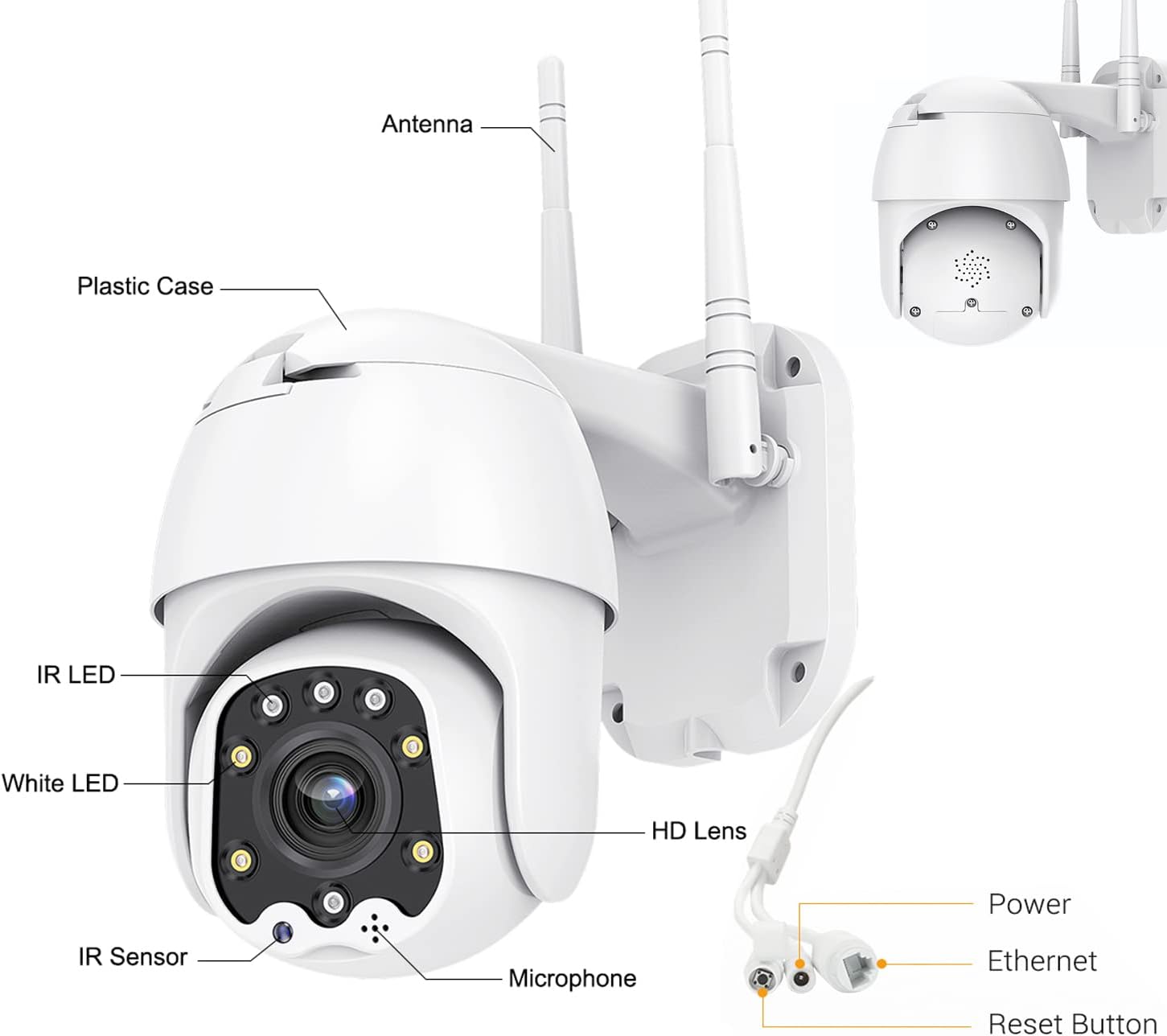
Figure 2: Camera Components and Connections.
2.3 SD 카드 설치 (선택 사항)
The camera supports a Micro SD card up to 128GB for local video storage (card not included).
- Open the cover on the camera body.
- 마이크로 SD 카드를 딸깍 소리가 나면서 제자리에 고정될 때까지 조심스럽게 슬롯에 삽입하십시오.
- 덮개를 단단히 닫으십시오.
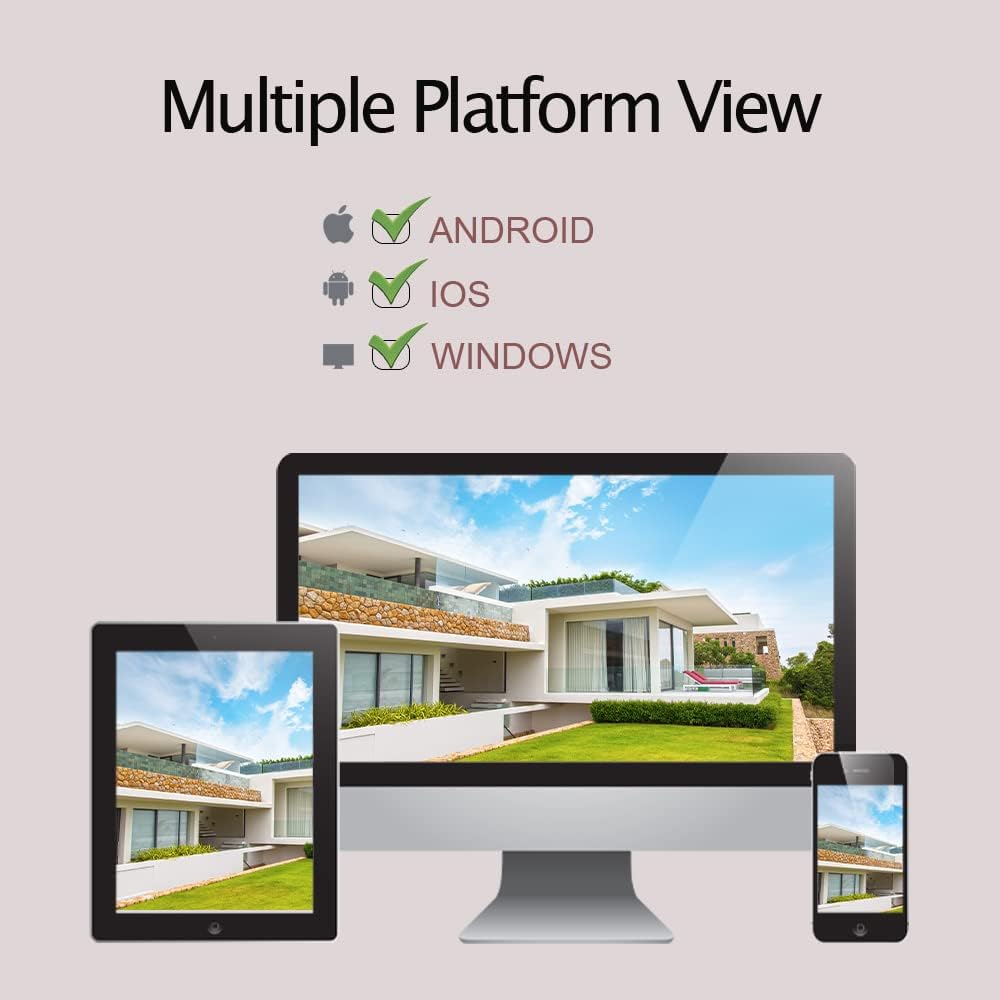
Figure 3: SD Card Installation Steps.
2.4 네트워크 연결 및 앱 설정
The camera connects via 2.4GHz Wi-Fi. Ensure your Wi-Fi password does not contain special symbols.
- Download the "CamHiPro" app from the App Store (iOS) or Google Play Store (Android).
- 계정을 등록하고 로그인합니다.
- 카메라의 전원을 켭니다.
- In the app, follow the on-screen instructions to add a new device. Select "Add Camera" and choose the Wi-Fi setup method.
- Enter your 2.4GHz Wi-Fi network details when prompted.
- The camera will connect to your Wi-Fi network. Once connected, you can view 라이브 스트림.
3. 카메라 작동
3.1 라이브 View 및 PTZ 제어
Once connected, you can access the live video feed through the CamHiPro app or PC software.
- 팬/틸트: 앱 내 방향 컨트롤을 사용하여 카메라를 수평(320°) 및 수직(90°)으로 회전시켜 조정하세요. view잉 각도.
- 디지털 줌: 손가락으로 확대/축소하여 라이브 화면을 보세요. view to digitally magnify the image.
3.2 양방향 오디오
카메라에는 양방향 통신을 위한 마이크와 스피커가 내장되어 있습니다.
- 앱에서 마이크 아이콘을 탭하면 카메라 스피커를 통해 말할 수 있습니다.
- 카메라의 마이크는 주변의 소리를 포착합니다.

Figure 4: Two-Way Audio Functionality.
3.3 동작 감지 및 알림
The camera can detect motion and send alerts to your device.
- Configure motion detection sensitivity and detection areas within the app settings.
- When motion is detected, the camera can send push notifications to your phone, send an email with a photo, or upload photos/videos to an FTP server.
- The camera also supports recording alarm video to the local Micro SD card.

Figure 5: Motion Detection Alerts.
3.4 야간 투시 모드
The AT-200DW offers intelligent full-color night vision and infrared night vision.
- 스마트 나이트 비전: The camera automatically switches between IR and full-color mode based on light conditions and detected motion.
- 적외선 나이트 비전: Provides black and white video in low light using IR LEDs.
- 풀 컬러 나이트 비전: Utilizes white LEDs to provide color video even in very low light conditions. This can also act as a deterrent.

Figure 6: Full-Color Night Vision for Deterrence.
3.5 멀티 플랫폼 View잉
Access your camera feed from various devices.
- 모바일 앱: CamHi/CamHiPro for iOS and Android smartphones.
- PC 소프트웨어 : Available for Windows and Mac operating systems.
- Web 브라우저: Supports IE, Firefox, Safari, Chrome.
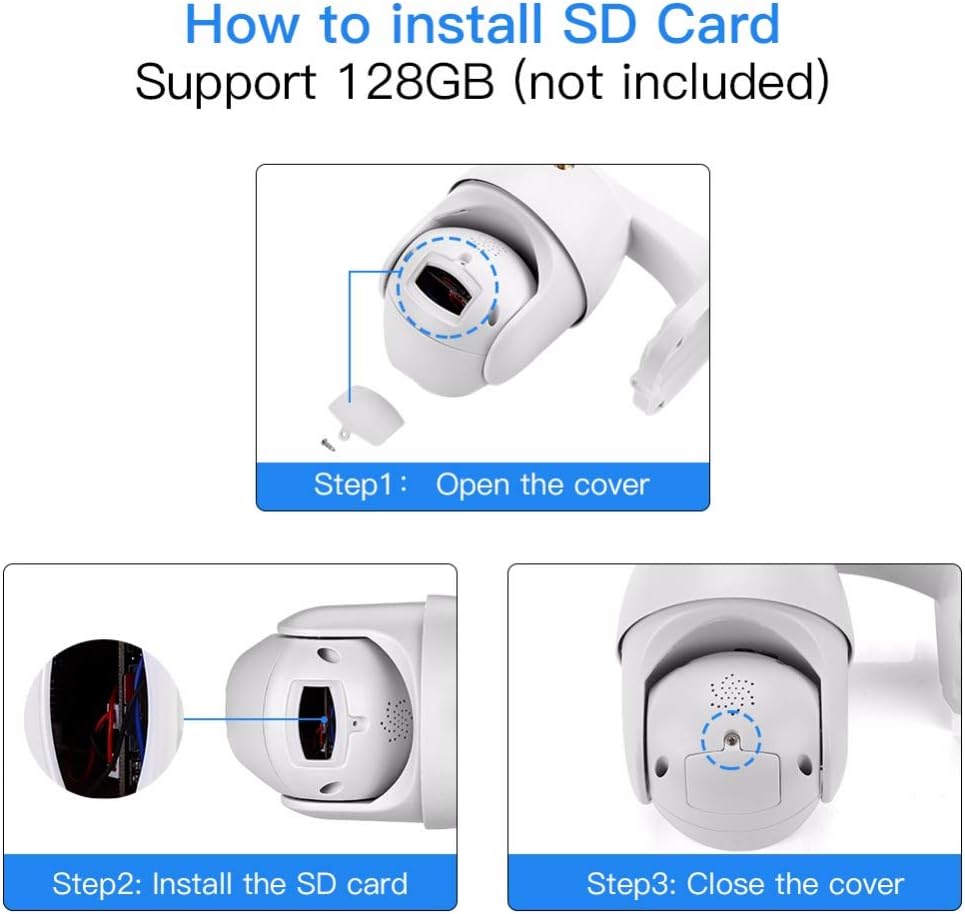
Figure 7: Multiple Platform Viewing Options.
4. 유지관리
정기적인 유지관리를 통해 카메라의 최적의 성능과 수명을 보장할 수 있습니다.
- 청소: 카메라 렌즈와 본체는 부드러운 천으로 주기적으로 닦아주세요.amp 천으로 먼지와 때를 제거하세요. 강한 화학 물질이나 연마성 세제는 사용하지 마세요.
- 펌웨어 업데이트: Check the CamHiPro app or Alptop's official web해당 사이트에서 사용 가능한 펌웨어 업데이트를 확인하세요. 펌웨어를 최신 상태로 유지하면 성능이 향상되고 새로운 기능이 추가될 수 있습니다.
- SD 카드 관리 : If using an SD card for continuous recording, consider formatting it periodically (e.g., monthly) through the app to maintain performance and prevent data corruption.
- 연결 확인: Occasionally verify the camera's Wi-Fi connection stability, especially after power outages or network changes.

그림 8: IP66 방수 설계.
5. 문제 해결
카메라에 문제가 발생하면 다음의 일반적인 문제와 해결 방법을 참조하세요.
| 문제 | 가능한 원인 | 해결책 |
|---|---|---|
| 카메라가 Wi-Fi에 연결되지 않습니다. | Incorrect Wi-Fi band (5GHz), wrong password, special characters in password, weak signal. | Ensure you are connecting to a 2.4GHz Wi-Fi network. Verify Wi-Fi password (no special symbols). Move camera closer to router or use a Wi-Fi extender. |
| No video feed or intermittent connection. | Network congestion, poor Wi-Fi signal, router channel interference. | Check network stability. Try changing your router's 2.4GHz Wi-Fi channel to a less congested one (e.g., 1, 6, or 11). Ensure your smartphone is not on the 2.4GHz band if possible. |
| 동작 감지가 작동하지 않거나 너무 민감합니다. | 설정 오류, 환경적 요인. | Adjust motion detection sensitivity and detection areas in the app. Ensure there are no moving objects (trees, flags) in the detection zone causing false alarms. |
| 양방향 오디오가 불분명하거나 에코가 발생합니다. | Environmental noise, microphone/speaker obstruction. | Ensure no obstructions near microphone or speaker. Reduce background noise if possible. |
| SD 카드가 녹화되지 않거나 인식되지 않습니다. | Card not inserted correctly, incompatible card, card full/corrupted. | Re-insert the SD card. Ensure it is a Class 10 or higher, up to 128GB. Format the SD card via the app. |
6. 사양
| 특징 | 세부 사항 |
|---|---|
| 모델 번호 | AT-200DW |
| 비디오 해상도 | 1080P HD (1920x1080) |
| 팬/틸트 범위 | 수평 320°, 수직 90° |
| 나이트 비전 범위 | IR: 150FT, Full-color: 100FT |
| 연결성 | 2.4GHz Wi-Fi (IEEE802.11b/g/n), Ethernet |
| 저장 | Supports max 128GB Micro SD card |
| 오디오 | Two-way audio (built-in 38dB microphone & speaker) |
| 전원 공급 장치 | 12V 2A (AC/DC) |
| 작동 온도 | Not specified, but designed for outdoor use (IP66) |
| IP 등급 | IP66(비바람에 견디는) |
| 치수 | 8.19 x 8.15 x 5.43 인치 |
| 무게 | 1.76파운드 |
7. 보증 및 지원
For warranty information and technical support, please refer to the documentation included with your product or contact Alptop customer service directly. You can also visit the official Alptop website for the latest support resources, FAQs, and contact details.
The primary application for managing your camera is the CamHiPro app, available for iOS and Android devices. PC software is also available for Windows and Mac users.