
소개
Thank you for choosing the Renkforce RF-SBS-500 2D Wired Barcode Scanner. This device is designed for efficient and reliable scanning of both 1D and 2D barcodes from various surfaces, including paper and smartphone screens. Its omnidirectional scanning capability and hands-free operation make it suitable for a wide range of applications. This manual provides essential information for the proper setup, operation, and maintenance of your scanner.
안전 지침
- 스캐너를 극한의 온도, 습도 또는 직사광선에 노출시키지 마세요.
- 스캐너를 떨어뜨리거나 강한 충격을 가하지 마십시오.
- 스캐너를 분해하거나 개조하지 마십시오. 그렇게 할 경우 보증이 무효화됩니다.
- Keep the scanning window clean to ensure optimal performance. Use a soft, dry cloth.
- Ensure the USB cable is connected securely to prevent accidental disconnection.
패키지 내용
- Renkforce RF-SBS-500 2D Wired Barcode Scanner
- 일체형 USB-A 케이블
- 사용 설명서 (본 문서)
설정
Follow these steps to set up your Renkforce RF-SBS-500 barcode scanner:
- 스캐너 풀기: 스캐너를 포장에서 조심스럽게 꺼내세요.
- 컴퓨터에 연결: Plug the integrated USB-A cable from the scanner into an available USB port on your desktop or laptop computer.
- 드라이버 설치: The scanner is typically plug-and-play. Your operating system (Windows, macOS, Linux) should automatically detect and install the necessary drivers. Wait for the installation to complete.
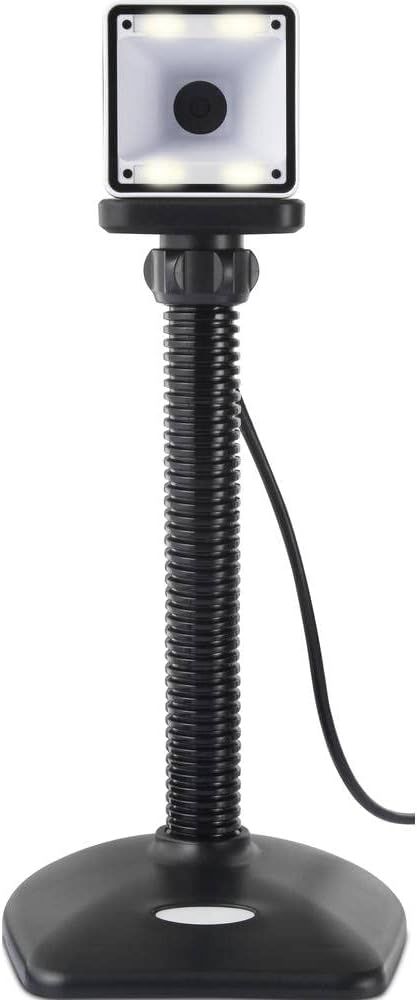
- 놓기: Place the scanner on a stable, flat surface. The flexible neck allows for adjustment of the scanning head angle for optimal positioning.

스캐너 작동
The Renkforce RF-SBS-500 is designed for ease of use with its omnidirectional and hands-free capabilities.
- 전원 켜기: Once connected via USB, the scanner will power on automatically. The LED indicators on the scanner head may illuminate briefly.
- 바코드 스캔하기: Position the barcode within the scanning area of the scanner head. The scanner will automatically detect and read the barcode.
- 시각적 및 청각적 피드백: Upon successful scanning, the integrated buzzer will emit a short beep, and the LED display on the scanner will flash or change color, indicating a successful read.
- 전방향 읽기: The scanner can read barcodes regardless of their orientation, eliminating the need to align the barcode precisely.
- Hands-Free Mode (Presentation Mode): The scanner operates continuously in a presentation mode, allowing you to simply pass items with barcodes in front of the scanning window without pressing any buttons. This saves time and improves workflow efficiency.
- 지원되는 바코드: The scanner supports both 1D (e.g., EAN, UPC, Code 39) and 2D (e.g., QR Code, Data Matrix, PDF417) barcode types.
유지
적절한 유지관리는 스캐너의 수명과 최적의 성능을 보장합니다.
- 스캔 창 정리: 스캔 창은 부드럽고 보풀 없는 천으로 정기적으로 닦아주세요. 잘 지워지지 않는 얼룩은 약간 두드려 닦아주세요.amp천에 물이나 순하고 마모성이 없는 세척제를 적셔 사용하십시오. 스캐너에 세척제를 직접 분사하지 마십시오.
- 일반 청소: 스캐너 외부를 마른 천이나 약간 젖은 천으로 닦으십시오.amp 옷감. 가혹한 화학 물질이나 연마재를 사용하지 마십시오.
- 저장: 사용하지 않을 때는 스캐너를 직사광선과 극한 온도 변화를 피해 깨끗하고 건조한 곳에 보관하십시오.
문제 해결
스캐너에 문제가 발생하면 다음의 일반적인 문제와 해결 방법을 참조하세요.
| 문제 | 가능한 원인 | 해결책 |
|---|---|---|
| 스캐너의 전원이 켜지지 않습니다. | USB 케이블이 제대로 연결되지 않았거나 USB 포트에 문제가 있습니다. | Ensure the USB cable is firmly connected to both the scanner and the computer. Try a different USB port. |
| 스캐너가 바코드를 읽지 못합니다. | Barcode damaged, scanning window dirty, or incorrect barcode type. | Check the barcode for damage. Clean the scanning window. Ensure the barcode type is supported (1D/2D). Adjust the distance and angle of the barcode to the scanner. |
| 스캔 후 경고음이나 LED 표시등이 켜지지 않습니다. | Barcode not read successfully. | Refer to the "Scanner does not read barcodes" solution. If the issue persists, contact support. |
| 스캔한 데이터가 잘못 표시됩니다. | Keyboard layout mismatch or software issue. | Ensure your computer's keyboard layout matches the expected output. Test with a simple text editor. |
If the problem persists after trying these solutions, please contact Renkforce customer support.
명세서
| 특징 | 사양 |
|---|---|
| 모델 번호 | RF-4679568 |
| 스캐닝 기능 | 1D 및 2D 바코드 |
| 연결 기술 | USB-A(유선) |
| 스캔 속도 | 초당 60 개 이미지 |
| 스캐닝 모드 | Omnidirectional, Hands-free (Presentation Mode) |
| 피드백 | Integrated Buzzer, LED Display |
| 호환 장치 | Desktop Computer, Laptop, Smartphone (via appropriate adapter if needed) |
| 치수(길이 x 너비 x 높이) | 150 x 5.2 x 5.2cm |
| 품목 무게 | 102그램 |
| 전원 | 강화 된 USB |
| 원산지 | 독일 |
보증 및 지원
Renkforce products are manufactured to high-quality standards and come with a standard warranty. Please refer to your purchase documentation or the Renkforce official web해당 지역에 적용되는 구체적인 보증 약관 및 조건은 해당 사이트를 참조하세요.
For technical support, troubleshooting assistance, or warranty claims, please contact Renkforce customer service. Contact details can typically be found on the Renkforce web사이트 또는 제품 포장에 표시하세요.