
1. 서론
Thank you for choosing the hoco. ES55 Songful TWS Wireless Headset. This manual provides detailed instructions on how to set up, operate, and maintain your new wireless earbuds. Please read this manual carefully before use to ensure optimal performance and longevity of your device.
2. 패키지 내용
패키지에 모든 품목이 들어 있는지 확인하세요.
- hoco. ES55 Songful TWS Wireless Headset (Left and Right Earbuds)
- 충전 케이스
- 충전 케이블
- 이어쿠션(다양한 사이즈)
- 사용 설명서 (본 문서)
3. 제품 오버view
Familiarize yourself with the components of your hoco. ES55 Songful headset.
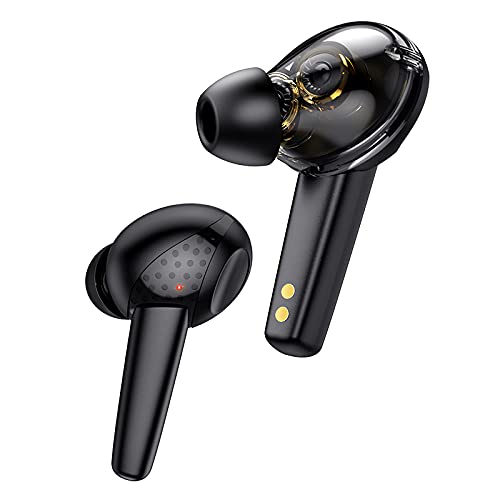
그림 3.1: The hoco. ES55 Songful TWS Wireless Headset earbuds. These are in-ear style earbuds, black in color, with a transparent section revealing internal components and gold charging contacts at the base of the stem.
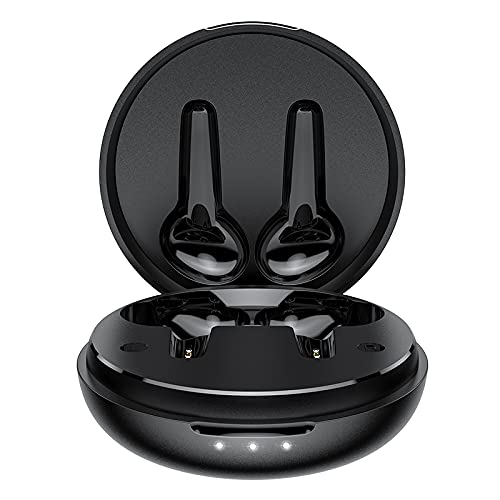
그림 3.2: The hoco. ES55 Songful charging case shown open, revealing the molded slots for the left and right earbuds. The case is black and circular, with three LED indicator lights on the front edge.
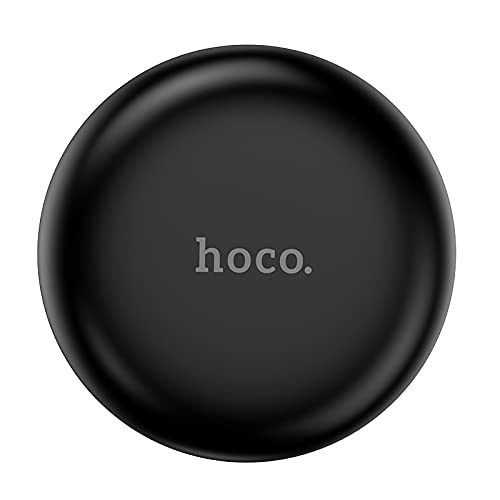
그림 3.3: The hoco. ES55 Songful charging case shown closed. It is a compact, circular black case with the "hoco." logo subtly embossed on the top surface.
4. 헤드셋 충전
처음 사용하기 전에 이어버드와 충전 케이스를 모두 완전히 충전하세요.
- 케이스 충전: Connect the provided charging cable to the charging port on the case and to a USB power source (e.g., computer, wall adapter). The LED indicators on the case will illuminate to show charging status. A full charge for the case takes approximately 1.5 hours.
- 이어버드 충전: Place the earbuds into their respective slots in the charging case. Ensure the charging contacts align. The earbuds will automatically begin charging. A full charge for the earbuds takes approximately 1 hour.
The charging case has a battery capacity of 400mAh, and each headset has a 35mAh battery. A full charge provides approximately 4 hours of talk/music time and up to 200 hours of standby time.
5. 장치와 페어링
Follow these steps to pair your hoco. ES55 Songful headset with your Bluetooth-enabled device:
- 초기 페어링:
- 충전 케이스가 충전되어 있고 이어버드가 들어 있는지 확인하세요.
- 충전 케이스를 여세요. 이어버드가 자동으로 페어링 모드로 전환되며, 이어버드 한쪽 또는 양쪽에 있는 LED 표시등이 깜빡입니다.
- 기기(스마트폰, 태블릿 등)에서 Bluetooth 설정으로 가서 Bluetooth를 켜세요.
- 검색 available devices. You should see "hoco. ES55 Songful" or a similar name appear in the list.
- Select "hoco. ES55 Songful" to connect. Once connected, a voice prompt will confirm successful pairing, and the earbud LED lights will stop flashing.
- 다시 연결 중 : Once paired, the earbuds will automatically connect to the last paired device when taken out of the charging case and Bluetooth is enabled on your device.
- 단일 이어버드 사용: Either earbud can be used independently. Simply take one earbud out of the case, and it will enter pairing mode or connect to the last paired device.
The headset uses Bluetooth v5.1 technology for stable and efficient wireless communication.
6. 헤드셋 작동
The hoco. ES55 Songful headset features intuitive controls for managing calls and music.
- 음악 재생/일시 중지: 양쪽 이어버드의 터치 센서를 한 번 탭하세요.
- 다음 트랙: 오른쪽 이어버드의 터치 센서를 두 번 탭하세요.
- 이전 트랙 : 왼쪽 이어버드의 터치 센서를 두 번 탭합니다.
- 전화 받기/종료: 전화가 걸려오는 동안 이어버드 양쪽의 터치 센서를 한 번 터치하세요.
- 전화 거부: 전화가 걸려오는 동안 이어버드 중 하나의 터치 센서를 2초 동안 길게 누르세요.
- Voice Assistant 활성화 : Triple-tap the touch sensor on either earbud to activate your device's voice assistant (e.g., Siri, Google Assistant).
- 게임 모드(낮은 지연 시간): The headset supports a low-latency "BEAST Mode" for gaming. Refer to your device's settings or specific app instructions for activation, if applicable.
The headset is equipped with ENx Tech enabled quad microphones for clear voice calls, reducing background noise.
7. 유지관리 및 관리
헤드셋의 수명과 최적의 성능을 보장하려면 다음 유지 관리 지침을 따르십시오.
- 이어버드와 충전 케이스를 깨끗하고 건조하게 유지하세요. 부드럽고 마른 천으로 닦아주세요.
- 장치를 극한의 온도, 습도 또는 부식성 물질에 노출시키지 마십시오.
- 기기를 분해하거나 직접 수리하려고 시도하지 마십시오. 그렇게 하면 보증이 무효화됩니다.
- 이어버드를 사용하지 않을 때는 충전 케이스에 보관하여 보호하고 충전 상태를 유지하세요.
- The earbuds are water-resistant and sweatproof, but not waterproof. Avoid submerging them in water.
8. 사양
| 특징 | 세부 사항 |
|---|---|
| 모델명 | Songful |
| 블루투스 버전 | v5.1 |
| 블루투스 칩 | JL AC6973 |
| 이어버드 배터리 용량 | 35mAh (각) |
| 충전 케이스 배터리 용량 | 400mAh |
| 이어버드 충전 시간 | 약 1시간 |
| 케이스 충전 시간 | 약 1.5시간 |
| 대화/음악 시간 | 약 4시간 |
| 대기 시간 | 약 200시간 |
| 드라이버 유형 | Dual Moving Coil, 6mm Dynamic Driver |
| 무선 범위 | 최대 10미터(33피트) |
| 방수성 | Water Resistant, Sweatproof |
| 제어 방법 | 터치, 음성 |
| 무게 | 35그램(총) |
| 치수 | 5 x 2 x 7cm |
9. 문제 해결
If you encounter issues with your hoco. ES55 Songful headset, refer to the following common solutions:
- 이어폰이 기기와 페어링되지 않음:
- 양쪽 이어버드가 모두 충전되어 있는지 확인하세요.
- 기기의 Bluetooth를 껐다가 켜세요.
- Forget "hoco. ES55 Songful" from your device's Bluetooth list and attempt to pair again.
- 이어버드를 케이스에 다시 넣고 뚜껑을 닫은 후 몇 초간 기다린 후 열어서 페어링 모드로 다시 들어가세요.
- 이어버드가 하나만 작동합니다:
- 양쪽 이어버드가 모두 충전되어 있는지 확인하세요.
- 이어버드 두 개를 모두 충전 케이스에 넣고 뚜껑을 닫은 다음, 두 개를 동시에 꺼내세요.
- 이어버드를 재설정해보세요(제조사의 설명서 참조) web(여기에 설명이 없는 경우 구체적인 재설정 지침은 해당 사이트를 참조하세요).
- 소리가 나지 않거나 볼륨이 낮음:
- 기기와 이어버드의 볼륨 레벨을 확인하세요.
- 이어버드가 기기에 제대로 연결되었는지 확인하세요.
- 이어버드 스피커 메시에서 이물질을 청소하세요.
- 충전 문제:
- 충전 케이블이 케이스와 전원에 모두 단단히 연결되어 있는지 확인하세요.
- 전원이 작동하는지 확인하세요.
- 이어버드와 케이스 내부의 충전 접점을 깨끗이 닦으세요.
10. 안전 정보
다음 안전 예방 조치를 준수하십시오.
- 청력 손상을 방지하려면 장시간 이어폰을 너무 높은 볼륨으로 사용하지 마세요.
- Be aware of your surroundings when using earbuds, especially in traffic or other potentially hazardous situations.
- 기기를 어린이와 애완동물의 손이 닿지 않는 곳에 보관하세요.
- 해당 지역 규정에 따라 장치와 배터리를 책임감 있게 폐기하세요.
11. 보증 및 지원
Your hoco. ES55 Songful TWS Wireless Headset comes with a manufacturer's warranty. For detailed information regarding warranty coverage, terms, and conditions, please refer to the warranty policy provided at the time of purchase or visit the official HOCO web대지.
For technical support, troubleshooting assistance beyond this manual, or warranty claims, please contact HOCO customer service through their official channels.
메모: Proof of purchase may be required for warranty services.