
Mcilpoog WS-T6
Mcilpoog WS-T6 Super Automatic Espresso Coffee Machine User Manual
Model: WS-T6
1. 서론
This manual provides essential instructions for the safe and efficient operation, maintenance, and troubleshooting of your Mcilpoog WS-T6 Super Automatic Espresso Coffee Machine. Please read this manual thoroughly before using the appliance and retain it for future reference.
2. 제품 오버view
The Mcilpoog WS-T6 is a super automatic espresso machine designed for convenience and quality. It features a built-in milk jug and a user-friendly touchscreen interface.
2.1 기계 구성품
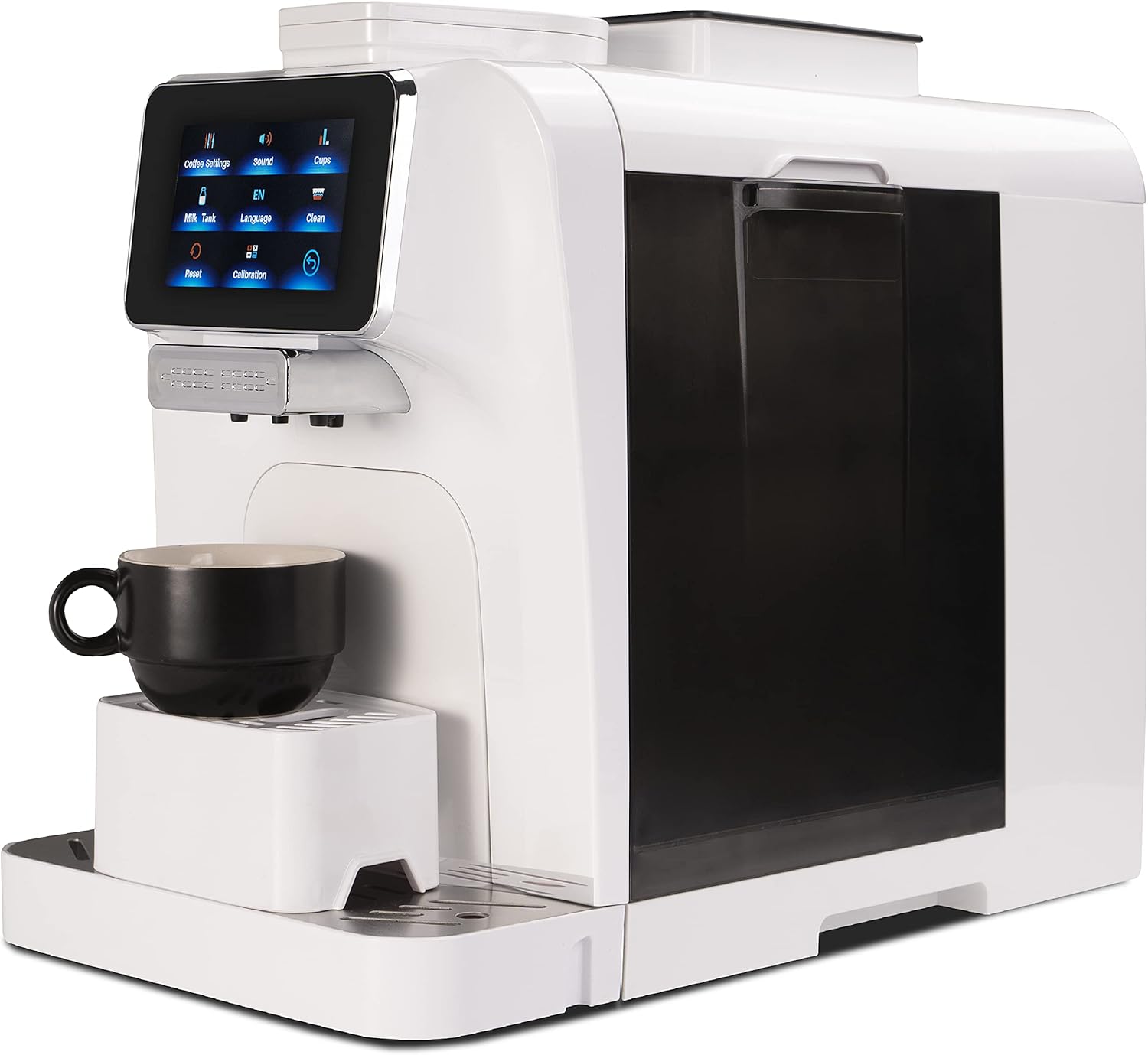
그림 1: 전면 view of the Mcilpoog WS-T6 Espresso Machine. This image shows the sleek white design of the machine with its touchscreen display and coffee dispenser.
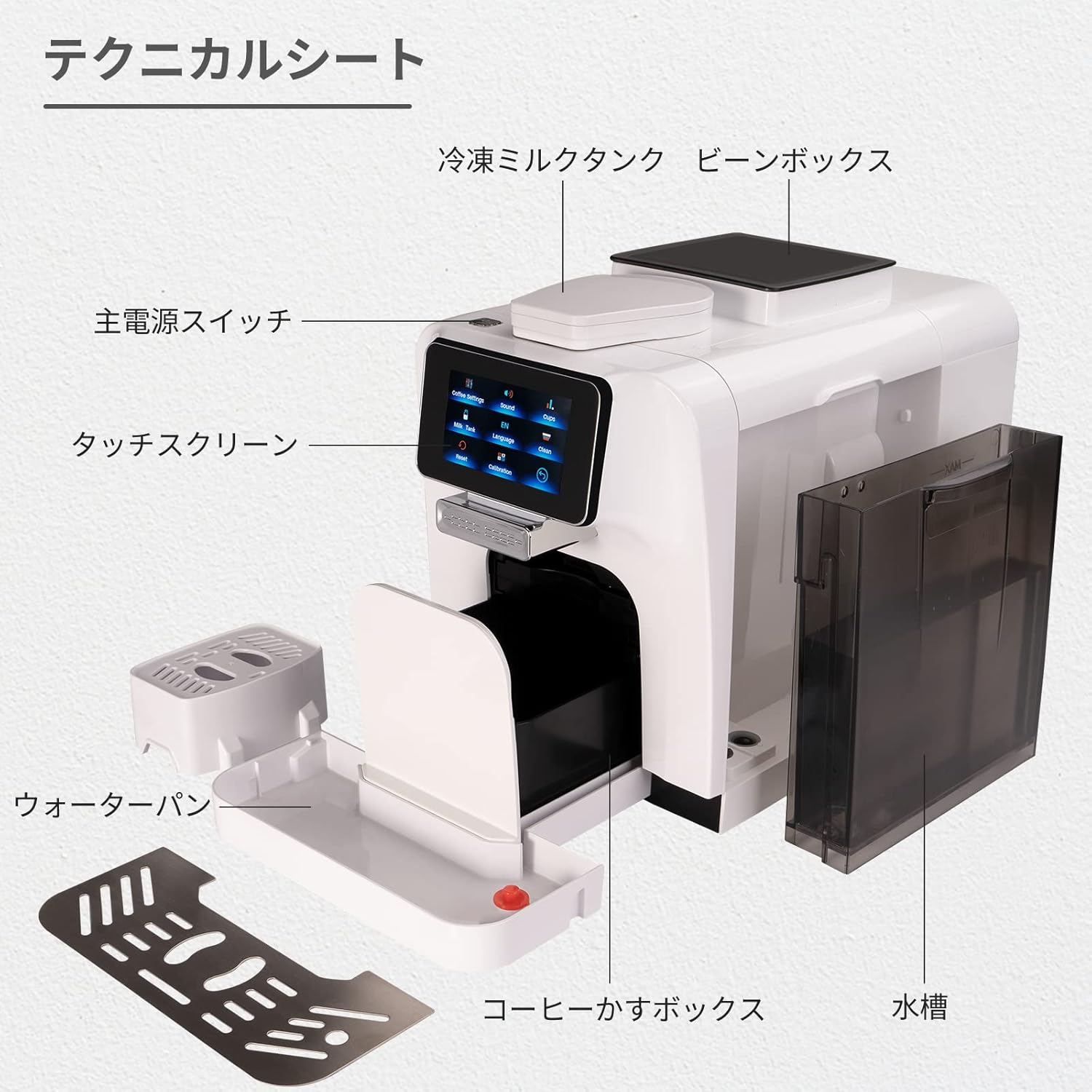
그림 2: 폭발 view diagram of the Mcilpoog WS-T6 components. Key parts include the main power switch, touchscreen, cold milk tank, bean box, water pan, coffee grounds box, and water tank.
- 터치스크린 디스플레이: For selecting beverages and adjusting settings.
- 커피 원두 투입구: 커피콩을 통째로 갈아서 보관합니다.
- 수조: 깨끗한 물을 위한 분리형 탱크.
- Milk Jug/Frother: 유제품 기반 음료를 위한 통합 시스템.
- 드립 트레이: 과도한 액체를 수집합니다.
- 찌꺼기 용기: 사용한 커피 찌꺼기를 모읍니다.
2.2 주요 특징
- 완전 자동 작동
- Integrated Milk System
- 터치 스크린 제어
- Adjustable Coffee Settings (strength, volume, temperature)
- Multiple Beverage Options
- Automatic Cleaning Functions
3. 초기 설정
- 짐 풀기: 모든 포장재를 조심스럽게 제거하고 모든 구성품이 들어 있는지 확인하세요.
- 놓기: 기기를 열원과 직사광선을 피해 안정적이고 평평한 곳에 놓으십시오. 적절한 환기가 이루어지도록 하십시오.
- 수조: Remove the water tank, rinse it, and fill it with fresh, cold water up to the MAX line. Reinsert it securely.
- 커피 원두 투입구: Open the lid of the coffee bean hopper and fill it with whole coffee beans. Do not use ground coffee in the bean hopper.
- 우유 시스템: If using the milk system, ensure the milk jug is clean and properly connected.
- 전원 연결: 전원 코드를 접지된 콘센트에 꽂으세요.
- 초기 헹굼 주기: Follow the on-screen prompts for the initial rinse cycle to prime the system. This is crucial for optimal performance.
4. 사용 설명서
4.1 터치스크린 탐색
The machine is operated via its intuitive touchscreen display. Navigate through menus by tapping the icons.

Figure 3: Touchscreen interface showing language selection. Users can select their preferred language from the available options.
4.2 음료 준비
- 켜기: Press the power button to turn on the machine. It will perform a brief self-check.
- 음료 선택: On the touchscreen, select your desired beverage (e.g., Espresso, Cappuccino, Latte).
- 사용자 정의(선택 사항): For some beverages, you can adjust settings like coffee strength, volume, or milk foam quantity via the touchscreen.
- 컵 놓기: Position a cup under the coffee dispenser. For milk-based drinks, ensure the milk frother spout is correctly positioned over the cup.
- 양조 시작: Press the 'Start' button on the screen. The machine will automatically grind beans, brew coffee, and froth milk as required.
- 즐기다: Once the brewing cycle is complete, your beverage is ready.

Figure 4: Beverage selection screen. This image displays the variety of coffee drinks that can be prepared with a single touch.
4.3 분쇄 설정 조정
The grind setting can be adjusted inside the bean hopper. Only adjust the grind setting while the grinder is operating to prevent damage. Refer to the specific instructions on the machine for precise adjustment.
5. 유지관리 및 청소
정기적인 청소와 관리는 에스프레소 머신의 수명 연장과 최적의 성능을 보장합니다.
5.1 일일 청소
- 물받이와 찌꺼기 용기: 매일 비우고 헹구세요.
- 우유 시스템: After each use, run the automatic milk system cleaning cycle. Disassemble and rinse milk components regularly.
- 수조: 매일 헹구고 깨끗한 물로 다시 채워주세요.
- 외부: 부드러운 천으로 외부를 닦아주세요.amp 옷감.
5.2 주간/월간 청소
- 양조 장치: The removable brew unit should be rinsed under lukewarm water weekly. Allow it to air dry before reinserting.
- 커피 주둥이: 커피 추출구에 남아 있는 커피 찌꺼기를 제거하려면 작은 브러시를 사용하여 청소하십시오.
5.3 석회질 제거
The machine will indicate when descaling is required. Follow the on-screen instructions and use a descaling solution specifically designed for espresso machines. Descaling removes mineral buildup and is crucial for machine performance and lifespan.
6. 문제 해결
기기에 문제가 발생하면 다음의 일반적인 문제와 해결 방법을 참조하세요.
- 기계가 켜지지 않음:
Ensure the power cord is securely plugged into a working outlet. Check the main power switch on the machine. - 커피 제공 없음:
Check if the water tank is filled and correctly inserted. Ensure the coffee bean hopper has beans. Clean the brew unit and coffee spout. - 기계 누수:
Verify the water tank is properly seated. Check for any blockages in the drip tray or internal components. If leaking persists, contact customer support. - Milk Frother Not Working/Poor Foam:
Ensure the milk system components are clean and free of blockages. Use fresh, cold milk. Check that all milk system parts are correctly assembled. - 표시되는 오류 메시지:
Refer to the specific error code displayed on the screen. The manual or manufacturer's website may provide a list of error codes and their solutions. Often, emptying the grounds container or refilling the water tank resolves these. - 커피 맛이 약하거나 묽어요:
Adjust the grind setting to a finer consistency. Increase the coffee strength setting on the touchscreen. Ensure fresh coffee beans are used.
이러한 해결 방법을 시도한 후에도 문제가 지속되면 고객 지원팀에 문의하세요.
7. 사양
| 특징 | 세부 사항 |
|---|---|
| 상표 | 맥실푸그 |
| 모델 번호 | WS-T6 |
| 제품 치수 | 9.69인치 깊이 x 6인치 너비 x 14.57인치 높이 |
| 품목 무게 | 31.2파운드 |
| 용량 | 1200밀리리터(물탱크) |
| 커피 메이커 유형 | 에스프레소 머신 |
| 작동 모드 | 완전 자동 |
| 휴먼 인터페이스 입력 | 터치스크린 |
| 포함된 구성 요소 | 우유 맛 |
| 한국어: | 601673773637 |
8. 보증 및 지원
For warranty information and customer support, please refer to the documentation included with your product or visit the official Mcilpoog web사이트. 보증 청구를 위해 구매 증빙 자료로 구매 영수증을 보관하세요.
Ask a question about this manual
Ask about setup, troubleshooting, compatibility, parts, safety, or missing instructions. Manuals+ will review the question and use this page’s manual context to help answer it.