
1. 서론
Thank you for choosing the Qlima PH635 Portable Reversible Air Conditioner. This manual provides essential information for the safe and efficient operation, maintenance, and troubleshooting of your appliance. Please read it thoroughly before use and keep it for future reference.
The Qlima PH635 is a versatile unit designed to provide comfort in various conditions, offering cooling, heating, dehumidification, and fan functions. It features automatic stop, programming backup in case of power interruption, and adjustable ventilation.
2. 안전 지침
사용자 또는 다른 사람의 부상 및 재산상의 손해를 방지하기 위해 다음 지침을 따라야 합니다. 지시 사항을 무시하여 잘못된 작동으로 인해 부상을 입거나 파손될 수 있습니다.
- Always ensure the unit is placed on a flat, stable surface to prevent tipping.
- 전원 코드나 플러그가 손상된 상태로 제품을 작동하지 마십시오. 전원 코드가 손상된 경우, 위험을 방지하기 위해 제조업체, 서비스 대리점 또는 이와 유사한 자격을 갖춘 사람이 교체해야 합니다.
- 공기 흡입구나 배출구에 손가락이나 이물질을 넣지 마십시오.
- 본 제품을 가연성 물질 및 화염으로부터 멀리 두십시오.
- 기기 주변의 환기가 잘 되도록 하십시오. 통풍구를 막지 마십시오.
- 청소나 유지관리 작업을 하기 전에는 반드시 기기의 플러그를 뽑으세요.
- 이 기기는 8세 이상의 어린이와 신체적, 감각적 또는 정신적 능력이 저하된 사람이나 경험과 지식이 부족한 사람이 사용할 수 있습니다. 단, 이 경우에도 기기를 안전하게 사용하는 방법에 대한 감독이나 지시를 받고 관련 위험을 이해한 경우에 한합니다.
- 어린이가 이 제품을 가지고 놀지 않도록 감독해야 합니다.
3. 패키지 내용
포장을 풀 때 모든 품목이 있는지 확인하세요.
- Qlima PH635 Portable Air Conditioner Unit
- 배기 호스
- Window Sealing Kit (adaptor, window slide bar)
- 원격 제어
- 사용 설명서 (본 문서)
4. 제품 오버view
4.1개의 구성요소
Familiarize yourself with the main parts of your Qlima PH635 unit:
- Control Panel (top of unit)
- Air Outlet (front, adjustable louvers)
- Air Inlet (rear/sides, with air filter)
- Exhaust Air Outlet (rear, for hose connection)
- Continuous Drainage Port (rear, for dehumidification)
- Casters (bottom, for mobility)
- 전원 코드
4.2 제품 이미지
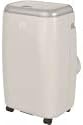
Image showing the Qlima PH635 portable reversible air conditioner from a slight angle, highlighting its compact, rectangular design with a light-colored casing and top control panel. The unit is equipped with casters for easy movement.
5. 설정
5.1 풀기
- 장치를 포장에서 조심스럽게 꺼냅니다.
- 모든 포장재를 제거하고 책임감 있게 폐기하십시오.
- Ensure no parts are missing or damaged.
5.2 배치
- Place the air conditioner on a firm, level surface in a location that allows for proper air circulation.
- Maintain a minimum distance of 30 cm (12 inches) from walls or other objects to ensure adequate airflow.
- 본 제품을 직사광선이나 열원 근처에 두지 마십시오.
5.3 배기 호스 설치
- Attach one end of the exhaust hose to the exhaust air outlet on the rear of the unit. Twist clockwise until secure.
- Extend the exhaust hose to the nearest window or vent opening. Keep the hose as short and straight as possible to maximize efficiency.
5.4 윈도우 키트 설치
For optimal performance, use the provided window sealing kit to prevent hot air from re-entering the room.
- Adjust the window slide bar to fit your window opening.
- Secure the slide bar in the window.
- Connect the other end of the exhaust hose to the adaptor on the window kit.
- Ensure all connections are sealed to prevent air leakage.
5.5 Drainage Setup (Dehumidification Mode)
When using the dehumidification function, continuous drainage is recommended. Connect a drainage hose (not supplied) to the continuous drainage port on the rear of the unit and lead it to a suitable drain or container.
6. 사용 설명서
6.1 제어판 및 리모콘
The unit can be operated via the control panel on top of the unit or the supplied remote control. The functions are generally identical.
6.2 전원 켜기/끄기
를 누르세요 힘 버튼을 눌러 장치를 켜거나 끕니다.
6.3 모드 선택
를 누르세요 방법 사용 가능한 모드를 순환하는 버튼:
- 냉각 모드: 실내를 시원하게 하려면 원하는 온도를 설정하세요.
- 가열 모드: 실내 난방용입니다. 원하는 온도를 설정하세요.
- 제습 모드: Removes moisture from the air. Fan speed is typically fixed in this mode.
- 팬 모드: 냉각이나 가열 없이 공기를 순환시킵니다.
6.4 온도 조절
In Cooling or Heating mode, use the UP 그리고 아래에 arrow buttons to set your desired temperature. The temperature range is typically 16°C to 30°C (61°F to 86°F).
6.5 팬 속도
를 누르세요 팬 속도 button to select between Low, Medium, or High fan speeds. This function is available in Cooling, Heating, and Fan modes.
6.6 타이머 기능
타이머 기능을 사용하면 기기가 자동으로 켜지거나 꺼지는 특정 시간을 설정할 수 있습니다.
- 를 누르세요 시간제 노동자 단추.
- 사용하세요 UP 그리고 아래에 arrow buttons to set the desired time (in hours).
- 누르다 시간제 노동자 다시 확인합니다.
6.7 절전 모드
Activate Sleep Mode for quieter operation and gradual temperature adjustment during sleep. Press the 잠 단추.
6.8 Automatic Stop and Programming Backup
The Qlima PH635 features an automatic stop function when the desired temperature is reached or the water tank is full (in dehumidification mode). In case of a power cut, the unit will automatically resume operation with the last settings once power is restored, thanks to its programming backup feature.
7. 유지관리
정기적인 유지관리를 통해 최적의 성능을 보장하고 에어컨의 수명을 연장할 수 있습니다.
7.1 장치 청소
- 청소하기 전에는 항상 장치의 플러그를 뽑으세요.
- 부드러운 천으로 외부를 닦아주세요.amp 옷감. 강한 화학 물질이나 연마성 세제를 사용하지 마십시오.
- 전기 부품에 물이 들어가지 않도록 주의하세요.
7.2 공기 필터 청소
공기 필터는 사용량과 공기 질에 따라 2주에 한 번 또는 그보다 더 자주 청소해야 합니다.
- 장치의 전원을 끄고 플러그를 뽑으세요.
- Locate and remove the air filters from the rear/sides of the unit.
- Wash the filters under running water (warm, not hot) or use a vacuum cleaner to remove dust.
- 필터를 다시 설치하기 전에 필터를 완전히 말리십시오.
7.3 계절별 보관
장기간 장치를 사용하지 않을 경우:
- 기기 내부에 고인 물을 모두 빼내십시오.
- Clean the air filters and the exterior.
- Store the unit in a dry, cool place, covered to protect it from dust.
8. 문제 해결
고객 지원팀에 문의하기 전에 다음 표를 참조하여 일반적인 문제와 해결 방법을 확인하세요.
| 문제 | 가능한 원인 | 해결책 |
|---|---|---|
| 장치가 켜지지 않습니다 | No power supply; Power cord not plugged in; Fuse blown; Water tank full (in dehumidification) | Check power outlet; Plug in power cord firmly; Replace fuse; Empty water tank. |
| No cooling/heating | Air filter clogged; Exhaust hose blocked or disconnected; Room temperature already reached; Doors/windows open; Room too large | Clean air filter; Check exhaust hose connection and ensure it's not blocked; Adjust desired temperature; Close doors/windows; Consider room size limitations. |
| 물 누출 | Drainage plug loose; Unit not level; Continuous drainage hose blocked | Ensure drainage plug is secure; Place unit on a level surface; Check and clear continuous drainage hose. |
| 시끄러운 작동 | Unit not on a level surface; Air filter clogged; Foreign object in fan | Ensure unit is on a level surface; Clean air filter; Turn off and unplug, then check for obstructions (if safe to do so). |
9. 사양
Key technical specifications for the Qlima PH635 Portable Reversible Air Conditioner:
| 특징 | 사양 |
|---|---|
| 상표 | 클리마 |
| 모델명 | PH635 |
| 치수(길이 x 너비 x 높이) | 71 x 33 x 44cm |
| 무게 | 31 킬로그램 |
| 냉각 용량 | 3200와트 (약 12000 BTU) |
| 가열 용량 | 3500와트 (제품명 기준) |
| 소음 수준 | 55데시벨 |
| 권tage | 240 볼트 |
| 특별 기능 | Heating and Cooling Function, Programmable, Automatic Stop, Programming Backup |
| 계절별 에너지 효율 비율(SEER) | 6.1 |
| 설치 유형 | 가지고 다닐 수 있는 |
| 전원 | 코드식 전기 |
10. 보증 및 지원
For warranty information and customer support, please refer to the documentation provided with your purchase or contact your retailer. Information regarding the availability of spare parts is currently unavailable.
When contacting support, please have your model number (PH635) and purchase details ready.


