
1. 서론
Thank you for choosing the Caliber HPG318DAB Portable DAB+/FM Radio. This device offers high-quality digital and analog radio reception, a compact design for portability, and convenient alarm functions. This manual provides essential information for the safe and efficient use of your radio.
2. 안전 정보
- 사용 전에 모든 지침을 주의 깊게 읽고 나중에 참조할 수 있도록 보관하십시오.
- 기기를 비, 습기 또는 극한의 온도에 노출시키지 마세요.
- 열원 근처나 직사광선에 장치를 두지 마십시오.
- 기기를 직접 분해하거나 수리하려고 하지 마십시오. 모든 정비는 자격을 갖춘 기술자에게 맡기십시오.
- 제공된 충전 케이블과 어댑터만 사용하세요.
- 어린이의 손이 닿지 않는 곳에 보관하세요.
3. 패키지 내용
패키지에 모든 품목이 들어 있는지 확인하세요.
- Caliber HPG318DAB Portable DAB+/FM Radio Unit
- 사용자 설명서
- USB 충전 케이블
- 전원 어댑터
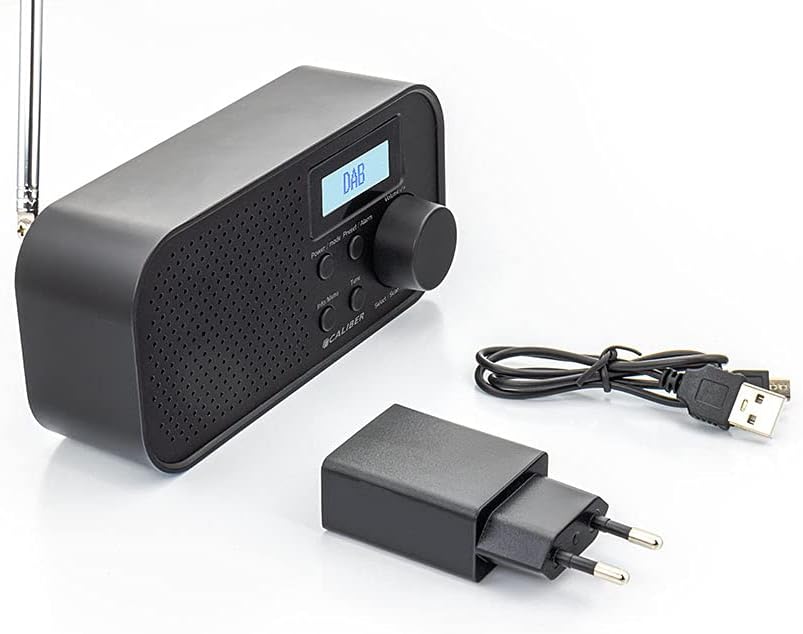
Image: Caliber HPG318DAB radio unit, USB charging cable, and power adapter.
4. 제품 오버view
4.1 전면 패널 컨트롤
이미지: 앞면 view of the Caliber HPG318DAB radio, highlighting the LCD screen, speaker grille, and control buttons.
- LCD 화면: Displays station information, time, and menu options.
- 전원 / 모드 버튼 : Turns the radio on/off and switches between DAB+ and FM modes.
- 메뉴/정보 버튼: Accesses menu settings and displays additional information.
- 사전 설정/알람 버튼: Saves/recalls preset stations and sets alarm functions.
- Select/Scan Button: Confirms selections and initiates station scans.
- 음소거 버튼: 일시적으로 경보음을 끕니다.
- 볼륨 노브: 오디오 볼륨을 조절합니다.
- 스피커 그릴: 오디오 출력.
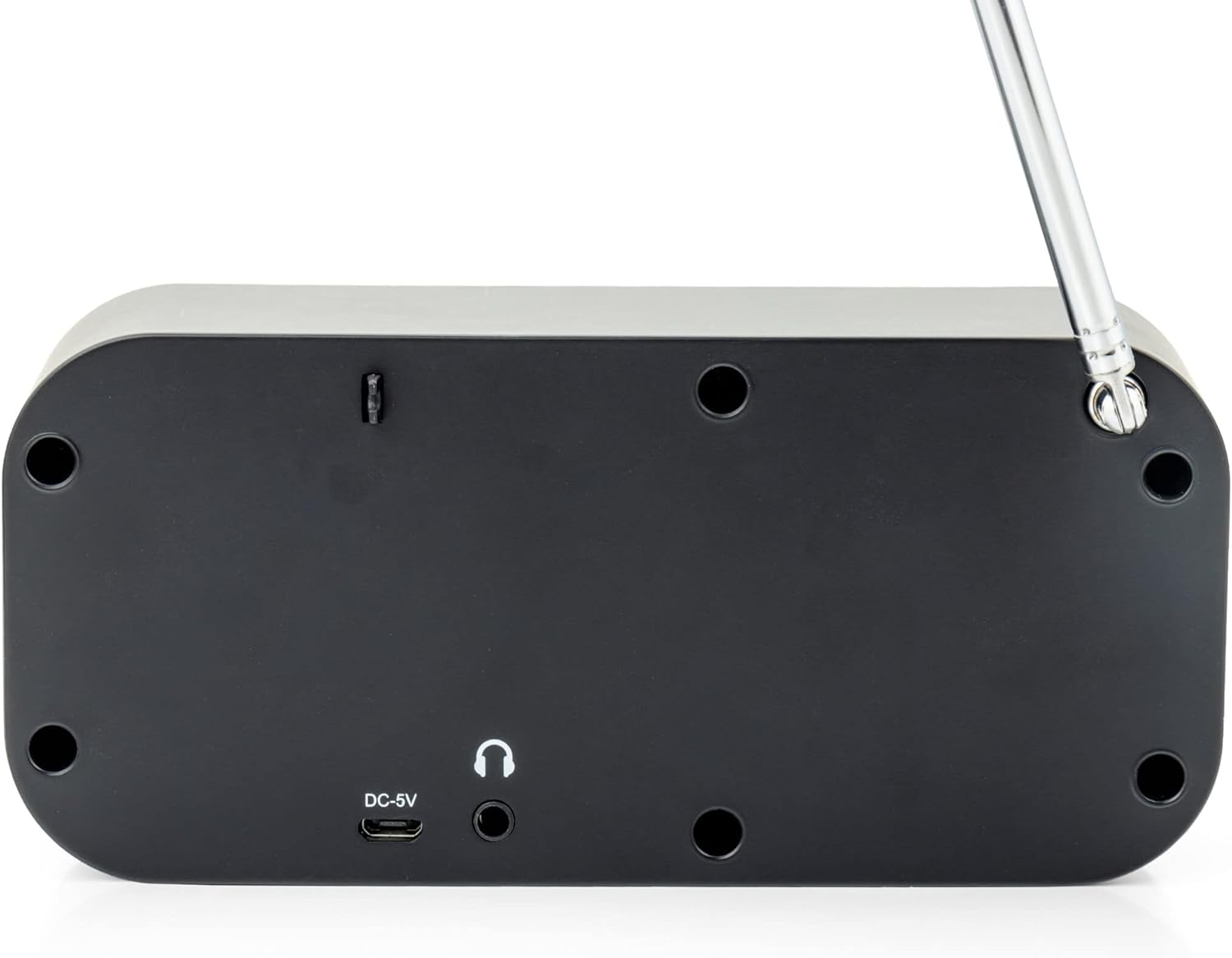
4.2 후면 패널 연결

이미지: 후면 view of the Caliber HPG318DAB radio, showing the DC-5V charging port, 3.5mm headphone jack, and telescopic antenna.
- DC-5V Input: 여기에 USB 충전 케이블을 연결하세요.
- 3.5mm 헤드폰 잭 : 헤드폰이나 이어폰을 연결하는 데 사용합니다.
- 텔레스코픽 안테나: 최적의 라디오 수신을 위해 연장하십시오.
5. 설정
5.1 배터리 충전
The Caliber HPG318DAB features a built-in rechargeable battery, providing up to 8 hours of playback on a full charge.
- Connect the small end of the provided USB charging cable to the DC-5V 입력 라디오 뒷면에 있는 포트.
- Connect the larger end of the USB cable to the provided power adapter.
- 전원 어댑터를 표준 벽면 콘센트에 꽂습니다.
- The charging indicator on the LCD screen will show the charging status. Once fully charged, the indicator will change.
참고: 처음 사용하기 전에 배터리를 완전히 충전하는 것이 좋습니다.
5.2 안테나 조정
For optimal radio reception, fully extend the telescopic antenna located on the rear of the device. Adjust its position to improve signal strength if reception is poor.
6. 사용 설명서
6.1 전원 켜기/끄기 및 모드 선택
- 라디오를 켜려면 ON, 누르고 계세요 전원/모드 단추.
- 라디오를 켜려면 끄다, 누르고 계세요 전원/모드 버튼을 다시 누르세요.
- 전환하려면 디앤에이비+ 그리고 FM modes, short press the 전원/모드 button while the radio is on. The current mode will be displayed on the LCD screen.
6.2 DAB+ 라디오 작동
- DAB+ 모드로 전환하려면 다음을 사용하세요. 전원/모드 단추.
- The radio will automatically perform a full scan for available DAB+ stations upon first use or if no stations are found. To initiate a manual scan, press the 메뉴/정보 button, navigate to 'Full Scan', and press Select/Scan.
- 사용하세요 볼륨 노브 이용 가능한 방송국 목록을 스크롤하려면 누르세요. Select/Scan 방송국을 선택합니다.
- To save a station as a preset (up to 10 presets): While listening to a station, press and hold the 사전 설정/알람 버튼을 사용합니다. 볼륨 노브 미리 설정된 숫자(1-10)를 선택한 다음 누르세요. Select/Scan 확인합니다.
- To recall a preset station: Short press the 사전 설정/알람 버튼, 사용 볼륨 노브 원하는 사전 설정 번호를 선택한 다음 누르세요. Select/Scan.
- 를 누르세요 메뉴/정보 버튼을 view additional information (e.g., program type, signal strength, time) provided by Radio Data System (RDS).
6.3 FM 라디오 작동
- FM 모드로 전환하려면 다음을 사용하세요. 전원/모드 단추.
- To automatically scan for stations: Press and hold the Select/Scan 버튼을 누르세요. 라디오가 주파수가 강한 다음 방송국을 스캔하고 멈춥니다.
- To manually tune: Rotate the 볼륨 노브 to adjust the frequency in small increments.
- To save a station as a preset (up to 10 presets): While listening to a station, press and hold the 사전 설정/알람 버튼을 사용합니다. 볼륨 노브 미리 설정된 숫자(1-10)를 선택한 다음 누르세요. Select/Scan 확인합니다.
- To recall a preset station: Short press the 사전 설정/알람 버튼, 사용 볼륨 노브 원하는 사전 설정 번호를 선택한 다음 누르세요. Select/Scan.
- 를 누르세요 메뉴/정보 버튼을 view additional information (e.g., station name, program type) provided by Radio Data System (RDS).
6.4 볼륨 조절
큰 것을 회전시키다 볼륨 노브 시계 방향으로 돌리면 소리가 커지고, 시계 반대 방향으로 돌리면 소리가 작아집니다.
6.5 헤드폰 사용
Connect any standard 3.5mm headphones or earphones to the 3.5mm 헤드폰 잭 on the rear of the radio for private listening. The internal speaker will automatically mute when headphones are connected.
6.6가지 알람 기능
The radio includes alarm clock and sleep timer functions.
알람 시계 설정:
- 를 누르고 계세요 사전 설정/알람 button until the alarm setup menu appears.
- 사용하세요 볼륨 노브 to navigate through options like Alarm 1, Alarm 2, Time, Source (Buzzer/DAB/FM), and Volume. Press Select/Scan 각 설정을 확인합니다.
- Set the desired alarm time, choose your preferred alarm source (buzzer, DAB+ station, or FM station), and set the alarm volume.
- Ensure the alarm is set to 'On' in the menu.
스누즈 기능 사용:
알람이 울리면 버튼을 누르세요. 선잠 button to temporarily pause the alarm for a short period (e.g., 9 minutes). The alarm will sound again after the snooze period.
취침 타이머 설정:
- 를 누르세요 메뉴/정보 단추.
- Navigate to the 'Sleep' option using the 볼륨 노브 그리고 누르세요 Select/Scan.
- Select the desired sleep timer duration (e.g., 15, 30, 45, 60, 90 minutes, or Off). The radio will automatically turn off after the selected time.
7. 유지관리
7.1 청소
To clean the radio, use a soft, dry cloth. Do not use abrasive cleaners, waxes, or solvents as they may damage the finish.
7.2 보관
When not in use for extended periods, store the radio in a cool, dry place away from direct sunlight and extreme temperatures. Ensure the battery is partially charged before storage to maintain its lifespan.
7.3 배터리 관리
To prolong the life of the built-in Lithium-ion battery, avoid fully discharging it frequently. Charge the radio regularly, even if not in constant use.
8. 문제 해결
| 문제 | 가능한 원인 | 해결책 |
|---|---|---|
| 라디오가 켜지지 않습니다. | 배터리가 소진되었습니다. | Connect the radio to power using the USB cable and adapter to charge the battery. |
| 라디오 수신 상태가 좋지 않습니다(DAB+/FM). | 안테나가 펼쳐지지 않았거나 신호가 약한 지역입니다. | 텔레스코픽 안테나를 완전히 펼친 후 위치를 조정하십시오. 라디오를 다른 위치로 옮겨 보십시오. |
| 소리가 나지 않습니다. | 볼륨이 너무 작거나 헤드폰이 연결되어 있습니다. | 사용하여 볼륨을 높이십시오. 볼륨 노브. Disconnect headphones if you want sound from the speaker. |
| 알람이 울리지 않습니다. | 경보 설정이 잘못되었거나 꺼져 있습니다. | Check alarm settings (time, source, volume, 'On' status) in the menu. |
9. 사양
| 특징 | 사양 |
|---|---|
| 모델 번호 | HPG318DAB |
| 치수(길이 x 너비 x 높이) | 15 x 4 x 6.5cm |
| 무게 | 255g |
| 전원 | Battery-Powered (1 Lithium-ion battery required) |
| 배터리 수명 | 최대 8시간 |
| 지원되는 라디오 대역 | DAB+, FM |
| 연결 기술 | AUX (for headphones), USB (for charging) |
| Maximum Speaker Output | 25와트 |
| 재료 | 플라스틱 |
| 색상 | 검은색 |
| 특별 기능 | Portable, Alarm Function, RDS, LCD Screen |
10. 보증 및 지원
For warranty information and customer support, please refer to the documentation provided with your purchase or visit the official Caliber web사이트. 보증 청구를 위해 구매 증빙 자료를 보관하세요.