
플렉시스팟 MAH0002191
FLEXISPOT Pro Corner Electric Standing Desk Instruction Manual
모델: MAH0002191
소개
This manual provides detailed instructions for the assembly, operation, and maintenance of your FLEXISPOT Pro Corner Electric Standing Desk. Please read this manual thoroughly before assembly and use to ensure safe and correct operation. Keep this manual for future reference.
안전 정보
- 조립하기 전에 모든 구성품이 있는지, 손상되지 않았는지 확인하십시오. 부품이 누락되었거나 파손된 경우 사용하지 마십시오.
- Assembly requires at least two people due to the weight and size of the components.
- 작동 중에는 어린이와 애완동물이 책상에 접근하지 못하도록 하세요.
- 높이를 조정할 때 책상 이동 경로에 방해물이 없는지 확인하세요.
- Do not sit or stand on the desk. The maximum weight capacity is 220 lbs.
- 제공된 전원 어댑터만 사용하십시오.
- 청소 또는 유지 보수 전에 전원을 차단하십시오.
패키지 내용
Your FLEXISPOT Pro Corner Electric Standing Desk arrives in two separate packages. Please verify all parts are included before beginning assembly.
- L-shaped Desktop (Splice Board)
- Desk Frame (Dual Motor Lift System)
- Control Pad with USB Charger
- 조립 도구
- 전원 어댑터 및 케이블
- 사용 설명서

Image: All components of the FLEXISPOT Pro Corner Electric Standing Desk laid out, including the L-shaped desktop, dual motor frame, and control panel.
조립 설명서
Follow these steps carefully for proper assembly. It is recommended to have two people for certain steps, especially when handling the desktop and flipping the assembled desk.
1단계: 부품 풀기 및 식별
Carefully unpack all contents from both boxes. Refer to the package contents list to ensure all parts are present. Lay out all components on a clean, soft surface to prevent scratches.

Image: Illustration showing the desk components arriving in two separate packages.
Step 2: Assemble the Desk Frame
Connect the various parts of the steel frame according to the diagrams provided in the included paper manual. Ensure all screws are tightened securely. The dual motor system should be integrated into the frame structure.
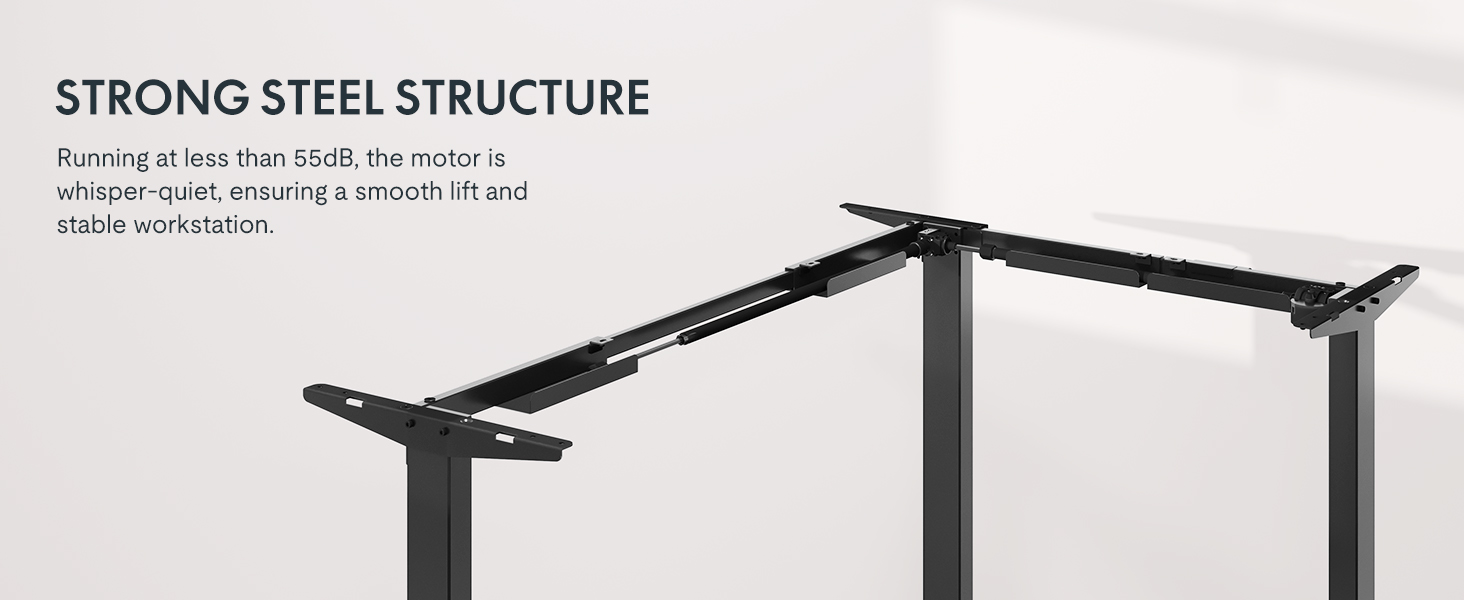
Image: Diagram illustrating the strong steel structure and dual motor system of the desk frame.
Step 3: Attach the Desktop
Place the L-shaped desktop upside down on a soft, protected surface. Position the assembled frame onto the desktop, aligning the pre-drilled holes. Secure the frame to the desktop using the provided screws. Note that the L-shape is reversible, allowing for left-hand or right-hand configuration. Choose your desired orientation before securing the desktop.

Image: The L-shaped desk shown with both left and right configurations, highlighting its reversible design.
4단계: 제어판 설치
Mount the control panel to the underside of the desktop in a convenient location. Connect the control panel cable to the motor control box as indicated in the wiring diagram. Ensure all connections are secure.

Image: Close-up of the advanced LED control panel with up/down movement buttons, height memory presets, sit/stand reminder, and a USB charger port.
Step 5: Connect Power and Position the Desk
With assistance, carefully flip the assembled desk upright and move it to its desired location. Connect the power adapter to the control box and then plug it into a wall outlet. Ensure cables are managed to prevent snagging during height adjustments.
작동 지침
높이 조정
- 사용하세요 ▲ 그리고 ▼ arrows on the control panel to adjust the desk height. The desk will move smoothly between 28.9 inches and 48.2 inches.
- 현재 높이가 LED 화면에 표시됩니다.

Image: The desk shown at its minimum (28 inches) and maximum (47.2 inches) adjustable heights, demonstrating its versatility for sitting and standing positions.
메모리 사전 설정
- The control panel features three memory settings (1, 2, 3) to store your preferred sitting and standing heights.
- To save a height: Adjust the desk to your desired height, then press the '중' button followed by the desired number button (1, 2, or 3). The display will show "S-" and then the number, indicating the height is saved.
- To recall a saved height: Press the corresponding number button (1, 2, or 3). The desk will automatically move to the saved position.
앉기/서기 알림
- The control panel includes a sit/stand reminder function. Press the '에이' button to activate or deactivate this feature. Refer to the detailed instructions in the included paper manual for setting reminder intervals.
USB 충전 포트
- A USB charging port is integrated into the control panel for convenient charging of small electronic devices.
충돌 방지 기능
- The desk is equipped with an anti-collision system. If the desk encounters an obstruction during height adjustment, it will automatically stop and reverse slightly to prevent damage.
Image: Illustration showing the anti-collision feature, where the desk stops and rebounds upon encountering an obstacle.
유지
- 책상과 프레임을 부드러운 천으로 정기적으로 닦아주세요.amp 천으로 닦으세요. 연마성 세제나 용제는 사용하지 마세요.
- 모든 나사와 연결부가 단단히 조여져 있는지 주기적으로 점검하십시오.
- Keep the area around the desk legs clear of dust and debris to ensure smooth operation of the lifting mechanism.
- Do not attempt to lubricate the motor or internal components.
문제 해결
| 문제 | 가능한 원인 | 해결책 |
|---|---|---|
| 책상이 움직이지 않습니다. | Power cable disconnected, motor overload, or control panel error. | Check power connections. Unplug and replug the desk after 30 seconds. Reduce weight on the desk if overloaded. Consult the full manual for specific error codes. |
| 책상이 고르지 않게 움직이거나 이상한 소리가 납니다. | 연결이 느슨하거나, 무게 분포가 고르지 않거나, 장애물이 있을 수 있습니다. | Ensure all screws are tight. Redistribute weight evenly on the desktop. Check for any obstructions under or around the desk. |
| 메모리 사전 설정이 작동하지 않습니다. | 저장 절차가 잘못되었습니다. | Refer to the "Memory Presets" section in Operating Instructions to correctly save heights. |
명세서
| 특징 | 세부 사항 |
|---|---|
| 모델 번호 | 마하0002191 |
| 제품 치수 | 63인치 깊이 x 39.4인치 너비 x 28.9인치 높이 |
| 높이 조절 범위 | 28.9인치 ~ 48.2인치 (데스크탑 두께 1인치 포함) |
| 최대 중량 용량 | 220파운드 |
| 모터 유형 | 듀얼 모터 |
| 소음 수준 | 50dB 이하 |
| 데스크탑 소재 | 목재(접합판) |
| 프레임 소재 | 산업용 강철 |
| 제어판 기능 | LED display, 3 memory presets, Sit/Stand reminder, USB charging port |
| 조립이 필요합니다 | 네 (추천인원 2명) |
보증 및 지원
FLEXISPOT provides the following warranty coverage for your product:
- 5년 보장: Desk frame and motor.
- 2년 보장: Control panel and electronics.
For customer support, please contact FLEXISPOT directly or refer to the contact information provided with your purchase documentation. You can also visit the official FLEXISPOT store for more information and assistance.
파는 사람: 플렉시스팟