
1. 서론
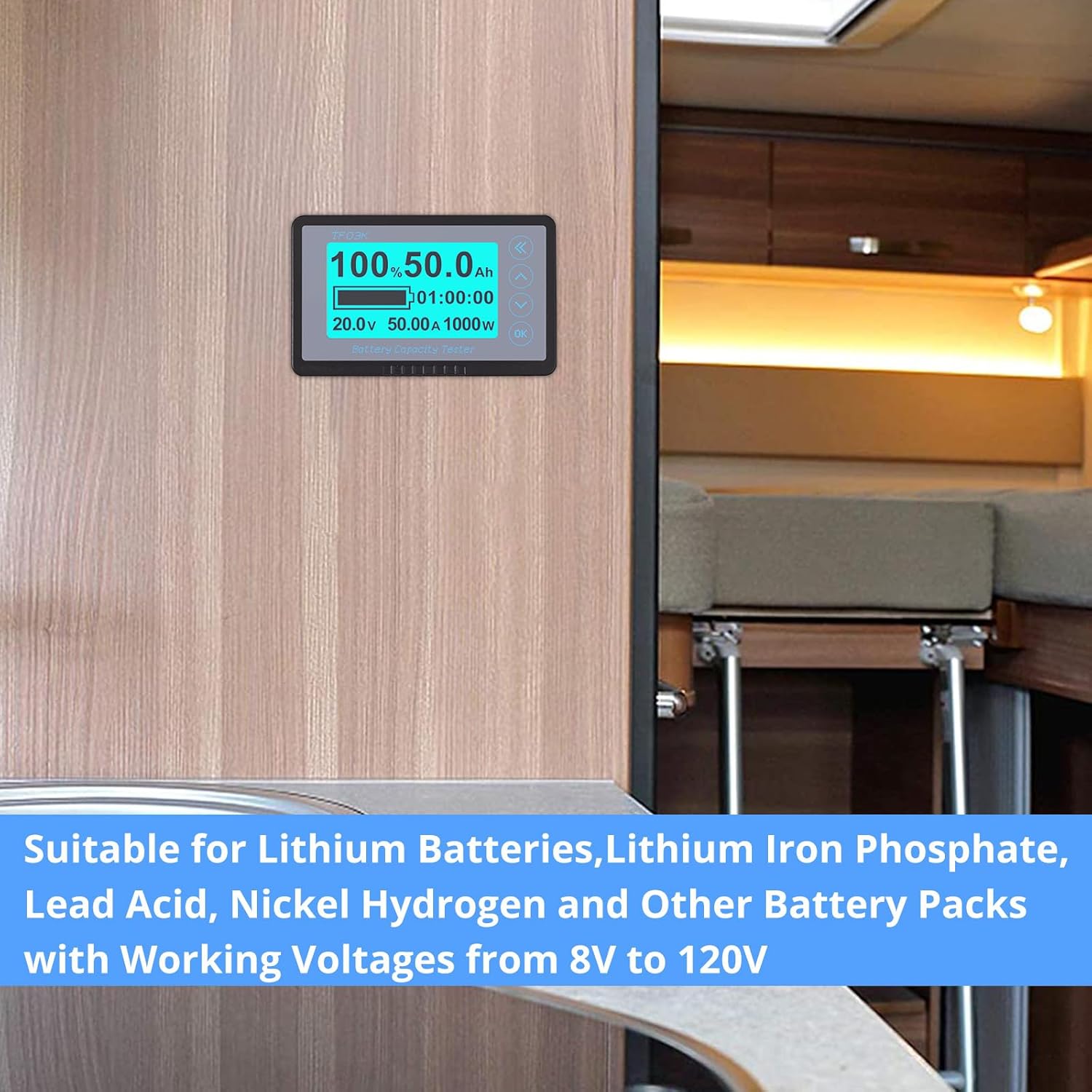
This manual provides detailed instructions for the installation, operation, and maintenance of your CAMWAY Battery Monitor with Shunt. This device is designed to accurately measure and display the voltage, current, power, real capacity, and remaining time of various battery types, including Lithium, Lithium Iron Phosphate, Lead Acid, and Nickel Hydrogen batteries, within an 8V-120V range and up to 500A.
The monitor is suitable for a wide range of applications such as RVs, golf carts, motorhomes, electric vehicles, and other equipment requiring precise battery status monitoring.
2. 상자 안에 무엇이 들어있나요?
패키지에 모든 구성품이 들어 있는지 확인하세요.
- Battery Monitor Display Unit
- 500A 션트/초amp레어
- 션트/Sampler Holder (Plastic insulation fixing bracket)
- 5-meter (16.4 ft) Shielded Wire
- 사용자 설명서

3. 제품 특징
- 와이드볼tage 및 전류 범위: Supports batteries from 8V to 120V, with current measurement up to 500A. Compatible with Lithium, Lithium Iron Phosphate, Lead Acid, and Nickel Hydrogen battery types.
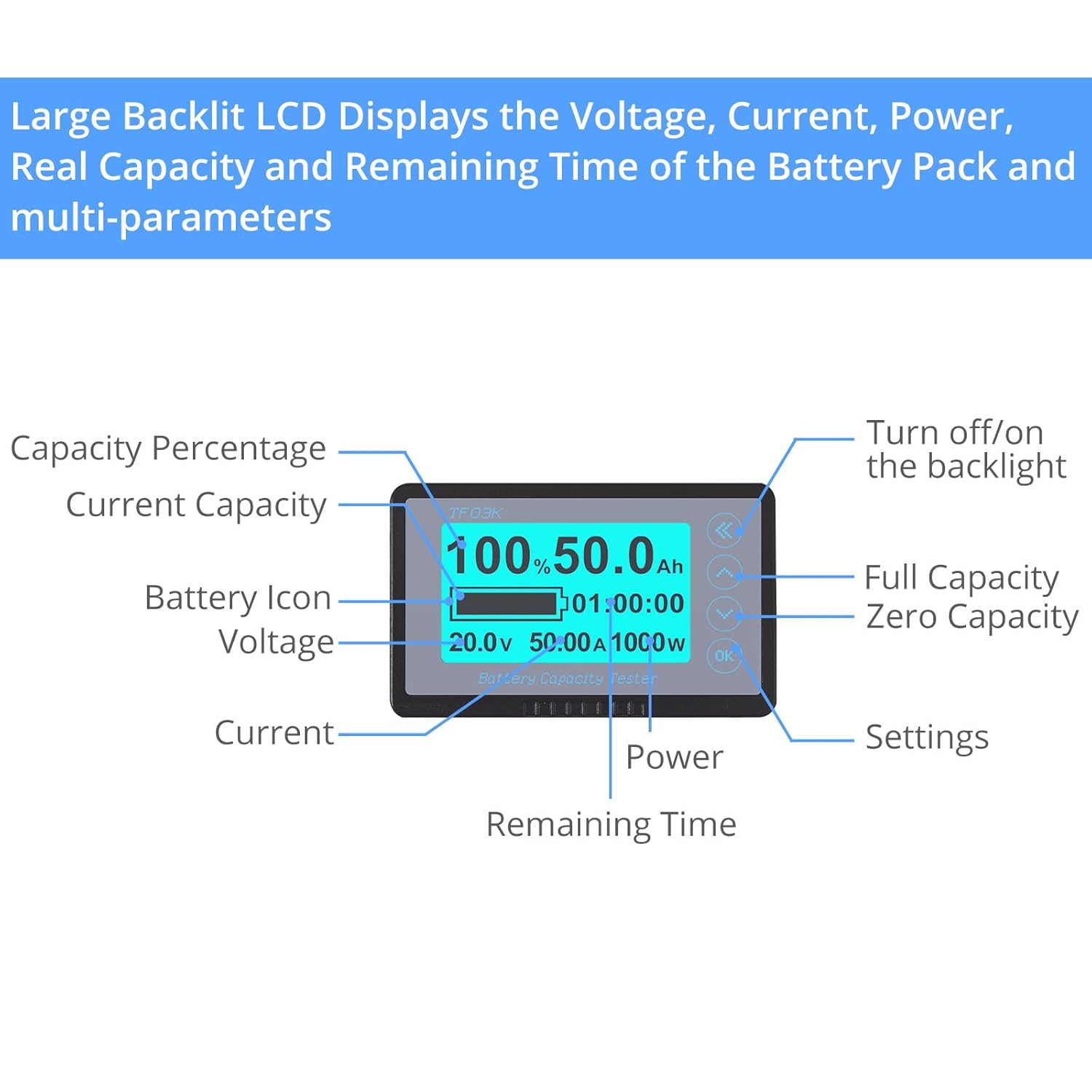
- 종합 모니터링: Accurately detects Voltage, Current, Power, Real Capacity (Full capacity voltage, Zero capacity voltage), and Remaining Time of the battery.
- Extended Shielded Wire: Includes a 5-meter (16.4 ft) shielded cable for convenient remote installation and improved signal stability, reducing interference.
- 방수 디자인 : Allows for installation in various environments, both indoors and outdoors.
- Low Capacity Alarm: Features a visual (flashing percentage and battery symbol) and audible (buzzer) alarm when battery capacity falls below a set threshold.
- 데이터 저장: Automatically stores the last tested data when the system is powered off, ensuring continuity of information.
- Backlit Large LCD: Displays multiple electronic parameters clearly. The backlight can be activated with a soft touch and can be turned on/off as needed.
4. 설정 및 설치
정확한 측정과 안전한 작동을 위해서는 올바른 설치가 매우 중요합니다. 다음 단계를 주의 깊게 따르십시오.
4.1 배선도
4.2 설치 단계
- Mount the Shunt: Securely mount the 500A shunt using the provided holder in a dry, accessible location close to the battery. Ensure good ventilation.
- Connect Battery Negative to Shunt: Connect the negative terminal of your battery (B-) to the 'B-' terminal on the shunt.
- Connect Load/Charger Negative to Shunt: Connect the negative terminal of your load (P-) and charger (C-) to the 'P-' terminal on the shunt. All current flowing into or out of the battery must pass through the shunt for accurate measurement.
- Connect Battery Positive: Connect the positive terminal of your battery (B+) to the positive side of your load and charger.
- Connect Monitor to Shunt: Use the provided 5-meter shielded wire to connect the display unit to the shunt. Ensure the connectors are firmly seated.
- Power the Monitor: The monitor typically draws power from the battery via the shielded cable connection to the shunt. Verify the display powers on after all connections are made.
중요한: Ensure all connections are tight and secure to prevent resistance and inaccurate readings. Incorrect wiring can damage the device or your battery system.
5. 사용 설명서
The CAMWAY Battery Monitor provides real-time data on your battery's status. Familiarize yourself with the display and controls.
5.1 디스플레이 오버view
5.2 기본 작업
- 전원 켜기: The monitor will power on automatically once correctly wired to the battery.
- 백라이트 제어: Briefly press the 'Left Arrow' button to cycle through backlight brightness levels or turn it off.
- View 매개변수: The main screen displays key parameters. Use the 'Up' and 'Down' arrow buttons to switch between different display modes or parameters if available.
- 액세스 설정: Press the 'OK' button to enter the settings menu. Use the arrow buttons to navigate and 'OK' to select or confirm.
5.3 배터리 매개변수 설정
To ensure accurate readings, you must configure the monitor with your battery's specifications, particularly its total capacity (Ah).
- 설정 입력: '확인' 버튼을 누르세요.
- Navigate to Capacity Setting: Use the 'Up'/'Down' arrows to find the 'Capacity' or 'Ah' setting.
- Adjust Capacity: Use the 'Up'/'Down' arrows to set the total Amp-hour (Ah) capacity of your battery. Confirm with 'OK'.
- 볼륨 설정tage Alarms (Optional): You can also set high and low voltage alarm thresholds within the settings menu.
5.4 Low Capacity Alarm
When the battery capacity drops below the preset low capacity alarm threshold, the display's percentage and battery symbol will flash, and an audible buzzer will sound (10 times per second) to alert you.
6. 유지관리
To ensure the longevity and accurate performance of your CAMWAY Battery Monitor, follow these maintenance guidelines:
- 깨끗하게 유지하십시오: Regularly wipe the display screen and unit with a soft, dry cloth. Avoid abrasive cleaners or solvents.
- 연결 확인: Periodically inspect all wiring connections, especially at the shunt, to ensure they remain tight and free from corrosion.
- 환경 보호: Although waterproof, avoid prolonged submersion or exposure to extreme temperatures beyond the specified operating range.
- 소프트웨어 업데이트: 제조사 확인해보세요 website for any available firmware updates, though this device typically does not require user-performed updates.
7. 문제 해결
배터리 모니터에 문제가 발생하면 다음의 일반적인 문제와 해결 방법을 참조하세요.
| 문제 | 가능한 원인 | 해결책 |
|---|---|---|
| 모니터 전원이 켜지지 않습니다. | Incorrect wiring; loose connection; no power from battery. | Verify all wiring according to the diagram (Section 4.1). Check for loose connections at the shunt and monitor. Ensure the battery has sufficient charge. |
| 부정확한 판독값(Vol)tage, Current, Capacity). | Incorrect battery capacity setting; shunt not properly installed; high resistance in wiring. | Ensure the correct Ah capacity is set in the monitor's settings (Section 5.3). Confirm all current flows through the shunt. Check for tight, clean connections. |
| Low capacity alarm triggers prematurely or not at all. | Incorrect alarm threshold setting. | Adjust the low capacity alarm threshold in the settings menu to match your desired level. |
| 디스플레이가 어둡거나 깜빡입니다. | Backlight setting; low battery voltage. | Adjust backlight brightness (Section 5.2). Check battery voltage; if low, charge the battery. |
If the problem persists after attempting these solutions, please contact CAMWAY customer support.
8. 사양
| 특징 | 사양 |
|---|---|
| 상표 | 캠웨이 |
| 모델 | B092HLVT35 |
| 전원 | 배터리 구동, 전기 |
| 색상 | 검은색 |
| 품목 무게 | 75그램(2.65온스) |
| 최소 운영 볼륨tage | 8 볼트 |
| 최대 운영 볼륨tage | 120 볼트 |
| Max. Current Capacity | 500 Amps (with 500A shunt) |
| 측정 유형 | 전류계, 전압계 |
| Shielded Wire Length | 5미터(16.4피트) |
| 상한 온도 등급 | 섭씨 35도 |
| 사양 충족 | IEC 61010-1, EN 61010-1 |
| 패키지 크기 | 6.02 x 5.91 x 2.13 인치 |

9. 제품 오버view 동영상
이 공식 영상을 시청하여 시각적으로 살펴보세요.view of the CAMWAY Battery Monitor and its features.
10. 보증 및 지원
For warranty information, technical support, or any inquiries regarding your CAMWAY Battery Monitor, please contact CAMWAY customer service directly. Refer to the contact information provided with your purchase or visit the official CAMWAY web대지.
보증 청구를 위해 구매 증명서를 보관하십시오.