
소개
This manual provides comprehensive instructions for the installation, operation, maintenance, and troubleshooting of your ASUS AMD Radeon RX 6700 XT Gaming Graphics Card. Please read this manual thoroughly before installing and using the product to ensure proper functionality and to prevent damage.
제품 끝view
주요 특징
- Powered by AMD Radeon RX 6700 XT GPU.
- Equipped with 12GB of GDDR6 memory.
- Designed for high-performance gaming.
- Features DisplayPort video output interface.
- GPU Clock Speed of 2 GHz.
구성 요소 식별

Figure 1: Retail packaging of the ASUS AMD Radeon RX 6700 XT Gaming Graphics Card, showing the product box and an included HDMI cable.

그림 2: 전면 view of the graphics card, highlighting the dual cooling fans and the "RADEON" branding.

Figure 3: Angled perspective of the graphics card, showcasing its heatsink and fan shroud design.

그림 4: 후면 view of the graphics card, displaying the various DisplayPort outputs for monitor connectivity.
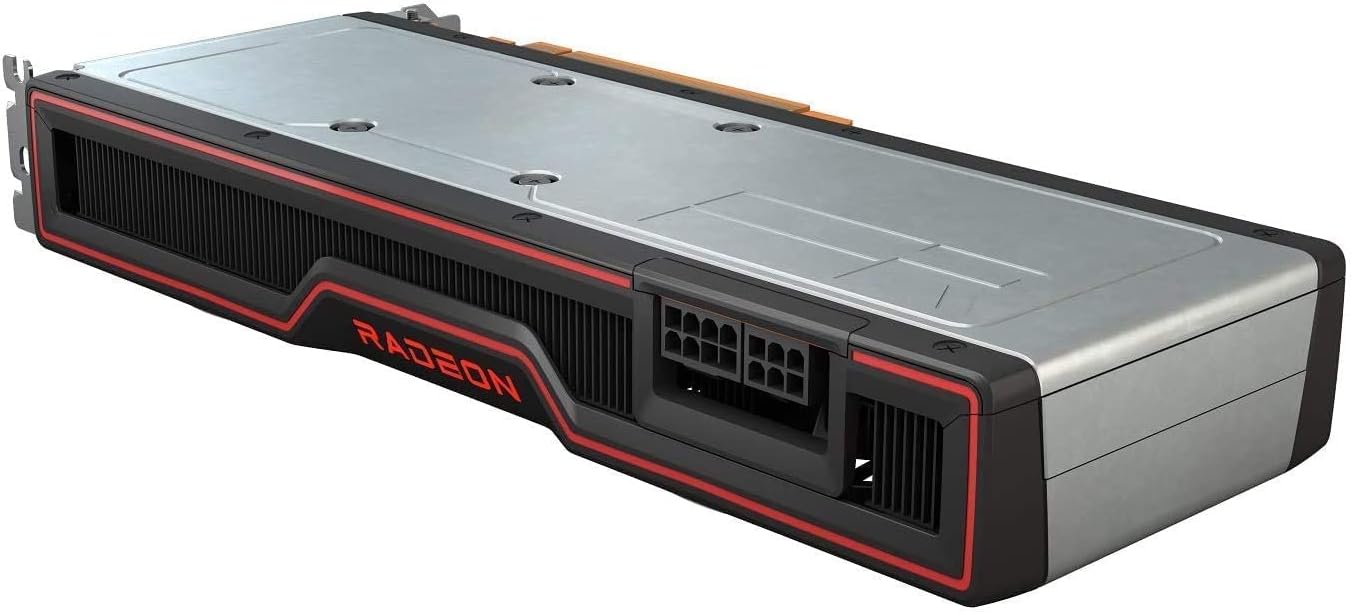
그림 5: 상향식 view of the graphics card's backplate, showing the power connectors (8-pin and 6-pin PCIe) and the overall length.
설치 가이드
시스템 요구 사항
- PCI Express-enabled motherboard with one x16 graphics slot.
- Minimum 650W power supply with one 8-pin and one 6-pin PCIe power connector.
- 운영 체제: Windows 10 64비트 이상.
- 8GB 시스템 메모리(16GB 권장).
물리적 설치
- 시스템을 준비하세요: 컴퓨터 전원을 끄고 모든 케이블을 뽑으세요. 컴퓨터 케이스를 여세요.
- PCIe 슬롯을 찾으십시오. 마더보드에서 사용 가능한 PCI Express x16 슬롯을 찾으십시오. 슬롯을 막고 있는 확장 슬롯 커버를 모두 제거하십시오.
- 그래픽 카드를 설치하세요: Carefully align the graphics card with the PCIe slot and press down firmly until it is fully seated. Secure the card with the screw or latch mechanism of your case.
- 전원 케이블을 연결하십시오: Connect the required 8-pin and 6-pin PCIe power connectors from your power supply to the corresponding ports on the graphics card. Ensure a secure connection.
- Close case and connect peripherals: 컴퓨터 케이스를 닫고 모든 케이블(모니터, 키보드, 마우스, 전원 케이블)을 다시 연결한 후 시스템 전원을 켜십시오.
작업
드라이버 설치
- 드라이버 다운로드: Once your system boots, navigate to the official AMD web사이트 (www.amd.com/en/support) or the ASUS support page for your specific model. Download the latest recommended graphics drivers for the AMD Radeon RX 6700 XT.
- 드라이버 설치: Run the downloaded driver installer. Follow the on-screen prompts to complete the installation. It is recommended to perform a clean installation if prompted.
- 시스템 재시작: 설치가 완료되면 컴퓨터를 다시 시작하여 새 드라이버를 적용하십시오.
소프트웨어 구성
After driver installation, you can use the AMD Radeon Software Adrenalin Edition to optimize your gaming experience, monitor performance, and adjust various graphics settings. This software is typically included with the driver package or can be downloaded separately from AMD's web대지.
유지
청소
- 압축 공기를 사용하여 그래픽 카드 팬과 방열판의 먼지를 정기적으로 청소하십시오. 청소하기 전에 시스템 전원을 끄고 전원 케이블을 뽑으십시오.
- 카드에 액체 세척제를 직접 사용하지 마십시오.
- Inspect power connectors for secure fit.
드라이버 업데이트
Periodically check for updated drivers on the AMD or ASUS support websites. Keeping your drivers up-to-date ensures optimal performance, stability, and compatibility with the latest games and applications.
문제 해결
| 문제 | 가능한 원인 | 해결책 |
|---|---|---|
| 디스플레이 출력이 없습니다. | Graphics card not seated correctly, power cables not connected, incorrect monitor input. | Reseat the card, ensure all power cables are connected, check monitor input source. |
| Low frame rates or poor performance. | Outdated drivers, insufficient power, overheating, background applications. | Update drivers, verify PSU wattage, ensure proper case airflow, close unnecessary applications. |
| 시스템이 충돌하거나 정지됩니다. | Unstable drivers, overheating, power supply issues. | Reinstall drivers, check temperatures, test with a different power supply if possible. |
기술 사양
| 특징 | 세부 사항 |
|---|---|
| 그래픽 코프로세서 | AMD 라데온 RX 6700 XT |
| 상표 | 아수스 |
| 그래픽 RAM 크기 | 12GB GDDR6 |
| GPU 클럭 속도 | 2GHz |
| 비디오 출력 인터페이스 | 디스플레이포트 |
| 품목 모델 번호 | AMD RX 6700 XT |
| ASIN | B092BQK2BF |
| 품목 무게 | 12 온스 |
| 패키지 크기 | 13.62 x 7.36 x 2.72 인치 |
| 첫 번째 이용 가능 날짜 | 12년 2021월 XNUMX일 |
보증 및 지원
보증 정보 및 기술 지원은 ASUS 공식 지원 페이지를 방문하십시오. web사이트를 방문하거나 고객 서비스에 문의하세요. 보증 청구를 위해 구매 증빙 자료로 구매 영수증을 보관하세요.
ASUS 지원 Web대지: www.asus.com/support/