
1. 서론
구매해주셔서 감사합니다asing the QFX PBX-8080 Portable Bluetooth Speaker. This manual provides important information regarding the setup, operation, and maintenance of your device. Please read it thoroughly before use and retain it for future reference.
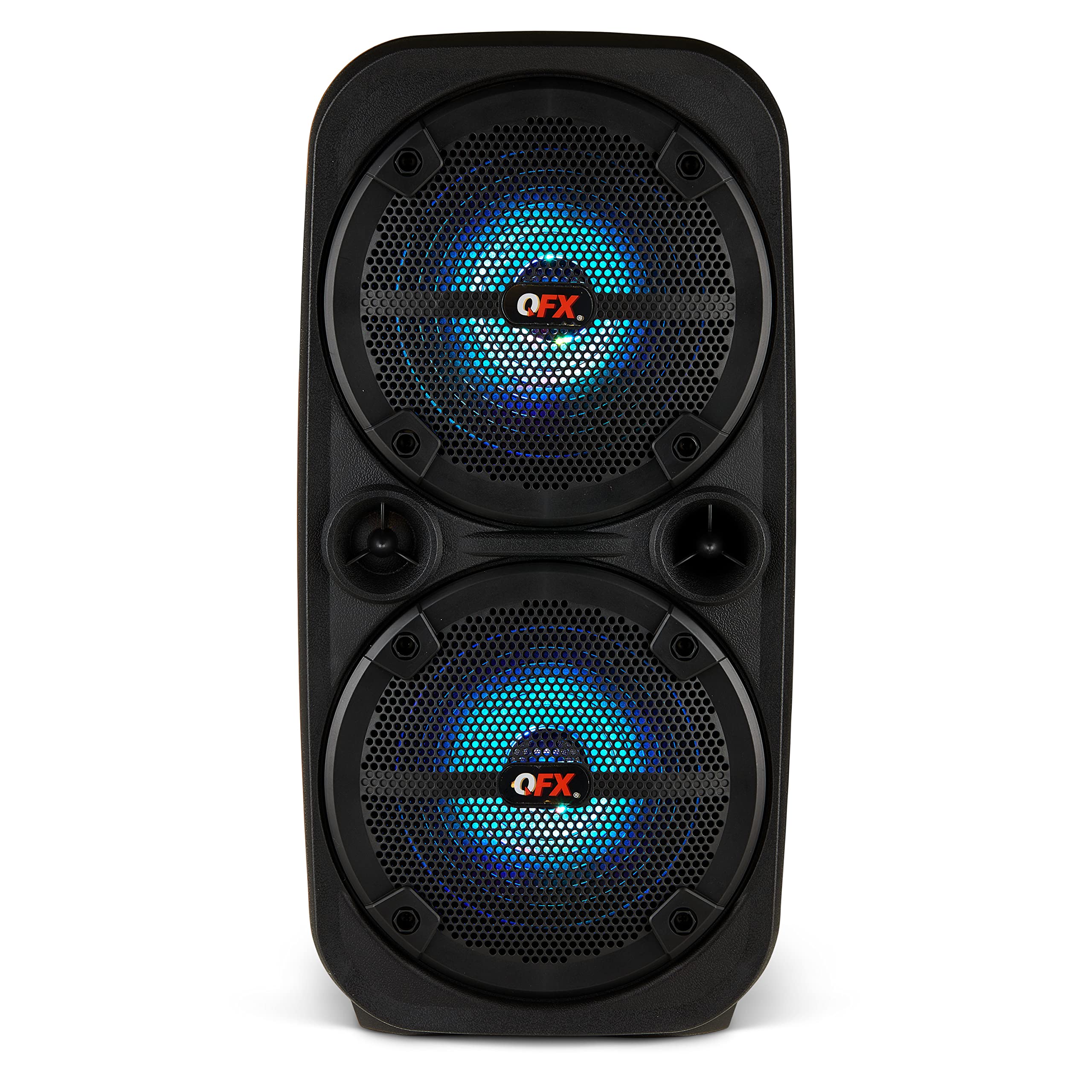
이미지 1.1: 앞면 view of the QFX PBX-8080 Portable Bluetooth Speaker. This image displays the speaker's robust design, featuring two 8-inch woofers, a central control panel, and illuminated LED party lights, indicating its readiness for use.
2. 안전 지침
- 지침을 읽어보세요: 제품을 사용하기 전에 모든 안전 및 작동 지침을 읽으십시오.
- 지시사항을 보관하세요: 나중에 참조할 수 있도록 안전 및 작동 지침을 보관하십시오.
- 경고를 주의하세요: 제품 및 작동 지침에 있는 모든 경고를 준수하십시오.
- 지시사항을 따르세요: 모든 작동 및 사용 지침을 따르세요.
- 물과 습기: 이 기기를 물 근처에서 사용하지 마십시오.
- 청소: 마른 천으로만 닦으십시오.
- 통풍: 환기구를 막지 마십시오. 제조업체의 지침에 따라 설치하십시오.
- 열: 라디에이터, 난방 조절기, 스토브 또는 기타 장치(다음을 포함)와 같은 열원 근처에 설치하지 마십시오. amp열을 생성하는 발전기.
- 전원 코드 보호 : 전원 코드가 밟히거나 끼지 않도록 보호하세요. 특히 플러그, 편의용 콘센트 및 기기에서 나오는 부분은 보호하세요.
- 첨부 파일: 제조사가 지정한 부속품/액세서리만 사용하세요.
- 번개: 번개 폭풍 시 또는 장기간 사용하지 않을 때는 기기의 플러그를 뽑아두세요.
- 서비스: 모든 서비스는 자격을 갖춘 서비스 담당자에게 의뢰하십시오. 전원 코드나 플러그가 손상되었거나, 액체가 쏟아졌거나, 물체가 기기에 떨어졌거나, 기기가 비나 습기에 노출되었거나, 정상적으로 작동하지 않거나, 떨어졌을 때와 같이 기기가 어떤 식으로든 손상된 경우 서비스가 필요합니다.
3. 패키지 내용
다음 항목에 대한 상자를 체크해 주세요.
- QFX PBX-8080 Portable Bluetooth Speaker
- USB 충전 케이블
- 사용 설명서(본 문서)
4. 제품 오버view
The QFX PBX-8080 is a versatile portable speaker designed for powerful audio output and various connectivity options. It features dual 8-inch woofers, LED party lights, and multiple input methods.
주요 구성 요소:
- 듀얼 8인치 우퍼: For powerful bass and clear audio.
- 제어판: Located on the top or front, featuring buttons for power, mode selection, volume, playback control, and LED light control.
- LED 파티 조명: Integrated lights that synchronize with music or can be set to various patterns.
- 입력 포트 : USB, Aux-in (3.5mm), Microphone input.
- 충전 포트: USB 충전 케이블을 연결합니다.
- 핸들: 간편한 휴대를 위해.
5. 설정
5.1 스피커 충전
- 스피커에서 충전 포트를 찾으세요.
- 제공된 USB 충전 케이블을 스피커의 충전 포트에 연결하십시오.
- USB 케이블의 다른 쪽 끝을 호환되는 USB 전원 어댑터(포함되지 않음) 또는 전원이 공급되는 USB 포트에 연결합니다.
- 충전 표시등(있는 경우)은 충전 중에 켜지며, 일반적으로 빨간색입니다.
- Once fully charged, the indicator light may change color (e.g., turn off or turn green). A full charge typically takes several hours.
- The speaker supports "Charge & Play," allowing you to use it while it is charging.
5.2 전원 켜기/끄기
- To power on the speaker, press and hold the Power button (usually marked with ⏻ or "POWER") for a few seconds until you hear an audible prompt or see the display/LEDs light up.
- 전원을 끄려면 스피커가 꺼질 때까지 전원 버튼을 다시 길게 누르세요.
6. 사용 설명서
6.1 블루투스 페어링
- Ensure the speaker is powered on and in Bluetooth mode. If not, press the "MODE" button until "Bluetooth" or "BT" is displayed/announced. The Bluetooth indicator will typically flash, indicating it's in pairing mode.
- 모바일 기기(스마트폰, 태블릿 등)에서 Bluetooth를 활성화하고 사용 가능한 기기를 검색하세요.
- Select "QFX PBX-8080" from the list of found devices.
- 페어링이 완료되면 스피커에서 확인음이 울리고 Bluetooth 표시등이 깜박임을 멈추고 계속 켜져 있습니다.
- 이제 스피커를 통해 기기의 오디오를 재생할 수 있습니다.
6.2 True Wireless Stereo(TWS) 기능
The TWS function allows you to connect two PBX-8080 speakers wirelessly for a stereo sound experience.
- Ensure both PBX-8080 speakers are powered on and in Bluetooth mode, but ~ 아니다 어떤 기기에도 연결 가능합니다.
- On one of the speakers, press and hold the "TWS" button (or a similar button, refer to speaker markings) for a few seconds.
- The speakers will attempt to connect to each other. Once connected, you will hear a confirmation tone.
- Now, connect your mobile device to one of the paired PBX-8080 speakers via Bluetooth (as described in section 6.1). Both speakers will play audio in stereo.
6.3 LED 파티 조명
The PBX-8080 features dynamic LED party lights. Use the "LIGHT" button (or similar) on the control panel to cycle through different light modes or to turn the lights off.
6.4 마이크 입력
- Connect a wired microphone (not included) to the "MIC IN" jack on the speaker.
- Adjust the microphone volume using the dedicated "MIC VOL" knob or buttons on the control panel.
- You can use the microphone while playing music from other sources.
6.5 보조 입력
- Connect an external audio device (e.g., MP3 player, laptop) to the "AUX IN" jack using a 3.5mm audio cable (not included).
- Press the "MODE" button on the speaker until "AUX" mode is selected.
- Control playback and volume from your connected device or the speaker's main volume control.
6.6 USB 입력
- MP3 오디오 파일이 들어 있는 USB 플래시 드라이브를 삽입하세요. files) into the "USB" port.
- The speaker will automatically switch to USB mode and begin playing music from the drive. If not, press the "MODE" button to select "USB" mode.
- 스피커의 재생 제어 버튼(재생/일시정지, 다음/이전 트랙)을 사용하여 음악을 관리하세요.
6.7 FM 라디오
- Press the "MODE" button until "FM" radio mode is selected.
- Press the "PLAY/PAUSE" button (or a dedicated scan button) to automatically scan and save available FM radio stations.
- Use the "NEXT/PREVIOUS" buttons to navigate between saved stations.
- 수신 상태를 개선하려면 스피커를 개방된 장소에 두십시오.
7. 유지관리
- 청소: 부드럽고 마른 천을 사용하여 스피커 외부를 닦으세요. 연마성 세제, 왁스 또는 용제를 사용하지 마세요.
- 저장: 장시간 사용하지 않을 경우, 스피커를 직사광선과 극한의 온도를 피해 시원하고 건조한 곳에 보관하세요.
- 배터리 관리 : 배터리 수명을 연장하려면 배터리를 자주 완전히 방전하지 마세요. 스피커를 사용하지 않더라도 정기적으로 충전하여 배터리 성능을 유지하세요.
- 물을 피하세요: 이 스피커는 방수 기능이 없습니다. 손상을 방지하기 위해 물과 습기로부터 멀리하십시오.
8. 문제 해결
| 문제 | 가능한 해결책 |
|---|---|
| 스피커의 전원이 켜지지 않습니다. |
|
| 스피커에서 소리가 나지 않습니다. |
|
| 블루투스 페어링에 실패했습니다. |
|
| FM 라디오 수신 상태가 좋지 않습니다. |
|
9. 사양
| 특징 | 세부 사항 |
|---|---|
| 모델명 | PBX-8080 |
| 상표 | QFX |
| 스피커 유형 | Woofer (2 x 8-inch) |
| 연결 기술 | 블루투스 |
| 특별 기능 | Bluetooth, True Wireless Stereo (TWS), LED Party Lights, Microphone Input, Aux Input, USB Input, FM Radio, Rechargeable, Handles |
| 오디오 출력 모드 | 스테레오 재생 |
| 전원 | Corded Electric (for charging), Rechargeable Battery |
| 품목 무게 | 5.73파운드(2.6kg) |
| 장치 치수(WxDxH) | 9.65 x 7.36 x 19.69인치(대략) |
| 한국어: | 606540039670 |
10. 보증 및 지원
QFX products are designed and manufactured to the highest quality standards. For specific warranty information, please refer to the warranty card included with your purchase or visit the official QFX website. If you encounter any issues or require technical assistance, please contact QFX customer support.
QFX 고객 지원:
- 최신 지원 정보는 다음을 방문하세요. QFX Store on Amazon or the official QFX web대지.