
1. 서론
구매해주셔서 감사합니다asing the Trevi CMP 588 DAB Portable Stereo System. This manual provides essential information for the safe and correct operation of your device. Please read it thoroughly before use and retain it for future reference.
The Trevi CMP 588 DAB is a versatile portable stereo system featuring DAB/DAB+ and FM radio with RDS, a CD/MP3 player, USB input, AUX-in, Bluetooth connectivity, and a headphone jack, all designed for an enhanced audio experience.
2. 안전 정보
- 전원: 지정된 전원 어댑터나 배터리만 사용하세요. 볼륨을 확인하세요.tage는 해당 장치의 요구 사항을 충족합니다.
- 물과 습기: Do not expose the unit to rain, moisture, or immerse it in water. Avoid placing objects filled with liquids, such as vases, on the unit.
- 통풍: 충분한 환기를 유지하세요. 환기구를 막지 마세요.
- 열: 라디에이터, 난방 장치, 스토브 또는 기타 장치(예: 열원)에서 장치를 멀리 두십시오. amp열을 생성하는 발전기.
- 청소: 청소하기 전에 벽면 콘센트에서 제품의 플러그를 뽑으세요. 부드럽고 마른 천을 사용하세요. 액체 세제나 에어로졸 세제는 사용하지 마세요.
- 서비스: 이 제품을 직접 수리하려고 하지 마십시오. 모든 서비스는 자격을 갖춘 서비스 담당자에게 문의하십시오.
- CD 플레이어: 레이저 빔을 직접 쳐다보지 마십시오.
3. 패키지 내용
모든 품목이 존재하고 양호한 상태인지 확인하세요.
- Trevi CMP 588 DAB Portable Stereo System
- AC 전원 케이블
- 원격 제어
- 사용 설명서 (본 문서)
4. 제품 특징
- DAB/DAB+ and FM Radio with RDS
- High Readability Dot Matrix Display
- CD Player (supports CD-DA, MP3)
- USB Input for MP3 Playback
- AUX-in for external audio devices
- 블루투스 연결
- 헤드폰 잭
- 손잡이가 있는 휴대용 디자인
- 리모컨 포함
5. 제어 및 연결

그림 1: 전면 view of the Trevi CMP 588 DAB, showing speakers, display, and main controls.
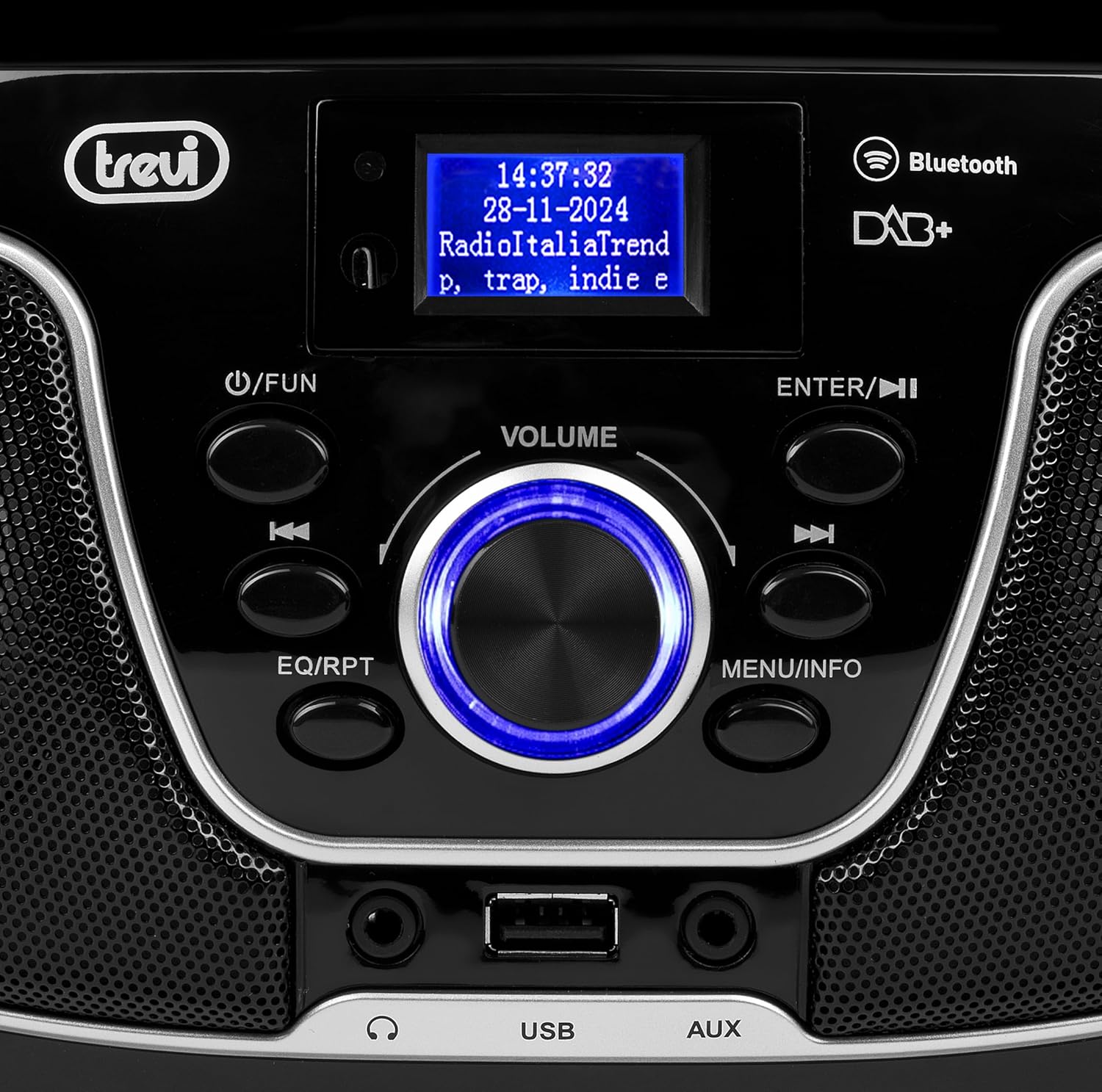
그림 2: 상세 view of the control panel, including power, function, volume knob, and navigation buttons.
전면 패널 컨트롤:
- POWER / FUN button: Press to turn on/off, press to switch functions (CD/USB/DAB/FM/Bluetooth/AUX).
- VOLUME 노브 : Rotate to adjust volume. Press to confirm selections.
- ENTER / ►►I button: Confirm selection / Skip to next track/station.
- I▼▼ / EQ/RPT button: Skip to previous track/station / Equalizer settings / Repeat mode.
- MENU / INFO button: Access menu / Display information.
- USB 포트: Connect USB storage devices for MP3 playback.
- AUX-in 잭: 외부 오디오 장치를 연결합니다.
- 헤드폰 잭: 개인 청취를 위해 헤드폰을 연결하십시오.

그림 3: 후면 view of the Trevi CMP 588 DAB, showing the power input and telescopic antenna.
후면 패널 연결:
- AC 전원 입력: 제공된 AC 전원 케이블을 연결합니다.
- 텔레스코픽 안테나: 최적의 라디오 수신을 위해 연장하십시오.

Figure 4: Remote control for the Trevi CMP 588 DAB, showing various function buttons.
원격 제어 기능:
- 대기 : 전원 켜기 / 끄기.
- 기능: Switch between modes (CD, USB, DAB, FM, Bluetooth, AUX).
- 음소거: 오디오를 음소거/음소거 해제합니다.
- RPT: 반복 재생 모드.
- 주사: Auto scan for radio stations.
- F+/CH+, F-/CH-: Navigate folders/channels.
- EQ : 이퀄라이저 설정.
- PLAY/PAUSE (►II): 재생/일시정지.
- PREV/TUN- (▼▼): Previous track/tune down.
- NEXT/TUN+ (►►): Next track/tune up.
- 정지 (■): 재생을 중지합니다.
- 메뉴: 메뉴에 접속하세요.
- 정보: 정보를 표시합니다.
- 음식물: Program tracks/stations.
- 볼륨+ / 볼륨-: 볼륨을 조절하세요.
6. 설정
6.1 전원 연결
- AC 전원: Connect the supplied AC power cable to the AC power input on the rear of the unit, then plug the other end into a wall outlet.
- Battery Operation (Optional): For portable use, insert 6 x C-size batteries (not included) into the battery compartment on the bottom of the unit. Ensure correct polarity.
6.2 초기 전원 켜기
를 누르세요 POWER / FUN 장치의 버튼 또는 대기 button on the remote control to turn on the system. The display will light up.
6.3 Setting Up the Antenna
For optimal radio reception, fully extend the telescopic antenna located at the rear of the unit. Adjust its position for the best signal.
7. 사용 설명서
7.1 DAB/DAB+ 라디오 작동
- 를 누르세요 POWER / FUN button repeatedly until "DAB" mode is selected.
- The unit will automatically scan for available DAB/DAB+ stations on first use. To perform a manual scan, press the 메뉴 button, navigate to "Full Scan" and press 입력하다.
- 스캔이 완료되면 다음을 사용하십시오. ▼▼ or ►► buttons to browse through the available stations. Press 입력하다 방송국을 선택합니다.
- 를 누르세요 정보 button to cycle through different information displays (e.g., program type, signal strength, time).
7.2 FM 라디오 작동
- 를 누르세요 POWER / FUN button repeatedly until "FM" mode is selected.
- To auto-scan and store stations, press the 주사 button on the remote. The unit will scan and save strong signals.
- 수동으로 튜닝하려면 버튼을 길게 누르세요. ▼▼ or ►► buttons to search for the next available station. Press briefly to fine-tune the frequency.
- The RDS function will display station information (if available).
7.3 CD/MP3 재생

그림 5: 상단 view of the Trevi CMP 588 DAB with the CD compartment open, ready for disc insertion.
- CD 수납공간 커버를 엽니다.
- Place a CD (CD-DA or MP3 CD) onto the spindle with the label side facing up.
- CD 수납 공간 커버를 닫습니다.
- 를 누르세요 POWER / FUN button repeatedly until "CD" mode is selected.
- The unit will read the disc. Press 재생/일시정지 (►II) 재생을 시작하세요.
- 사용 ▼▼ or ►► to skip tracks. Press and hold to fast forward/rewind.
- 누르다 정지 (■) 재생을 중지합니다.
7.4 USB 재생
- MP3가 포함된 USB 플래시 드라이브 삽입 fileUSB 포트에 s.
- 를 누르세요 POWER / FUN "USB" 모드가 선택될 때까지 버튼을 반복해서 누릅니다.
- 이 장치는 MP3를 자동으로 감지하고 재생을 시작합니다. files.
- 사용 ▼▼ or ►► 트랙을 건너뛰다.
7.5 블루투스 페어링 및 재생
- 를 누르세요 POWER / FUN button repeatedly until "Bluetooth" mode is selected. The display will show "BT" or "PAIRING".
- 모바일 기기(스마트폰, 태블릿 등)에서 Bluetooth를 활성화하세요.
- 검색 available devices and select "TREVI CMP 588 DAB" from the list.
- 페어링이 완료되면 기기의 오디오를 스테레오 시스템을 통해 재생할 수 있습니다.
- Use the controls on your mobile device or the stereo system to manage playback.
7.6 AUX 입력 작동
- Connect an external audio device (e.g., MP3 player, smartphone) to the AUX-in jack using a 3.5mm audio cable (not included).
- 를 누르세요 POWER / FUN "AUX" 모드가 선택될 때까지 버튼을 반복해서 누릅니다.
- Play audio from your connected device. The volume can be controlled via both the stereo system and the external device.
8. 유지관리
8.1 장치 청소
부드럽고 마른 천으로 제품 외부를 닦으십시오. 연마성 세제, 왁스 또는 용제는 마감재를 손상시킬 수 있으므로 사용하지 마십시오. 청소하기 전에 제품의 전원을 반드시 뽑으십시오.
8.2 CD 렌즈 관리
If the CD player experiences reading errors, the lens may be dirty. Use a commercially available CD lens cleaner to clean the lens. Do not touch the lens with your fingers.
8.3 보관
If the unit will not be used for an extended period, remove the batteries (if applicable) and unplug the power cable. Store the unit in a cool, dry place away from direct sunlight and extreme temperatures.
9. 문제 해결
| 문제 | 가능한 원인 | 해결책 |
|---|---|---|
| 전원이 없습니다 | 전원 케이블이 연결되지 않았습니다. 배터리가 소모되었거나 잘못 삽입되었습니다. | 전원 케이블 연결 상태를 확인하십시오. 배터리를 교체하거나 극성이 올바른지 확인하십시오. |
| 소리가 나지 않습니다 | 볼륨이 너무 낮음; 음소거 기능이 활성화됨; 잘못된 소스가 선택됨. | Increase volume; Deactivate mute; Select correct function (CD, USB, DAB, FM, BT, AUX). |
| 라디오 수신 불량 | 안테나가 펼쳐지지 않았거나 위치가 잘못되었습니다. 신호가 약한 지역입니다. | 텔레스코픽 안테나를 완전히 펼치고 조정하십시오. 기기를 다른 위치로 옮겨 보십시오. |
| CD/USB가 재생되지 않습니다 | 디스크가 더럽거나 긁혔습니다. 잘못된 정보입니다. file format on USB; USB drive not properly inserted. | Clean or replace disc; Ensure MP3 format for USB; Reinsert USB drive. |
| 블루투스 페어링이 실패했습니다 | Device too far; Bluetooth not enabled on source device; Unit not in pairing mode. | Move devices closer; Enable Bluetooth on source device; Ensure unit is in Bluetooth mode and searching. |
10. 사양
- 모델: CM 588 DAB
- 전원: AC 230V ~ 50Hz or 6 x C-size batteries (not included)
- 전력 소비량: 15 와트
- 스피커 유형: Stereo (2 speakers)
- 연결성: 블루투스, USB, AUX-in
- 지원되는 오디오 형식: CD audio (CD-DA), MP3
- 무선 주파수: DAB/DAB+, FM with RDS
- 치수(길이 x 너비 x 높이): 50 x 50 x 28cm (대략)
- 무게: 약 1.5킬로그램
- 색상: 검은색
11. 보증 및 지원
This product is covered by a standard manufacturer's warranty. Please refer to the warranty card included in your package for specific terms and conditions, including the warranty period and coverage details.
기술 지원, 서비스 또는 보증 청구는 판매점이나 공식 Trevi 고객 서비스에 문의하세요. 연락처 정보는 일반적으로 Trevi 웹사이트에서 확인하실 수 있습니다. web사이트 또는 제품 포장.
Please retain your proof of purchase (receipt) for any warranty-related inquiries.