1. 서론
This manual provides detailed instructions for the Efolen 4G Kids Smartwatch Model A21. Please read this guide carefully to ensure proper setup, operation, and maintenance of your device. This smartwatch is designed to offer communication, location tracking, and various educational and entertainment features for children, while providing peace of mind for parents.
2. 제품 오버view
The Efolen 4G Kids Smartwatch Model A21 is a feature-rich device equipped with 4G connectivity, GPS, Wi-Fi, and LBS positioning for accurate location tracking. It supports two-way video calls, voice chat, and an SOS emergency function. The watch features a 1.4-inch HD touch screen and is IP67 waterproof for daily use.

Image: The Efolen 4G Kids Smartwatch Model A21, showcasin디자인과 화면.
주요 특징:
- 4G 연결: For reliable communication and data transfer.
- GPS+WiFi+LBS Positioning: Provides accurate real-time location tracking.
- Video Call & Voice Chat: Two-way communication with approved contacts.
- SOS 기능: Emergency button to alert pre-set contacts.
- IP67 방수: Resistant to splashes and rain (not for swimming or showering).
- 1.4인치 HD 터치스크린: 선명하고 반응성이 뛰어난 디스플레이.
- 보수계: 일일 걸음 수를 추적합니다.
- 수업 모드: Disables certain functions during school hours.
- 알람 시계: 매일의 활동에 대한 알림을 설정하세요.
- Early Education & Fast Learning Games: Engaging activities for children.

이미지: 오버view of the smartwatch's various functions, including 4G, GPS, SOS, video call, waterproof rating, pedometer, alarm, camera, settings, Bluetooth, class mode, voice chat, and Wi-Fi.
3. 설정 지침
3.1 SIM 카드 설치
The Efolen 4G Kids Smartwatch requires a Nano SIM card for full functionality, including calls and data. Ensure the watch is powered off before inserting the SIM card.
- 전원 끄기 : Turn off the smartwatch completely.
- Locate SIM Slot: Identify the SIM card slot on the side of the watch. You may need to gently unscrew a cover.
- 나노 SIM 카드를 삽입하세요: Carefully insert the Nano SIM card into the slot with the chip facing upwards and the notched corner oriented correctly. Push until it clicks into place.
- 보안 커버: If applicable, replace and secure the SIM card slot cover.
- 전원 켜기: Turn on the smartwatch. The network signal should appear on the screen after a few moments.
Important: When requesting a SIM card from your operator, specify it is for a regular smartphone or tablet, not explicitly for a watch, as this 4G smartwatch functions like a phone. Ensure 4G data, call, and SMS services are activated on the SIM card.

Image: A visual guide demonstrating the correct method for inserting a Nano SIM card into the smartwatch, showing the watch's components and the SIM card orientation.
3.2 App Pairing (Setracker 2)
To manage the smartwatch and access its full features, download the 'Setracker 2' application on your smartphone (available for Android and iOS).
- 앱 다운로드 : 검색 'Setracker 2' in your smartphone's app store and install it.
- 계정 등록: 앱을 열고 새 계정을 등록하세요.
- 바인딩 장치: Scan the QR code located on the back of the watch or in its settings menu to bind the smartwatch to your account. Follow the on-screen prompts to complete the pairing process.
- Set Contacts: Add emergency contacts, family numbers, and whitelist numbers through the app.
4. 사용 설명서
4.1 전화 걸기 및 받기
The smartwatch supports two-way voice and video calls with contacts saved in the 'Setracker 2' app.
- 전화를 걸려면: Navigate to the 'Contacts' or 'Phone' app on the watch, select a contact, and tap the call icon.
- 전화를 받으려면: 전화가 걸려오면 시계 화면의 초록색 통화 아이콘을 누르세요.
- 영상 통화: Select the 'Video Call' option from the watch menu or within a contact's details to initiate a video call.

Image: Illustration of the two-way calling feature, showing a child on the smartwatch screen and a parent on a smartphone.

Image: A visual representation of the video call function between the smartwatch and a smartphone.
4.2 Voice Messaging
The smartwatch allows for short voice messages to be sent and received between the watch and the paired smartphone app.
- 음성 메시지를 보내려면: Go to the 'Messages' app on the watch, tap the microphone icon, hold to record your message, and release to send.
- To Listen to a Voice Message: Tap on a received message in the 'Messages' app.

Image: Depiction of the voice message function, showing a message being sent from the smartwatch to a smartphone.
4.3 GPS 추적
The smartwatch uses a combination of GPS, Wi-Fi, and LBS to provide accurate location tracking, which can be viewed through the 'Setracker 2' app.
- 실시간 위치: Open the 'Setracker 2' app on your smartphone to view the current location of the smartwatch on a map.
- Historical Tracking: The app also allows you to review the watch's location history.
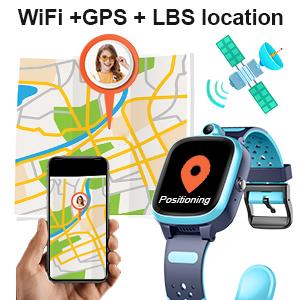
Image: An illustration showing the smartwatch's WiFi+GPS+LBS location tracking capability, with a child's location displayed on a map in the app.
4.4 SOS 기능
In an emergency, the child can press and hold the SOS button on the watch to initiate an emergency call sequence.
- SOS 활성화: Press and hold the SOS button (usually the power button) for 3 seconds.
- Emergency Dialing: The watch will automatically dial three pre-set emergency contacts in a cycle until one answers.
- SOS 경보: An SOS alert will also be sent to the 'Setracker 2' app on the parent's smartphone.

Image: A visual guide explaining the SOS function, showing a child activating the SOS button and an emergency call appearing on a smartphone.
4.5 Class Mode (Do Not Disturb)
Parents can set 'Class Mode' through the 'Setracker 2' app to prevent distractions during school hours.
- 일정 설정 : In the 'Setracker 2' app, navigate to the 'Class Mode' settings.
- Define Times: Set specific time periods during which the watch will enter 'Do Not Disturb' mode. During these times, only the SOS function will remain active.
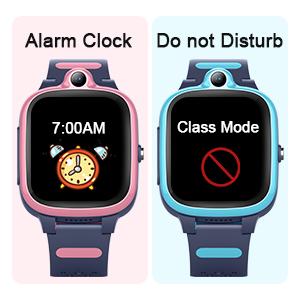
Image: Displays the smartwatch screen showing an alarm clock setting and the 'Class Mode' (Do Not Disturb) icon.
4.6 기타 기능
- 보수계: Access the pedometer app on the watch to view 일일 걸음 수.
- 알람 시계: Set multiple alarms via the 'Setracker 2' app to remind your child of various activities.
- 카메라 및 사진 앨범: The watch has a built-in camera for taking photos, which are saved in the photo album.
- Fast Learning Game: Engage with pre-installed educational games.
5. 유지관리
5.1 방수(IP67)
The Efolen 4G Kids Smartwatch is rated IP67 waterproof, meaning it is resistant to splashes, rain, and brief immersion in shallow water. It is suitable for washing hands or wearing in rainy conditions.
Caution: Do not immerse the watch in water for extended periods, wear it while swimming, or expose it to hot water or steam (e.g., during a shower), as this can damage the device.

Image: The smartwatch being splashed with water, illustrating its IP67 waterproof rating. A note advises against showering with the watch due to hot water and steam.
5.2 청소 및 관리
- 청소: 부드럽고 마른 천으로 시계를 정기적으로 닦으세요. 잘 지워지지 않는 오염의 경우, 가볍게amp 천을 사용하여 습기가 포트로 들어가지 않도록 할 수 있습니다.
- 화학 물질을 피하세요: 독한 화학 물질, 세척 용제 또는 강력한 세제를 사용하지 마십시오. 이러한 물질은 시계의 마감재나 내부 부품을 손상시킬 수 있습니다.
- 충전 중: Use the provided charging cable. Ensure the charging contacts are clean and dry before connecting.
6. 문제 해결
If you encounter issues with your Efolen 4G Kids Smartwatch, refer to the following common solutions:
| 문제 | 가능한 해결책 |
|---|---|
| Watch not connecting to network. | Ensure the Nano SIM card is correctly inserted and activated with 4G data, call, and SMS services. Restart the watch. Check network coverage in your area. |
| GPS 위치 정보가 정확하지 않습니다. | 시계에 명확한 것이 있는지 확인하십시오. view of the sky for GPS signals. Location accuracy can be affected by buildings, dense foliage, or indoor environments. Wi-Fi and LBS provide supplementary positioning. |
| 전화를 걸거나 받을 수 없습니다. | Verify the SIM card has active call services and sufficient balance. Check if the numbers are correctly saved in the app's whitelist. Ensure the watch is not in 'Class Mode'. |
| 배터리가 빨리 소모됩니다. | Frequent GPS updates, video calls, and high screen brightness can consume more power. Adjust settings in the app to optimize battery life. Ensure the watch is fully charged. |
| App cannot bind the watch. | Ensure the watch is powered on and has network connectivity. Double-check the QR code or manual input for the correct ID. Try restarting both the watch and the smartphone app. |
7. 사양
| 특징 | 세부 사항 |
|---|---|
| 상표 | 에폴렌 |
| 모델 번호 | A21 |
| 운영 체제 | Android, iOS (compatible) |
| 화면 크기 | 1.4 인치 |
| 연결성 | 4G Cellular, GPS, Wi-Fi |
| 특별 기능 | Phone Call, Video Call, GPS Tracking, SOS, IP67 Waterproof |
| 배터리 | 1 리튬 폴리머 배터리(포함) |
| 방수성 | IP67 (Splash and rain resistant) |
| 대상 청중 | Boys, Girls (Children) |
8. 보증 및 지원
Information regarding specific warranty details for the Efolen 4G Kids Smartwatch Model A21 is not available in the provided product data. For warranty claims, technical support, or further assistance, please refer to the product packaging or contact the retailer or manufacturer directly.