
Hoco ES32 Plus
Hoco ES32 Plus Series TWS Wireless Bluetooth Headset User Manual
Model: ES32 Plus | Brand: Hoco
소개
Thank you for choosing the Hoco ES32 Plus Series TWS Wireless Bluetooth Headset. This manual provides detailed instructions on how to set up, operate, and maintain your new headset. Please read this manual carefully before use to ensure optimal performance and longevity of your device.
패키지 내용
- Hoco ES32 Plus TWS Wireless Bluetooth Headset (Left and Right Earbuds)
- 충전 케이스
- 충전 케이블
- 실리콘 케이스
- 훅
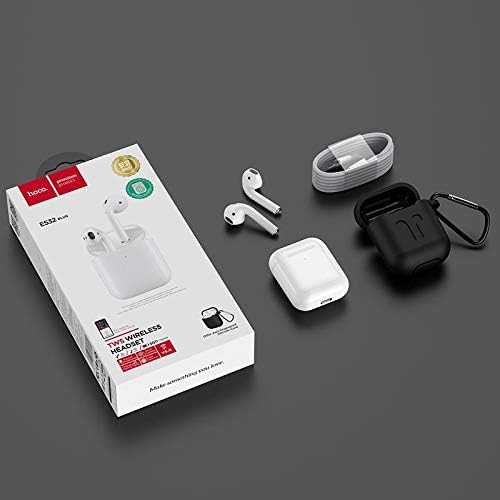
Image: Contents of the Hoco ES32 Plus package, including the earbuds, charging case, charging cable, silicone case, and hook.
제품 끝view 및 기능
The Hoco ES32 Plus headset is designed for a seamless wireless audio experience. Key features include:
- 블루투스 V5.0: 안정적이고 효율적인 무선 연결을 보장합니다.
- Airoha AB1536U Chip: Provides reliable performance.
- 배터리 용량: 350mAh for the charging case, 30mAh for each earbud.
- 긴 배터리 수명: Approximately 3 hours of talk/music time, 200 hours standby time.
- 컴팩트한 디자인: Earbuds and case are lightweight and portable.
- Pop-Up Window Support: For Apple mobile phones, enabling quick pairing and battery display.
- 마스터-슬레이브 전환: Allows independent use of either earbud.
- 인이어 감지: Automatically pauses/plays audio when earbuds are removed/inserted.
- 무선 충전 지원: 케이블 없이 편리하게 충전하세요.
- 터치 조작: 직관적인 음악 및 통화 제어 기능.

이미지: 자세한 view of the Hoco ES32 Plus wireless earbuds, highlighting their design.
설치 가이드
1. 초기 충전
Before first use, fully charge the charging case and earbuds. Place the earbuds into the charging case. Connect the charging cable to the case and a USB power source, or place the case on a compatible wireless charger.

Image: The Hoco ES32 Plus charging case being charged wirelessly on a charging pad.
2. 기기와 페어링
- 이어버드가 충전 케이스에 들어 있고 케이스가 충분히 충전되어 있는지 확인하세요.
- 충전 케이스 뚜껑을 여세요. 이어버드가 자동으로 페어링 모드로 진입합니다.
- On your mobile device (e.g., iPhone, Samsung, Huawei, Oppo), go to Bluetooth settings and turn Bluetooth on.
- 검색 available devices. You should see "HOCO ES32 Plus" or similar in the list.
- Select "HOCO ES32 Plus" to connect. For Apple devices, a pop-up window may appear for quick pairing.
- 연결되면 이어버드를 사용할 수 있습니다.

Image: Visual guide demonstrating the pairing process for the Hoco ES32 Plus headset with an iPhone, including the pop-up window for connection and battery status.
작동 지침
터치 컨트롤
The Hoco ES32 Plus earbuds feature intuitive touch controls on the outer surface of each earbud.
- 재생/일시 중지: 양쪽 이어버드를 한 번 탭하세요.
- 다음 트랙: 오른쪽 이어버드를 두 번 탭하세요.
- 이전 트랙 : 왼쪽 이어버드를 두 번 탭하세요.
- 전화 받기/종료: 전화가 오는 동안 양쪽 이어버드를 한 번 탭하세요.
- 전화 거부: 전화가 오는 동안 한쪽 이어버드를 2초간 길게 누르세요.
- 음성 지원(Siri/Google Assistant) 활성화: 양쪽 이어버드를 세 번 탭하세요.
인이어 감지
The earbuds are equipped with in-ear detection. Music will automatically pause when you remove an earbud and resume when you put it back in.
유지
- 청소: 부드럽고 마른 보풀 없는 천을 사용하여 이어버드와 충전 케이스를 닦으세요. 강한 화학 물질이나 연마재를 사용하지 마세요.
- 저장: 사용하지 않을 때는 이어버드를 충전 케이스에 보관하여 보호하고 충전 상태를 유지하세요.
- 배터리 관리 : 배터리 수명을 연장하려면 배터리를 자주 완전히 방전하지 마십시오. 계속 사용하지 않더라도 정기적으로 충전하십시오.
- 방수 기능: 이어버드는 방수가 되지 않습니다. 물, 땀 또는 높은 습도에 노출되지 않도록 주의하세요.
문제 해결
| 문제 | 가능한 해결책 |
|---|---|
| 이어버드가 페어링/연결되지 않음 |
|
| 하나의 이어 버드에서 소리가 나지 않음 |
|
| 충전 케이스가 충전되지 않음 |
|
| 음질이 좋지 않음 |
|
명세서
| 특징 | 세부 사항 |
|---|---|
| 블루투스 버전 | V5.0 |
| 칩셋 | Airoha AB1536U |
| 충전 케이스 배터리 용량 | 350mAh |
| Earbud Battery Capacity (Single) | 30mAh |
| 토크/음악 시간 | 약 3시간 |
| 대기 시간 | 200시간 |
| 치수 (케이스) | 53.8 x 44.3 x 21.4mm |
| 무게(합계) | 47g |
| 연결성 | 무선 전화 |
| 색상 | 하얀색 |
| 모델 번호 | ES32 Plus |
| 호환 장치 | 모바일 폰 |
| 특별 기능 | Dual ear, Pop-up window support (Apple), Master-slave switching, In-ear detection, Wireless charging support |
보증 및 지원
For warranty information and technical support, please refer to the official Hoco website or contact your local retailer where the product was purchased. Keep your proof of purchase for any warranty claims.
추가 지원이 필요하면 다음을 방문하세요. Hoco brand page on Amazon.eg.
Ask a question about this manual
Ask about setup, troubleshooting, compatibility, parts, safety, or missing instructions. Manuals+ will review the question and use this page’s manual context to help answer it.