
1. 서론
구매해주셔서 감사합니다asing the QFX E-B3 Bluetooth Professional High-Power Speaker. This manual provides essential information for the safe and efficient operation of your speaker. Please read it thoroughly before use and retain it for future reference.
The QFX E-B3 is designed to deliver powerful audio with features including Bluetooth connectivity, FM radio, USB/SD card playback, LED party lights, and a 250W power amplifier. It also supports True Wireless System (TWS) for stereo pairing with another compatible speaker.
2. 안전 정보
- 전원: 스피커는 제품에 표시된 지정된 전원 공급 장치에만 연결하십시오.
- 통풍: 스피커 주변에 적절한 환기가 이루어지도록 하십시오. 환기구를 막지 마십시오.
- 물과 습기: This speaker is not waterproof. Do not expose it to rain, moisture, or any liquids to prevent electric shock or fire.
- 열: 스피커를 라디에이터, 난방기, 스토브 또는 기타 열을 발생시키는 기기와 같은 열원에서 멀리 두십시오.
- 청소: Unplug the speaker from the power outlet before cleaning. Use a dry cloth for cleaning. Do not use liquid cleaners or aerosol cleaners.
- 서비스: 이 제품을 직접 수리하려고 하지 마십시오. 모든 서비스는 자격을 갖춘 서비스 담당자에게 문의하십시오.
- 놓기: 스피커가 넘어지지 않도록 안정적이고 평평한 표면에 놓으십시오.
3. 패키지 내용
패키지에 모든 품목이 들어 있는지 확인하세요.
- QFX E-B3 High-Power Speaker
- 마이크로폰
- 원격 제어
- AC 전원 케이블
- 사용 설명서 (본 문서)
4. 제품 오버view
The QFX E-B3 speaker features dual 15-inch woofers and a 1-inch tweeter, protected by a metal grill. It includes integrated handles and wheels for portability.

그림 4.1: 전면 view of the QFX E-B3 Speaker.
Rear Panel Controls and Ports
The rear panel houses all input/output connections and control knobs.
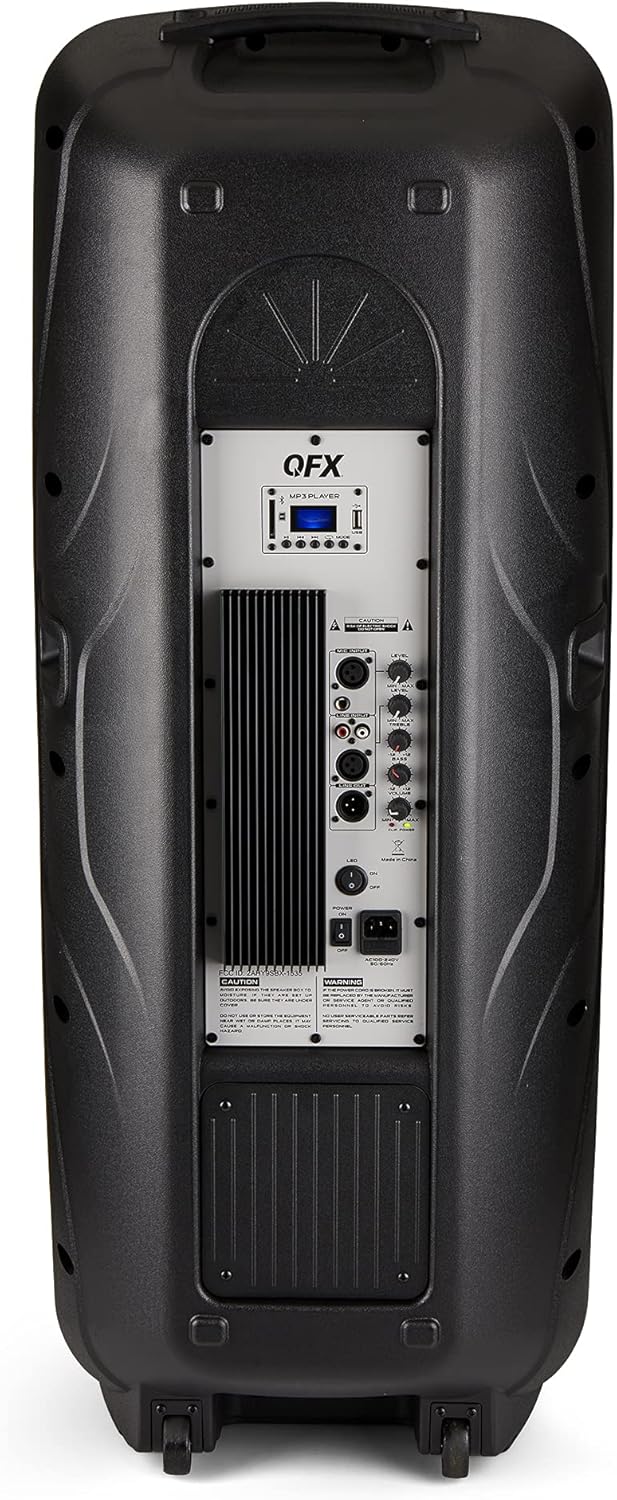
Figure 4.2: Rear panel with controls and ports.
- 전원 스위치: 스피커를 켜거나 끕니다.
- AC 입력: AC 전원 케이블을 연결합니다.
- USB/SD Card Ports: 오디오 재생을 위해 fileUSB 드라이브나 SD 카드에서.
- 디스플레이 화면: 현재 모드와 트랙 정보를 표시합니다.
- 모드 버튼: Switches between input modes (Bluetooth, FM, USB, SD, RCA).
- 재생/일시 정지 버튼: USB/SD/Bluetooth 재생을 제어합니다.
- 이전/다음 트랙 버튼: 음악 트랙이나 FM 방송국을 탐색합니다.
- 마스터 볼륨 노브: 전반적인 볼륨을 조절합니다.
- Bass/Treble Control Knobs: Adjusts low and high frequencies.
- XLR 마이크 입력: Connects a wired microphone.
- 마이크 볼륨/에코 조절 노브: Adjusts microphone volume and echo effect.
- RCA 입력(좌/우): Connects external audio devices via RCA cables.
- XLR Line Input/Output: For connecting to other audio equipment.
5. 설정
초기 배치
Place the speaker on a stable, flat surface. For optimal sound, position it in a central location within the listening area. The integrated wheels and handle allow for easy transport.

Figure 5.1: Speaker being moved with handle and wheels.
전원 연결
- 스피커의 전원 스위치가 꺼짐(OFF) 위치에 있는지 확인하십시오.
- Connect the AC power cable to the AC input on the rear panel of the speaker.
- AC 전원 케이블의 다른 쪽 끝을 일반 벽면 콘센트에 꽂으세요.
- Flip the power switch to the ON position. The display screen will illuminate.
6. 사용 설명서
블루투스 페어링
- Turn on the QFX E-B3 speaker.
- 를 누르세요 방법 button on the speaker or remote control until "BLUE" appears on the display screen, indicating Bluetooth mode.
- 모바일 기기(스마트폰, 태블릿 등)에서 Bluetooth를 활성화하세요.
- 검색 available Bluetooth devices and select "QFX E-B3" from the list.
- Once paired, the speaker will emit a confirmation sound. You can now play audio from your device through the speaker.
진정한 무선 시스템(TWS) 페어링
TWS allows two QFX E-B3 speakers to connect wirelessly for a stereo sound experience. This feature works only in Bluetooth mode.
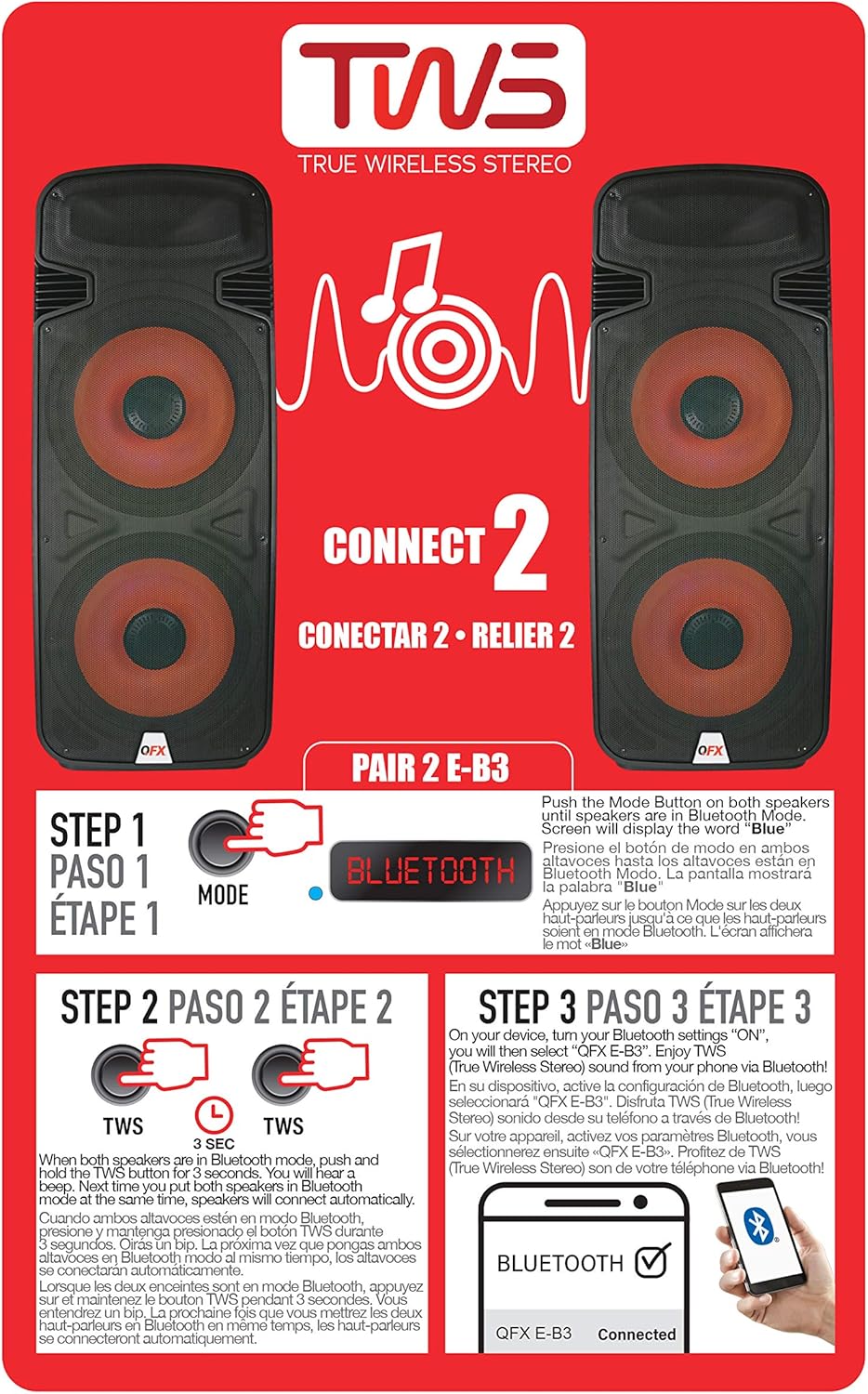
Figure 6.1: TWS Pairing Instructions.
- Ensure both QFX E-B3 speakers are powered on and in Bluetooth mode. The display on both speakers should show "BLUE".
- 스피커 중 하나(기본 스피커)에서 버튼을 길게 누르세요. 트위스 button for approximately 3 seconds. The speakers will attempt to connect to each other.
- Once successfully paired, you will hear a confirmation sound, and the display on the primary speaker will show "BLUE" while the secondary speaker will show "BLUE" as well.
- On your Bluetooth-enabled device, search for and select "QFX E-B3". The two speakers will now play audio in stereo.
FM 라디오 작동
- 를 누르세요 방법 button to switch to FM radio mode. The display will show the FM frequency.
- 를 누르고 계세요 재생/일시정지 button to initiate an automatic scan for FM stations. The speaker will save all found stations.
- 사용하세요 이전/다음 트랙 저장된 FM 방송국을 탐색하는 버튼입니다.
USB/SD 카드 재생
- Insert a USB flash drive or SD card (with compatible audio files) 후면 패널의 해당 포트에 연결하십시오.
- 스피커는 자동으로 USB/SD 모드로 전환되어 오디오 재생을 시작합니다. files. 그렇지 않은 경우 다음을 누릅니다. 방법 USB 모드 또는 SD 모드를 선택하는 버튼입니다.
- 사용하세요 재생/일시정지 그리고 이전/다음 트랙 재생을 제어하는 버튼.
마이크 입력
- Connect a microphone to the XLR Microphone Input on the rear panel.
- Adjust the Microphone Volume and Echo knobs to achieve the desired sound.
RCA 입력
- Connect an external audio source (e.g., CD player, mixer) to the RCA Input (L/R) ports using appropriate RCA cables.
- 를 누르세요 방법 button to select RCA input mode.
- Adjust the master volume on the speaker and the volume on your external audio source.
LED 파티 조명
The speaker features integrated LED party lights that activate automatically when the speaker is powered on. There are no specific controls for the LED lights mentioned; they are designed to enhance the audio experience.
7. 유지관리
청소
- Always unplug the speaker before cleaning.
- 부드럽고 마른 천을 사용하여 스피커의 외부 표면을 닦으세요.
- 연마성 세척제, 왁스 또는 용제는 마감재를 손상시킬 수 있으므로 사용하지 마십시오.
- 환기구에 먼지나 이물질이 들어가지 않도록 깨끗하게 유지하세요.
저장
When not in use for extended periods, store the speaker in a cool, dry place, away from direct sunlight and extreme temperatures. Cover the speaker to protect it from dust.
8. 문제 해결
If you encounter issues with your QFX E-B3 speaker, refer to the following common problems and solutions:
| 문제 | 가능한 원인 | 해결책 |
|---|---|---|
| 전원이 없습니다 | Power cable not connected; Power outlet not active; Speaker power switch off. | Ensure AC cable is securely connected to speaker and outlet. Check if outlet is working. Turn speaker power switch ON. |
| 소리가 나지 않습니다 | Volume too low; Incorrect input mode selected; Audio source not playing. | Increase master volume. Press MODE button to select correct input. Ensure audio source is playing and its volume is up. |
| 블루투스가 연결되지 않습니다 | Speaker not in Bluetooth mode; Device Bluetooth off; Speaker already paired to another device; Device too far. | Ensure speaker is in Bluetooth mode ("BLUE" on display). Turn on device Bluetooth. Disconnect from other devices. Move device closer to speaker (within 30 feet). |
| TWS 페어링 실패 | 스피커가 블루투스 모드가 아닙니다. TWS 버튼을 충분히 오래 누르지 않았습니다. | Ensure both speakers are in Bluetooth mode. Press and hold the TWS button on one speaker for 3 seconds. |
| USB/SD 재생이 작동하지 않습니다 | 잘못된 모드입니다. 호환되지 않습니다. file format; Corrupted USB/SD card. | Press MODE to select USB/SD. Ensure audio files are in a compatible format (e.g., MP3). Try a different USB/SD card. |
9. 사양
| 특징 | 사양 |
|---|---|
| 상표 | QFX |
| 모델 번호 | E-B3 |
| 스피커 최대 출력 전력 | 250 와트 |
| 연결 기술 | USB, 블루투스 |
| 오디오 출력 모드 | 스테레오 재생 |
| 장착 유형 | Plug Mount, Wheel Mount |
| 스피커 유형 | Woofer (Dual 15 Inches) |
| 컨트롤러 유형 | 원격 제어 |
| 색상 | Party LED |
| 방수 | 거짓 |
| 제어 방법 | 원격 |
| 우퍼 직경 | 15 인치 |
| 오디오 채널 수 | 2.0 |
| 무선 기술 | 블루투스 |
| 연결 프로토콜 | 블루투스 |
| 전원 | 코드식 전기 |
| 오디오 드라이버 유형 | 동적 드라이버 |
| 오디오 드라이버 크기 | 15 인치 |
| 품목 치수(D x W x H) | 16.77인치 깊이 x 13.98인치 너비 x 23.74인치 높이 |
| 품목 무게 | 13.2 파운드 |
| 호환 장치 | 노트북, MP3 플레이어, 스마트폰, 태블릿, 텔레비전 |
| 한국어: | 606540039618 |
10. 보증 정보
This product is covered by a limited warranty. For specific details regarding warranty coverage and terms, please refer to the warranty information provided at the point of purchase or contact QFX customer support directly. The warranty is typically per contract with the retailer.
11. 지원
For technical assistance, troubleshooting beyond this manual, or inquiries about your QFX E-B3 speaker, please contact QFX customer support or your retailer. Contact information can usually be found on the manufacturer's web사이트 또는 구매 영수증에서 확인하세요.