
1. 서론
The D-Link AC1750 WiFi Range Extender (DAP-1720) is designed to expand the coverage of your existing wireless network, providing a stronger and more reliable Wi-Fi signal throughout your home or office. This device supports dual-band connectivity (2.4 GHz and 5 GHz) with combined speeds up to 1750 Mbps, making it ideal for high-bandwidth activities like 4K streaming and online gaming across multiple devices. Its smart signal indicator assists in finding the optimal placement for maximum coverage.
2. 제품 오버view
The DAP-1720 features a compact, plug-in design with external antennas for enhanced signal strength. It includes a Gigabit Ethernet port for wired connections and a smart signal indicator for easy setup.
2.1 주요 특징
- Extends Wi-Fi coverage and eliminates dead spots with Dual Band connectivity.
- Supports both 2.4 GHz and 5 GHz bands for combined speeds up to 1750 Mbps.
- Smart Signal Indicator helps identify the best location for optimal Wi-Fi coverage.
- Features a 3x3 antenna configuration for improved data rates and reliability.
- Includes a 10/100/1000 Gigabit Ethernet Port for wired device connectivity.
2.2 장치 레이아웃

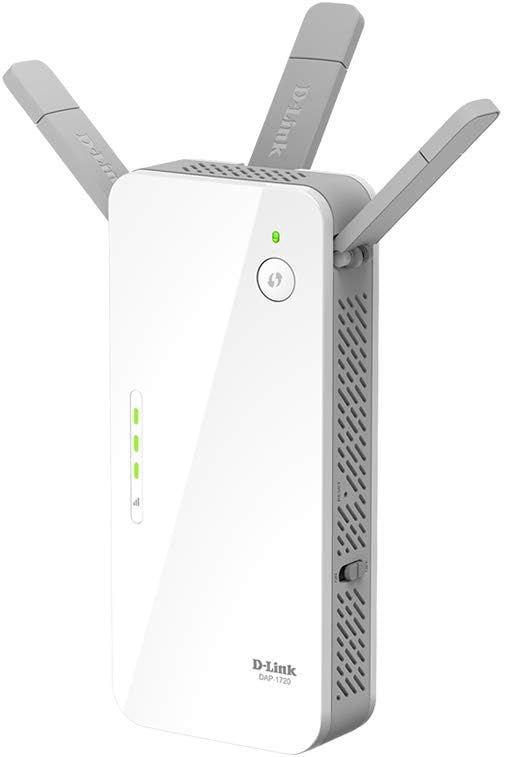
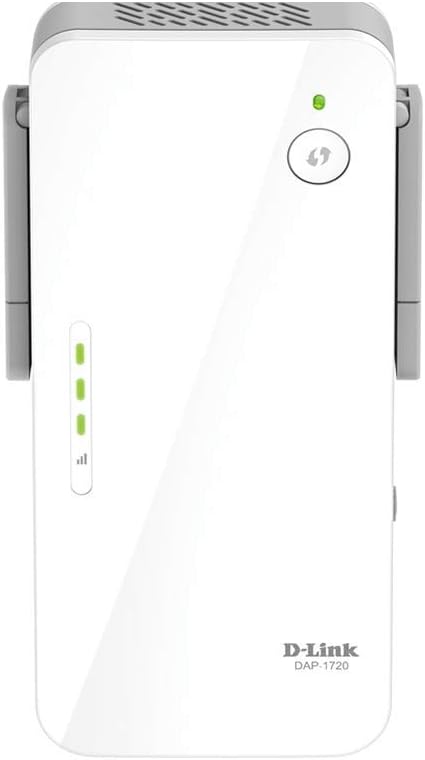

3. 설정 지침
There are two primary methods to set up your D-Link DAP-1720 Range Extender: using Wi-Fi Protected Setup (WPS) or manual configuration via a web 브라우저.
3.1 WPS Setup (Recommended)
- 전원 켜기: Plug the DAP-1720 into a power outlet near your existing wireless router. Wait for the power LED to turn solid green.
- 라우터에서 WPS 활성화: Press the WPS button on your wireless router. Refer to your router's manual for the exact location of this button.
- 익스텐더에서 WPS를 활성화하세요: Within two minutes, press the WPS button on the DAP-1720 (often indicated by a circular arrow icon).
- 모니터 상태: The signal indicator LEDs on the DAP-1720 will flash during the connection process. Once connected, the LEDs will turn solid green, indicating a successful connection.
- 최적의 배치: Unplug the DAP-1720 and move it to a location halfway between your router and the Wi-Fi dead zone. Plug it into a power outlet. The Smart Signal Indicator LEDs will help you find the best spot. Aim for at least two solid green bars for good signal strength.
Note: If the signal indicator shows red or only one bar, move the extender closer to your router.
3.2 수동 설정 (Web 브라우저)
- 전원 켜기: Plug the DAP-1720 into a power outlet near your existing wireless router.
- 익스텐더에 연결: On your computer or mobile device, connect to the D-Link extender's default Wi-Fi network (e.g., "dlink-XXXX"). The default Wi-Fi name and password are usually found on a label on the device or in the Quick Installation Guide (QIG).
- 액세스 설정 마법사: 열기 web 브라우저와 유형 http://dlinkap.local 또는 기본 IP 주소(예: 192.168.0.50) 주소 표시줄에 입력합니다.
- 화면의 지침을 따르세요: The setup wizard will guide you through selecting your existing Wi-Fi network(s) and configuring the extender's settings, including its new Wi-Fi name and password.
- 최적의 배치: After configuration, unplug the DAP-1720 and move it to a suitable location as described in step 5 of the WPS setup.
4. 레인지 익스텐더 작동 방법
4.1 장치 연결
- 무선 장치: Once the extender is set up, search for the new extended Wi-Fi network name (SSID) on your devices (e.g., "YourNetworkName_EXT" or "YourNetworkName_5G_EXT") and connect using the password you configured.
- 유선 장치: For devices like smart TVs, gaming consoles, or desktop computers that benefit from a stable wired connection, use an Ethernet cable to connect them to the Gigabit Ethernet port on the DAP-1720.
4.2 듀얼 밴드 기능
The DAP-1720 operates on both 2.4 GHz and 5 GHz frequency bands. The 2.4 GHz band offers wider coverage and better penetration through walls, while the 5 GHz band provides faster speeds over shorter distances with less interference. Your devices will automatically connect to the optimal band, or you can manually select the preferred band if separate SSIDs were configured during setup.
5. 유지관리
- 펌웨어 업데이트: Periodically check the D-Link support web펌웨어 업데이트 사이트입니다. 기기의 펌웨어를 최신 상태로 유지하면 최적의 성능, 보안 및 새로운 기능 이용이 보장됩니다.
- 청소: Ensure the device's ventilation slots are clear of dust to prevent overheating. Use a soft, dry cloth for cleaning. Do not use liquid cleaners.
- 장치 재설정: If you encounter persistent issues or wish to reconfigure the extender from scratch, you can perform a factory reset. Locate the reset button (usually a small pinhole) on the device, and while the device is powered on, press and hold it for about 10 seconds using a paperclip until the LEDs flash.
6. 문제 해결
6.1 No Internet Access After Connecting to Extender
- 라우터 연결 상태를 확인하세요: Ensure your main router is working correctly and has internet access.
- 익스텐더 배치: Verify the DAP-1720 is placed within range of your main router. The Smart Signal Indicator should show at least two green bars. Relocate if necessary.
- Re-run Setup: Try re-running the WPS or manual setup process to ensure the extender is properly connected to your main Wi-Fi network.
- IP 주소 충돌: If you manually configured the extender, ensure its IP address does not conflict with other devices on your network.
6.2 신호 불량 또는 느린 속도
- 확장기 재배치: Move the extender closer to your main router. The ideal location is halfway between the router and the area needing coverage.
- 간섭 최소화: Keep the extender away from large metal objects, concrete walls, and devices that emit radio frequency interference (e.g., microwaves, cordless phones).
- Check Router Performance: Ensure your main router is providing adequate signal strength and speed.
- 펌웨어 업데이트 : Ensure the extender's firmware is up-to-date.
6.3 접근할 수 없습니다 Web-Based Setup Page
- 연결 확인: Ensure your device is connected to the extender's Wi-Fi network (e.g., "dlink-XXXX") or directly via Ethernet.
- 정확한 주소: 제대로 입력하고 있는지 다시 한번 확인하세요. http://dlinkap.local or the correct IP address into your browser's address bar.
- 브라우저 캐시 지우기: 브라우저의 캐시와 쿠키를 지우거나 다른 브라우저를 사용해 보세요.
- Temporarily Disable Firewall/Antivirus: Your computer's security software might be blocking access.
- 공장 초기화 : If all else fails, perform a factory reset and attempt the manual setup again.
7. 사양
| 특징 | 세부 사항 |
|---|---|
| 모델 번호 | DAP-1720/RE |
| 무선 표준 | 802.11ac, 802.11n |
| 데이터 전송 속도 | 최대 1750Mbps(2.4GHz에서 450Mbps, 5GHz에서 1300Mbps) |
| 주파수 대역 클래스 | 듀얼 밴드 |
| 이더넷 포트 | 1 x 10/100/1000 Gigabit Ethernet Port |
| 안테나 구성 | 3x3 Internal Antennas |
| 제품 치수 | 6.5 x 2.5 x 1.5 인치 |
| 품목 무게 | 8 온스 |
| 포함된 구성 요소 | DAP-1720 device, Quick Installation Guide (QIG) |
8. 보증 및 지원
For detailed warranty information, technical support, and additional resources, please visit the official D-Link support web사이트에서 FAQ, 최신 드라이버, 고객 서비스 연락처 정보를 확인하실 수 있습니다.
D-링크 지원 Web대지: www.dlink.com/support