
1. 서론
This manual provides detailed instructions for the safe and efficient use of your Hoco HC3 Bounce Sports Wireless Speaker. Please read this manual thoroughly before operating the device and retain it for future reference. The Hoco HC3 is a versatile portable speaker supporting Bluetooth, FM radio, TF card, USB, AUX, and TWS modes.

Figure 1: Hoco HC3 Bounce Sports Wireless Speaker. This image displays the speaker in a vertical orientation, showcasing its black mesh grille, the 'hoco' logo at the bottom right, and a braided carrying strap attached to the top left side. The control buttons are visible on the side panel.
2. 패키지 내용
상자를 풀 때 모든 품목이 있는지 확인하세요.
- Hoco HC3 Bounce Sports Wireless Speaker
- USB 충전 케이블
- 사용 설명서 (본 문서)
- AUX Audio Cable (if included with your model)
3. 제품 오버view
3.1 스피커 구성 요소

Figure 2: Rear panel of the Hoco HC3 speaker. This image highlights the various input ports and control buttons located on the back of the speaker. Visible elements include the power switch, USB port, TF card slot, AUX input, and LED indicator.
스피커의 컨트롤과 포트에 대해 알아보세요.
- 전원 버튼: 길게 누르면 전원이 켜지거나 꺼집니다. 짧게 누르면 모드가 전환됩니다.
- 재생/일시 정지 버튼: 오디오를 재생하거나 일시 정지합니다. 전화를 받거나 끊습니다.
- 볼륨 높이기 / 다음 트랙 버튼: 짧게 누르면 다음 곡으로, 길게 누르면 볼륨이 커집니다.
- 볼륨 낮추기/이전 트랙 버튼: 짧게 누르면 이전 트랙, 길게 누르면 볼륨이 줄어듭니다.
- 모드 버튼(M): Short press to cycle through Bluetooth, FM, TF card, USB, and AUX modes.
- USB 포트: USB 드라이브 재생용입니다.
- TF 카드 슬롯 : TF(MicroSD) 카드 재생용.
- 보조 입력: 유선 오디오 연결용 3.5mm 잭.
- 충전 포트: 스피커 충전용 마이크로 USB 포트.
- LED 표시등: Displays charging status and operating mode.
3.2 주요 특징
- 블루투스 V5.0: 안정적이고 효율적인 무선 연결을 제공합니다.
- 다양한 재생 모드: Supports Bluetooth, FM radio, TF card, USB drive, and AUX input.
- 진정한 무선 스테레오(TWS): Allows two HC3 speakers to connect wirelessly for a stereo sound experience.
- 긴 배터리 수명: 2400mAh battery capacity offers up to 5 hours of music playback.
- 듀얼 스피커: Equipped with two 45mm speaker units, each with 5W power output.
- 소형 및 휴대성: Dimensions of 202*60*60mm and weight of 561g for easy transport.
4. 설정
4.1 스피커 충전
- 제공된 USB 충전 케이블을 스피커의 충전 포트에 연결하세요.
- USB 케이블의 다른 쪽 끝을 5V USB 전원 어댑터(별도 구매) 또는 컴퓨터의 USB 포트에 연결하십시오.
- The LED indicator will illuminate to show charging status. It typically takes about 3 hours for a full charge.
- Once fully charged, the LED indicator will change or turn off (refer to specific LED behavior in the troubleshooting section if unsure).
참고: 최적의 배터리 수명을 위해, 처음 사용하기 전에 스피커를 완전히 충전하세요.
4.2 전원 켜기/끄기
- 전원을 켜려면: Long press the Power button until you hear an audible prompt and the LED indicator lights up.
- 전원을 끄려면: Long press the Power button again until you hear an audible prompt and the LED indicator turns off.
5. 사용 설명서
5.1 블루투스 페어링
- Ensure the speaker is powered on and in Bluetooth mode (the LED indicator will typically flash blue, indicating it's ready for pairing). If not, short press the Mode (M) button to switch to Bluetooth mode.
- 모바일 기기(스마트폰, 태블릿, 컴퓨터)에서 Bluetooth를 활성화하세요.
- 검색 available Bluetooth devices. You should see "HC3" or "Hoco HC3" in the list.
- Select "HC3" to connect. Once paired, the speaker will emit an audible confirmation, and the LED indicator will stop flashing and remain solid blue.
- 이제 스피커를 통해 기기의 오디오를 재생할 수 있습니다.
참고: 스피커는 전원을 켤 때 마지막으로 페어링된 장치의 블루투스가 활성화되어 있고 범위 내에 있으면 자동으로 해당 장치에 다시 연결을 시도합니다.
5.2 FM 라디오 모드
- 스피커의 전원을 켭니다.
- Short press the Mode (M) button repeatedly until you enter FM radio mode.
- To auto-scan and save available FM stations, short press the Play/Pause button. The speaker will scan and store stations.
- Use the Volume Up / Next Track and Volume Down / Previous Track buttons to navigate between saved stations.
5.3 TF 카드 / USB 재생
- 스피커의 전원을 켭니다.
- Insert a TF (MicroSD) card into the TF card slot or a USB flash drive into the USB port.
- The speaker should automatically switch to TF card or USB mode and begin playing audio files. If not, short press the Mode (M) button to select the correct mode.
- Use the Play/Pause, Volume Up / Next Track, and Volume Down / Previous Track buttons to control playback.
Note: Ensure your TF card or USB drive contains compatible audio files (e.g., MP3 format).
5.4 AUX 모드
- 스피커의 전원을 켭니다.
- Connect one end of a 3.5mm audio cable (if included) to the speaker's AUX input port.
- 오디오 케이블의 다른 쪽 끝을 외부 기기(예: MP3 플레이어, 컴퓨터)의 오디오 출력 단자에 연결하십시오.
- The speaker should automatically switch to AUX mode. If not, short press the Mode (M) button to select AUX mode.
- Control playback from your external device. Volume can be adjusted on both the speaker and the external device.
5.5 TWS(True Wireless Stereo) 기능
The TWS function allows you to pair two Hoco HC3 speakers together for a true stereo sound experience.
- HC3 스피커 두 개 모두 전원이 꺼져 있는지 확인하십시오.
- 두 스피커를 동시에 켜세요. 그러면 두 스피커 모두 블루투스 페어링 모드로 진입할 것입니다.
- On 하나 of the speakers (this will become the primary speaker), long press the Mode (M) button or a dedicated TWS button (if present, otherwise try the Play/Pause button for 3-5 seconds) until you hear a pairing tone. The speakers will attempt to connect to each other.
- Once successfully paired, you will hear a confirmation tone, and one speaker's LED will indicate it's the primary (e.g., flashing slowly), while the other's LED will be solid.
- Now, connect your mobile device to the 주요한 speaker via Bluetooth as described in section 5.1.
- 이제 두 스피커를 통해 오디오가 스테레오로 재생됩니다.
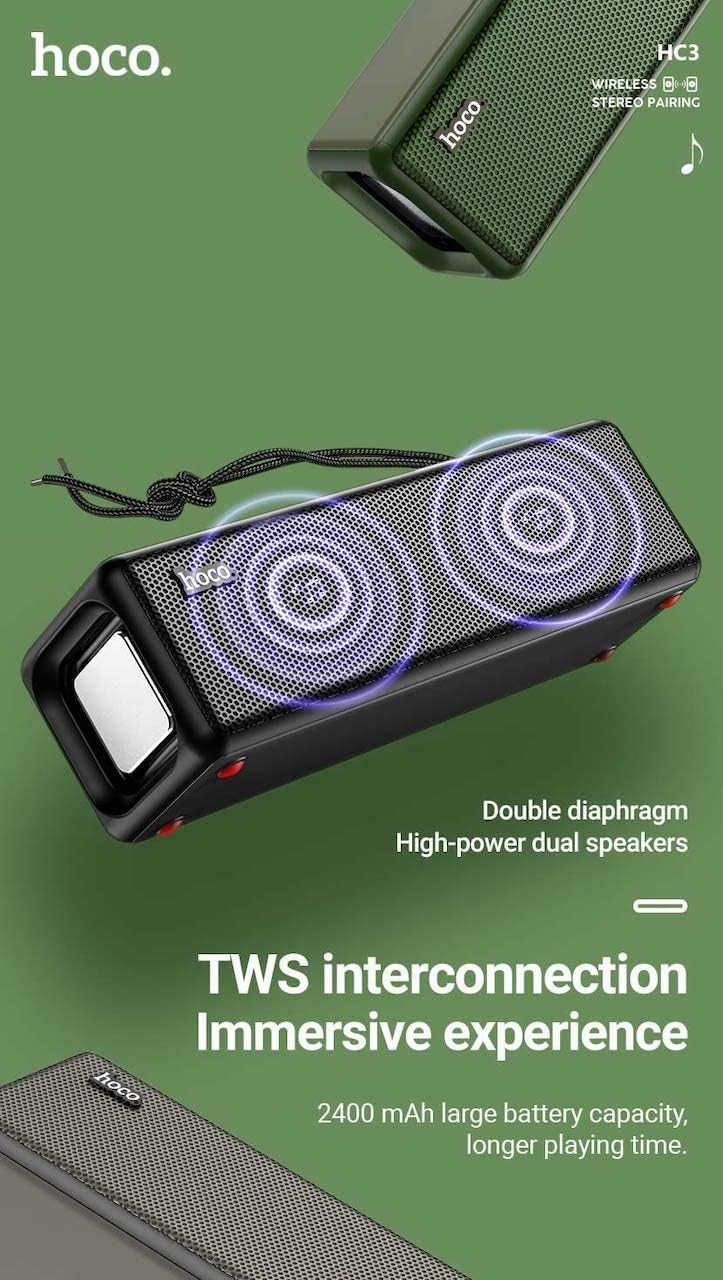
Figure 3: TWS Interconnection. This image illustrates the concept of two Hoco HC3 speakers wirelessly connected to provide a stereo audio experience, highlighting the dual speaker setup and the 2400 mAh battery capacity.
5.6 통화 처리
스마트폰과 블루투스로 연결했을 때:
- 전화 받기: 재생/일시 정지 버튼을 짧게 누릅니다.
- 통화 종료: 통화 중에 재생/일시 정지 버튼을 짧게 누르세요.
- 전화 거부: 수신 전화가 울리면 재생/일시 정지 버튼을 길게 누르세요.
- 마지막 번호 재다이얼: 재생/일시정지 버튼을 두 번 누르세요.
6. 유지관리
- 청소: Use a soft, dry cloth to clean the speaker's surface. Do not use abrasive cleaners, alcohol, or other chemical solvents.
- 저장: 스피커는 직사광선과 극한의 온도를 피해 시원하고 건조한 곳에 보관하세요.
- 배터리 관리 : To prolong battery life, charge the speaker regularly, even if not in use for extended periods (e.g., once every 3 months). Avoid fully discharging the battery frequently.
- 방수 기능: While designed for sports, avoid submerging the speaker in water. Refer to product specifications for any IP rating.
- 충격 방지: Protect the speaker from drops and strong impacts.
7. 문제 해결
If you encounter issues with your Hoco HC3 speaker, refer to the following table for common problems and solutions:
| 문제 | 가능한 원인 | 해결책 |
|---|---|---|
| 스피커의 전원이 켜지지 않습니다. | 배터리가 부족합니다. | 스피커를 최소 30분 동안 충전하세요. |
| 블루투스로 페어링할 수 없습니다. | 장치에서 Bluetooth가 활성화되어 있지 않습니다. 스피커가 페어링 모드가 아닙니다. 장치에서 너무 멀리 떨어져 있습니다. | Ensure Bluetooth is on, speaker is in pairing mode (flashing blue LED), and devices are within 10 meters. Forget "HC3" on your device and try pairing again. |
| 소리가 나지 않습니다. | 볼륨이 너무 낮음; 잘못된 모드 선택; 기기에서 오디오가 재생되지 않음. | Increase volume on both speaker and connected device. Verify correct mode (Bluetooth, AUX, TF, USB). Ensure audio is playing on the source device. |
| FM 라디오 수신 상태가 좋지 않습니다. | 신호가 약함; 환경적 간섭. | 스피커를 수신 상태가 더 좋은 곳으로 옮기세요. 방송국을 다시 검색하세요. |
| TF 카드/USB 재생이 작동하지 않습니다. | Card/drive not inserted correctly; incompatible file 형식; 손상됨 files. | Ensure card/drive is fully inserted. Check file formats (MP3 recommended). Try another card/drive. |
| TWS 페어링이 실패합니다. | 스피커가 TWS 페어링 모드가 아니거나, 스피커 간 거리가 너무 멀습니다. | Ensure both speakers are powered on and in TWS pairing mode. Keep them close during pairing. Refer to section 5.5. |
8. 사양
| 특징 | 세부 사항 |
|---|---|
| 모델 | HC3 |
| 치수 | 202 x 60 x 60mm |
| 무게 | 561g |
| 블루투스 버전 | V5.0 (Chip: JLAC6928B) |
| 배터리 용량 | 2400mAh |
| 충전 시간 | 약 3시간 |
| 토크/음악 시간 | 최대 5시간 |
| 스피커 유닛 | 45mm * 2 |
| 스피커 전원 출력 | 5W*2 |
| 연결 모드 | Bluetooth, FM, TF card, USB, AUX, TWS |
| 오디오 출력 모드 | 둘러싸다 |
| 제조업체 | 호코 |
| 원산지 | 중국 |
9. 보증 및 지원
Hoco products are manufactured to high quality standards. For information regarding warranty coverage, please refer to the warranty card included with your purchase or contact your local Hoco distributor or retailer. Keep your proof of purchase for any warranty claims.
For technical support or further assistance, please visit the official Hoco website or contact their customer service department. Contact details are typically available on the product packaging or the official web대지.