
소개
The Sharkoon Skiller SGK30 is a mechanical gaming keyboard designed for performance and durability. It features customizable RGB lighting, N-Key rollover, and a 1000Hz polling rate for responsive gameplay and typing. This manual provides essential information for setting up, operating, and maintaining your keyboard.

Image: Sharkoon Skiller SGK30 Mechanical Gaming Keyboard banner displaying the product name and type.
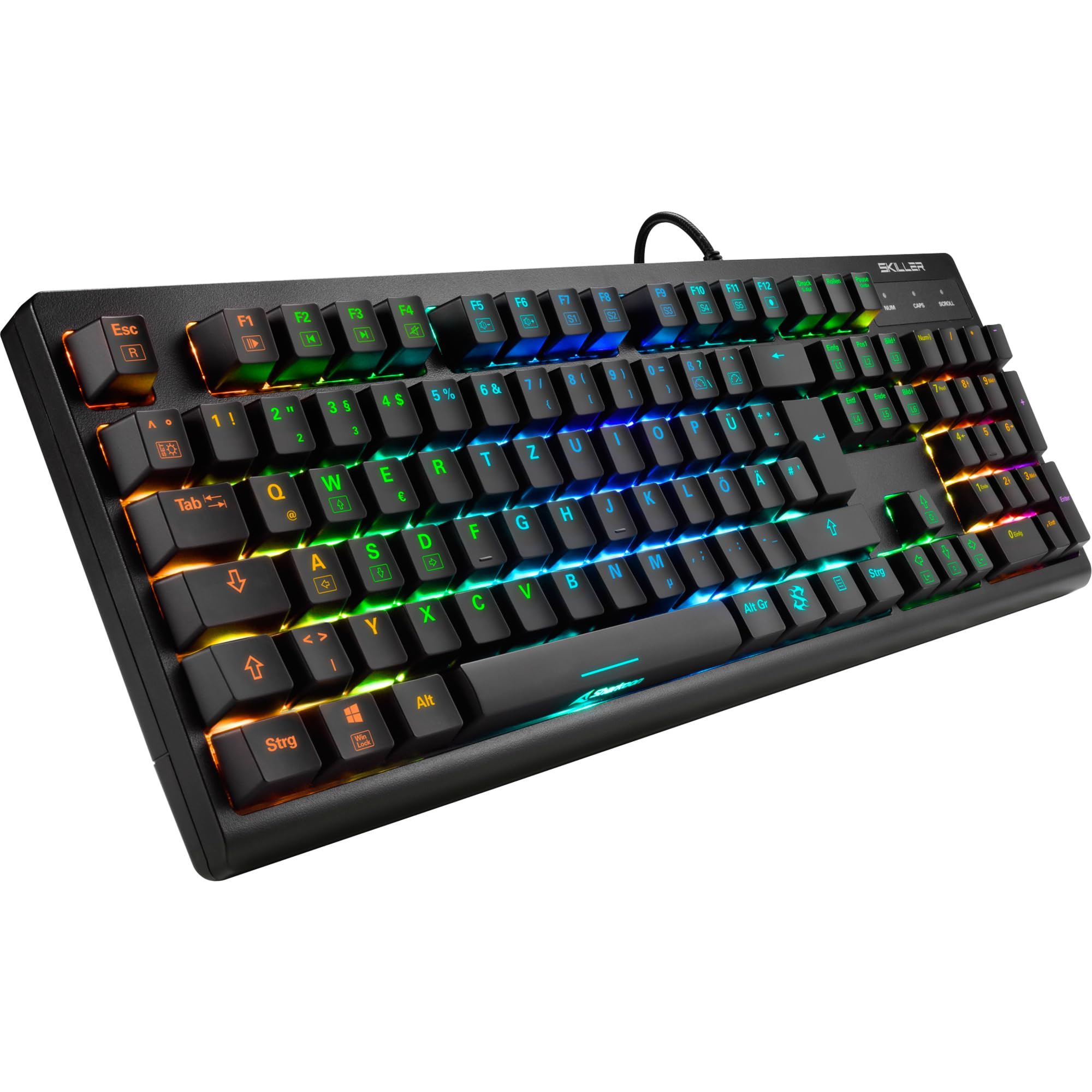
이미지: 위에서 아래로 view of the Sharkoon Skiller SGK30 mechanical gaming keyboard, showcasin전체 레이아웃과 생생한 RGB 백라이팅을 갖추고 있습니다.
제품 끝view 동영상
영상: 공식 제품 출시view of the Sharkoon Skiller SGK30 Mechanical Gaming Keyboard, demonstrating its features, RGB lighting effects, and mechanical switches.
설정
Follow these steps to set up your Sharkoon Skiller SGK30 keyboard:
- 키보드 풀기: 키보드와 동봉된 USB 케이블을 포장에서 조심스럽게 꺼내세요.
- 컴퓨터에 연결: Plug the Micro USB end of the cable into the keyboard's port and the standard USB-A end into an available USB port on your computer.
- 드라이버 설치: The keyboard is plug-and-play. Your operating system (Windows 10 or later recommended) should automatically detect and install the necessary drivers.
- 소프트웨어 설치(선택 사항): For advanced customization of RGB lighting and key assignments, download the official Sharkoon software from the manufacturer's web대지.

Image: The Sharkoon Skiller SGK30 keyboard positioned on a desk, ready for connection.
작동 지침
기본 주요 기능
The Sharkoon Skiller SGK30 features a standard layout with additional function keys accessible via the FN 열쇠.
- FN + F1-F12: Access multimedia controls (e.g., play/pause, volume up/down, mute).
- FN + 윈도우 키: 게임 중 실수로 Windows 키가 눌리는 것을 방지하기 위해 Windows 키를 잠그거나 잠금 해제하세요.
- N 키 롤오버: All keys are registered simultaneously, ensuring every keystroke is detected, even during rapid input.
RGB 조명 제어
The keyboard offers extensive RGB lighting customization. Use the following combinations to adjust lighting effects:
- FN + Insert/Home/Page Up/Delete/End/Page Down: Cycle through various pre-programmed lighting effects.
- FN + Arrow Keys (Up/Down): Adjust brightness levels of the lighting.
- FN + Arrow Keys (Left/Right): 동적 조명 효과의 속도를 조절하세요.
- Custom Illumination: Use the dedicated software for advanced per-key lighting customization.

이미지: 클로즈업 view of the keyboard keys highlighting the adjustable RGB illumination capabilities.
소프트웨어 사용자 정의
For advanced settings, macro programming, and detailed RGB customization, download and install the Sharkoon Skiller SGK30 software from the official Sharkoon web사이트. 이 소프트웨어를 사용하면 다음을 수행할 수 있습니다.
- 사용자 지정 조명 프로를 만들고 저장하세요files.
- Program macros for specific keys.
- 키 기능을 다시 매핑하세요.

Image: A screenshot showing the graphical user interface of the Sharkoon Skiller SGK30 customization software, illustrating various options for lighting and key remapping.
유지
적절한 유지 관리는 키보드의 수명과 성능을 보장합니다.
- 청소: Use a soft, dry cloth to wipe the surface of the keyboard. For deeper cleaning, use compressed air to remove dust and debris from between the keycaps.
- 키캡 제거: If necessary, keycaps can be carefully removed using a keycap puller (not included) for thorough cleaning of the switches. Reinstall keycaps by pressing them firmly onto the switch stems.
- 액체를 피하세요: 키보드를 액체에 노출시키지 마십시오. 액체를 쏟은 경우 즉시 키보드를 분리하고 완전히 말린 후 다시 연결하십시오.
- 저장: 키보드는 직사광선과 극한의 온도를 피해 시원하고 건조한 곳에 보관하세요.

이미지: 클로즈업 view of the mechanical switches on the Sharkoon Skiller SGK30 keyboard, illustrating their design for durability and ease of maintenance. Note: This model is available with Red switches, while the image shows Blue switches.
문제 해결
If you encounter issues with your Sharkoon Skiller SGK30 keyboard, refer to the following common solutions:
| 문제 | 가능한 원인 | 해결책 |
|---|---|---|
| 키보드가 응답하지 않습니다 | USB 연결이 느슨하거나, USB 포트에 결함이 있거나, 드라이버에 문제가 있습니다. |
|
| RGB 조명이 작동하지 않거나 올바르지 않습니다. | Lighting settings incorrect, software conflict. |
|
| 키가 등록되지 않음 | 키캡 아래에 먼지/이물질이 있고, 스위치에 결함이 있습니다. |
|
명세서
| 특징 | 세부 사항 |
|---|---|
| 상표 | 샤쿤 |
| 모델 번호 | 4044951030026 |
| 키보드 유형 | 기계식 게임 키보드 |
| 스위치 유형 | Red Switch (Blue switches are also available for this model series) |
| 연결성 | 마이크로 USB |
| 폴링 속도 | 1000Hz |
| N키 롤오버 | 지원됨 |
| RGB 조명 | Customizable RGB |
| 운영 체제 | 윈도우 10 (및 기타 윈도우 버전과 호환 가능) |
| 치수(길이x너비x높이) | 44 x 14.4 x 3.5cm |
| 무게 | 867g |
상자 안에 무엇이 들어있나요?
The Sharkoon Skiller SGK30 package includes:
- Sharkoon Skiller SGK30 Mechanical Gaming Keyboard
- USB 케이블
보증 및 지원
보증 정보 및 기술 지원에 대해서는 Sharkoon 공식 웹사이트를 참조하십시오. web사이트를 방문하거나 가까운 판매점에 문의하세요. 보증 청구를 위해 구매 증빙 자료를 보관하세요.
참고: 제품 사양 및 기능은 사전 고지 없이 변경될 수 있습니다.