
1. 서론
Thank you for choosing the HOCO ES43 Bluetooth 5.0 Wireless Stereo Earphones. This manual will guide you through the features, setup, and operation of your new earphones to ensure an optimal audio experience. Please read these instructions carefully before use and retain them for future reference.
2. 제품 오버view
The HOCO ES43 earphones offer a seamless wireless audio experience with Bluetooth 5.0 connectivity and a built-in microphone for calls. The compact charging case provides extended battery life, making them ideal for on-the-go use.
주요 특징:
- Bluetooth Version 5.0 for stable and efficient connection.
- JL AC6976 Chipset for reliable performance.
- 핸즈프리 통화를 위한 내장 마이크.
- Supports master-slave switching for flexible use of single or dual earbuds.
- 휴대성을 위한 작고 가벼운 디자인.
패키지 내용:
- HOCO ES43 Wireless Stereo Earphones (Left and Right)
- 충전 케이스
- 충전 케이블
- 사용자 설명서

Image: The retail packaging for the HOCO ES43 earphones, showing the product and key features on the box.
3. 설정
3.1 이어폰 및 케이스 충전
처음 사용하기 전에 이어폰과 충전 케이스를 완전히 충전하세요.
- 이어폰을 충전 케이스에 넣으세요. 이어폰이 각 슬롯에 제대로 장착되었는지 확인하세요.
- 충전 케이블을 케이스의 충전 포트와 USB 전원에 연결하세요.
- The charging case has a battery capacity of 400 mAh, and each earphone has a 40 mAh battery.
- Charging time for the case is approximately 1.5 hours. Earphones take approximately 2 hours to fully charge inside the case.
- Indicator lights on the case and/or earphones will show charging status and turn off or change color when fully charged.
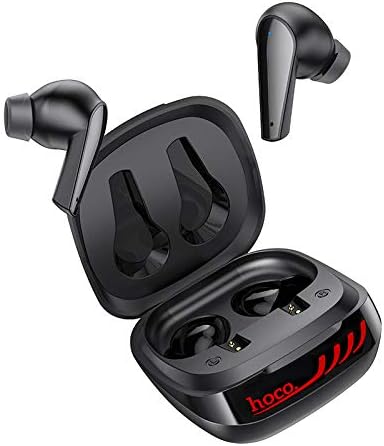
Image: The HOCO ES43 earphones placed inside their open charging case, showing the charging contacts.
3.2 블루투스 페어링
이어폰을 장치에 연결하려면:
- 이어폰이 충전되어 있는지 확인하세요.
- 충전 케이스를 여세요. 이어폰이 자동으로 켜지고 페어링 모드로 진입합니다(이어폰의 LED 표시등이 깜빡입니다).
- 기기(스마트폰, 태블릿 등)에서 Bluetooth를 활성화하세요.
- 검색 available Bluetooth devices and select "HOCO ES43" from the list.
- 연결되면 이어폰 표시등이 깜빡임을 멈추거나 단색으로 바뀝니다.
- 이 이어폰은 마스터-슬레이브 전환을 지원하여 초기 페어링 후 각 이어버드를 독립적으로 사용할 수 있습니다.
4. 사용 설명서
The HOCO ES43 earphones feature touch controls for easy management of music and calls.
4.1 전원 켜기/끄기
- 전원 켜기: Open the charging case, and the earphones will automatically power on. Alternatively, press and hold the touch area on both earbuds for a few seconds.
- 전원 끄기 : Place the earphones back into the charging case and close the lid. Alternatively, disconnect Bluetooth and the earphones will power off automatically after a few minutes, or press and hold the touch area on both earbuds for a few seconds.
4.2 음악 재생
- 재생/일시 중지: 양쪽 이어버드의 터치 영역을 한 번 탭하세요.
- 다음 트랙: 오른쪽 이어버드의 터치 영역을 두 번 탭합니다.
- 이전 트랙 : 왼쪽 이어버드의 터치 영역을 두 번 탭합니다.
4.3 통화 관리
- 전화 받기/종료: 양쪽 이어버드의 터치 영역을 한 번 탭하세요.
- 전화 거부: 양쪽 이어버드의 터치 영역을 2초간 길게 누르세요.
4.4 음성 어시스턴트
- Voice Assistant 활성화 : 양쪽 이어버드의 터치 영역을 세 번 탭합니다.

Image: A person wearing the HOCO ES43 earphones, demonstrating typical usage during an activity.
5. 유지관리
Proper maintenance ensures the longevity and optimal performance of your HOCO ES43 earphones.
- 청소: 이어폰과 충전 케이스는 부드럽고 마른 천으로 정기적으로 닦아주세요. 강한 화학 물질이나 연마재는 사용하지 마세요.
- 충전 연락처: 이어폰과 케이스의 충전 접점이 깨끗하고 이물질이 없는지 확인하여 정상적인 충전이 이루어지도록 하십시오.
- 저장: 사용하지 않을 때는 이어폰을 충전 케이스에 넣어 먼지와 손상으로부터 보호하십시오. 서늘하고 건조한 곳에 보관하십시오.
- 물을 피하세요: 이 이어폰은 방수 기능이 없습니다. 물, 습기 또는 극한 온도에 노출시키지 마십시오.
- 배터리 관리 : 배터리 수명을 연장하려면 이어폰과 충전 케이스를 자주 완전히 방전시키지 마십시오. 계속 사용하지 않더라도 정기적으로 충전하십시오.
6. 문제 해결
HOCO ES43 이어폰에 문제가 발생하면 다음의 일반적인 해결 방법을 참조하세요.
- 이어폰이 기기와 페어링되지 않습니다:
- 기기에서 Bluetooth가 활성화되어 있는지 확인하세요.
- 이어폰이 충전되어 있고 충전 케이스에서 꺼내져 있는지 확인하세요.
- Forget/delete "HOCO ES43" from your device's Bluetooth list and try pairing again.
- 기기와 이어폰을 다시 시작하세요.
- 이어폰이 하나만 작동합니다:
- Place both earphones back into the charging case, close the lid, wait a few seconds, then open it again to allow them to re-sync.
- 두 이어폰이 모두 충전되어 있는지 확인하세요.
- 이어폰을 재설정해 보세요(제조사 설명서를 참조하세요). web(필요한 경우 구체적인 재설정 지침은 해당 사이트를 참조하세요).
- 소리가 나지 않거나 볼륨이 낮음:
- 기기와 이어폰의 볼륨 레벨을 확인하세요.
- 이어폰이 기기에 제대로 연결되어 있는지 확인하세요.
- 이어폰 스피커 그릴에 이물질이 끼어 있는 것을 깨끗이 제거하십시오.
- 충전 문제:
- 충전 케이블이 케이스와 전원에 모두 단단히 연결되어 있는지 확인하세요.
- 전원이 제대로 작동하는지 확인하십시오.
- 이어폰과 케이스 내부의 충전 접점을 청소하세요.
- 다른 충전 케이블이나 전원 어댑터를 사용해 보세요.
7. 사양
| 블루투스 버전 | 5.0 |
| 블루투스 칩 | JL AC6976 |
| 충전 케이스 배터리 용량 | 400mAh |
| 이어폰 배터리 용량 | 40mAh(각) |
| 충전 시간(케이스) | 약 1.5시간 |
| 충전 시간(이어폰) | 약 2시간 |
| 음악 / 토크 시간 | 약 4시간 |
| 대기 시간 | 약 200시간 |
| 총 중량 | 48그램 |
| 헤드폰 폼 팩터 | 귀에 |
| 연결 기술 | 무선(블루투스) |
| 제어 유형 | Call Control, Touch Control |
| 모델 번호 | ES43 |
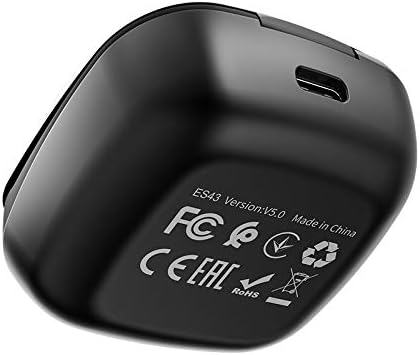
Image: The underside of the HOCO ES43 charging case, displaying model number, Bluetooth version, and compliance markings.
8. 안전 정보
다음 안전 지침을 준수하십시오.
- 제품을 분해, 수리, 개조하지 마세요.
- 이어폰과 충전 케이스를 극한 온도, 직사광선 및 화기로부터 멀리하십시오.
- 제품을 물이나 기타 액체에 노출시키지 마십시오.
- 청력 손상을 방지하려면 장시간 높은 볼륨으로 제품을 사용하지 마세요.
- 어린이와 애완동물의 손이 닿지 않는 곳에 보관하세요.
- 현지 규정에 따라 책임감 있게 제품을 폐기하십시오.
9. 보증 및 지원
For warranty information and customer support, please refer to the documentation provided at the time of purchase or contact your retailer. HOCO is committed to providing quality products and support.