
Ctronics CTIPC-285C-Z4B
Ctronics 5배 광학 줌 WiFi 실외 보안 카메라 사용 설명서
Model: CTIPC-285C-Z4B
1. 서론
Thank you for choosing the Ctronics 5X Optical Zoom WiFi Outdoor Security Camera. This manual provides detailed instructions for the installation, operation, and maintenance of your camera. Please read this manual thoroughly before use to ensure proper functionality and safety. This camera is designed for outdoor surveillance, offering advanced features such as 5X optical zoom, human detection, auto-tracking, color night vision, and two-way audio.

그림 1.1: Ctronics 5X Optical Zoom WiFi Outdoor Security Camera. This image shows the main unit of the camera with its dual antennas and lens array.
2. 안전 정보
제품 손상 및 본인과 타인의 부상을 방지하기 위해 다음 안전 수칙을 준수해 주십시오.
- Ensure the power supply is stable and matches the camera's voltage 요구 사항(12볼트).
- 카메라를 작동 범위를 넘어서는 극한의 온도나 습도에 노출시키지 마세요.
- 렌즈가 강한 광원에 직접 노출되지 않도록 하십시오. 센서가 손상될 수 있습니다.
- 카메라를 분해하거나 개조하지 마십시오. 모든 정비는 자격을 갖춘 기술자에게 맡기십시오.
- 카메라와 액세서리를 어린이의 손이 닿지 않는 곳에 보관하세요.
- Ensure proper mounting to prevent the camera from falling.
3. 패키지 내용
Please check the package contents upon opening. If any items are missing or damaged, contact your retailer or Ctronics support.
- Ctronics 5X Optical Zoom WiFi Outdoor Security Camera
- 전원 어댑터
- 장착 나사 및 벽면 플러그
- 네트워크 케이블용 방수 키트 (해당되는 경우)
- 빠른 시작 가이드
4. 설정
4.1 물리적 설치
- 위치를 선택하세요: 탁 트인 적절한 야외 장소를 선택하세요 view of the area you wish to monitor. Ensure the location has access to a power outlet.
- 설치: Use the provided mounting template (if included) to mark drill holes on the wall or ceiling. Drill the holes, insert wall plugs, and secure the camera bracket using the screws.
- 전원 연결: Connect the power adapter to the camera's power input and plug it into a power outlet.
4.2 네트워크 연결
The camera supports 2.4GHz Wi-Fi networks.
- 앱 다운로드: Download the "Ctronics" app from your smartphone's app store (iOS/Android). For PC users, download the HiP2P software for MAC/Windows.
- 초기 설정 : 앱 내 안내에 따라 카메라를 추가하세요. 일반적으로 카메라의 QR 코드를 스캔하거나 카메라 ID를 직접 입력하는 방식입니다.
- 와이파이 구성: 앱을 통해 카메라를 2.4GHz Wi-Fi 네트워크에 연결하세요.

그림 4.1: Broad Compatibility. This image illustrates the camera's compatibility with various devices and operating systems, including iOS, Android, Windows, and Mac OS, through the Ctronics Pro app and HiP2P Client software.
4.3 마이크로 SD 카드 설치 (선택 사항)
The camera supports a micro SD card up to 64GB for local storage of recordings.
- Locate the SD card slot on the camera (refer to the camera diagram in the quick start guide).
- Carefully insert the micro SD card into the slot until it clicks into place.
- Format the SD card via the camera's settings in the Ctronics app for optimal performance.
5. 카메라 작동
5.1 팬, 틸트, 줌(PTZ)
The camera features motorized pan (355° horizontally) and tilt (90° vertically) functions, along with 5X optical zoom.
- 제어: Use the Ctronics app to remotely control the camera's pan and tilt movements by swiping on the live view 화면.
- 광학 줌: 라이브 화면에서 손가락으로 확대/축소하세요 view to activate the 5X optical zoom. The camera will auto-focus for clear detailed images.
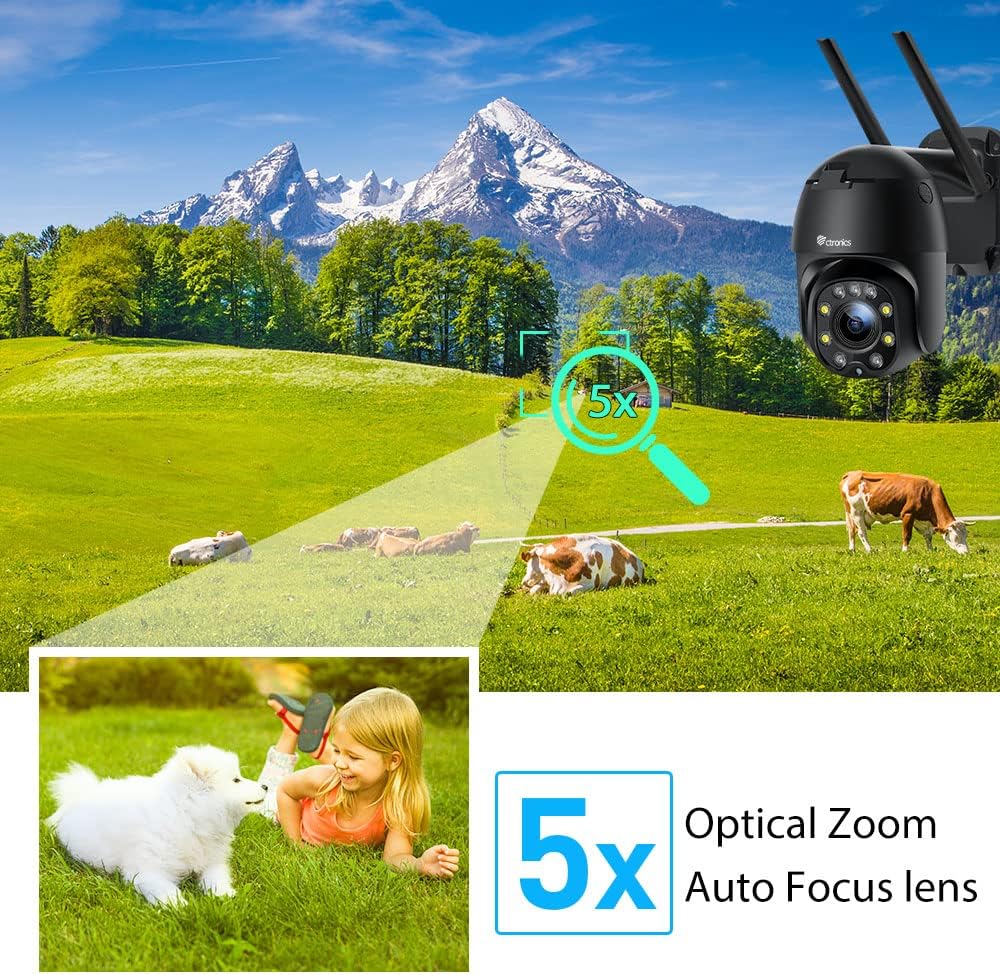
그림 5.1: 5X Optical Zoom. This image demonstrates the camera's 5X optical zoom capability, allowing for detailed viewing of distant objects with auto-focus functionality.
5.2 Human Detection and Auto-Tracking
The camera utilizes AI algorithms to distinguish human movement from other triggers, reducing false alarms by up to 95%.
- 발각: When a human is detected, the camera will automatically track their movement within its field of view.
- 알림: You will receive instant notifications via the app, FTP, or email.
- 녹음: Detected events are recorded to the installed SD card.

그림 5.2: Human Detection. This image illustrates how the camera's human detection feature accurately identifies people while ignoring non-human movements like pets, significantly reducing false alarms.

그림 5.3: Auto Tracking. This image demonstrates the camera's auto-tracking capability, showing how it follows a detected subject's movement within its 355° horizontal and 90° vertical range.
5.3 HD 1080P & Night Vision
The camera provides 1920x1080P resolution for clear images and offers two night vision modes.
- 컬러 나이트 비전: With 4 spotlights and 5 infrared lights, the camera can display vivid color images in total darkness up to 25 meters.
- 적외선 나이트 비전: Standard black and white infrared vision is also available.

그림 5.4: Color Night Vision. This image illustrates the camera's ability to provide full-color video surveillance even in low-light or nighttime conditions.
5.4 양방향 오디오
내장된 마이크와 스피커를 사용하여 방문객과 소통하거나 침입자를 저지하세요.
- 실시간 대화: Use the Ctronics app to engage in real-time conversations.
- 소음 감소: The camera features ambient noise reduction technology for clearer sound quality.

그림 5.5: Two-Way Audio. This image depicts the camera's two-way audio functionality, allowing users to communicate with individuals near the camera via their smartphone.
5.5 원격 접속
View 라이브 푸tage and recordings from anywhere at any time using the Ctronics app or HiP2P software.
- Ensure your camera is connected to the internet.
- Log in to your Ctronics app or HiP2P software account to access your camera feed.
6. 유지관리
정기적인 유지 관리는 카메라의 수명과 최적의 성능을 보장합니다.
- 청소: 카메라 렌즈와 바디를 부드러운 천으로 가볍게 닦아주세요.amp 옷감. 강한 화학 물질이나 연마성 세제를 사용하지 마십시오.
- 펌웨어 업데이트: Check the Ctronics app periodically for available firmware updates. Keeping the firmware updated ensures you have the latest features and security enhancements.
- 전원 주기: If the camera experiences minor issues, try power cycling it by unplugging and replugging the power adapter.
7. 문제 해결
이 섹션에서는 일반적으로 발생할 수 있는 문제에 대해 설명합니다.
| 문제 | 가능한 원인 | 해결책 |
|---|---|---|
| 카메라 오프라인 | 전원 없음; Wi-Fi 연결 끊김; 공유기 문제 | Check power connection; Reconnect Wi-Fi in app; Restart router |
| 화질이 나쁘다 | Dirty lens; Network bandwidth; Low light | Clean lens; Check internet speed; Ensure sufficient lighting or use night vision |
| 허위 경보 | Sensitivity too high; Non-human movement | Adjust detection sensitivity in app; Ensure human detection is enabled |
| SD 카드가 녹화되지 않습니다 | SD card full/corrupted; Not formatted; Incorrect settings | Format SD card in app; Check recording settings; Replace SD card if faulty |
8. 사양
Detailed technical specifications for the Ctronics CTIPC-285C-Z4B camera:
| 특징 | 사양 |
|---|---|
| 모델 번호 | CTIPC-285C-Z4B |
| 치수(길이 x 너비 x 높이) | 11 x 17 x 30cm |
| 무게 | 940그램 |
| 재료 | 아크릴로니트릴 부타디엔 스티렌(ABS) |
| 파워 타입 | 전기 케이블 |
| 권tage | 12 볼트 |
| 전력 소비 | 6 와트 |
| 해결 | 1920x1080픽셀 |
| 광학 줌 | 5X |
| 팬 범위 | 355° |
| 기울기 범위 | 90° |
| 야간 시야 거리 | 약. 25미터 |
| 방수 등급 | IP66 |
| 메모리 카드 유형 | 마이크로SD |
| 최대 메모리 용량 | 64GB (XNUMX기가바이트) |
| 호환 장치 | Smartphone (iOS/Android), PC (MAC/Windows) |
9. 보증 및 지원
Ctronics products come with a standard warranty. For specific warranty terms and conditions, please refer to the warranty card included with your product or visit the official Ctronics website. If you encounter any issues not covered in this manual or require further assistance, please contact Ctronics customer support:
- Web대지: www.ctronics.com
- 이메일: 제품 포장을 참조하거나 web지원 이메일 사이트.
- 핸드폰: 제품 포장을 참조하거나 web지원 전화번호를 위한 사이트입니다.
Please have your model number (CTIPC-285C-Z4B) and purchase information ready when contacting support.
Ask a question about this manual
Ask about setup, troubleshooting, compatibility, parts, safety, or missing instructions. Manuals+ will review the question and use this page’s manual context to help answer it.