
1. 소개 및 이상view
The ADJ Link is a 4-universe controller designed for managing compatible DMX devices. It offers flexible control via the dedicated Airstream LINK iOS App for iPad. The Link unit establishes a private, standalone 2.4 or 5 GHz DSSS (Direct Sequence Spread Spectrum) WiFi network, ensuring reliable wireless communication even in busy RF environments. This network facilitates wireless DMX signal transmission to compatible DMX-512 devices.
The Link controller is an ideal solution for small production events, nightclubs, bars, or any venue requiring the convenience of wireless iPad control and a robust, 4-DMX universe app-based lighting control system. It is compatible exclusively with iPad devices running iOS 11.0 or later. Please note that the iPad is not included with the controller.
2. 주요 특징
- 제어 인터페이스: Features (6) General Purpose Buttons, (1) Master and (8) Control 100mm Faders, (16) Page Playback Buttons Above Faders, (8) Rotary Dials with Push-In Selection Above Faders, (1) Blackout Button, (32) Instant Effect or Scene Calling Buttons, (8) Bump / Momentary Effect Buttons, (4) Rotary Encoder Wheels with Push-In Selection.
- 연결성: USB 2.0 Type “B” Port, WiFi (2.4 and 5Ghz DSSS Network), 4 DMX Universes (hardwired).
- 전원 및 액세서리: USB Input for Gooseneck Work Light, DC9V Power Supply.
- 설치: Removable Outer Case for 6U Rack Mounting.
- 보안: Kensington Security Device Slot.
- 앱 호환성: Dedicated Airstream LINK iOS APP for iPad (iOS 11.0 or later required).
3. 설정
To set up your ADJ Link controller, follow these steps:
- 전원 연결: Connect the included DC9V power supply to the Link controller.
- DMX Device Connection: Connect your compatible DMX lighting fixtures to the (4) hardwired, 5-pin XLR DMX outputs on the rear of the Link unit. Each output corresponds to a DMX universe.
- iPad Connection: The Link controller can connect to an iPad wirelessly or via a hardwired USB connection.
- 무선 설정 : The Link creates a private 2.4 or 5 GHz DSSS WiFi network. Connect your iPad to this network.
- 유선 설정: Connect your iPad to the USB port on the Link controller using a compatible USB cable.
- 앱 설치: Download and install the dedicated Airstream LINK iOS APP from the Apple App Store on your iPad. Ensure your iPad runs iOS 11.0 or later.
- USB Light (Optional): If desired, connect the included USB light to the USB input for gooseneck work light for illumination of the control surface.

그림 1: 후면 view of the ADJ Link controller, illustrating DMX outputs, USB ports, and power connection points. An iPad is shown docked in the controller.
4. 사용 설명서
The ADJ Link controller provides comprehensive control over your DMX lighting setup, primarily through its physical interface and the Airstream LINK iOS App.
4.1. 기본 제어 기능
- 페이더: Use the (1) Master and (8) Control 100mm Faders to adjust intensity levels for various DMX channels or groups.
- Rotary Dials & Encoder Wheels: The (8) Rotary Dials with Push-In Selection and (4) Rotary Encoder Wheels with Push-In Selection allow for fine-tuning of parameters such as pan, tilt, color, and effects.
- 재생 버튼: The (16) Page Playback Buttons above faders and (32) Instant Effect or Scene Calling Buttons enable quick recall of pre-programmed scenes and effects.
- 블랙아웃 버튼: The (1) Blackout Button instantly turns off all connected lights.
- Bump/Momentary Buttons: Use the (8) Bump / Momentary Effect Buttons for temporary activation of effects.
4.2. iPad App Integration (Airstream LINK iOS App)
The Airstream LINK iOS App provides an intuitive graphical interface for advanced control and programming. When connected wirelessly, you can undock your iPad for remote control, programming, and playback of your light show.

Figure 2: The ADJ Link controller with an iPad showing the Airstream LINK iOS App interface for color and intensity control.

Figure 3: The ADJ Link controller with an iPad showing the Airstream LINK iOS App interface for movement effects and pan/tilt control.
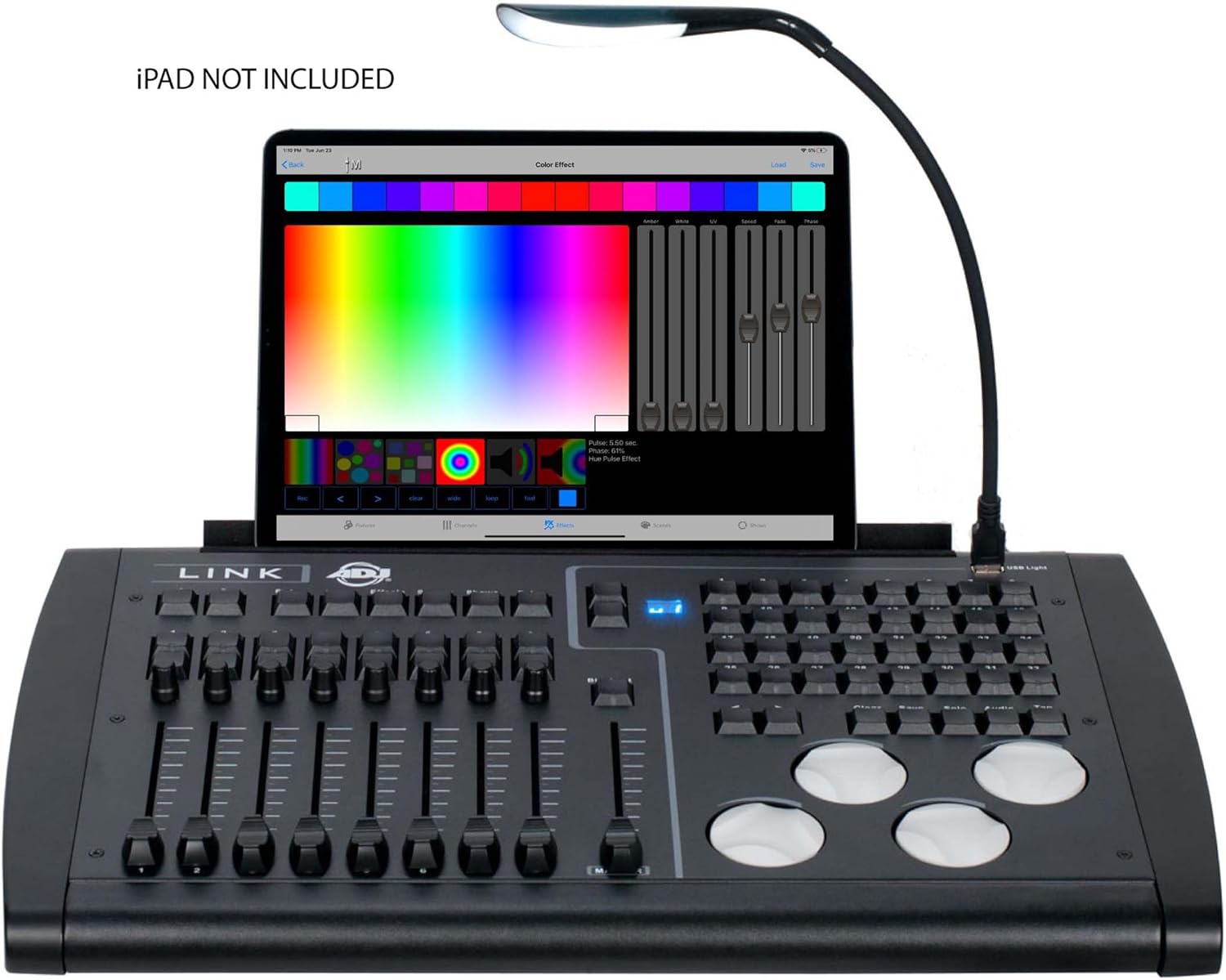
Figure 4: The ADJ Link controller with an iPad showing the Airstream LINK iOS App interface for color selection and effects.
4.3. 비디오 튜토리얼
For detailed visual instructions on operating DMX controllers and integrating with lighting software, please refer to the following official video tutorials:
Video 1: ADJ Airstream LINK new Fixture Groups feature. This video demonstrates the new fixture grouping capabilities within the ADJ Airstream LINK app, enhancing control and organization of DMX devices.
Video 2: SoundSwitch BPM Detection video. This tutorial explains how to use SoundSwitch's auto BPM detection feature to synchronize lighting effects with audio, a useful concept for DMX control.
Video 3: YGYbeyond dmx192 stage control equipment operation video. This video provides operational guidance for a DMX192 stage control unit, offering insights into general DMX controller usage.
Video 4: WMX1 video instructional. This instructional video demonstrates the features and operation of the ADJ WMX1 standalone DMX lighting controller, showcasing similar control concepts to the Link.
5. 사양
| 특징 | 설명 |
|---|---|
| 색상 | 검은색 |
| 재료 | 플라스틱, 금속 |
| 품목 치수(L x W x H) | 20.2인치(514mm) x 12.9인치(328mm) x 3.6인치(91mm) |
| 품목 무게 | 15.0파운드 (6.8kg) |
| 커넥터 유형 | USB |
| DMX 유니버스 | 4 |
| 와이파이 네트워크 | 2.4 and 5Ghz DSSS |
| iPad 호환성 | Requires iOS 11.0 or later (iPad NOT included) |
6. 포함 된 항목
The ADJ Link controller package includes the following items:
- ADJ Link Controller
- USB 케이블
- USB 조명
- DC9V 전원 공급 장치
- 랙 마운트 키트

Figure 5: The ADJ Link controller shown with its included accessories, such as cables, power supply, and rack mount kit.
7. 유지관리
To ensure the longevity and optimal performance of your ADJ Link controller, regular maintenance is recommended:
- 청소: Regularly wipe the control surface and exterior with a soft, dry cloth. Avoid using abrasive cleaners or solvents.
- 저장: Store the unit in a cool, dry place away from direct sunlight and extreme temperatures when not in use. If rack-mounted, ensure proper ventilation.
- 케이블 관리 : Keep all cables organized and free from kinks or excessive bending to prevent damage.
- 소프트웨어 업데이트: Periodically check the Apple App Store for updates to the Airstream LINK iOS App to ensure you have the latest features and bug fixes.
8. 문제 해결
If you encounter issues with your ADJ Link controller, consider the following troubleshooting steps:
- 전원 없음: Ensure the DC9V power supply is securely connected to both the unit and a working power outlet.
- DMX 신호 없음: Verify all DMX cables are correctly connected between the Link and your fixtures. Check the DMX addresses and modes on your fixtures.
- iPad Connectivity Issues:
- For wireless connection, ensure your iPad is connected to the Link's private WiFi network.
- For wired connection, ensure the USB cable is functioning and properly connected.
- Restart the Airstream LINK iOS App or your iPad.
- 앱이 응답하지 않음: Close and reopen the Airstream LINK iOS App. Ensure your iPad's operating system meets the minimum requirement (iOS 11.0 or later).
- 무선 연결이 간헐적으로 끊깁니다. Ensure the Link unit is placed in an area with minimal RF interference from other wireless devices.
9. 보증 및 지원
The ADJ Link 4-Universe DMX Hardware Controller comes with a 2년 보증.
For further assistance, technical support, or warranty claims, please contact ADJ Products customer service or visit their official website. You can also find additional resources and product information on the 아마존에서 ADJ 스토어를 만나보세요.