
1. 서론
Thank you for choosing the Langsdom GT4 Dual Driver Earbuds. These wireless earbuds are designed to provide a superior audio experience with dual dynamic drivers, Bluetooth 5.0 connectivity, and convenient touch controls. This manual will guide you through the setup, operation, and maintenance of your new earbuds.
2. 패키지 내용
다음 품목이 패키지에 포함되어 있는지 확인하세요.
- Langsdom GT4 Dual Driver Earbuds (Left and Right)
- 충전 케이스
- USB-C 충전 케이블
- Soft Ear Caps (S, M, L sizes)
- 사용자 설명서

Image: Contents of the Langsdom GT4 earbud package, including earbuds, charging case, USB-C cable, and various ear tip sizes.
3. 제품 오버view
The Langsdom GT4 earbuds feature advanced technology for an immersive audio experience.
3.1 Dual Dynamic Drivers
Each earbud is equipped with two 8mm dynamic drivers, providing enhanced bass and clear treble for a rich sound profile.

Image: Diagram illustrating the dual 8mm dynamic drivers within the Langsdom GT4 earbuds, highlighting superior audio sound with AAC and SBC support.
3.2 블루투스 5.0 기술
Utilizing Bluetooth 5.0, the earbuds offer a stable and fast connection, ensuring high-quality audio transmission and compatibility with various devices.
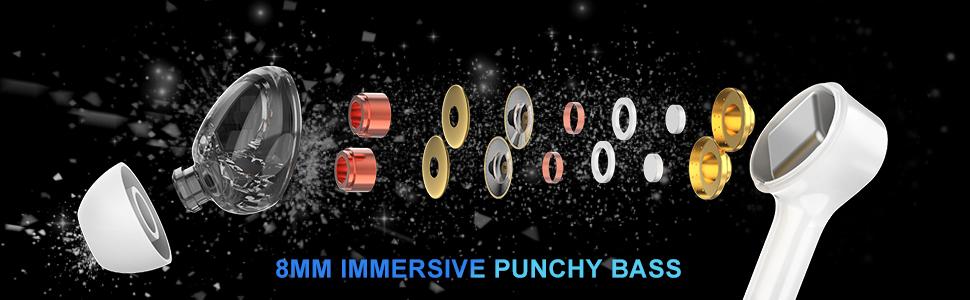
Image: Close-up of the Bluetooth 5.0 chip inside the earbud, emphasizing HD call quality, wide compatibility, and long battery life.
3.3 긴 배터리 수명
The earbuds provide up to 5 hours of playtime on a single charge, with the charging case extending total playtime to approximately 30 hours.
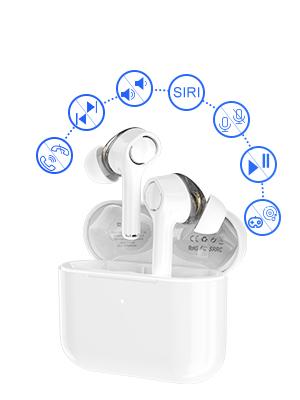
Image: Graphic showing the Langsdom GT4 earbuds and charging case, indicating 1.2 hours charging time, 5 hours play time, and 30 hours total endurance time.
3.4 인체공학적 디자인
Designed for comfort and stability, each earbud weighs only 4g and comes with three sizes of silicone ear tips to ensure a secure fit for extended wear.

Image: A person wearing the Langsdom GT4 earbuds, demonstrating their comfortable and secure fit.
4. 설정 지침
4.1 이어버드와 케이스 충전
- 이어버드를 충전 케이스에 넣으세요. 이어버드가 제대로 장착되었는지 확인하세요.
- USB-C 충전 케이블을 케이스의 충전 포트와 전원에 연결합니다.
- The indicator light on the charging case will show charging status. A full charge takes approximately 1.2 hours for the earbuds and case.
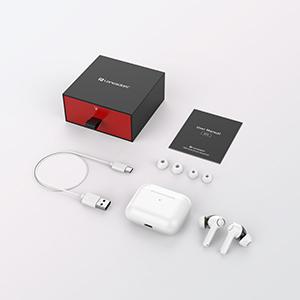
Image: Close-up of the USB-C charging port on the Langsdom GT4 charging case, with a charging cable connected.
4.2 장치와의 페어링
- 충전 케이스의 뚜껑을 엽니다. 이어버드가 자동으로 켜지고 페어링 모드로 들어갑니다.
- 기기(스마트폰, 태블릿 등)에서 Bluetooth를 활성화하세요.
- 검색 "GT4" in the list of available Bluetooth devices and select it to connect.
- 연결되면 확인음이 들리고 이어버드를 사용할 준비가 됩니다.
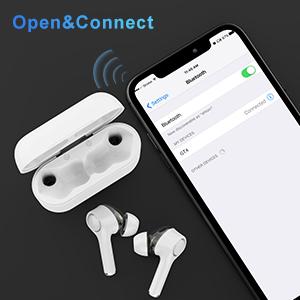
Image: A smartphone screen showing the Bluetooth settings with "GT4" selected for pairing, next to the open charging case with earbuds.
5. 사용 설명서
5.1 터치 컨트롤
The Langsdom GT4 earbuds feature intuitive touch controls. Gently tap the touch sensitive area on either earbud to perform the following actions:
| 행동 | 왼쪽 이어버드(L) | 오른쪽 이어버드(R) |
|---|---|---|
| 재생/일시정지 | 1 탭 | 1 탭 |
| 볼륨을 높이다 | - | 2 탭 |
| 볼륨 낮추기 | 2 탭 | - |
| 다음 노래 | 길게 누르기 3초 | - |
| 이전 노래 | - | 길게 누르기 3초 |
| 전화 받기/종료하기 | 1 탭 | 1 탭 |
| 전화 거부 | 2 탭 | 2 탭 |
| 음성 비서(Siri/Google)를 활성화하세요. | 3 탭 | 3 탭 |
| Game Mode / Exit Game Mode | 3 탭 | - |
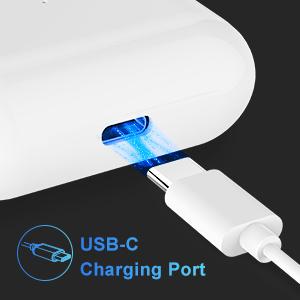
Image: Diagram illustrating the various touch control functions on the Langsdom GT4 earbuds, including play/pause, volume, call management, and voice assistant activation.
5.2 음악 및 게임 모드
The GT4 earbuds offer a dual-mode function for optimized audio performance based on your activity.
- 음악 모드: Provides rich stereo bass and clear sound for an immersive listening experience.
- 게임 모드: Reduces latency for synchronized audio and video, enhancing your gaming experience.
To switch between modes, tap the left earbud 3 times.

Image: Graphic comparing Music Mode (low latency, stereo bass) and Gaming Mode (zero delay, synchronization) for the Langsdom GT4 earbuds.
6. 유지관리
- 부드럽고 마른 천으로 이어버드와 충전 케이스를 정기적으로 청소하세요.
- 이어폰을 극한의 온도, 습도 또는 액체에 노출시키지 마십시오.
- 이어버드를 보호하고 배터리 수명을 유지하기 위해 사용하지 않을 때는 이어버드를 충전 케이스에 보관하세요.
- Do not attempt to disassemble or repair the earbuds yourself. Contact customer support for assistance.
7. 문제 해결
| 문제 | 해결책 |
|---|---|
| 이어폰이 페어링되지 않음 | Ensure earbuds are charged. Turn off and on Bluetooth on your device. Forget "GT4" from your device's Bluetooth list and re-pair. |
| 하나의 이어폰만 작동 | Place both earbuds back in the charging case, close the lid, then open it again. Ensure both earbuds are charged. |
| 볼륨이 낮거나 음질이 좋지 않음 | Adjust volume on both earbuds and your device. Ensure ear tips are properly sealed in your ear. Clean any debris from the earbud speakers. |
| 이어폰이 충전되지 않음 | Check the charging cable and power source. Ensure earbuds are correctly seated in the charging case. Clean charging contacts on earbuds and case. |
| 연결 문제(연결 끊김) | Ensure your device is within the Bluetooth range (33-50 feet). Avoid obstacles between earbuds and device. Try resetting the earbuds (refer to manufacturer's specific reset instructions if available, otherwise re-pair). |
8. 사양
- 모델: GT4
- 연결성: 무선(블루투스 5.0)
- 드라이버 크기: Dual 8mm Dynamic Drivers per earbud
- 노는 시간: 최대 5시간(이어버드), 최대 30시간(충전 케이스 사용 시)
- 충전 시간: 약 1.2시간
- 충전 포트: USB-C
- 제어 유형: 터치 컨트롤
- 이어버드 무게: 4그램(각각)
- 재료: 플라스틱
- 치수: 1.97 x 0.71 x 1.57인치(제품)
9. 공식 제품 영상
비디오: 공식 제품 소개 영상asing the Langsdom GT4 Dual Driver Earbuds, demonstrating features like auto-pairing, dual drivers, Bluetooth 5.0, secure fit, and long battery life.
10. 보증 및 지원
Langsdom products come with a standard manufacturer's warranty. For detailed warranty information, product support, or service inquiries, please refer to the warranty card included in your package or visit the official Langsdom web대지.
연락처 정보: Please refer to the contact details provided on the product packaging or the official Langsdom web고객 서비스 사이트.