
1. 서론
This user manual provides detailed instructions for the operation and maintenance of the VOLTCRAFT SDM-2125 Coating Thickness Gauge. This device is designed for high-precision and non-destructive measurements of coating thickness on both ferrous and non-ferrous metal substrates. It automatically detects the substrate material and determines the coating thickness using magnetic flux or eddy current principles.
The SDM-2125 weighs approximately 180 g and can store up to 500 data groups. It features a clear display that indicates whether measured values are within set limits (green for within limits, red for below limit, yellow for exceeding limit). For energy efficiency, the device automatically switches off after five minutes of inactivity. It supports both single-point and multi-point measurements, and its advanced algorithm for calculating measurement averages ensures quick and accurate results.

그림 1: 전면 view of the VOLTCRAFT SDM-2125 Coating Thickness Gauge, showing the display and control buttons.
2. 주요 특징
- Dual-Purpose Measurement: Suitable for both ferrous and non-ferrous metals.
- 측정 원리: Utilizes both magnetic flux and eddy current measurement methods.
- Automatic Substrate Detection: Automatically identifies the underlying material (ferrous or non-ferrous).
- 데이터 저장: Capable of storing up to 500 data groups for comprehensive analysis.
- Flexible Measurement Modes: Offers two measurement options: single-point measurement or continuous multi-point measurement.
- Limit Value Indication: Visual feedback (green, red, yellow) to indicate if measurements are within, below, or above set limits.
- 자동 차단 : Conserves battery life by automatically powering down after five minutes of inactivity.

Figure 2: The SDM-2125 displaying a measurement reading, highlighting its clear digital interface.
3. 설정
3.1 풀기 및 검사
- Carefully remove the SDM-2125 device and all accessories from the packaging.
- Inspect the device for any signs of damage during transit. If damage is found, do not proceed with setup and contact customer support.
- Verify that all components listed in the packing list are present. This typically includes the main unit, calibration foils, and a zero-calibration plate.
3.2 배터리 설치
The SDM-2125 requires batteries for operation. (Note: Batteries are not included with the device.)
- 장치 뒷면에서 배터리함을 찾으세요.
- 배터리 덮개를 엽니다.
- 배터리 칸 내부에 표시된 대로 올바른 극성을 맞춰 필요한 배터리를 넣으세요.
- 배터리 덮개를 단단히 닫으세요.
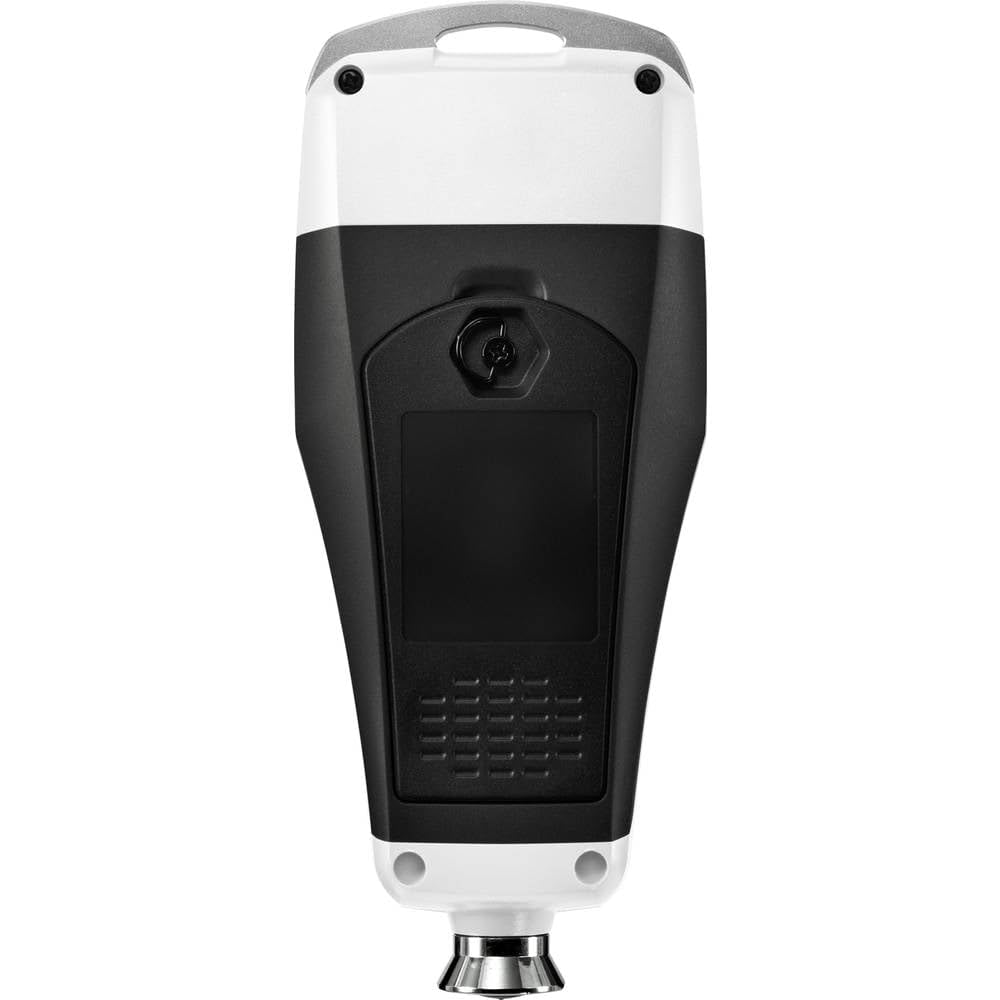
그림 3: 후면 view of the SDM-2125, illustrating the battery compartment location.
3.3 초기 전원 켜기 및 교정
- 전원 버튼을 눌러 장치를 켭니다.
- Perform a zero-point calibration on a bare, uncoated metal substrate (ferrous and non-ferrous, if applicable) provided with the device. Follow the on-screen instructions or refer to the quick start guide for specific calibration steps.
- Calibrate with the included calibration foils of known thickness to ensure accuracy across the measurement range.
4. 운영
4.1 기본 측정
- 기기의 전원이 켜져 있고 보정되었는지 확인하십시오.
- Place the probe of the gauge firmly and perpendicularly onto the coated surface to be measured.
- The device will automatically detect the substrate material (Fe for ferrous, NFe for non-ferrous) and display the coating thickness reading.
- Observe the color indicator on the display for limit value status (green, red, or yellow).
4.2 측정 모드
The SDM-2125 supports different measurement modes:
- 단일 측정 모드: For individual readings at specific points. Press the probe, read the value, then lift the probe.
- Continuous Measurement Mode: For scanning a surface and obtaining multiple readings rapidly. Keep the probe in contact and slide it across the surface. The device will continuously update the reading.
4.3 데이터 저장 및 불러오기
The device can store up to 500 data groups.
- To save a measurement, refer to the device's specific button functions (e.g., a 'Save' or 'Memory' button).
- To recall stored data, navigate through the memory function using the designated buttons. The device typically displays statistics like average, minimum, and maximum values for stored groups.

Figure 4: The SDM-2125 showing a measurement value, demonstrating its capability to display various data points including number of readings, average, min, and max.
5. 유지관리
5.1 청소
- Regularly clean the device's exterior with a soft, dry cloth.
- 완고한 먼지의 경우 약간 damp cloth with mild detergent can be used, but ensure no liquid enters the device.
- Pay special attention to keeping the measurement probe clean and free of debris, as this can affect accuracy.
- 연마성 세척제, 용제 또는 강력한 화학 물질을 사용하지 마십시오.
5.2 보관
- When not in use for extended periods, remove the batteries to prevent leakage and damage to the device.
- Store the device in its original case or a protective pouch to prevent scratches and impacts.
- 직사광선, 극한 온도 및 높은 습도를 피해 서늘하고 건조한 곳에 보관하십시오.
5.3 교정 확인
- Periodically check the calibration of the device using the provided calibration foils and zero-calibration plate.
- Recalibrate if readings are inconsistent or if the device has been subjected to significant temperature changes or impacts.
6. 문제 해결
| 문제 | 가능한 원인 | 해결책 |
|---|---|---|
| 장치의 전원이 켜지지 않습니다. | 배터리가 소진되었거나 올바르게 설치되지 않았습니다. | 배터리 극성을 확인하고 새 배터리로 교체하세요. |
| 부정확한 판독값. | Probe is dirty; device needs calibration; incorrect measurement surface. | Clean the probe; perform calibration; ensure surface is flat and clean. |
| Device displays "OL" (Over Limit) or "Err". | Measurement exceeds range; sensor error. | Ensure coating thickness is within 0-1250 µm range; restart device. If error persists, contact support. |
| Automatic shut-off too soon. | Device is idle for 5 minutes. | This is normal operation. Interact with the device to keep it active. |
7. 사양
| 기인하다 | 세부 사항 |
|---|---|
| 제조업체 | 볼트크래프트 |
| 부품 번호 | VC-11197635 |
| 품목 무게 | 130g |
| 제품 치수 | 6.5 x 3.5 x 15.2cm |
| 모델 번호 | VC-11197635 |
| 전원 | 배터리 구동 |
| 패키지 수량 | 1 |
| 특별 기능 | 재료 두께 게이지 |
| 배터리 포함 | 아니요 |
| 필요한 배터리 | 아니요 |
| 측정 범위 | 0 - 1250 µm |
8. 보증 및 지원
For warranty information, technical support, or service inquiries regarding your VOLTCRAFT SDM-2125 Coating Thickness Gauge, please refer to the warranty card included with your product or visit the official VOLTCRAFT web대지.
You can also contact the seller, Conrad Electronic SE, for assistance with your purchase.
온라인 리소스:
- VOLTCRAFT Official Web대지: www.voltcraft.com (General link, specific link not provided in input)
- Conrad Electronic SE Seller Page: 판매자 정보