
Goshyda KX-T6001CID
Goshyda KX-T6001CID Big Button Corded Telephone User Manual
Model: KX-T6001CID | Brand: Goshyda
소개
Thank you for choosing the Goshyda KX-T6001CID Big Button Corded Telephone. This manual provides detailed instructions to help you set up, operate, and maintain your new telephone. Please read this manual thoroughly before use to ensure proper functionality and to take full advantag그 기능의 전자.
안전 정보
- 전화기를 물이나 습기에 노출시키지 마십시오.
- 휴대전화를 직사광선이나 열원 근처에 두지 마십시오.
- Use only the provided telephone line cord.
- 전화기를 직접 열거나 수리하려고 하지 마십시오. 모든 서비스는 자격을 갖춘 전문가에게 맡기십시오.
- 어린이의 손이 닿지 않는 곳에 보관하세요.
패키지 내용
패키지에 모든 품목이 들어 있는지 확인하세요.
- 1 x 송수화기
- 1 x Telephone Base Unit
- 핸드셋 코드 1개
- 1 x 전화선 코드
- 1 x 사용자 설명서

Image: The Goshyda KX-T6001CID telephone, showing the base unit, handset, and coiled cord.
제품 끝view
Familiarize yourself with the main components and controls of your telephone.

이미지: 앞면 view of the telephone, highlighting the LCD display, large numeric keypad, and function buttons.
Keypad and Display:
- 숫자 키패드(0-9, *, #): For dialing phone numbers.
- LCD 디스플레이: 발신자 번호, 시간, 날짜 및 메뉴 옵션을 표시합니다.
- M1/M2 버튼: One-touch memory dialing keys.
- SET/STORE Button: Used for entering settings menu and saving entries.
- 위/아래 버튼: Navigate through menu options or adjust volume.
- RING Button: Adjust ringer volume.
- 볼륨 버튼: Adjust earpiece/speaker volume.
- FL/BRT (Flash/Brightness) Button: Flash function for call waiting, also adjusts LCD brightness.
- REDIAL Button: 마지막으로 걸었던 번호로 다시 전화를 겁니다.
- H.F (Hands-Free) Button: 스피커폰 모드를 활성화합니다.

이미지: 클로즈업 view of the large, easy-to-read buttons on the telephone's keypad.
설정
1. Connecting the Telephone:
- Connect one end of the coiled handset cord to the handset and the other end to the handset jack on the left side of the telephone base unit.
- Connect one end of the telephone line cord to the LINE jack on the back of the telephone base unit.
- 전화선 코드의 다른 쪽 끝을 벽면 전화 잭에 연결합니다.
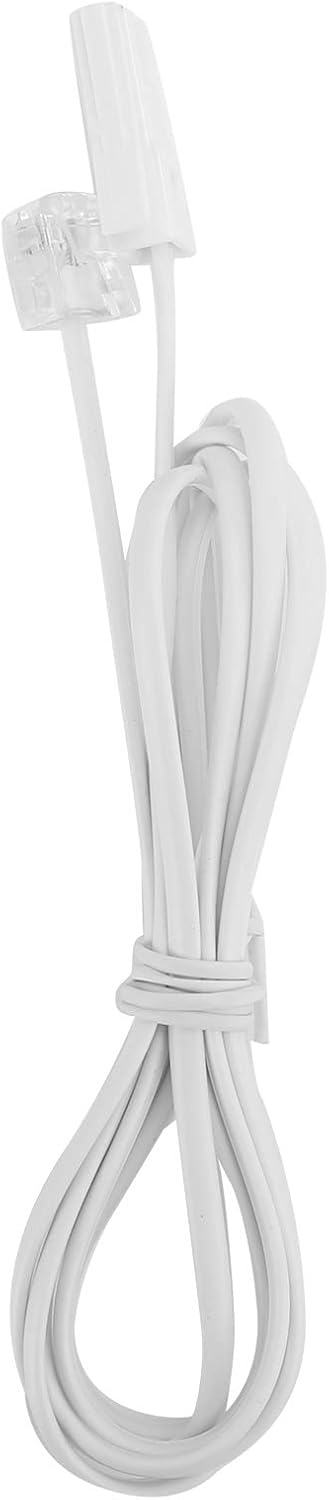
Image: The telephone line cord, used to connect the phone to the wall jack.
2. 초기 설정:
Upon initial connection, the LCD display may prompt you to set the date and time. Follow the on-screen instructions using the UP 그리고 아래에 값을 조정하는 버튼과 세트/스토어 확인 버튼을 클릭하세요.
작동 지침
전화 걸기:
- 수화기를 들거나 HF button for speakerphone.
- 숫자 키패드를 사용하여 원하는 전화번호를 누르세요.
- 전화가 연결될 때까지 기다립니다.
- 통화를 종료하려면 수화기를 내려놓거나 버튼을 누르십시오. HF 버튼을 다시 누르세요.
전화 받기 :
전화가 울리면 수화기를 들거나 버튼을 누르세요. HF 버튼을 클릭합니다.
재다이얼:
핸드셋을 들거나 HF, 그런 다음 누르세요 재 다이얼 마지막으로 전화를 건 번호로 전화를 걸려면 버튼을 클릭하세요.
Using Memory Keys (M1/M2):
숫자 저장하기:
- 핸드셋을 들거나 HF.
- 누르다 세트/스토어.
- 저장하려는 전화번호로 전화를 걸어주세요.
- 누르다 세트/스토어 다시.
- 둘 중 하나를 누르세요 M1 or M2 to save the number to that memory key.
Dialing from Memory:
핸드셋을 들거나 HF, then press either M1 or M2 to dial the stored number.
특징
- DTMF/FSK Dual System Caller ID: Supports both DTMF and FSK caller ID systems for displaying incoming call information.

Image: The telephone's display, showing its capability for DTMF/FSK dual system caller ID function.
- FLASH Time Adjustment: Adjustable FLASH time (90/95/100/120/180/300/600/1000ms) for compatibility with various PBX systems or call waiting services.
- 16 Ringtone Options: Choose from 16 different ringtones.

Image: The telephone with graphic elements suggesting a choice of 16 ringtones.
- 조절 가능한 LCD 밝기: Five levels of LCD screen brightness adjustment for optimal view주고받음.
- 3 Alarm Clock Functions: Set up to 3 different alarm clocks, each with unique alarm sounds.
- 10 Groups of Dual Key Memory: Store up to 10 frequently called numbers using dual-key memory functions.
- 1-99 Hours Do Not Disturb Function: Set a "Do Not Disturb" period from 1 to 99 hours.
유지
- 전화기를 부드러운 천으로 닦으세요.amp 천. 연마성 세척제나 용매를 사용하지 마십시오.
- Keep the telephone away from dust and extreme temperatures.
- 손상을 방지하기 위해 전선이 엉키거나 끼이지 않도록 하십시오.
문제 해결
| 문제 | 가능한 원인 | 해결책 |
|---|---|---|
| 다이얼 톤이 없습니다 | 전화선 코드가 분리되었거나 고장났습니다. | Check all cable connections. Try a different telephone line cord. Test the wall jack with another phone. |
| 전화를 걸거나 받을 수 없습니다 | Line issue, or phone is in "Do Not Disturb" mode. | Verify phone line service. Check if "Do Not Disturb" is active and disable it. |
| 발신자 ID가 표시되지 않습니다 | Caller ID service not subscribed or incompatible system. | 발신자 번호 표시 서비스가 활성화되어 있는지 확인하려면 전화 서비스 제공업체에 문의하십시오. |
| 디스플레이가 어둡거나 비어 있습니다. | LCD brightness setting is too low. | Adjust the LCD brightness using the FL/BRT button or menu settings. |
명세서
| 특징 | 세부 사항 |
|---|---|
| 모델 | KX-T6001CID |
| 상표 | 고시다 |
| 재료 | 아크릴로니트릴 부타디엔 스티렌(ABS) |
| 색상 | 하얀색 |
| 유형 | 유선 전화 |
| 다이얼러 유형 | 단일 키패드 |
| 거는 사람 확인 | Yes (DTMF/FSK Dual System) |
| 플래시 시간 | 90/95/100/120/180/300/600/1000ms |
| 벨소리 | 16가지 옵션 |
| LCD 밝기 | 5단계 조절 가능 |
| 알람 기능 | 3개 그룹 |
| 메모리 기능 | 10 groups of dual key memory |
| 방해하지 마세요 | 1-99시간 |
| 품목 무게 | 481그램 |
| 치수(길이 x 너비 x 높이) | 10 x 10 x 10 millimeters (approximate) |
| 전원 | Battery Powered (likely referring to LCD/memory backup, as corded phones are line-powered for basic functions) |
보증 및 지원
This Goshyda product is covered by a standard manufacturer's warranty. For specific warranty details, please refer to the documentation included with your purchase or contact Goshyda customer support.
For technical assistance or further inquiries, please contact Goshyda customer service through their official web사이트 또는 제품과 함께 제공된 연락처 정보.
Ask a question about this manual
Ask about setup, troubleshooting, compatibility, parts, safety, or missing instructions. Manuals+ will review the question and use this page’s manual context to help answer it.