
1. 서론
This manual provides essential instructions for the proper setup, operation, and maintenance of your Coredy Replacement Charging Dock Station. Please read this manual thoroughly before use and retain it for future reference.
The Coredy Replacement Charging Dock Station is designed to provide a reliable charging point for compatible Coredy robot vacuum cleaners, ensuring your device is always ready for operation.
2. 안전 정보
- 건조한 장소에서만 사용하십시오. This charging dock is intended for indoor use in dry environments. Do not expose it to water or moisture.
- 전원 어댑터: The charging dock requires a compatible power adapter, which is sold separately. Ensure you use the correct adapter specified for your Coredy robot vacuum cleaner model.
- 놓기: Place the charging dock on a hard, level surface against a wall, ensuring there are no obstacles within 3 feet (1 meter) in front of the dock and 1.5 feet (0.5 meters) on either side.
- 어린이와 애완동물: Keep the charging dock and its power cord out of reach of children and pets to prevent accidents.
- 손상: Do not use the charging dock if it is damaged. Contact Coredy support for assistance.
3. 패키지 내용
패키지에 모든 품목이 들어 있는지 확인하세요.
- Coredy Replacement Charging Dock Station (x1)
메모: The power adapter for the charging dock is sold separately and is not included in this package.
4. 설정
- 위치를 선택하세요: Select a suitable indoor location for the charging dock. It should be placed against a wall on a hard, level surface. Ensure there is at least 3 feet (1 meter) of clear space in front of the dock and 1.5 feet (0.5 meters) on either side to allow the robot vacuum to easily dock.
- 전원 연결: Insert the power adapter (sold separately) into the power port on the back of the charging dock. Plug the other end of the power adapter into a wall outlet.
- 전원 표시기: Once connected to power, the indicator light on the charging dock should illuminate, signaling that it is ready.
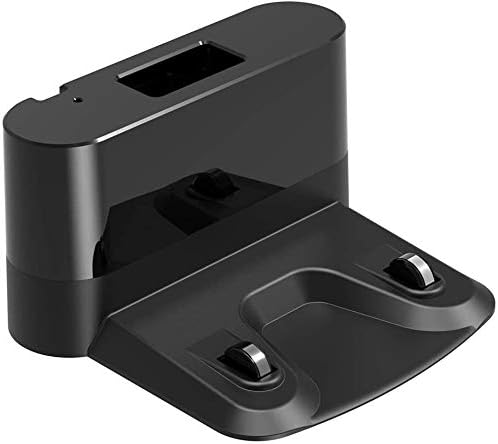
각진 view of the black Coredy Replacement Charging Dock Station, showing its compact design and charging contacts.
5. 운영
The Coredy robot vacuum cleaner will automatically return to the charging dock when its battery is low or when a cleaning cycle is complete. Ensure the charging dock remains powered on and unobstructed for seamless operation.
- 수동 도킹: If needed, you can manually place the robot vacuum onto the charging dock, aligning its charging contacts with those on the dock.
- 충전 표시기: Refer to your specific Coredy robot vacuum cleaner's manual for details on its charging indicator lights. Typically, a light on the robot will change to indicate charging status.
6. 유지관리
To ensure optimal performance and longevity of your charging dock:
- 청소: Periodically wipe the charging contacts on the dock and the robot vacuum with a clean, dry cloth to remove any dust or debris that may interfere with charging.
- 저장: If storing the charging dock for an extended period, unplug it from the power outlet and store it in a cool, dry place.
7. 문제 해결
If your robot vacuum is not charging or docking correctly, consider the following:
- 전원 연결: Ensure the charging dock's power adapter is securely plugged into both the dock and a working wall outlet.
- 장애물: Check for any objects blocking the path to the charging dock or the dock itself.
- 충전 연락처: Clean the charging contacts on both the dock and the robot vacuum.
- 호환성: Verify that your robot vacuum model is compatible with this charging dock.
- 로봇 배터리: Consult your robot vacuum's manual for battery-related troubleshooting.
8. 사양
| 상표 | 코레디 |
| 호환 모델 | R300, R380, R400, R550, R650, R580, R750, G800, G850 Robot Vacuum Cleaners |
| 포함된 구성 요소 | Charging Dock (Power Adapter Sold Separately) |
| 품목 무게 | 8.8 온스 |
| 패키지 크기 | 9.69 x 8.62 x 4.45 인치 |
9. 보증 및 지원
For warranty information or technical support, please refer to the documentation included with your original Coredy robot vacuum cleaner or visit the official Coredy web사이트. 보증 청구를 위해 구매 증빙 자료로 구매 영수증을 보관하세요.