
1. 제품 오버view
The KUIDAMOS DSO FNIRSI PRO is a portable digital oscilloscope designed for various measurement tasks. It features a 2.4-inch LCD display, a real-time sampling rate of up to 20MS/s, and an analog bandwidth of 5MHz. This device is equipped with a built-in 1200mAh rechargeable lithium battery, offering approximately 3 hours of continuous operation. It supports waveform storage and management, making it suitable for both maintenance and research and development applications.
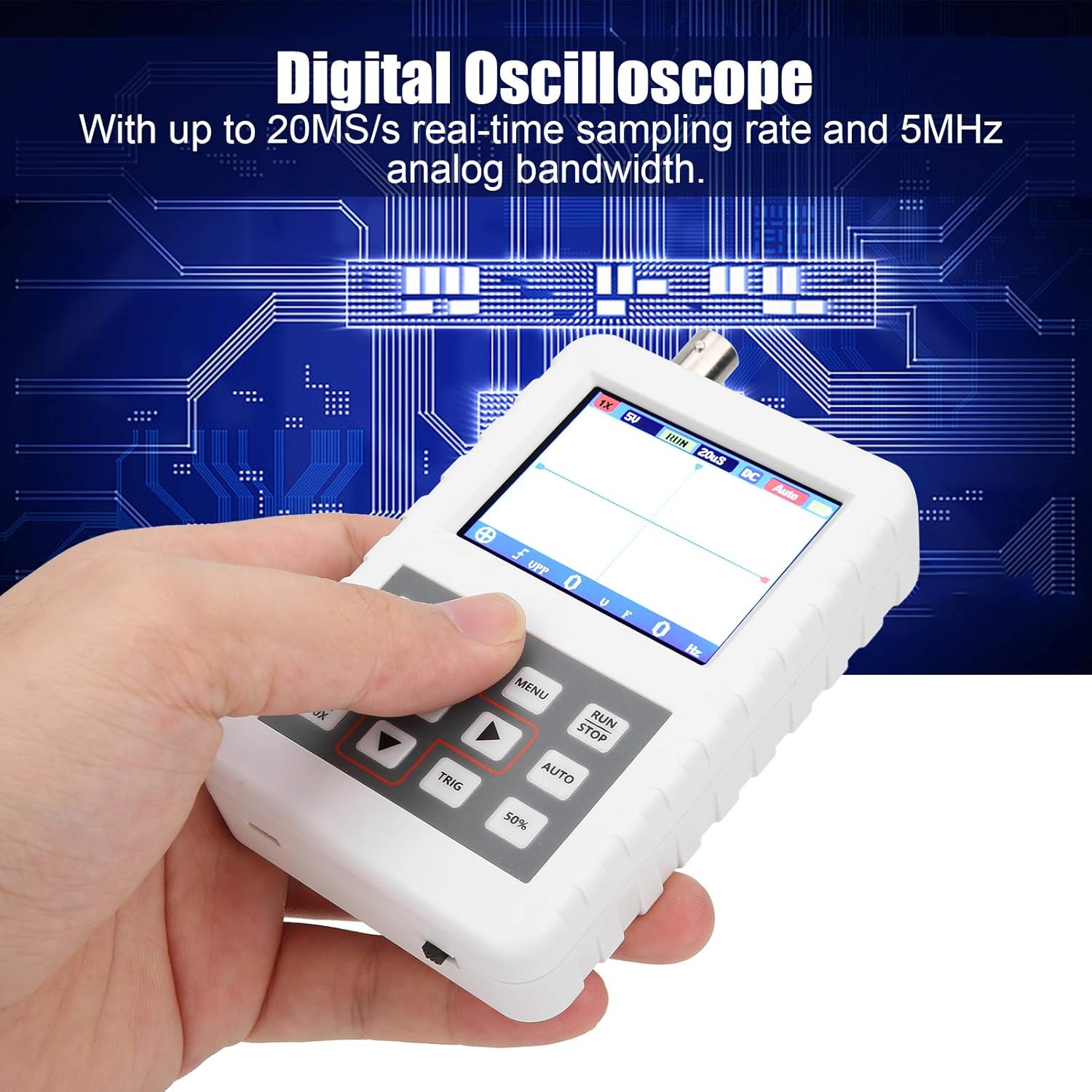
Image 1.1: The DSO FNIRSI PRO Digital Oscilloscope, highlighting its 20MS/s sampling rate and 5MHz analog bandwidth.

Image 1.2: The oscilloscope's 2.4-inch HD LCD screen with 320 x 240 resolution for clear waveform display.

이미지 1.3: 앞면과 뒷면 views of the DSO FNIRSI PRO, illustrating its physical layout.
2. 패키지 내용
아래 나열된 모든 품목이 패키지에 포함되어 있는지 확인하세요.
- 1 x DSO FNIRSI PRO Digital Oscilloscope
- 1 x Matching Probe
- 1 x USB Data Line
- 1 x 사용자 매뉴얼(이 문서)
3. 초기 설정
3.1 장치 충전
Before first use, fully charge the oscilloscope. Connect the provided USB data line to the device's charging port and to a 5V/1A, 2A, 3A, or 4A USB power adapter. The built-in 1200mAh lithium battery can be charged continuously for approximately 3 hours.
3.2 프로브 연결
Connect the matching probe to the BNC connector on the top of the oscilloscope. Ensure a secure connection by twisting the probe connector clockwise until it locks into place.
3.3 전원 켜기/끄기
To power on the device, press and hold the power button (usually located on the side or bottom) for a few seconds until the screen illuminates. To power off, press and hold the power button again until the device shuts down.
4. 사용 설명서
4.1 제어 및 인터페이스
The oscilloscope features a user-friendly interface with several buttons for navigation and function control.

Image 4.1: Operating the DSO FNIRSI PRO, showing the placement of control buttons.
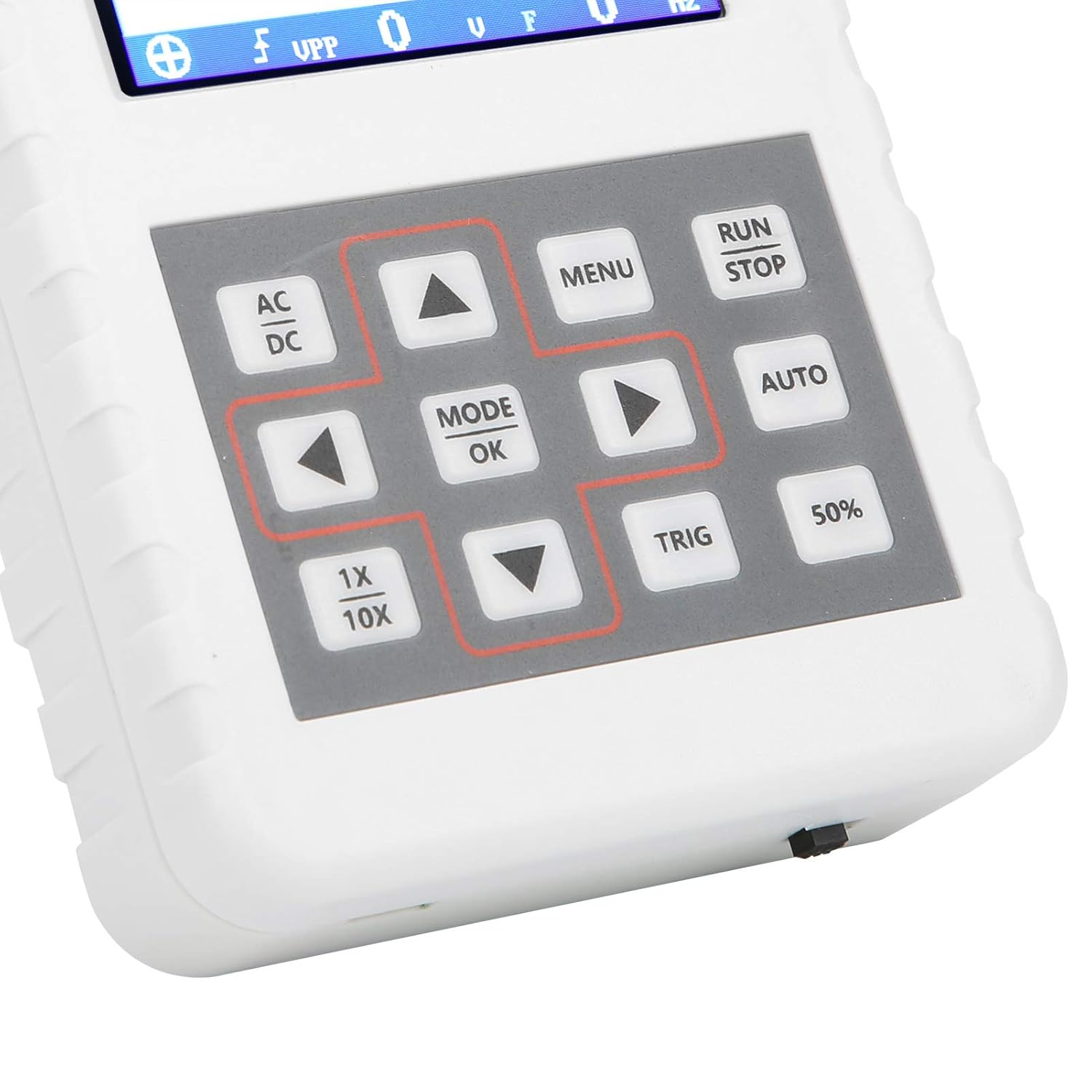
이미지 4.2: 상세 view of the oscilloscope's control panel.
- 메뉴: 설정 및 기능의 메인 메뉴에 접근합니다.
- 실행/정지: 파형 수집을 시작하거나 일시 중지합니다.
- 자동 : 파형 표시를 최적화하기 위해 설정을 자동으로 조정합니다.
- 삼각: Adjusts trigger level.
- 50%: Sets the trigger level to 50% of the waveform amp위도.
- 교류/직류: Toggles between AC and DC coupling modes.
- 1X/10X: Sets the oscilloscope's input attenuation to match the probe's setting.
- MODE/OK: Confirms selections or changes modes.
- 화살표 버튼(위, 아래, 왼쪽, 오른쪽): 메뉴를 탐색하고 매개변수를 조정하세요.
4.2 Probe Attenuation Settings
It is critical to match the probe's attenuation setting with the oscilloscope's input setting to ensure accurate measurements.
- 을 위한 1X measurement (0-40V): Set both the physical switch on the probe and the 1배/10배 button on the oscilloscope to the 1X 위치.
- 을 위한 10X measurement (40-800V): Set both the physical switch on the probe and the 1배/10배 button on the oscilloscope to the 10X 위치.
4.3 Measurement Modes and Triggering
The oscilloscope supports various trigger modes to stabilize waveform display:
- 하나의: Captures a single waveform event and then stops.
- 정상: Captures a waveform only when a trigger condition is met.
- 자동: Continuously acquires waveforms, even without a trigger, but will trigger if a signal is present.
사용하세요 삼각 button and arrow keys to adjust the trigger level, which determines the voltage point at which the oscilloscope begins to acquire data.
4.4 Waveform Storage and Management
The device includes 16MB of built-in storage, capable of storing up to 500 waveform images. Use the file manager function to browse, view, and manage saved waveforms. This includes viewing detailed information, flipping through images, and deleting unwanted files.

이미지 4.3: Examples of sine wave measurements at various frequencies.

이미지 4.4: Examples of square, triangular, and sawtooth wave measurements.
5. 관리 및 유지 보수
5.1 청소
부드럽고 마른 천으로 기기를 닦으십시오. 연마성 세척제나 용제를 사용하지 마십시오. 기기가 손상될 수 있습니다.asin화면 또는 플러그를 뽑으십시오. 청소하기 전에 기기의 전원이 꺼져 있고 모든 전원 공급 장치에서 분리되어 있는지 확인하십시오.
5.2 배터리 관리
배터리 수명을 연장하려면 배터리를 자주 완전히 방전시키지 마십시오. 기기를 장기간 보관할 경우, 배터리를 약 50% 정도 충전해 두고 몇 달에 한 번씩 완전히 충전하십시오.
5.3 보관
Store the oscilloscope in a cool, dry place, away from direct sunlight, extreme temperatures, and high humidity. Keep it protected from dust and physical impact.
6. 문제 해결
- Issue: Abnormal measured data.
해결책: Check the probe's attenuation switch (1X or 10X) and ensure it matches the setting on the oscilloscope (using the 1배/10배 button). If the probe is set to 10X and the oscilloscope is set to 1X, the device will not be damaged, but the data displayed will be incorrect. - 문제: 기기가 켜지지 않습니다.
해결책: Ensure the battery is sufficiently charged. Connect the device to a power source using the USB data line and allow it to charge for at least 30 minutes before attempting to power it on again. - Issue: Screen is blank or frozen.
해결책: Try performing a soft reset by pressing and holding the power button for an extended period (e.g., 10-15 seconds) until the device powers off, then power it back on. If the issue persists, ensure the battery is charged.
7. 기술 사양
| 특징 | 사양 |
|---|---|
| 제품 모델 | DSO FNIRSI PRO |
| 제품 소재 | ABS |
| 채널 수 | 1 |
| 화면 크기 | 약 6.1cm / 2.4인치 |
| 화면 해상도 | 320 x 240 |
| 디스플레이 유형 | LCD 화면 |
| 아날로그 대역폭 | 5MHz |
| 최대 Samp링율 | 20MSps |
| 트리거 모드 | 싱글/일반/자동 |
| 파형 저장 | 16MB (up to 500 waveform pictures) |
| 내장 배터리 | 리튬 배터리 1200mAh |
| 대기 시간 | 3시간 |
| 충전 입력 | 5V/1A/2A/3A/4A |
| 제조업체 | KUIDAMOS |
| 원산지 | 미국 |
| 품목 부품 번호 | KUIDAMOStgaix9hwck |
8. 보증 및 고객 지원
보증 정보, 기술 지원 또는 서비스 문의는 구매 시 제공된 문서를 참조하거나 판매자에게 직접 문의하십시오. 보증 청구를 위해서는 구매 영수증을 증빙 자료로 보관하십시오.