
SIMREX X900
SIMREX X900 드론 사용자 설명서
Optical Flow Positioning RC Quadcopter with 1080P HD Camera
소개
구매해주셔서 감사합니다asing the SIMREX X900 Drone. This quadcopter features Optical Flow Positioning for stable flight, a 1080P HD camera for clear aerial photography and video recording, Altitude Hold for easy control, and Headless Mode for simplified navigation. Its foldable design makes it highly portable. Please read this manual thoroughly before operating the drone to ensure safe and optimal performance.

Figure 1: SIMREX X900 Drone with controller and smartphone.
This image displays the SIMREX X900 drone in its unfolded state, alongside its remote controller and a smartphone mounted on the controller, showing the live video feed from the drone's camera. The drone is red and black with four propellers.
패키지 내용
- SIMREX X900 RC Quadcopter
- 리모컨
- Rechargeable Drone Battery (1 included)
- USB 충전 케이블
- 예비 프로펠러
- 드라이버
- 사용자 설명서
설치 가이드
1. 드론 펼치기
Gently unfold the drone arms until they lock into position. Ensure all four arms are fully extended before flight.
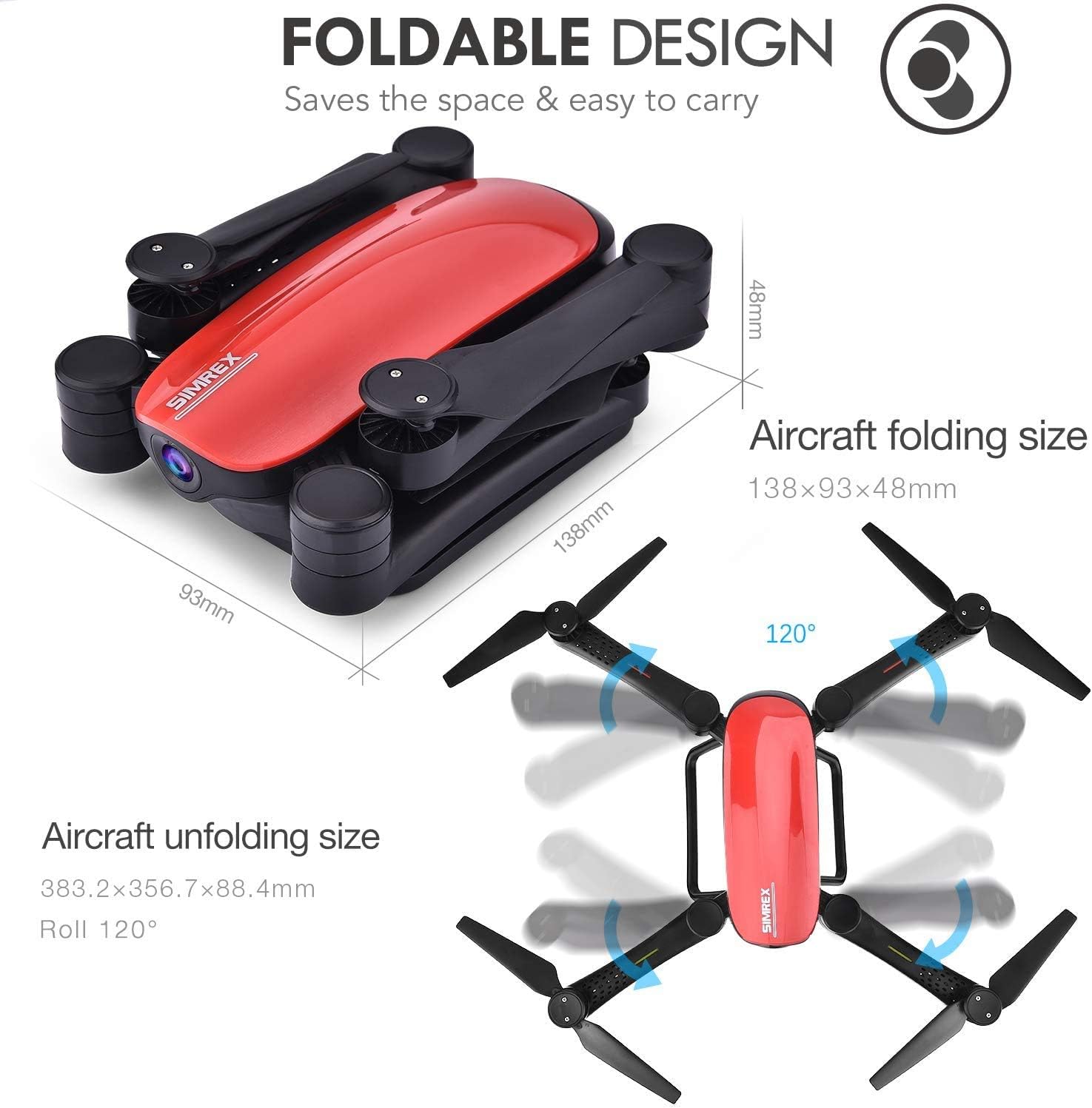
Figure 2: Foldable design and dimensions of the X900 drone.
This image illustrates the compact folded size (138x93x48mm) and the larger unfolded size (383.2x356.7x88.4mm) of the SIMREX X900 drone, highlighting its portability and ease of storage.
2. 배터리 설치 및 충전
- Insert the fully charged drone battery into the battery compartment on the rear of the drone until it clicks into place.
- For charging, connect the USB charging cable to the drone battery and a USB power source (e.g., computer USB port, USB wall adapter). The charging indicator light will show charging status.
- Install 3 x AAA batteries (not included) into the remote controller, observing correct polarity.
3. 프로펠러 점검
Ensure all propellers are securely attached and free from damage. Replace any damaged propellers with the provided spares using the screwdriver.
4. 앱 다운로드 및 연결
Download the official SIMREX drone application from your smartphone's app store (iOS/Android compatible). Turn on the drone and connect your smartphone to the drone's Wi-Fi network (usually named "SIMREX-XXXX"). Open the app to view the live video feed and access advanced controls.

Figure 3: Control options for the X900 drone.
This image illustrates two methods of controlling the drone: direct control via a smartphone connected to the drone's WiFi, or using the included transmitter with a smartphone mounted as a monitor for FPV (First Person View).
작동 지침
1. 드론과 컨트롤러 페어링
- 드론을 평평하고 평평한 표면에 놓습니다.
- 드론을 켜세요. 표시등이 깜빡일 겁니다.
- 리모콘을 켭니다.
- Push the left joystick (throttle) all the way up, then all the way down. The drone lights will become solid, indicating successful pairing.
2. 이륙 및 착륙
- 원키 테이크오프: Press the one-key take-off button on the controller. The drone will automatically ascend to a stable height.
- 수동 이륙: Push both joysticks simultaneously to the bottom-outer corners to arm the motors. Then, slowly push the left joystick (throttle) upwards to take off.
- 원키 랜딩: 원터치 착륙 버튼을 누르세요. 드론이 자동으로 하강하여 착륙합니다.
- 수동 착륙: Slowly pull the left joystick (throttle) downwards until the drone lands. Once landed, push both joysticks to the bottom-outer corners to stop the motors.
3. 고도 유지 모드
The X900 drone features Altitude Hold, allowing it to maintain a consistent height without continuous throttle input. Once the desired altitude is reached, release the throttle stick, and the drone will hover at that height, making it easier to control and capture stable footage.

Figure 4: Drone utilizing Altitude Hold feature.
This image depicts the SIMREX X900 drone maintaining a stable altitude above a grassy field, demonstrating its Altitude Hold capability. A dotted line indicates the drone's fixed height.
4. 헤드리스 모드
In Headless Mode, the drone's orientation is relative to the pilot, regardless of which way the drone's front is facing. This simplifies flight control, especially for beginners, as you don't need to worry about the drone's actual heading.

Figure 5: Drone operating in Headless Mode.
This image shows the SIMREX X900 drone flying over a body of water, with arrows indicating movement directions relative to the pilot, illustrating the concept of Headless Mode where the drone's orientation does not affect control inputs.
5. 3D Flips and Stunts
To perform a 360-degree flip, fly the drone to a sufficient height (at least 3 meters). Press the 3D flip button on the controller, then push the right joystick in the desired direction (forward, backward, left, or right). The drone will perform a flip in that direction.

Figure 6: Drone performing 3D stunts.
This image captures the SIMREX X900 drone in mid-air, depicted in various orientations as it performs a 360-degree flip, showcasing its stunt capability.
6. 중력 센서 모드
Activate Gravity Sensor Mode via the smartphone app or controller. In this mode, you can control the drone's flight by tilting your smartphone or the controller, providing an intuitive and immersive flying experience.

Figure 7: Controlling the drone with Gravity Sensor Mode.
This image shows a hand holding the SIMREX X900 remote controller, with the drone flying in the background, illustrating how tilting the controller (or a smartphone) can control the drone's movement in Gravity Sensor Mode.
유지
- 청소: 드론과 컨트롤러를 닦을 때는 부드럽고 마른 천을 사용하십시오. 물이나 용제는 사용하지 마십시오.
- 프로펠러 관리: Regularly inspect propellers for cracks or damage. Replace any damaged propellers immediately to ensure safe flight.
- 배터리 관리 : Do not overcharge or over-discharge the battery. Store batteries in a cool, dry place when not in use. Remove batteries from the drone and controller during long-term storage.
- 저장: When not in use, store the drone in a cool, dry environment, away from direct sunlight and extreme temperatures. Fold the drone arms for compact storage.
문제 해결
| 문제 | 가능한 원인 | 해결책 |
|---|---|---|
| 드론이 컨트롤러에 응답하지 않습니다. | 페어링되지 않았습니다. 드론 또는 컨트롤러의 배터리가 부족합니다. | 드론과 컨트롤러를 다시 페어링하십시오. 드론 배터리를 충전하고 컨트롤러 배터리를 교체하십시오. |
| 드론이 비행 중 불안정하거나 표류합니다. | Not calibrated; damaged propellers; windy conditions. | Perform gyroscope calibration on a flat surface. Replace damaged propellers. Fly in calm conditions. |
| No live video feed on smartphone. | 드론의 Wi-Fi에 연결되지 않았습니다. 앱이 열려 있지 않거나 충돌했습니다. | Ensure phone is connected to drone's Wi-Fi. Restart the app and drone. |
| 드론은 이륙하지 않습니다. | Motors not armed; low battery. | Arm motors (joysticks to bottom-outer corners). Charge drone battery. |
명세서
| 특징 | 세부 사항 |
|---|---|
| 상표 | 심렉스 |
| 모델명 | X900 |
| 비디오 캡처 해상도 | 1080p (1920x1080 픽셀) |
| 연결 기술 | 와이파이 |
| 배터리 용량 | 1800밀리amp 시간 |
| 제어 유형 | 원격 제어 |
| 미디어 유형 | SD (for recording) |
| 패키지 크기 | 10 x 6.97 x 3.27 인치 |
| 품목 무게 | 1.62파운드 |
보증 및 지원
For warranty information, technical support, or any inquiries regarding your SIMREX X900 drone, please contact SIMREX customer service directly. Refer to the product packaging or the official SIMREX web연락처 정보 사이트.
SIMREX Official Store: Visit the SIMREX Store on Amazon
Ask a question about this manual
Ask about setup, troubleshooting, compatibility, parts, safety, or missing instructions. Manuals+ will review the question and use this page’s manual context to help answer it.