
1. 서론
Thank you for choosing the HOCO E52 Euphony Wireless Bluetooth Audio Receiver. This manual provides essential information for the safe and efficient use of your device. Please read it thoroughly before operation and retain it for future reference.
2. 제품 오버view
The HOCO E52 is a compact wireless Bluetooth audio receiver designed to convert wired audio devices into Bluetooth-enabled ones. It features an integrated microphone for hands-free calls and comes with a pair of in-ear earphones.

Figure 2.1: HOCO E52 Euphony Wireless Bluetooth Audio Receiver with included earphones.
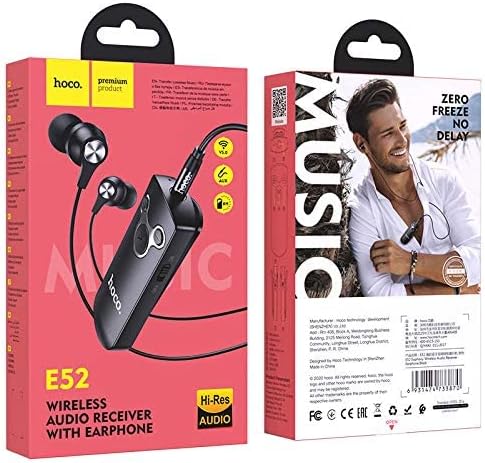
그림 2.2: 상세 view of the HOCO E52 receiver, highlighting the control buttons and power switch.
3. 패키지 내용
패키지에 모든 품목이 들어 있는지 확인하세요.
- HOCO E52 Wireless Bluetooth Audio Receiver
- 인이어 이어폰
- 충전 케이블
- 이어쿠션(다양한 사이즈)
- 보호 케이스
- 사용 설명서 (본 문서)
4. 설정
4.1 장치 충전
Before first use, fully charge the HOCO E52 receiver. Connect the provided charging cable to the micro-USB port on the receiver and the other end to a USB power source (e.g., computer USB port, wall adapter). The indicator light will show charging status and turn off or change color when fully charged.
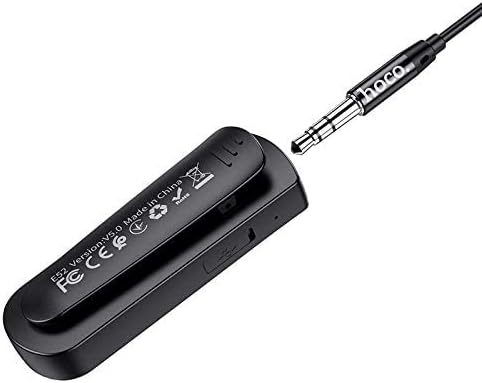
그림 4.1: 후면 view of the HOCO E52 receiver, illustrating the clip and the micro-USB charging port.
4.2 블루투스 페어링
- 전원 켜기: Slide the power switch to the 'ON' position. The indicator light will flash, indicating it is in pairing mode.
- 블루투스 활성화: 스마트폰이나 기타 블루투스 지원 기기에서 블루투스 설정으로 이동하여 블루투스가 켜져 있는지 확인하세요.
- 장치 선택: Look for 'HOCO E52' (or similar) in the list of available devices and select it to connect.
- 확인: Once successfully paired, the indicator light on the E52 will stop flashing and remain solid, or flash slowly. A voice prompt may also confirm the connection.
- 이어폰 연결: Plug the included earphones (or your own 3.5mm wired headphones) into the 3.5mm audio jack on the HOCO E52 receiver.
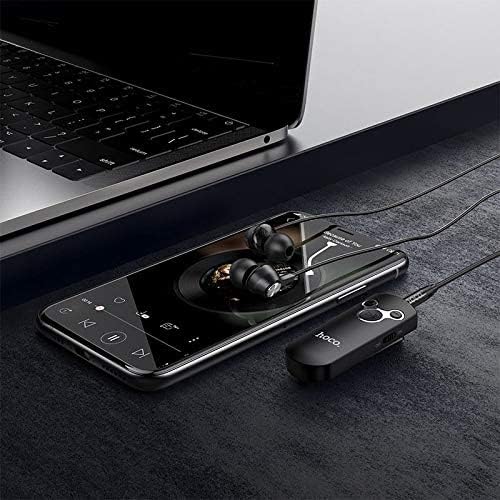
Figure 4.2: The HOCO E52 receiver connected to a smartphone, demonstrating its use with a media device.
5. 사용 설명서
5.1 전원 켜기/끄기
- 전원 켜기: '켜짐/꺼짐' 스위치를 '켜짐' 위치로 밀어주세요.
- 전원 끄기 : Slide the 'ON/OFF' switch to the 'OFF' position.
5.2 음악 재생
- 재생/일시 중지: 중앙 버튼을 누르세요 재생/일시정지 버튼을 한 번 누릅니다.
- 다음 트랙: 를 누르고 계세요 볼륨 업(+) 단추.
- 이전 트랙 : 를 누르고 계세요 볼륨 작게 (-) 단추.
5.3 통화 관리
With the built-in microphone, you can manage calls directly from the receiver.
- 전화 받기/종료: 중앙 버튼을 누르세요 재생/일시정지 button once during an incoming call to answer, or during an active call to end.
- 전화 거부: Press and hold the central 재생/일시정지 button for 2 seconds during an incoming call.
- 마지막 번호 재다이얼: Double-press the central 재생/일시정지 단추.
5.4 볼륨 조절
- 볼륨 증가: 를 누르세요 볼륨 업(+) 단추.
- 볼륨 감소: 를 누르세요 볼륨 작게 (-) 단추.
6. 유지관리
- 기기를 건조한 곳에 보관하세요. 습기나 액체에 노출되지 않도록 하세요.
- 부드럽고 마른 천으로 기기를 닦으세요. 강한 화학 물질이나 연마성 세제는 사용하지 마세요.
- 사용하지 않을 때는 장치를 서늘하고 건조한 곳에 보관하십시오.
- Avoid extreme temperatures, as this can shorten the lifespan of electronic components.
- 기기를 분해하거나 개조하려고 하지 마세요. 그럴 경우 보증이 무효화되고 기기가 손상될 수 있습니다.
7. 문제 해결
| 문제 | 가능한 원인 | 해결책 |
|---|---|---|
| 장치 전원이 켜지지 않음 | 배터리 부족 | 장치를 완전히 충전하십시오. |
| 기기와 페어링할 수 없습니다 | Bluetooth not enabled on source device; E52 not in pairing mode; too far apart | Ensure Bluetooth is on. Power cycle E52 to enter pairing mode. Keep devices within 10 meters. |
| 소리가 나지 않습니다 | Volume too low; earphones not connected properly; incorrect audio output selected on source device | Increase volume on E52 and source device. Re-plug earphones. Check audio output settings on your phone/computer. |
| 배터리 수명이 짧음 | Device not fully charged; high volume usage | Ensure full charge. Reduce volume if possible. |
8. 사양
- 모델: E52
- 블루투스 버전: 5.0
- 연결 기술 : 무선(블루투스)
- Music & Talk Time: 약 6시간
- 마이크로폰: 통합
- 헤드폰 폼 팩터: 귀에
- 색상: 검은색
- 패키지 크기: 18.2 x 10.8 x 3.2cm
- 품목 무게: 72g
- 제조업체: 호코
9. 안전 정보
- 기기를 극한 온도, 직사광선 또는 화기에 노출시키지 마십시오.
- 장치를 떨어뜨리거나 강한 충격을 가하지 마십시오.
- 어린이의 손이 닿지 않는 곳에 보관하세요.
- 해당 지역 규정에 따라 장치와 배터리를 책임감 있게 폐기하세요.
- Do not use the device while driving or in situations where your attention is critical.
10. 보증 및 지원
For warranty information and customer support, please refer to the documentation provided at the point of purchase or contact your retailer. HOCO products typically come with a limited warranty against manufacturing defects.