
Sartorius MCA125S-2S00-I
Sartorius Cubis II Semi-Micro Balance MCA125S-2S00-I User Manual
Model: MCA125S-2S00-I
1. 서론
This manual provides essential instructions for the safe and efficient operation, setup, and maintenance of your Sartorius Cubis II Semi-Micro Balance, model MCA125S-2S00-I. This high-performance laboratory balance is designed for precise weighing applications requiring a 0.01 mg division and a maximum load of 120g. It features a modular design, an MCA Interface, and an integrated Draft Shield I to ensure accurate and repeatable results in R&D and analytical laboratories.
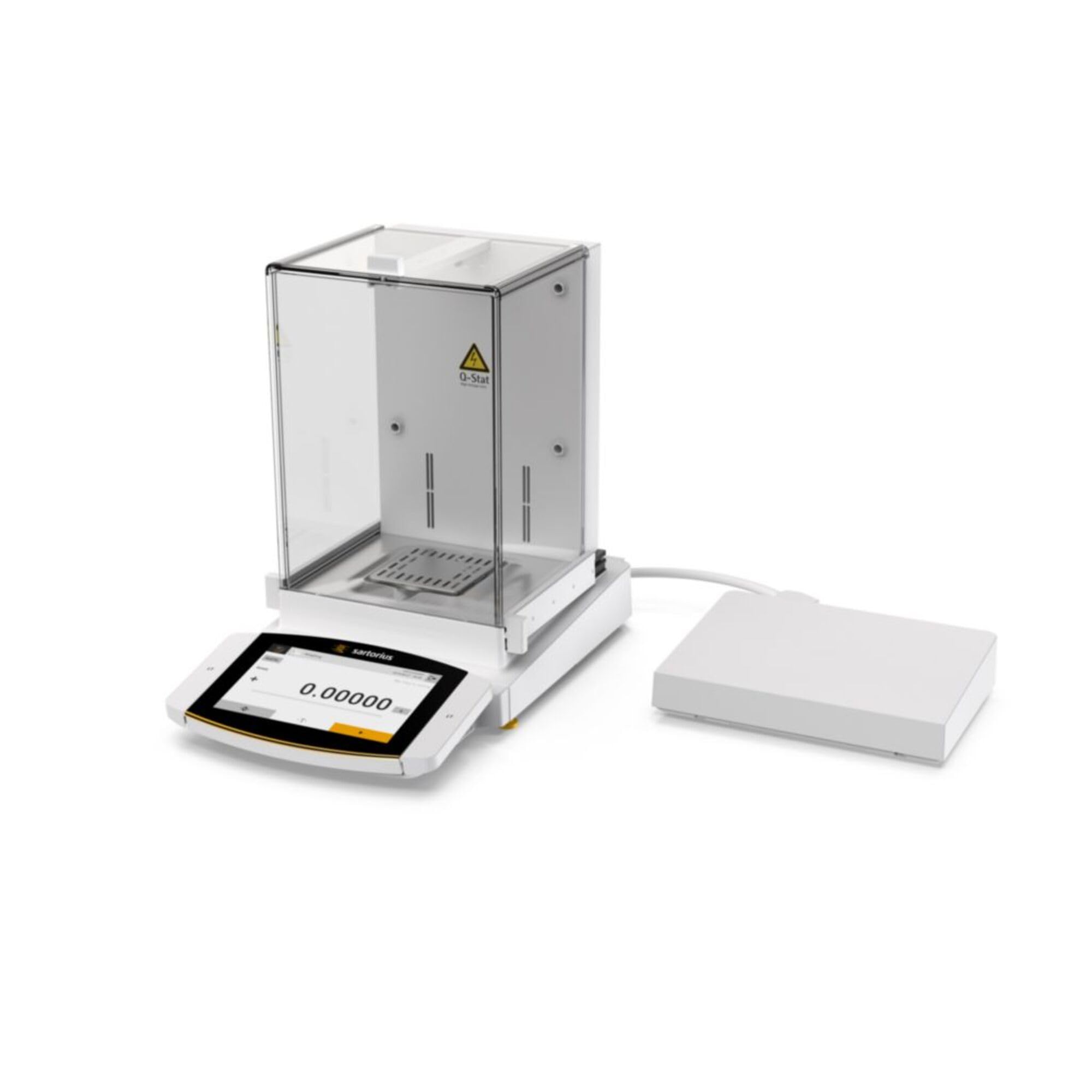
Figure 1: Sartorius Cubis II Semi-Micro Balance MCA125S-2S00-I with Draft Shield I. This image shows the complete balance unit, including the weighing pan and the protective draft shield.
2. 안전 정보
Always observe the following safety precautions to prevent injury and damage to the balance:
- Read this entire manual before operating the balance.
- 저울은 진동, 바람, 극심한 온도 변화가 없는 안정적이고 평평한 환경에서만 작동하십시오.
- Ensure the power supply matches the balance's requirements (100-240V).
- Do not expose the balance to corrosive chemicals or excessive moisture.
- Only use Sartorius-approved accessories and spare parts.
- Disconnect the power cable before cleaning or performing any maintenance.
- 저울을 직접 열거나 수리하려고 하지 마십시오. 자격을 갖춘 전문가에게 서비스를 의뢰하십시오.
3. 포장 풀기 및 초기 검사
Carefully unpack all components and check for any visible damage. Retain the original packaging for future transport or storage.
- Open the shipping carton and remove the balance unit and accessories.
- 포장 목록에 기재된 모든 구성품이 있는지 확인하십시오.
- Inspect the balance for any signs of damage incurred during shipping. If damage is found, contact your supplier immediately.
4. 설정
4.1 배치
Place the balance on a sturdy, level, and vibration-free surface. Avoid locations near air conditioning vents, open windows, or direct sunlight, which can cause temperature fluctuations and affect weighing accuracy.
4.2 드래프트 실드 조립
The Cubis II MCA125S-2S00-I comes with Draft Shield I. Assemble the draft shield components according to the diagrams provided in the separate assembly guide (if applicable) or by carefully following the intuitive design. Ensure all glass panels are securely seated to prevent air currents from affecting measurements.
Figure 2: Illustrative image of the balance with Draft Shield I. This image highlights the transparent draft shield enclosure, crucial for protecting the weighing pan from air currents.
4.3 균형 맞추기
The balance must be perfectly level for accurate measurements. Use the leveling feet located at the base of the balance and the integrated spirit level (bubble level) to adjust until the bubble is centered.
- Locate the spirit level, usually at the front or side of the balance.
- Adjust the two rear leveling feet until the bubble is centered in the spirit level.
- Adjust the front leveling foot (if present) to fine-tune the level.
4.4 전원 연결
Connect the power adapter to the balance and then plug it into a suitable electrical outlet (100-240V AC). Allow the balance to warm up for at least 30 minutes after connecting power before performing any measurements to ensure optimal stability.
5. 사용 설명서
5.1 켜기/끄기
를 누르세요 켜짐/꺼짐 button (often indicated by a circle with a vertical line) to power on the balance. To turn off, press and hold the same button until the display shuts down.
5.2 기본 계량 절차
- Ensure the weighing pan is clean and empty.
- 방풍문을 닫으세요.
- 를 누르세요 살갈퀴 or 영 디스플레이를 0으로 설정하는 버튼입니다.
- 무게를 <binary data, 8 bytes>할 물건을 저울 접시 중앙에 조심스럽게 올려놓으십시오.
- 방풍문을 닫으세요.
- Wait for the stability indicator (usually a circle or asterisk) to appear on the display, indicating a stable reading.
- Read the weight displayed in milligrams (mg).
- 저울 접시에서 물건을 꺼내세요.
5.3 Tare 기능 사용
The tare function allows you to weigh the net weight of a substance by subtracting the weight of its container.
- 빈 용기를 저울 접시 위에 올려놓으세요.
- 방풍문을 닫으세요.
- 를 누르세요 살갈퀴 button. The display will show zero.
- 측정할 물질을 용기에 넣으세요.
- Close the draft shield doors and wait for a stable reading. The displayed value is the net weight of the substance.
5.4 MCA Interface
The MCA Interface provides advanced control and data management capabilities. Refer to the separate MCA Interface user guide for detailed instructions on navigating menus, configuring settings, and connecting to external devices or software. This interface allows for customization of weighing applications, data logging, and compliance features.
6. 교정
Regular calibration is crucial for maintaining the accuracy of your balance. The Cubis II balance may feature internal calibration (isoCAL) or require external calibration using certified weights.
6.1 Internal Calibration (isoCAL)
If your balance is equipped with isoCAL, it will perform automatic internal calibration at set intervals or when temperature changes occur. You can also initiate it manually via the menu. Consult the MCA Interface user guide for specific steps.
6.2 외부 교정
For external calibration, you will need certified calibration weights appropriate for the balance's capacity and readability. The procedure typically involves:
- Accessing the calibration menu on the MCA Interface.
- Following the on-screen prompts to place and remove the specified calibration weights.
- Confirming the calibration process.
Always use certified weights and ensure they are clean and handled with gloves to avoid contamination.
7. 유지관리
Proper maintenance ensures the longevity and accuracy of your balance.
7.1 청소
- 청소하기 전에 항상 밸런스 장치의 전원을 차단하십시오.
- 부드럽고 보풀이 없는 천을 사용하십시오. dampened with a mild cleaning agent (e.g., isopropyl alcohol or a mild soap solution) to clean the exterior surfaces.
- Remove the weighing pan and draft shield components for separate cleaning. Wash them with mild detergent and rinse thoroughly. Ensure they are completely dry before reassembling.
- Do not use abrasive cleaners, strong solvents, or immerse the balance in water.
- Avoid spraying cleaning agents directly onto the balance; apply them to the cloth first.
7.2 환경 조건
Maintain a stable environment. Avoid rapid temperature changes, high humidity, and strong air currents. Store the balance in a clean, dry place when not in use.
8. 문제 해결
This section addresses common issues you might encounter. For problems not listed here, contact Sartorius customer support.
| 문제 | 가능한 원인 | 해결책 |
|---|---|---|
| 불안정한 판독 | Drafts, vibrations, unstable surface, temperature fluctuations, dirty weighing pan. | Ensure draft shield is closed. Relocate balance to a stable, vibration-free area. Check leveling. Allow balance to acclimatize. Clean weighing pan. |
| 밸런스 기능이 켜지지 않습니다. | No power supply, faulty power cable/adapter. | Check power cable connection. Verify power outlet. Try a different power adapter if available. |
| 부정확한 판독 | Not calibrated, incorrect leveling, temperature drift, overloading. | Perform calibration. Re-level the balance. Allow warm-up time. Do not exceed 120g max load. |
| 오류 메시지 표시 | Internal fault, overload, communication error. | Refer to the MCA Interface user guide for specific error codes. Turn off and restart the balance. If persistent, contact support. |
9. 사양
Key technical specifications for the Sartorius Cubis II Semi-Micro Balance MCA125S-2S00-I:
- 모델: MCA125S-2S00-I
- 상표: 사르토리우스
- Maximum Load (Maxload): 120g
- Readout Accuracy (Division): 0.01mg
- 인터페이스: MCA Interface
- 드래프트 쉴드: Draft Shield I
- 전원 공급 장치: 100-240V
- 포함된 구성 요소: 균형
- 폼 팩터: 미니
10. 보증 및 지원
For detailed warranty information, please refer to the warranty card included with your product or visit the official Sartorius website. In case of technical issues, service requirements, or questions not covered in this manual, please contact your local Sartorius representative or authorized service center. Provide your model number (MCA125S-2S00-I) and serial number when requesting support.
Sartorius Contact Information: 참고해주세요 www.sartorius.com/en/global-contacts 지역 연락처는
Ask a question about this manual
Ask about setup, troubleshooting, compatibility, parts, safety, or missing instructions. Manuals+ will review the question and use this page’s manual context to help answer it.