
소개
This manual provides essential information for setting up, operating, maintaining, and troubleshooting your ASUS ZenBook Duo 14 UX482 laptop. Please read this guide thoroughly to ensure proper use and to maximize the performance and longevity of your device.
상자 안에 무엇이 들어있나요?
Upon unboxing your ASUS ZenBook Duo 14 UX482, verify that all the following items are included:
- ASUS ZenBook Duo 14 UX482EA-DS71T Laptop
- 노트북 슬리브
- 노트북 스탠드
- 첨필
- 전원 어댑터 및 코드
- 사용자 가이드 (이 문서)
- 보증 카드

이미지: 앞면 view of the ASUS ZenBook Duo 14 UX482 laptop, showcasing its dual-screen design with the main 14-inch display and the secondary ScreenPad Plus.
설정
1. 초기 전원 켜기
- 전원 어댑터를 노트북의 전원 포트에 연결한 다음 벽면 콘센트에 연결합니다.
- Open the laptop lid. The ScreenPad Plus will automatically tilt for ergonomic view주고받음.
- 일반적으로 키보드 데크에 있는 전원 버튼을 눌러 노트북을 켭니다.
- 화면의 지시에 따라 Windows 10 Home 설치 과정을 완료하십시오.

이미지: 측면 view of the ASUS ZenBook Duo 14 UX482, illustrating the tilted ScreenPad Plus for improved ergonomics and airflow.
2. 주변기기 연결하기
Your ZenBook Duo 14 UX482 features various ports for connecting external devices:
- USB 3.0 포트 : 표준 USB 장치용.
- USB-C(썬더볼트) 포트: For high-speed data transfer, display output, and charging.
- HDMI 포트 : 외부 디스플레이나 프로젝터에 연결합니다.
- 오디오 잭 : 헤드폰이나 외부 스피커용.

Image: Left side of the ASUS ZenBook Duo 14 UX482, displaying the various input/output ports available for connectivity.
Operating Your ZenBook Duo 14
Main Display and ScreenPad Plus
The ZenBook Duo 14 features a 14-inch Full HD NanoEdge touchscreen as its main display and a 12.6-inch tilting matte touchscreen, the ScreenPad Plus, as a secondary display. These two screens work together to enhance multitasking and productivity.
- Extending Display: Drag windows or applications between the main display and ScreenPad Plus.
- 앱 전환기: Use the built-in ScreenPad Plus controls to quickly move applications between screens.
- 태스크 그룹: Create groups of applications to launch simultaneously across both displays for specific workflows.
- 필적: Utilize the ScreenPad Plus for intuitive text input with the included stylus.
- 바로 가기 키: Automate complex keyboard sequences with a single tap on the ScreenPad Plus.
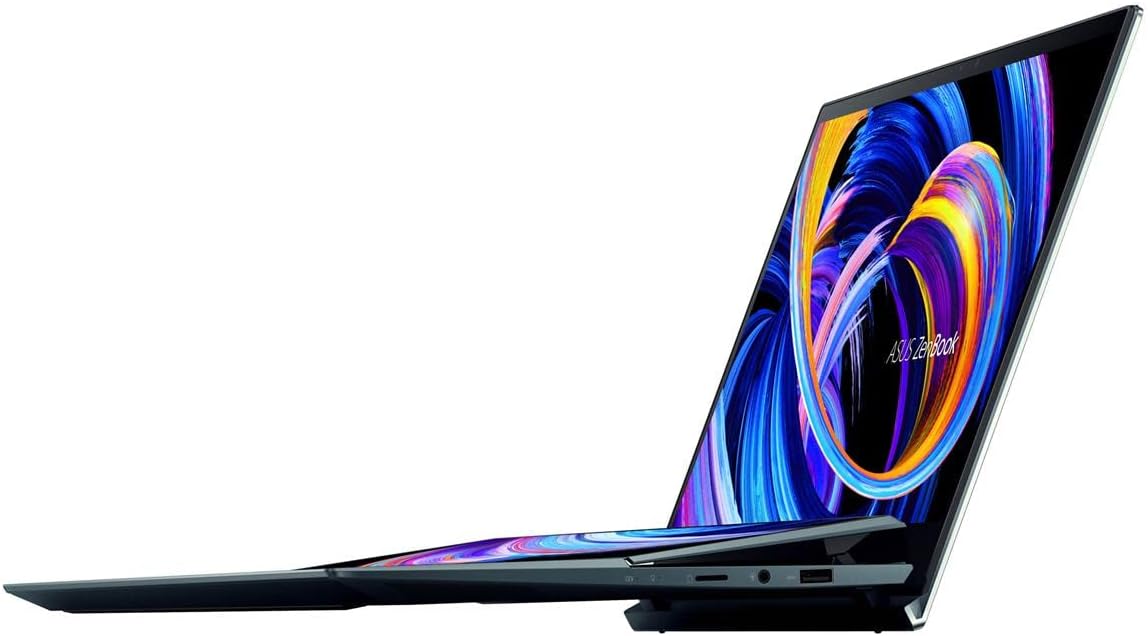
Image: The ASUS ZenBook Duo 14 UX482 with its ScreenPad Plus displaying multiple applications, demonstrating its multitasking capabilities.
키보드 및 트랙패드
The laptop features a full-size backlit keyboard and a precision trackpad located on the right side of the keyboard deck. The unique placement of the trackpad is designed to accommodate the ScreenPad Plus. An included stylus can be used for precise input on both touchscreens.
Intel Evo Platform Features
Your ZenBook Duo 14 is built on the Intel Evo Platform, offering a balance of performance, responsiveness, and battery life. Key benefits include:
- Fast wake from sleep.
- Long-lasting battery life (up to 10.5 hours average).
- Responsive performance with the 11th Gen Intel Core i7 processor and Intel Iris Xe graphics.
- Advanced connectivity with 802.11ax (Wi-Fi 6) and Bluetooth.
유지
청소 및 관리
- Use a soft, lint-free cloth to clean the screens and chassis. Avoid abrasive materials.
- 완고한 얼룩의 경우 가볍게 damp천에 물이나 화면에 안전한 세척액을 묻혀 닦으세요.
- Do not spray cleaners directly onto the laptop.
- Keep the laptop away from extreme temperatures, direct sunlight, and liquids.
배터리 관리
- 배터리 수명을 연장하려면 배터리를 자주 완전히 방전하지 마세요.
- 장시간 사용하지 않을 경우 노트북을 서늘하고 건조한 곳에 보관하세요.
- 반드시 정품 ASUS 전원 어댑터만 사용하십시오.
소프트웨어 업데이트
Regularly update your Windows operating system and ASUS drivers to ensure optimal performance, security, and compatibility. Windows updates can be managed through the Windows Settings, and ASUS updates can be found via the MyASUS application or the official ASUS support web대지.
문제 해결
This section addresses common issues you might encounter. For more complex problems, refer to the ASUS support web사이트를 방문하거나 고객 서비스에 문의하세요.
- 노트북 전원이 켜지지 않습니다: 전원 어댑터가 제대로 연결되어 있고 배터리가 충분히 충전되어 있는지 확인하세요. 다른 콘센트에 연결해 보세요.
- ScreenPad Plus not responding: Check if the ScreenPad Plus is enabled in the ASUS ScreenXpert software. Restart the laptop.
- Trackpad issues: If the trackpad is unresponsive, ensure drivers are up to date. A system restart can often resolve temporary glitches.
- 외부 디스플레이가 감지되지 않았습니다. Verify the cable connection (HDMI or USB-C). Ensure the external display is powered on and set to the correct input source. Use Windows display settings to detect and configure the display.
- 느린 성능: 불필요한 애플리케이션을 종료하세요. 백그라운드에서 리소스를 많이 사용하는 프로세스가 있는지 확인하세요. 충분한 저장 공간을 확보하세요.
명세서
| 특징 | 세부 사항 |
|---|---|
| 모델명 | ZenBook Duo UX482EA-DS71T |
| 메인 디스플레이 | 14-inch FHD (1920 x 1080) NanoEdge Touch Display |
| 2차 디스플레이 | 12.6-inch Tilting ScreenPad Plus Matte Touchscreen |
| 프로세서 | Intel Core i7-1165G7 (Up to 4.7 GHz, 4 Cores) |
| 제도법 | Intel Iris Xe 그래픽(통합) |
| 숫양 | 8GB LPDDR4X |
| 저장 | 512GB PCIe NVMe M.2 SSD |
| 운영 체제 | Windows 10 Home(Windows 11 출시 시 무료 업그레이드) |
| 무선 연결 | 802.11ax(Wi-Fi 6), 블루투스 |
| 포트 | 1x USB 3.0, USB-C (Thunderbolt), HDMI, Audio-out |
| 배터리 수명 | Approximately 10.5 Hours (Average) |
| 무게 | 3.46파운드 |
| 치수(길이x너비x높이) | 12.76 x 8.74 x 0.68 인치 |
| 색상 | 셀레스티얼 블루 |
보증 및 지원
보증 정보
Your ASUS ZenBook Duo 14 UX482 comes with a limited warranty. Please refer to the included Warranty Card for detailed terms and conditions, including coverage period and service procedures. Keep your proof of purchase for warranty claims.
고객 지원
기술 지원, 드라이버 다운로드 또는 추가 제품 정보는 ASUS 공식 지원 웹사이트를 방문하십시오. web대지:
중요 법적 고지
The Windows 11 upgrade will be delivered to qualifying devices late 2021 into 2022. Timing varies by device. Certain features require additional hardware (see aka.ms/windows11-spec).
제품 비디오
No official seller-created product videos were found with specific URLs and metadata for embedding in this manual. Please refer to the manufacturer's official web이용 가능한 모든 비디오 자료를 찾을 수 있는 사이트입니다.