
1. 서론
Thank you for choosing the Ortizan X10 Wireless Portable Bluetooth Speaker. This manual provides essential information for setting up, operating, and maintaining your speaker to ensure optimal performance and longevity. The Ortizan X10 is designed for robust outdoor and indoor use, featuring IPX7 waterproofing, powerful 24W sound, extended battery life, and dynamic party lights.
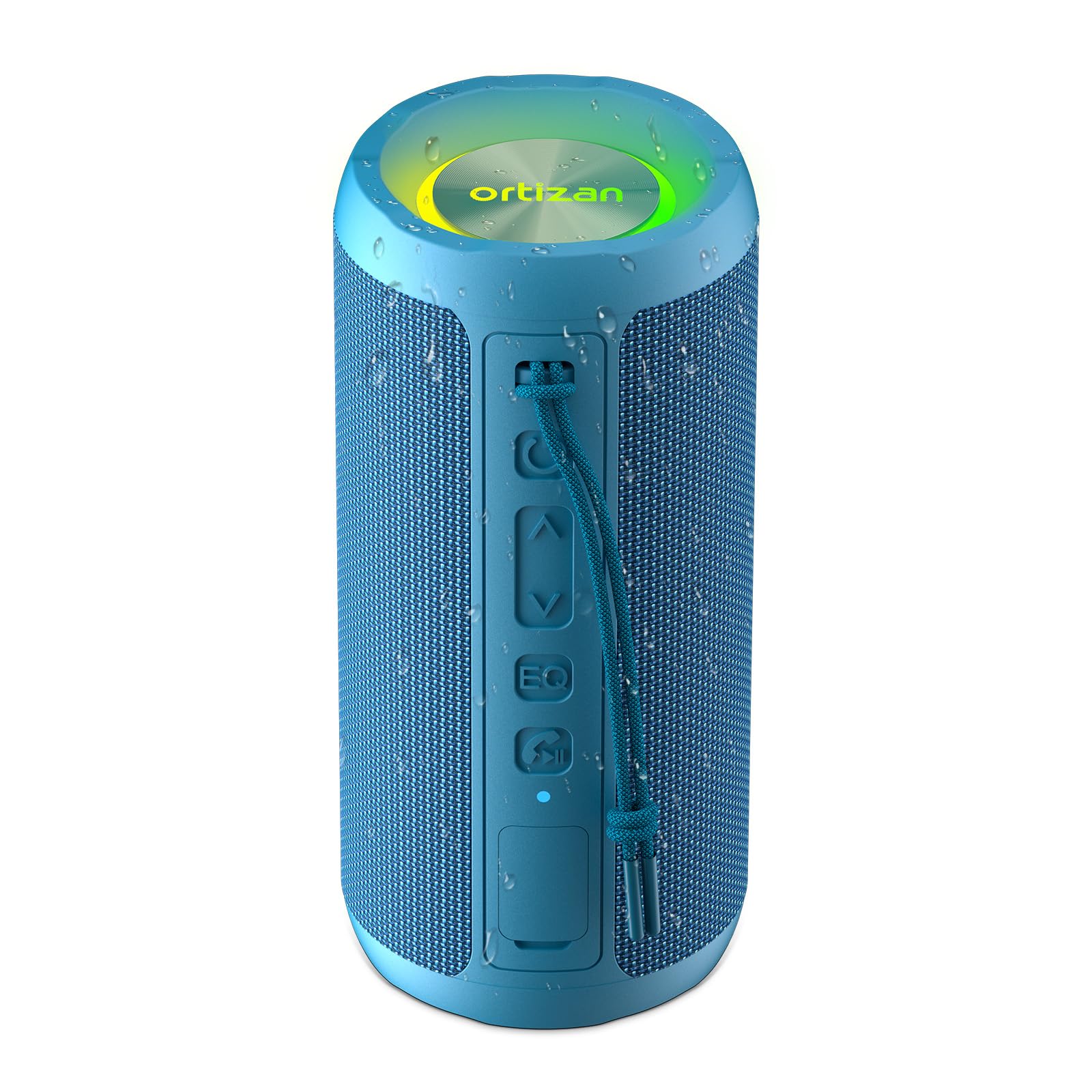
Image 1.1: Ortizan X10 Wireless Portable Bluetooth Speaker in Blue.
2. 패키지 내용
다음 품목이 패키지에 포함되어 있는지 확인하세요.
- 1 x Ortizan X10 Bluetooth Speaker
- 1 x USB-C 충전 케이블
- 1 x AUX 케이블
- 1 x Carabiner Strap
- 1 x 사용자 매뉴얼(이 문서)
3. 제품 오버view
3.1 컨트롤 및 포트
Familiarize yourself with the buttons and ports on your Ortizan X10 speaker:
- 전원 버튼: 전원을 켜거나 끄려면 길게 누릅니다.
- 볼륨 낮추기/이전 트랙 버튼(-): 짧게 누르면 볼륨이 낮아지고, 길게 누르면 이전 트랙으로 돌아갑니다.
- 재생/일시정지 버튼(►): 음악을 재생하거나 일시 정지하려면 누릅니다.
- 볼륨 높이기/다음 트랙 버튼(+): 짧게 누르면 볼륨이 커지고, 길게 누르면 다음 트랙이 됩니다.
- EQ 버튼: Press to cycle through sound equalization modes (Vocal, 3D Deep Bass, Extra Bass). Double-click to turn on/off light effect.
- 조명 모드 버튼(☀): 조명 모드를 변경하려면 누릅니다.
- Call / TWS Button (☎): Press to answer/end calls. Long press to activate TWS pairing.
- USB-C 충전 포트: 스피커를 충전합니다.
- AUX-in 포트: 유선 오디오 연결용.
- TF 카드 슬롯 : For playing music directly from a Micro SD card (up to 32GB).

이미지 3.1: 이상view of speaker controls and connectivity options.
4. 설정
4.1 스피커 충전
Before first use, fully charge the speaker. Connect the provided USB-C cable to the speaker's charging port and a compatible USB power adapter (not included). The charging indicator light will show charging status.
4.2 전원 켜기/끄기
- 전원을 켜려면: Press and hold the Power button (Ⓞ) for 2-3 seconds. You will hear an audible prompt, and the indicator light will flash.
- 전원을 끄려면: Press and hold the Power button (Ⓞ) for 2-3 seconds. You will hear an audible prompt, and the indicator light will turn off.
4.3 블루투스 페어링
To connect your Ortizan X10 speaker to a Bluetooth-enabled device:
- Ensure the speaker is powered on and in Bluetooth pairing mode (the indicator light will be flashing blue).
- 기기(스마트폰, 태블릿 등)에서 Bluetooth를 활성화하고 사용 가능한 기기를 검색하세요.
- 목록에서 "Ortizan X10"을 선택하세요.
- Once connected, the speaker will emit an audible confirmation, and the indicator light will turn solid blue.
4.4 True Wireless Stereo(TWS) 페어링
For an immersive stereo experience, you can pair two Ortizan X10 speakers together:
- Ortizan X10 스피커 두 대 모두 전원이 켜져 있고 다른 블루투스 장치에 연결되어 있지 않은지 확인하십시오.
- On one speaker, long press the Call / TWS button (☎). This speaker will become the primary unit.
- The primary speaker will automatically search for the secondary speaker. Once connected, both speakers will emit an audible confirmation.
- 이제 4.3절에 설명된 대로 블루투스를 통해 기기를 기본 스피커에 연결하세요. 오디오는 두 스피커를 통해 스테레오로 재생됩니다.

Image 4.1: Two Ortizan X10 speakers configured for True Wireless Stereo (TWS) pairing.
5. 사용 설명서
5.1 기본 음악 재생
- 재생/일시 중지: Press the Play/Pause button (►).
- 볼륨 업: 볼륨 높이기 버튼(+)을 짧게 누르세요.
- 볼륨 작게 : 볼륨 낮추기 버튼(-)을 짧게 누르세요.
- 다음 트랙: Long press the Volume Up button (+).
- 이전 트랙 : Long press the Volume Down button (-).
5.2개의 EQ 모드
The Ortizan X10 offers three equalization modes to optimize your listening experience:
- Press the EQ button to cycle through:
- 보컬 모드: Enhances clarity for vocals.
- 3D 딥 베이스 모드: Provides a rich, deep bass experience.
- 엑스트라 베이스 모드: Delivers powerful, boosted bass.

Image 5.1: The EQ button allows switching between different sound modes.
5.3 파티 조명
The speaker features dynamic RGB lights that can sync with your music:
- 조명 모드 변경: Press the Light Mode button (☀) to cycle through various light effects.
- 조명 켜기/끄기: Double-click the EQ button to toggle the light effect on or off.

Image 5.2: The Ortizan X10 features vibrant RGB lighting.
5.4 핸즈프리 통화
Bluetooth로 연결하면 스피커를 사용하여 핸즈프리 통화를 할 수 있습니다.
- 전화 받기: Press the Call / TWS button (☎).
- 통화 종료: Press the Call / TWS button (☎).
- 전화 거부: Long press the Call / TWS button (☎).
5.5 AUX 입력 사용
Connect an audio device directly to the speaker using the provided 3.5mm AUX cable. The speaker will automatically switch to AUX mode.
5.6 Using TF Card
Insert a Micro SD (TF) card (up to 32GB) with MP3 audio files into the TF card slot. The speaker will automatically detect the card and begin playing music.
6. 유지관리
6.1 청소
부드러운 천으로 스피커를 닦고 damp cloth. Do not use harsh chemicals or abrasive cleaners. Ensure all ports are sealed before cleaning with water.
6.2 방수 관리(IPX7)
The Ortizan X10 is IPX7 waterproof, meaning it can be submerged in water up to 1 meter (3.3 feet) for 30 minutes. To maintain its waterproof integrity:
- 스피커를 물에 노출시키기 전에 충전 및 AUX 포트를 덮고 있는 고무 플랩이 단단히 닫혔는지 확인하세요.
- 스피커를 바닷물이나 기타 부식성 액체에 노출시키지 마십시오.
- After exposure to water, especially chlorinated or saltwater, rinse the speaker with fresh water and dry thoroughly before charging or opening the port cover.

Image 6.1: The Ortizan X10 is designed with IPX7 waterproof protection.
6.3 보관
Store the speaker in a cool, dry place away from direct sunlight and extreme temperatures. If storing for an extended period, charge the battery to approximately 50% every few months to preserve battery health.
7. 문제 해결
| 문제 | 가능한 원인 | 해결책 |
|---|---|---|
| 스피커 전원이 켜지지 않습니다 | 배터리 부족 | 스피커를 완전히 충전하세요. |
| 블루투스로 페어링이 불가능합니다 | Speaker not in pairing mode / Device Bluetooth off / Too far from device | Ensure speaker is in pairing mode. Turn on Bluetooth on your device. Move speaker closer to device (within 66ft/20m). |
| 소리가 나지 않습니다 | 볼륨이 너무 작습니다 / 입력 모드가 올바르지 않습니다 / 기기가 재생되지 않습니다 | Increase speaker and device volume. Check if AUX or TF card is inserted. Ensure music is playing on your device. |
| TWS 페어링 실패 | Speakers already connected to other devices / Too far apart | Disconnect both speakers from any other Bluetooth devices. Ensure speakers are close to each other during TWS pairing. |
| 조명이 작동하지 않습니다 | 불이 꺼졌다 | Double-click the EQ button to turn lights on. |
8. 사양
| 특징 | 세부 사항 |
|---|---|
| 모델명 | X10 |
| 상표 | 오르티잔 |
| 스피커 유형 | 집 밖의 |
| 연결 기술 | Bluetooth, Wireless, AUX, TF Card |
| 무선 통신 기술 | 블루투스 5.3 |
| 스피커 최대 출력 전력 | 30와트 (24W RMS) |
| 배터리 용량 | 2600mAh |
| 노는 시간 | 최대 30시간(30% 볼륨) |
| 방수 레벨 | IPX7 방수 |
| 블루투스 범위 | 66피트(20미터) |
| 제품 치수 | 3.11인치 깊이 x 3.11인치 너비 x 6.69인치 높이 |
| 품목 무게 | 0.45킬로그램(15.8온스) |
| 특별 기능 | Bass Boost, AUX, Hi-Res Audio, 3 EQ Modes, TF Card Port, Dual Passive Radiators, Hands-free, True Wireless Stereo, Shockproof, Stereo pairing |
8.1 사운드 기능
The Ortizan X10 features dual neodymium drivers and a bass radiator, delivering 24W RMS power for clear vocals and deep 60Hz bass with minimal distortion.

이미지 8.1: 내부 view highlighting the dual speakers and bass membrane for enhanced sound.
8.2 배터리 수명
Equipped with a 2600mAh battery and smart power management, the speaker provides up to 30 hours of playtime at 30% volume. USB-C fast charging allows use while charging.

Image 8.2: Visual representation of the speaker's 30-hour battery life.
9. 공식 제품 영상
Video 9.1: Official product video demonstrating the Ortizan X10 speaker's features and outdoor use.
10. 보증 및 지원
The Ortizan X10 Wireless Portable Bluetooth Speaker comes with a limited warranty. For detailed warranty information, product support, or technical assistance, please refer to the official Ortizan web해당 사이트를 방문하거나 고객 서비스에 문의하세요. 보증 청구를 위해 구매 영수증을 보관하세요.
제조업체: 오르티잔