
소개
This manual provides detailed instructions for the installation, operation, and maintenance of your EKEN V7 HD 1080P Smart WiFi Video Doorbell. Please read this manual thoroughly before using the product to ensure proper functionality and safety. Keep this manual for future reference.
패키지 내용
아래 나열된 모든 품목이 패키지에 포함되어 있는지 확인하세요. 품목이 누락되었거나 손상된 경우 고객 지원팀에 문의하세요.

Image: The EKEN V7 Video Doorbell, two blue rechargeable batteries, and a dual-slot battery charger. These are the primary components included in the package.
- EKEN V7 HD 1080P Smart WiFi Video Doorbell
- Rechargeable Batteries (2 pcs)
- 배터리 충전기
- 장착 브래킷
- 장착 나사 및 벽 앵커
- 사용 설명서 (본 문서)
제품 끝view
The EKEN V7 Video Doorbell is a smart security device designed to provide real-time video monitoring and two-way audio communication with visitors at your door. It features 1080P Full HD resolution, night vision, and a wide-angle lens for comprehensive coverage.

이미지: 앞면 view of the EKEN V7 Video Doorbell, showing the camera lens, motion sensor, and illuminated doorbell button.
주요 특징:
- 1080P Full HD 비디오: Clear video streaming and recording.
- 166° Wide-angle Lens: 광범위한 분야 view to cover your entryway.
- 야간 투시경: Infrared LEDs for clear visibility in low-light conditions.
- 양방향 오디오 : Speak and listen to visitors remotely via the mobile app.
- PIR 모션 감지: Alerts you to movement at your door.
- 내후성: 다양한 기후 조건을 견딜 수 있도록 설계되었습니다.
- 2.4G WiFi 연결: 원격 접속을 위해 홈 네트워크에 연결됩니다.
- 긴 배터리 수명: Efficient power consumption for extended use.
- 클라우드 스토리지: Optional cloud service for video recording storage.

Image: An infographic highlighting the key features of the EKEN V7 Video Doorbell, such as 1080P Full HD, PIR Motion Detection, Night Vision, 166° Wide-angle Camera Lens, Long Battery Life, and 7 Days Free Cloud Service.

Image: A visual representation comparing the doorbell's view during the day (color) and at night (monochrome infrared), demonstrating the 166-degree wide-angle lens.
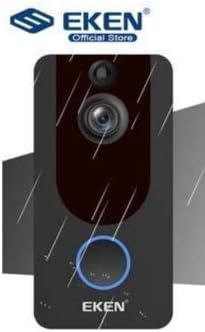
Image: The EKEN V7 Video Doorbell depicted with rain effects, illustrating its weather-resistant design suitable for outdoor installation.
설정
1. 배터리 충전
- Insert the two rechargeable batteries into the provided battery charger.
- 충전기를 전원에 연결합니다.
- Allow the batteries to charge fully before first use. The indicator light on the charger will change when charging is complete.
2. Installing the Doorbell
- 문 가까이에 적절한 위치를 선택하여 시야가 확보되도록 하십시오. view 그리고 와이파이 신호가 좋습니다.
- 벽에 드릴로 뚫을 구멍 위치를 표시하려면 장착 브래킷을 본떠서 사용하세요.
- 필요한 경우 구멍을 뚫고 벽 고정 장치를 삽입합니다.
- 제공된 나사를 사용하여 장착 브래킷을 벽에 고정합니다.
- Insert the charged batteries into the doorbell unit.
- 초인종 본체를 장착 브래킷에 부착하고 딸깍 소리가 나면서 제자리에 단단히 고정되었는지 확인하십시오.
3. Wi-Fi 연결 및 앱 설정
- Download the official EKEN doorbell app from your smartphone's app store (iOS or Android).
- 앱을 열고 계정을 만들거나 로그인하세요.
- Follow the in-app instructions to add your new doorbell device. This typically involves scanning a QR code on the doorbell or manually entering its ID.
- Connect the doorbell to your 2.4GHz Wi-Fi network. Ensure your phone is also connected to the same 2.4GHz network during setup.
- 연결되면 다음을 수행할 수 있습니다. view live video, receive notifications, and adjust settings through the app.
작동 지침
살다 View 및 양방향 오디오
- Open the EKEN app on your smartphone.
- Select your doorbell from the device list to access the live video feed.
- To speak to a visitor, tap the microphone icon in the app. To listen, ensure the speaker icon is enabled.

Image: A user communicating with a delivery person at their door using the EKEN V7 Video Doorbell's two-way audio feature through the mobile application.
동작 감지 알림
- When motion is detected, the doorbell will send a push notification to your smartphone.
- 알림을 탭하여 view 실시간 영상 또는 녹화된 이벤트.
- Adjust motion sensitivity settings within the app to minimize false alerts.
비디오 녹화 및 재생
- The doorbell automatically records video when motion is detected or the doorbell button is pressed.
- Recorded videos are stored in the cloud (subscription may be required after initial free period) or on a local SD card (if supported and installed).
- Access and playback recorded events through the app's history or event log.

Image: The EKEN V7 Video Doorbell shown next to a smartphone displaying a live 1080P Full HD video feed, illustrating remote monitoring capabilities.
유지
- 청소: 카메라 렌즈와 초인종 표면을 부드러운 천으로 살살 닦아주세요.amp 천으로 닦으세요. 연마성 세제나 용제는 사용하지 마세요.
- 배터리 관리: Recharge batteries when the app indicates low power. For optimal performance, consider having a spare set of charged batteries.
- 펌웨어 업데이트: Regularly check the app for available firmware updates for your doorbell. Updates can improve performance and add new features.
- Wi-Fi 연결: Ensure your Wi-Fi router is functioning correctly and the doorbell has a strong signal for uninterrupted operation.
문제 해결
- 도어벨이 Wi-Fi에 연결되지 않음:
- Ensure your Wi-Fi network is 2.4GHz. The doorbell does not support 5GHz networks. Check Wi-Fi password and signal strength. Try resetting the doorbell and your router.
- 동작 감지 알림 없음:
- Verify that motion detection is enabled in the app settings. Adjust sensitivity levels. Ensure the doorbell's view 방해받지 않습니다.
- 영상 화질 불량 또는 렉 현상:
- Check your Wi-Fi signal strength at the doorbell's location. Move the router closer or consider a Wi-Fi extender. Ensure your internet connection is stable.
- 양방향 오디오가 작동하지 않습니다.
- Check microphone and speaker permissions for the app on your smartphone. Ensure the doorbell's microphone and speaker are not obstructed.
- 도어벨이 켜지지 않음:
- Ensure batteries are fully charged and correctly inserted. If using wired power, check connections.
명세서
| 특징 | 세부 사항 |
|---|---|
| 상표 | 에켄 |
| 모델 | V7 |
| 비디오 녹화 해상도 | 1080p 풀 HD |
| 포토 센서 기술 | CMOS |
| 연결 기술 | Wi-Fi(2.4GHz만 해당) |
| 특별 기능 | Night Vision, Two-Way Audio, PIR Motion Detection, Weather Resistant |
| 이미지 안정화 | 아니요 |
| 제조업체 참조 | Ia-112 |
| ASIN | B08PMXWFF3 |
| 첫 번째 가능한 날짜 | 17년 2020월 XNUMX일 |
보증 및 지원
For warranty information and technical support, please refer to the official EKEN web해당 웹사이트를 방문하거나 고객 서비스 센터에 직접 문의하십시오. 구체적인 보증 기간 및 지원 채널에 대한 자세한 정보는 일반적으로 구매 서류 또는 제조업체 웹사이트에 제공됩니다. web대지.
Guaranteed software updates until: Unknown.