
AMPIRE LDS-NBT-CP
AMPIRE LDS-NBT-CP Smartphone Interface User Manual
For BMW NBT Multimedia Systems with CarPlay and Android Auto
1. 서론
본 설명서는 제품의 설치, 작동 및 유지 관리에 대한 자세한 지침을 제공합니다. AMPIRE LDS-NBT-CP Smartphone Interface. This device integrates your smartphone's functionalities, such as Apple CarPlay and Android Auto, directly into your BMW's NBT multimedia system, enhancing your in-car experience with navigation, communication, and entertainment features.
2. 제품 오버view
그만큼 AMPIRE LDS-NBT-CP is a plug-and-play smartphone interface designed for seamless integration with your vehicle's factory multimedia system. It displays content on the original factory monitor and routes audio through the vehicle's AUX input.

이미지 2.1: 앞면 view 의 AMPIRE LDS-NBT-CP Smartphone Interface unit, showing various ports and indicators.
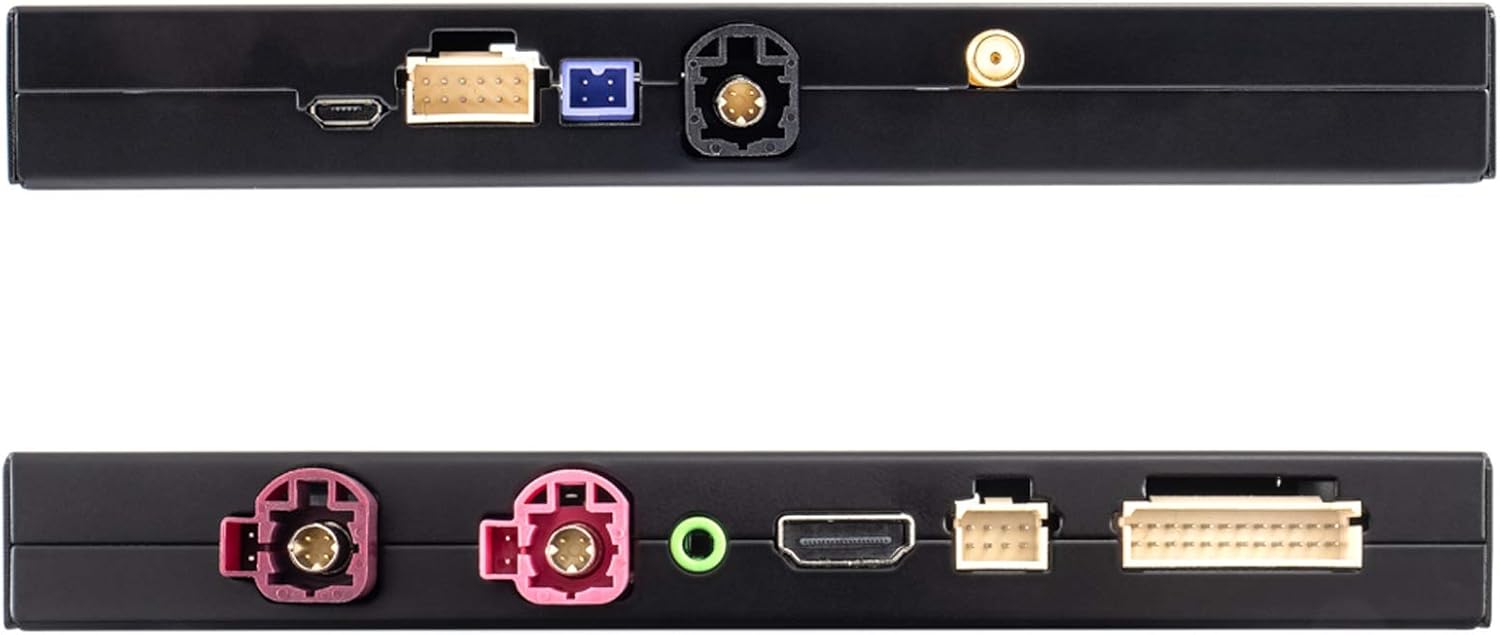
이미지 2.2: 상단 및 하단 views of the interface, highlighting connection ports for USB, WiFi, and other inputs/outputs.
3. 주요 특징
- Full Smartphone Integration: Seamlessly integrates Apple CarPlay and Android Auto into your vehicle's factory system.
- 항해: Utilize navigation applications like Google Maps and Waze directly on your car's display.
- 미디어 재생 : Access music streaming services such as Spotify and Amazon Prime Music.
- 고해상도 디스플레이: Supports up to 1080p HD resolution for video and images.
- 무선 연결 : Features wireless functions via 5.8G WLAN or Bluetooth. CarPlay can also be connected via cable.
- 카메라 입력: Includes inputs for front and rear view cameras (composite video).
- 오디오 처리 : Integrated audio DSP with EQ for enhanced sound quality.
- 소프트웨어 업데이트: Supports software updates via the USB input.
- 제어: Operates using the vehicle's existing buttons and control systems.
- 음성 제어: Siri voice control is available in CarPlay mode via the included microphone.
- 미러링크: Android users can utilize the Mirrorlink function to mirror their smartphone display.
4. 호환성
This interface is compatible with BMW vehicles equipped with the NBT multimedia system. Please verify your vehicle's model and manufacturing date against the list below:
- BMW 1 시리즈: F20/21 (03/2013 - 03/2015)
- BMW 2 시리즈: F22 (11/2013 - 03/2015)
- BMW 3 시리즈: F30/31 (11/2012 - 07/2015), F34 (03/2013 - 07/2015), F80 (03/2014 - 07/2015)
- BMW 4 시리즈: F32 (07/2013 - 07/2015), F33 (11/2013 - 07/2015), F36 (03/2014 - 07/2015)
- BMW 5 시리즈: F07 (07/2012 onwards), F10/11/18 (09/2012 onwards)
- BMW 6 시리즈: F06/12/13 (03/2013 onwards)
- BMW 7 시리즈: F01/02/03 (07/2012 - 06/2015)
- BMW X3: F25 (04/2013 - 03/2016)
- BMW X4: F26 (04/2014 - 03/2016)
- BMW X5: F15 (08/2014 - 07/2016), F85 (12/2014 - 07/2016)
- BMW X6: F16 (08/2014 - 07/2016), F86 (12/2014 - 07/2016)
The interface is designed to work with smartphones for audio and video applications in the car.
5. 패키지 내용
Upon opening the package, ensure all the following components are present and undamaged:

이미지 5.1: 이상view of all items included in the package, including the interface unit, various cables, and accessories.
- AMPIRE LDS-NBT-CP Smartphone Interface Unit
- Wiring Harness Set (Power, Video, USB, etc.)
- External Microphone for Voice Control
- 와이파이 안테나
- AUX 오디오 케이블

Image 5.2: Close-up of the main wiring harness, showing various connectors for integration into the vehicle's system.
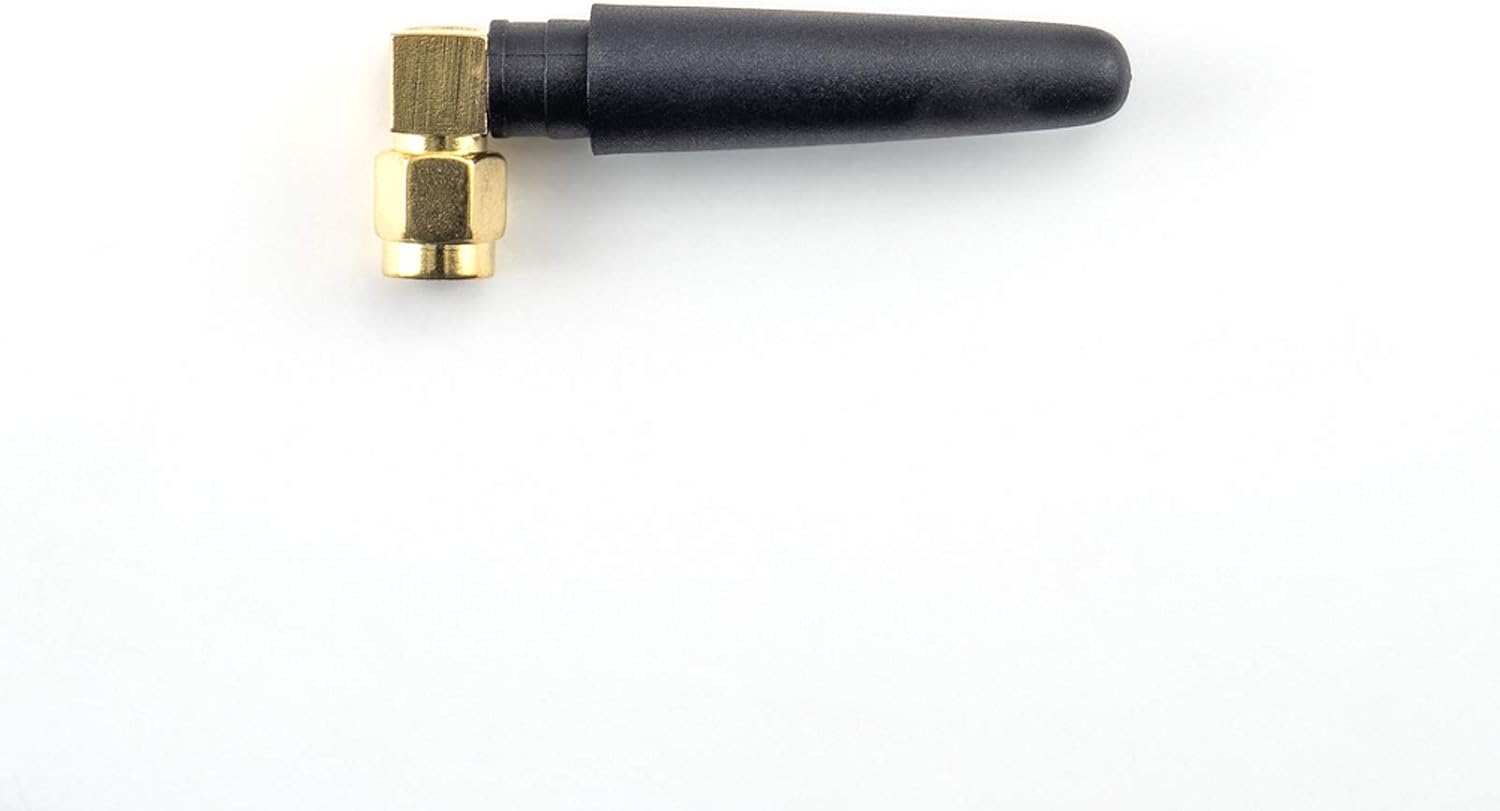
Image 5.3: The compact WiFi antenna, essential for wireless connectivity features.

Image 5.4: The external microphone, used for Siri voice commands and hands-free calling.

Image 5.5: The AUX audio cable, used to route sound from the interface to the vehicle's sound system.
6. 설정 및 설치
그만큼 AMPIRE LDS-NBT-CP Smartphone Interface is designed for integration into your vehicle's existing wiring and multimedia system. Due to the complexity of automotive electronics, professional installation by a qualified technician is highly recommended to ensure correct functionality and to avoid damage to your vehicle or the interface.
6.1. General Installation Steps (Consult a professional for detailed instructions):
- 차량 분해: Carefully remove necessary trim panels and the head unit to access the vehicle's wiring.
- 인터페이스 연결: Connect the main wiring harness from the interface to the vehicle's head unit and power supply. This is typically a plug-and-play process, but specific connections must be identified.
- 디스플레이 연결: Connect the video input/output cables between the interface and the vehicle's display.
- 오디오 연결: Connect the AUX audio cable from the interface to the vehicle's AUX input. Ensure the vehicle's audio source is set to AUX for sound output from the interface.
- 주변기기 연결:
- Connect the external microphone for voice control. Position it optimally for clear audio capture.
- Attach the WiFi antenna for wireless connectivity.
- If installing front or rear cameras, connect them to the designated camera inputs on the interface.
- Connect any USB devices (e.g., for wired CarPlay or software updates) to the USB port.
- 테스트: Before reassembling the vehicle, perform thorough testing of all functions, including CarPlay, Android Auto, audio, and camera inputs.
- 재조립: Once all functions are verified, carefully reassemble the vehicle's trim panels.
Refer to your vehicle's specific service manual or consult a professional installer for precise wiring diagrams and disassembly procedures.
7. 사용 설명서
설치되면 AMPIRE LDS-NBT-CP interface allows you to access smartphone functionalities through your BMW's NBT system.
7.1. Activating the Interface
The interface is typically activated by pressing and holding a specific button on your vehicle's iDrive controller or steering wheel. Consult your installer or vehicle documentation for the exact activation method.
7.2. 스마트폰 연결하기
- 무선 CarPlay/Android Auto:
- 스마트폰의 Bluetooth와 Wi-Fi가 활성화되어 있는지 확인하세요.
- On the interface screen, navigate to the CarPlay or Android Auto option.
- Pair your smartphone with the interface via Bluetooth. Follow the on-screen prompts.
- Once paired, the system will automatically connect via Wi-Fi for wireless CarPlay/Android Auto.
- 유선 CarPlay:
- Connect your iPhone to the interface's USB port using a certified USB cable.
- CarPlay should automatically launch on the vehicle's display.
7.3. CarPlay 및 Android Auto 사용
Once connected, you can control CarPlay or Android Auto using your vehicle's factory controls (iDrive controller, steering wheel buttons). The interface mirrors your smartphone's display, allowing access to:
- 항해: Use Apple Maps, Google Maps, Waze, etc.
- 전화통화: 핸즈프리로 전화를 걸고 받을 수 있습니다.
- 메시징: 음성 명령을 통해 메시지를 보내고 받습니다.
- 음악: Play music from your favorite apps.
- 음성 지원: Use Siri (for CarPlay) or Google Assistant (for Android Auto) via the external microphone.
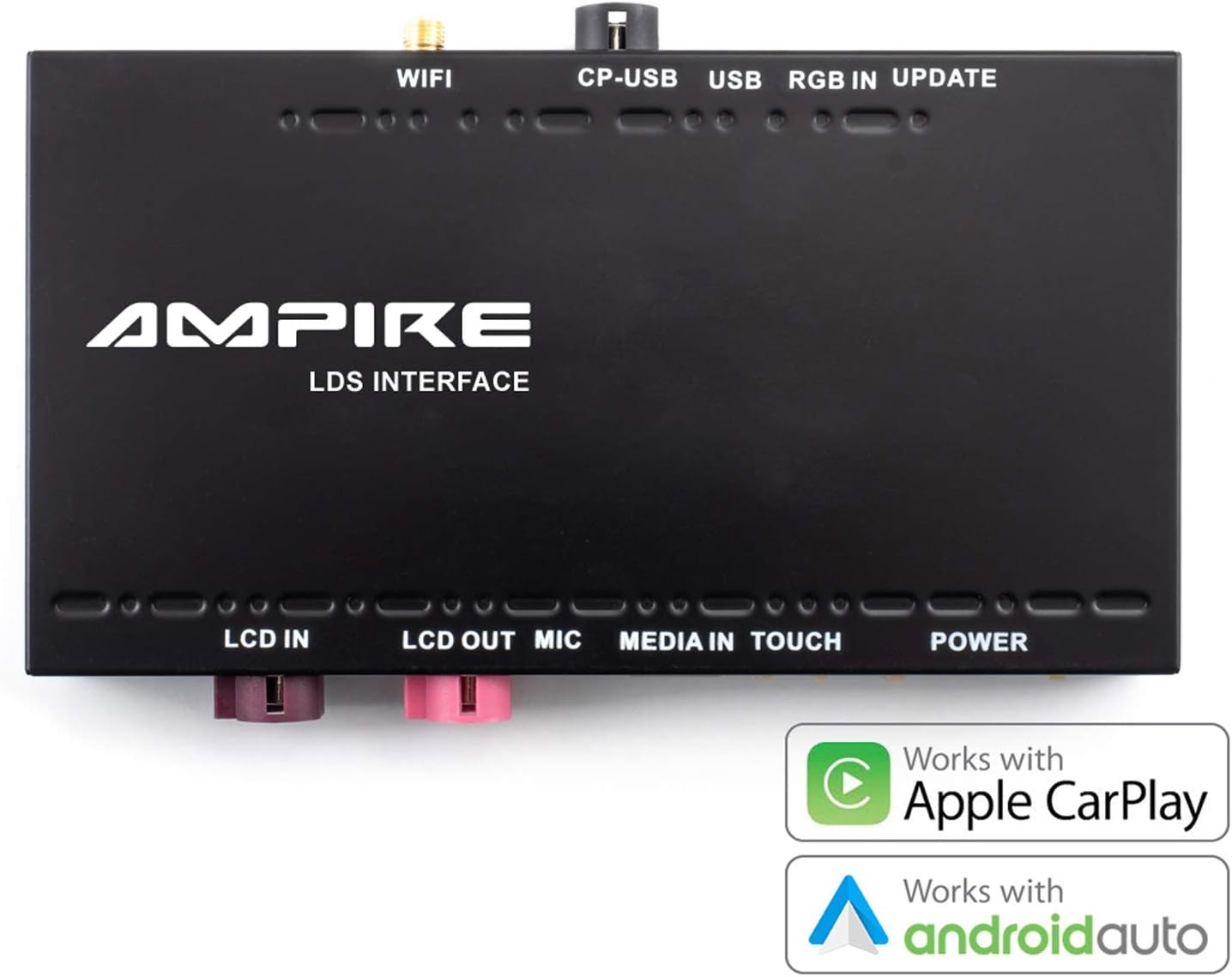
Image 7.1: The interface unit, emphasizing its compatibility with both Apple CarPlay and Android Auto.
7.4. Mirrorlink (Android Only)
For Android users, the Mirrorlink function allows you to mirror your smartphone's entire display onto the car's screen. This provides access to apps not natively supported by Android Auto. Refer to your smartphone's settings for Mirrorlink activation.
8. 유지관리
그만큼 AMPIRE LDS-NBT-CP Smartphone Interface is designed for reliable operation with minimal maintenance. Follow these guidelines to ensure its longevity:
- 청소: Keep the interface unit and connections free from dust and debris. Use a soft, dry cloth for cleaning. Do not use liquid cleaners directly on the unit.
- 소프트웨어 업데이트: 정기적으로 제조업체를 확인하십시오 website for available software updates. Updates can improve performance, add features, or resolve issues. Use the USB input for software updates as instructed by the manufacturer.
- 환경 조건: Ensure the unit is installed in a location protected from extreme temperatures, direct sunlight, and moisture.
- 케이블 무결성: Regularly inspect all connected cables for any signs of wear or damage. Replace damaged cables immediately to prevent malfunctions.
9. 문제 해결
문제가 발생하면 AMPIRE LDS-NBT-CP interface, refer to the following common troubleshooting steps:
- 디스플레이 없음/검은 화면:
- Ensure the interface is powered on and correctly connected to the vehicle's display.
- Verify that the vehicle's display input is switched to the correct source (if applicable).
- Check all video cables for secure connections.
- 오디오 없음:
- Confirm the vehicle's audio source is set to AUX.
- Check the AUX audio cable connection between the interface and the vehicle.
- Ensure the volume on both your smartphone and the vehicle's system is turned up.
- CarPlay/Android Auto 연결 안 됨:
- For wireless connection, ensure Bluetooth and Wi-Fi are enabled on your smartphone and paired correctly.
- For wired CarPlay, try a different USB cable or USB port if available.
- Restart your smartphone and the vehicle's multimedia system.
- 스마트폰의 운영체제가 최신 상태인지 확인하세요.
- 음성 제어가 작동하지 않음:
- Check if the external microphone is securely connected and positioned correctly.
- Ensure microphone permissions are granted on your smartphone for CarPlay/Android Auto.
- 간헐적인 연결:
- 간섭을 일으키는 요인(예: 다른 무선 기기)을 확인하십시오.
- 와이파이 안테나가 제대로 연결되어 있는지 확인하십시오.
If these steps do not resolve the issue, contact AMPIRE customer support or your professional installer for further assistance.
10. 사양
| 특징 | 세부 사항 |
|---|---|
| 상표 | AMP분노 |
| 모델 번호 | LDS-NBT-CP |
| 호환 장치 | 스마트폰 |
| 특정 제품 사용 | 자동차 오디오 및 비디오 |
| 커넥터 유형 | USB, Wi-Fi, AUX type A |
| 포트 수 | 3 (Note: This refers to primary user-accessible ports like USB, AUX. The device has more internal connections.) |
| 오디오 출력 | Speakers (via vehicle's AUX input) |
| 필요한 배터리 | 아니요 |
| 품목 무게 | 1.14kg |
| 색상 | 검은색 |
| 첫 번째 가능한 날짜 | 3년 2021월 XNUMX일 |
11. 보증 및 지원
그만큼 AMPIRE LDS-NBT-CP Smartphone Interface is built for durability and a long lifespan. For specific warranty details, please refer to the documentation provided with your purchase or contact AMPIRE customer support directly. For technical assistance or installation inquiries, it is recommended to consult with your professional installer or the AMPIRE support team.
제조업체: AMP분노
Ask a question about this manual
Ask about setup, troubleshooting, compatibility, parts, safety, or missing instructions. Manuals+ will review the question and use this page’s manual context to help answer it.