
중요한 안전 정보
- 조립 및 사용 전에 모든 지침을 주의 깊게 읽으십시오.
- 조립 중에는 어린이와 애완동물이 접근하지 못하도록 주의하세요. 작은 부품은 질식 위험을 초래할 수 있습니다.
- Ensure all bolts and screws are securely tightened before use. Recheck periodically.
- 의자 위에 서지 마세요.
- 의자의 부품이 누락되었거나, 손상되었거나, 마모된 경우 사용하지 마십시오. 교체 부품은 고객 지원 센터로 문의하십시오.
- 최대 하중 용량: 280파운드. 이 한도를 초과하지 마십시오.
- 의자가 넘어지지 않도록 평평한 곳에서 사용하십시오.
패키지 내용
Please refer to the packaging and included assembly guide for a complete list of all components and hardware. Ensure all parts are present before beginning assembly.
설치 지침
Assembly of the Flash Furniture X40 Gaming Chair is required. Follow the step-by-step instructions provided in the separate assembly manual included with your product. All necessary tools are typically provided.

이미지: 후면 view of the chair, illustrating the backrest and lumbar pillow attachment points.
For a visual guide to assembly and features, please watch the official product video:
Video: Official Flash Furniture product overview, demonstrating key features and assembly aspects.
작동 지침
1. 리클라이닝 기능
To recline the chair back, locate the lever on the side of the seat (typically on the right). Pull the lever upwards and lean back to your desired angle (between 95° and 175°). Release the lever to lock the backrest in position. The armrests are designed to move with the reclining back for continuous support.
2. Slide-Out Footrest
To extend the footrest, pull the loop located under the front of the seat. The footrest will slide out. You can then flip it up for comfortable leg elevation. To retract, push the footrest back under the seat until it locks into place.

Image: The chair with its footrest fully extended, ready for use.
3. Massaging Lumbar Pillow
The chair includes a removable lumbar pillow with a vibrating massage function. To activate the massage, connect the attached 3-foot USB cord to a compatible USB power source (e.g., computer, USB wall adapter). The pillow can be adjusted or removed as per your comfort preference.

Image: Detail of the massaging lumbar pillow with its USB connection.
4. 좌석 높이 조절
To adjust the seat height, locate the pneumatic lever under the seat (typically on the left). While seated, pull the lever up to lower the seat. To raise the seat, stand up slightly and pull the lever up. Release the lever to lock the height.
5. 360도 회전
The chair is equipped with a 5-star nylon base and sporty casters, allowing for smooth 360-degree rotation and easy movement across various surfaces.
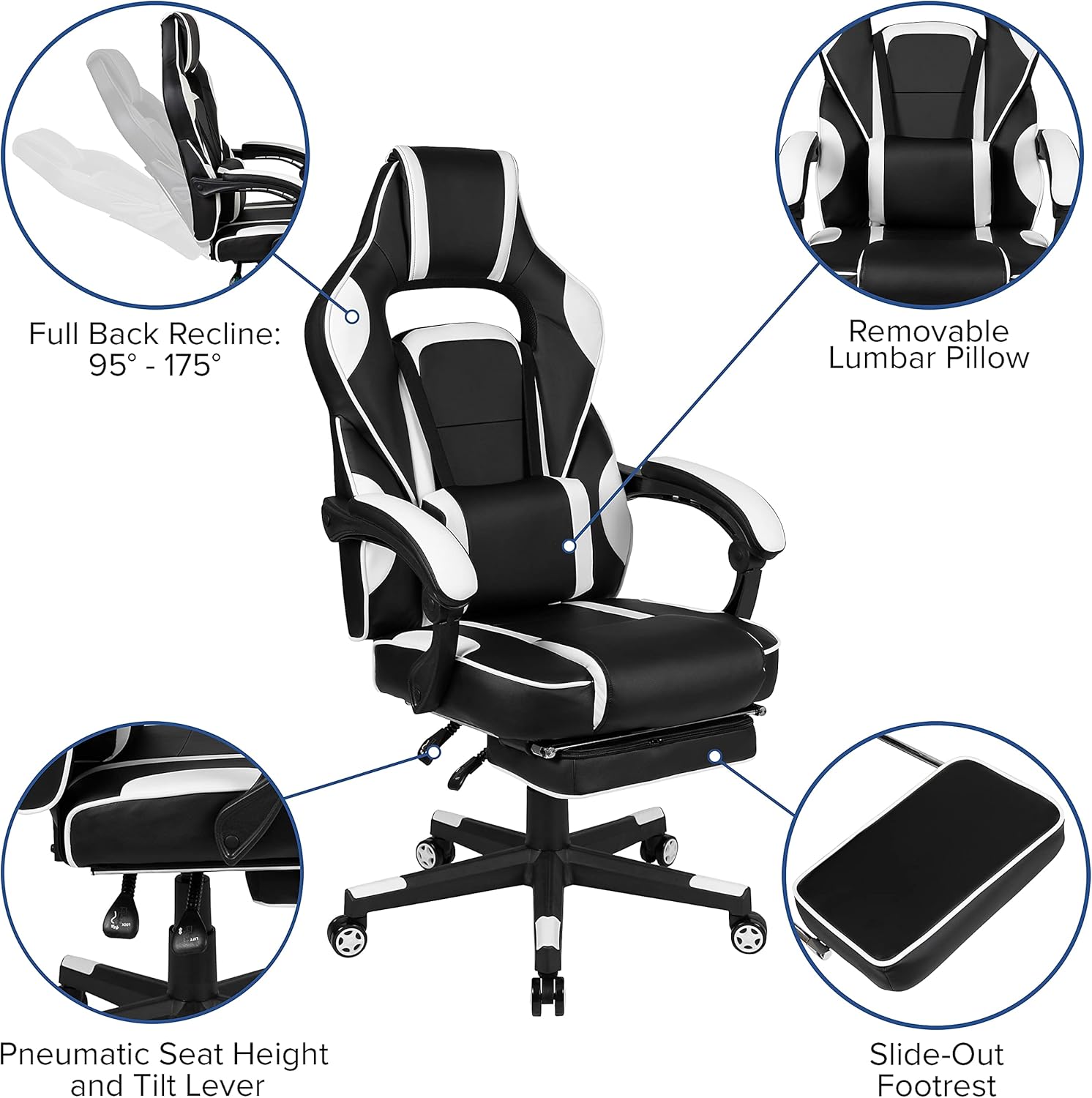
이미지: 이상view of chair features including recline, lumbar support, height adjustment, and footrest.
유지
청소 지침
For routine cleaning of the faux leather upholstery, use a solvent and water-based cleaner, such as foam. Apply the cleaner to a soft cloth and gently wipe the surface. Do not saturate the material. Avoid harsh chemicals or abrasive cleaners, as these may damage the finish. Regularly wipe down the base and casters to prevent dust and debris buildup.
일반 관리
- 모든 고정 장치가 단단히 조여져 있는지 주기적으로 확인하십시오.
- 퇴색과 소재의 변질을 방지하기 위해 직사광선에 장시간 노출시키지 마십시오.
- 날카로운 물건이 가구에 닿지 않도록 하여 구멍이나 찢어짐을 방지하십시오.
문제 해결
Chair Not Adjusting Height
Ensure the pneumatic lever is fully engaged. If the issue persists, the gas lift cylinder may need replacement. Contact customer support.
삐걱거리는 소리
Check all bolts and screws for tightness. Lubricate moving parts, such as the tilt mechanism or casters, with a silicone-based lubricant if necessary.
Footrest Not Extending/Retracting Smoothly
Inspect the footrest mechanism for any obstructions. Ensure the tracks are clean and free of debris. A small amount of lubricant may improve movement.
명세서
| 특징 | 세부 사항 |
|---|---|
| 상표 | 플래시 가구 |
| 모델명 | Flash Furniture X40 |
| 품목 모델 번호 | CH-00288-WH-GG |
| 색상 | 하얀색 |
| 제품 치수 | 29.25인치 깊이 x 28인치 너비 x 51.25인치 높이 |
| 좌석 깊이 | 21.25인치 |
| 좌석 등받이 내부 높이 | 31 인치 |
| 팔 높이 (바닥에서부터) | 높이 27.25~30.25인치 |
| 최대 중량 권장 사항 | 280 파운드 |
| 재료 | Metal, Twill, Plastic, Polyurethane, PVC, Plywood, Foam, Leather/Faux Leather |
| 백 스타일 | 등받이 각도 조절 (95° ~ 175°) |
| 특징 | Adjustable, Massaging Lumbar, Slide-Out Footrest |
| 한국어: | 889142923763 |

Image: Dimensional drawing of the chair, indicating height, width, and depth ranges.
보증 및 지원
For warranty information or technical support, please refer to the documentation included with your purchase or visit the official Flash Furniture website. If you require assistance with parts or assembly, please contact Flash Furniture customer service directly.