
1. 서론
The Vgate VR800 OBD2 Scanner is a powerful and user-friendly diagnostic tool designed for automotive enthusiasts and professional mechanics alike. It provides comprehensive diagnostic functions for OBD-II/EOBD compliant vehicles, enabling users to quickly identify and resolve issues related to the Check Engine Light (CEL). This manual provides detailed instructions on how to set up, operate, and maintain your VR800 scanner to ensure optimal performance and accurate vehicle diagnostics.
2. 제품 오버view
The Vgate VR800 is a handheld diagnostic device featuring a color LCD display, intuitive button layout, and a durable OBD-II connector cable. Its compact design allows for easy portability and use in various automotive environments.
2.1 주요 구성 요소
- LCD 컬러 디스플레이: Provides clear and detailed diagnostic information.
- 탐색 버튼: 메뉴 탐색을 위한 위, 아래, 왼쪽, 오른쪽 화살표.
- 확인 버튼: 선택 사항을 확인합니다.
- I/M 버튼: Shortcut for I/M Readiness status.
- Question Mark (?) Button: Provides help and DTC lookup information.
- 반환 버튼: 이전 화면으로 돌아갑니다.
- OBD-II Connector: Connects the scanner to the vehicle's diagnostic port.
- USB 포트: For software updates and data printing.

3. 특징
The Vgate VR800 OBD2 Scanner offers a comprehensive set of features for vehicle diagnostics:
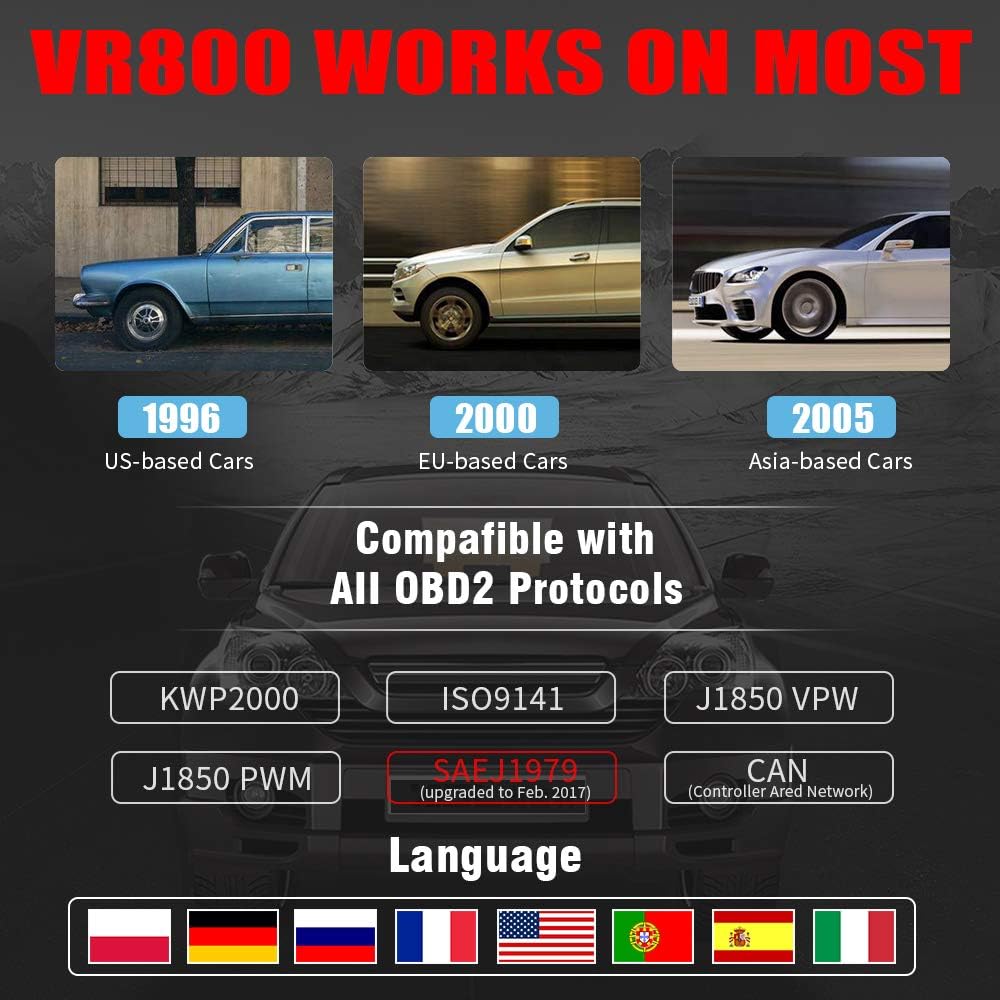
- All OBD2 Protocols Support: Compatible with ISO9141, KWP2000, J1850 PWM, J1850 VPW, and CAN protocols. Compliance with SAEJ1979 has been upgraded to the latest standards (February 2017).
- 광범위한 차량 호환성: Works with most American vehicles manufactured after 1996, European vehicles after 2000, and Asian vehicles after 2005. Applicable to OBD-II/CAN/EOBD-compliant vehicles, including light-duty trucks (6.5T or less), SUVs, and minivans.
- Smog Check Helper (I/M Readiness): Features Red-Yellow-Green LEDs and a built-in speaker to indicate readiness status for emissions testing. Dedicated I/M and '?' shortcut keys provide quick access to readiness checks.
- Full OBD Service Modes: Quickly reads and checks Diagnostic Trouble Codes (DTCs), views freeze frame data, reads live PCM data stream, performs On-Board Monitor tests, and displays live O2 sensor test data.
- Built-in DTC Lookup Library: Allows accurate determination of the causes of the Check Engine Light.
- Accurate Battery Status Check: Reads real-time battery and voltag정보.
- 다국어 지원: Available in English, French, German, Italian, Spanish, Russian, Polish, and Portuguese.
- Data Logging and Printing: Supports data logging and connection to a PC for printing diagnostic data files.



4. 설정
Follow these steps to set up your Vgate VR800 OBD2 Scanner:
- OBD-II 포트를 찾으세요: OBD-II 포트는 일반적으로 차량 운전석 쪽 대시보드 아래에 있습니다. 찾을 수 없는 경우 차량 사용 설명서를 참조하십시오.
- 스캐너 연결: Plug the VR800's OBD-II connector cable firmly into the vehicle's OBD-II port.
- 전원 켜기: The scanner will automatically power on once connected to the vehicle's OBD-II port. No external power source or batteries are required as it draws power directly from the vehicle.
- Initial Setup (if prompted): If this is your first time using the scanner or after a factory reset, you may be prompted to select a language. Use the navigation buttons to select your preferred language and press OK.

5. 사용 설명서
Once the scanner is connected and powered on, you can begin diagnosing your vehicle.
5.1 메뉴 탐색
사용하세요 UP 그리고 아래에 화살표 버튼을 눌러 메뉴 옵션을 스크롤하세요. OK button to select an option. Press the 반품 버튼을 눌러 이전 화면으로 돌아갑니다.
5.2 진단 문제 코드(DTC) 읽기
- 메인 메뉴에서 선택하세요 DTC 읽기.
- The scanner will display any active or pending DTCs. Each code will have a brief description.
5.3 Clearing DTCs
Warning: Clearing DTCs will erase all diagnostic trouble codes from the vehicle's computer and may reset readiness monitors. Ensure you have addressed the underlying issue before clearing codes.
- 메인 메뉴에서 선택하세요 명확한 DTC.
- Confirm your selection when prompted. The scanner will attempt to clear the codes.
5.4 I/M 준비 기능
The I/M Readiness function checks if the various emissions-related systems on the vehicle are operating correctly and if they have completed their self-tests.
- 전용 버튼을 누르세요 나는 button on the scanner.
- The display will show the status of various monitors (e.g., O2 Sensor, EVAP, Catalyst). A green light indicates ready, yellow indicates pending, and red indicates not ready or a fault.
5.5 View라이브 데이터
Live Data allows you to view real-time sensor data from the vehicle's engine control unit (ECU).
- 메인 메뉴에서 선택하세요 라이브 데이터.
- Choose the specific data parameters you wish to view (e.g., engine RPM, vehicle speed, O2 sensor voltag이자형).
5.6 DTC 조회
If you have a DTC and need more information, use the built-in DTC lookup library.
- 메인 메뉴에서 선택하세요 DTC 조회 또는 누르세요 ? button when a DTC is displayed.
- Enter the DTC code (if not already displayed) to get a detailed description and possible causes.
5.7 배터리 상태 확인
To check your vehicle's battery voltage and status:
- 메인 메뉴에서 선택하세요 배터리.
- 스캐너는 현재 배터리 용량을 표시합니다.tage and an estimated charge percentage.
6. 유지관리
Proper maintenance ensures the longevity and accuracy of your Vgate VR800 scanner.
- 청소: 스캐너 외부를 닦을 때는 부드럽고 마른 천을 사용하십시오. 연마성 세척제나 용제를 사용하지 마십시오.
- 저장: Store the scanner in a clean, dry environment away from extreme temperatures and direct sunlight.
- 소프트웨어 업데이트: Regularly check for software updates to ensure compatibility with the latest vehicle models and diagnostic protocols. Updates can typically be performed by connecting the scanner to a PC via the USB port and using the provided update software.
7. 문제 해결
If you encounter issues while using your Vgate VR800 scanner, refer to the following common problems and solutions:
- 스캐너 전원이 켜지지 않습니다:
- OBD-II 커넥터가 차량의 포트에 제대로 연결되어 있는지 확인하십시오.
- 차량의 시동 스위치가 ON 위치에 있는지 확인하십시오 (엔진은 꺼져 있어도 됩니다).
- 차량의 OBD-II 포트 퓨즈를 확인하십시오(차량 설명서를 참조하십시오).
-
Ask a question about this manual
Ask about setup, troubleshooting, compatibility, parts, safety, or missing instructions. Manuals+ will review the question and use this page’s manual context to help answer it.