
1. 서론
구매해주셔서 감사합니다asing the Absima Truck Racing 1:14 RC Electric Monster Truck 4WD RtR 2.4. This manual provides essential information for the safe operation, setup, maintenance, and troubleshooting of your new remote-controlled vehicle. Please read this manual thoroughly before operating the truck to ensure proper function and to maximize your enjoyment.
This 1:14 scale electric monster truck features 4-wheel drive (4WD) for enhanced performance and control. It is designed for Ready-to-Run (RtR) convenience, meaning most components are pre-assembled and ready for use after initial setup.

이미지 1.1: 전면 view of the Absima Truck Racing 1:14 RC Electric Monster Truck. The truck features a blue and black body with racing decals, large off-road tires, and a robust front bumper.
2. 안전수칙
Always observe the following safety guidelines to prevent injury or damage to the product and surroundings:
- 성인 감독: 본 제품은 14세 이상 사용자에게 권장됩니다. 8세 미만 사용자는 보호자의 감독 하에 사용해야 합니다.
- 운영 환경: Operate the RC truck in open areas, away from people, pets, vehicles, and water. Avoid public roads.
- 배터리 안전:
- Use only the specified charger and batteries.
- 배터리를 과충전하거나 단락시키지 마십시오.
- 배터리를 극단적인 온도나 직사광선에 노출시키지 마십시오.
- Remove batteries from the truck and transmitter when not in use.
- 현지 규정에 따라 배터리를 폐기하십시오.
- 움직이는 부품: Keep fingers, hair, and loose clothing away from rotating wheels and other moving parts to prevent entanglement.
- 방수: The electronics are splash-protected, but avoid submerging the vehicle in water.
- 수정 사항: Do not modify the truck or its components. Unauthorized modifications can void the warranty and compromise safety.
- 저장: Store the truck and its components in a cool, dry place, out of reach of children.
3. 패키지 내용
포장을 풀 때 다음 품목이 모두 포함되어 있는지 확인하세요.
- Absima Truck Racing 1:14 RC Electric Monster Truck (pre-assembled)
- 2.4GHz 원격 제어 송신기
- Rechargeable Lithium-ion Battery for the truck (2 included)
- USB 배터리 충전기
- 사용 설명서(본 문서)

Image 3.1: The included USB battery charger and two green lithium-ion batteries. The charger is black with two charging slots and connects via a USB cable.
4. 설정
4.1. 차량 배터리 충전
- USB 충전기를 호환되는 USB 전원(예: 컴퓨터 USB 포트, USB 벽면 어댑터)에 연결하십시오.
- Insert the rechargeable Lithium-ion battery into the charger. Ensure correct polarity.
- The charger's indicator light will show the charging status (refer to charger's specific instructions if available).
- Once fully charged, disconnect the battery from the charger and the charger from the power source. Charging time may vary.
4.2. 차량 배터리 설치
- Locate the battery compartment on the underside of the truck. It is typically secured by clips or screws.
- 배터리 덮개를 엽니다.
- Carefully insert the charged Lithium-ion battery into the compartment.
- Connect the battery connector to the vehicle's power connector. Ensure a secure connection.
- 배터리 덮개를 단단히 닫으세요.

이미지 4.2.1: 밑면 view of the Absima RC truck chassis. The battery compartment is visible in the center, designed for easy access.
4.3. 송신기 배터리 설치
The remote control transmitter requires its own batteries (not specified in product data, typically AA batteries). Refer to the transmitter's manual for specific battery type and installation instructions.
- 송신기 뒷면의 배터리 덮개를 여세요.
- 필요한 배터리를 넣을 때, +/- 극성을 정확히 확인하십시오.
- 배터리 덮개를 단단히 닫으세요.
4.4. 송신기와 차량 페어링
The 2.4 GHz system usually pairs automatically. Follow these steps:
- Ensure both the vehicle battery and transmitter batteries are installed and charged.
- 먼저 송신기를 켜십시오.
- 차량의 전원 스위치를 켜세요.
- The indicator lights on both the transmitter and vehicle should show a solid light, indicating a successful connection. If not, turn both off and repeat the process.
5. 사용 설명서
5.1. 기본 제어
- 스로틀 트리거: 방아쇠를 몸쪽으로 당기면 앞으로 가속하고, 방아쇠를 몸에서 멀리 밀면 브레이크 또는 후진이 됩니다.
- 스티어링 휠 : Turn the steering wheel left to steer the truck left, and right to steer the truck right.
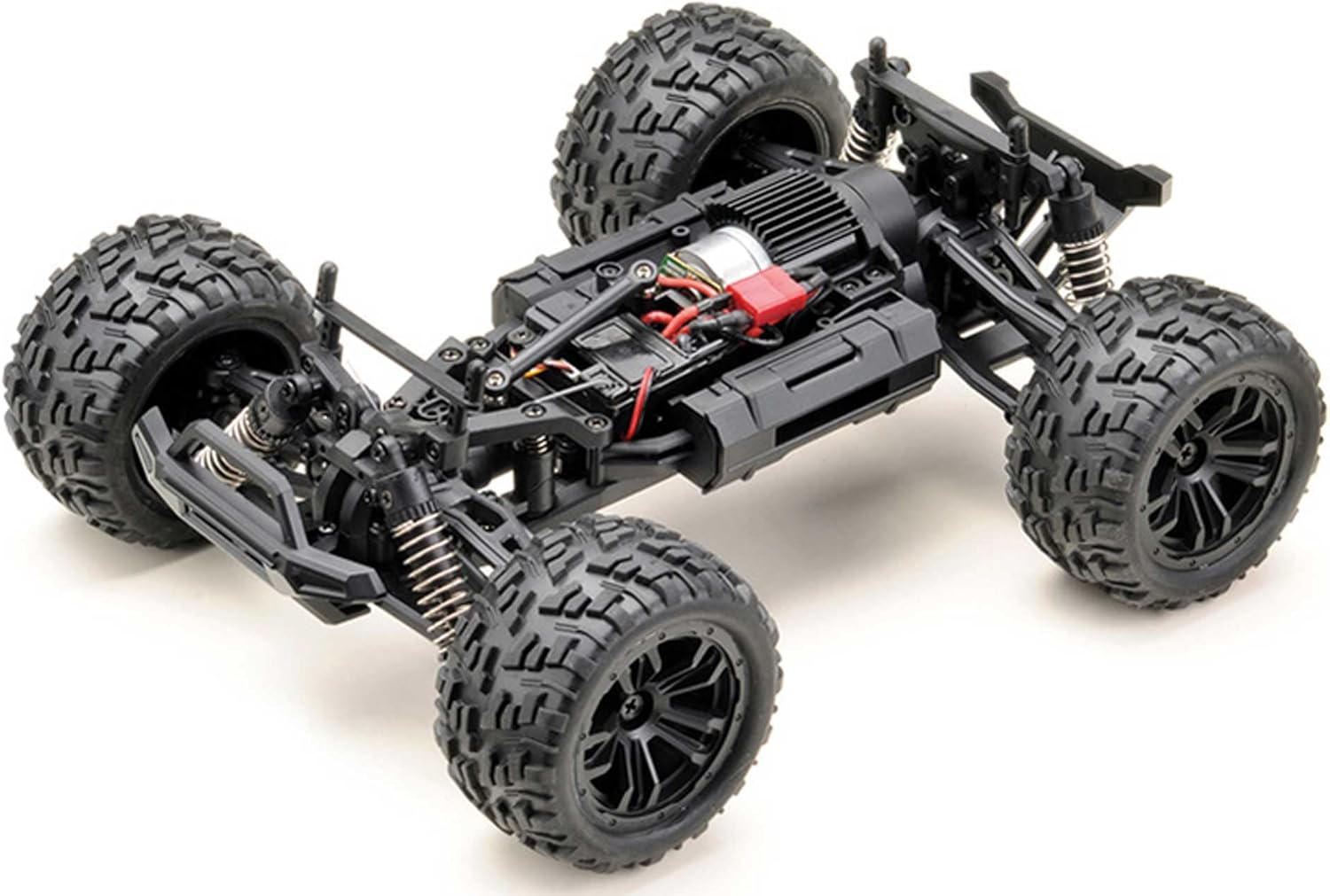
이미지 5.1.1: 위에서 아래로 view of the Absima RC truck chassis with the body removed, showing the motor, electronics, and suspension components. This view highlights the internal layout for maintenance and understanding controls.
5.2. 운전 요령
- 천천히 시작해서 조작법에 익숙해지세요.
- 탁 트인 공간에서 핸들 조작과 가속 페달 조작 연습을 하세요.
- 고속 주행 중 급정거나 급회전을 피하여 전복 사고를 예방하십시오.
- Be mindful of obstacles and uneven terrain. The 4WD system provides good traction, but extreme conditions can still cause issues.
- When the battery power is low, the truck's performance will decrease. Recharge the battery promptly.
5.3. Adjustments (Steering Trim)
If the truck does not drive straight when the steering wheel is centered, use the steering trim dial on the transmitter to adjust it. Turn the dial incrementally until the truck tracks straight.
6. 유지관리
정기적인 유지보수는 RC 트럭의 수명과 최적의 성능을 보장합니다.
6.1. 청소
- After each use, especially in dusty or dirty conditions, clean the truck.
- 부드러운 브러시나 압축 공기를 사용하여 차체, 서스펜션 및 모터 부분의 먼지와 이물질을 제거하십시오.
- 광고로 몸을 닦다amp 옷감. 가혹한 화학 물질을 사용하지 마십시오.
6.2. 배터리 관리
- 배터리는 사용 전에 항상 완전히 충전하십시오.
- 배터리 충전을 방치하지 마십시오.
- Store batteries in a cool, dry place, ideally at a storage charge level (around 50%).
- If a battery appears damaged or swollen, discontinue use immediately and dispose of it safely.
6.3. 검사
- 주기적으로 모든 나사와 패스너의 조임 상태를 점검하세요.
- Inspect the suspension components (shocks, arms) for damage or wear.
- Check the tires for wear and ensure they are securely mounted.
- Examine wiring for any cuts or loose connections.
6.4. 보관
- Remove all batteries from the truck and transmitter before long-term storage.
- Store the truck in a clean, dry environment, away from direct sunlight and extreme temperatures.
7. 문제 해결
This section addresses common issues you might encounter. If problems persist, contact customer support.
| 문제 | 가능한 원인 | 해결책 |
|---|---|---|
| 트럭이 송신기에 반응하지 않습니다. |
|
|
| Truck drives slowly or lacks power. |
|
|
| 핸들이 중앙에서 벗어나 있습니다. |
|
|
| 제어 범위가 짧음. |
|
|
8. 사양
Key technical specifications for the Absima Truck Racing 1:14 RC Electric Monster Truck:
- 모델 번호: 14004
- 규모: 1시 14분
- 구동 시스템: 4륜 구동 (4WD)
- 전원: 전기 같은
- 배터리: 2 리튬이온(포함)
- 치수(길이 x 너비 x 높이): 30 x 23 x 13cm(약 11.8 x 9.1 x 5.1인치)
- 무게: 845그램 (약 1.86파운드)
- 재료: Rubber (tires), other components not specified but typically plastic/metal.
- 색상: 검정/파란색
- 특징: Splash-protected electronics
- 추천 연령: 14세 이상
9. 보증 및 지원
Absima products are manufactured to high-quality standards. For warranty information, please refer to the documentation provided with your purchase or visit the official Absima web사이트. 보증 청구를 위해 구매 증빙 자료를 보관하세요.
For technical support, spare parts, or further assistance, please contact your retailer or the Absima customer service department. Contact details can typically be found on the product packaging or the manufacturer's web대지.