
SUNMI TF700
SUNMI M2 MAX 산업용 태블릿 사용 설명서
모델: TF700
소개
This manual provides comprehensive instructions for the safe and efficient use of your SUNMI M2 MAX Industrial Tablet, model TF700. Please read this manual thoroughly before operating the device and retain it for future reference.

그림 1: 전면 view of the SUNMI M2 MAX Industrial Tablet, showing its display with various application icons.
설정
1. 언박싱 및 초기 검사
모든 구성품을 포장에서 조심스럽게 꺼내세요. 아래 나열된 모든 품목이 들어 있고 손상되지 않았는지 확인하세요.
- SUNMI M2 MAX Industrial Tablet (TF700)
- 전원 어댑터
- USB Type-C 케이블
- Hand Strap (optional, if included with your model)
2. 장치 충전
Before first use, fully charge the tablet. Connect the USB Type-C cable to the tablet's charging port and the other end to the power adapter. Plug the power adapter into a wall outlet. The charging indicator will illuminate.
The tablet is equipped with an 8360mAh non-removable lithium polymer battery. A full charge can provide over 12 hours of continuous operation.
3. Installing SIM Card and MicroSD Card (Optional)
The device supports MicroSIM or NanoSIM cards (Config 1) and an eSIM (Config 2). It also supports MicroSD cards up to 128GB for expanded storage.
- 태블릿 측면에 있는 SIM/MicroSD 카드 슬롯을 찾으세요.
- 제공된 SIM 카드 추출 도구(해당되는 경우) 또는 작은 클립을 사용하여 트레이를 여십시오.
- Carefully place the SIM card(s) and/or MicroSD card into the tray according to the diagram on the tray.
- 트레이를 슬롯에 다시 부드럽게 밀어 넣어 딸깍 소리가 나면서 제자리에 고정되도록 합니다.

그림 2: 후면 view of the SUNMI M2 MAX, highlighting the camera, pogo pin charging interface, and the location of the SIM/MicroSD card slot.
4. Attaching the Hand Strap (Optional)
If your model includes a hand strap, attach it to the designated points on the back of the tablet for secure handling during mobile operations.
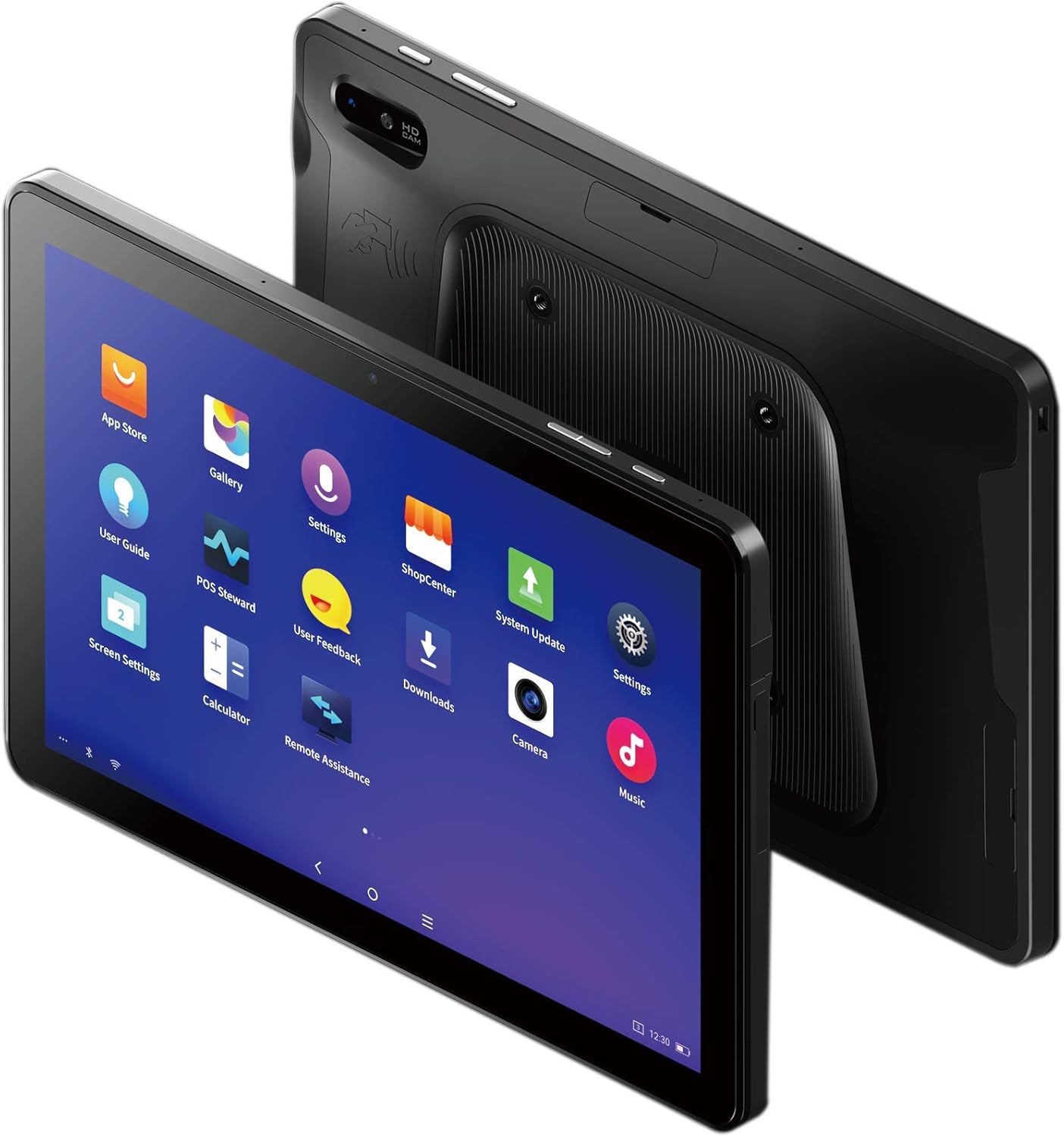
Figure 3: The SUNMI M2 MAX Industrial Tablet being held with an optional hand strap, demonstrating enhanced portability and secure grip.
장치 작동
1. 전원 켜기/끄기
- 전원 켜기: Press and hold the Power button (located on the side) until the SUNMI logo appears on the screen.
- 전원 끄기 : 전원 끄기 메뉴가 나타날 때까지 전원 버튼을 길게 누르세요. "전원 끄기"를 선택하고 확인하세요.
- 다시 시작: 전원 끄기 메뉴에서 "다시 시작"을 선택하여 장치를 재부팅하십시오.
2. 기본 탐색
The SUNMI M2 MAX runs on the Android operating system. Navigation is primarily touch-based:
- 수도꼭지: 항목을 선택하거나 애플리케이션을 열려면.
- 강타: 목록을 스크롤하거나 화면을 전환합니다.
- 핀치 투 줌: 이미지를 확대하거나 축소하려면 web 페이지.
- 홈 버튼: 홈 화면으로 돌아갑니다.
- 뒤로가기 버튼: 이전 화면으로 돌아갑니다.
- 최근 앱 버튼: 최근에 사용한 애플리케이션을 표시합니다.
3. 네트워크에 연결하기
The tablet supports Wi-Fi (2.4GHz/5GHz, 802.11 a/b/g/n/ac) and cellular networks (2G, 3G, 4G).
- 와이파이: 이동하다 설정 > 네트워크 및 인터넷 > Wi-FiWi-Fi를 켜고, 원하는 네트워크를 선택한 후, 필요한 경우 비밀번호를 입력하세요.
- 셀룰러 데이터: 유효한 SIM 카드가 삽입되어 있는지 확인하십시오. 다음으로 이동하십시오. 설정 > 네트워크 및 인터넷 > 모바일 네트워크 to enable mobile data and configure APN settings if necessary.
- 블루투스: 이동하다 설정 > 연결된 기기 > 블루투스 to pair with Bluetooth devices (supports Bluetooth 5.0).
4. Using NFC
The SUNMI M2 MAX is equipped with NFC (Near Field Communication) for contactless transactions and data exchange. To use NFC, ensure it is enabled in settings and hold the tablet near a compatible NFC reader or device.
5. 카메라 작동
The tablet features a 13 MP rear camera with flash and autofocus, and a 5 MP front camera. Open the "Camera" application to capture photos or record videos.
유지
1. 장치 청소
부드럽고 털이 없는 천을 살짝 사용하세요.ampened with water or a screen cleaner to wipe the display and exterior. Avoid using harsh chemicals, abrasive cleaners, or excessive moisture.
2. 배터리 관리
- 정제를 극한 온도(-20°C 이하 또는 70°C 이상)에 노출시키지 마십시오.
- 배터리가 자주 완전히 방전되지 않도록 하세요.
- Use only the original or certified compatible power adapter and cable.
3. 소프트웨어 업데이트
최적의 성능과 보안을 위해 시스템 업데이트를 정기적으로 확인하고 설치하세요. 설정 > 시스템 > 시스템 업데이트.
4. 환경 보호
The SUNMI M2 MAX is designed with IP68 protection and a 1m drop specification, making it suitable for demanding environments. However, avoid intentional drops or prolonged submersion in water.
문제 해결
| 문제 | 가능한 원인 | 해결책 |
|---|---|---|
| 장치의 전원이 켜지지 않습니다. | 배터리 부족; 소프트웨어 오류. | 기기를 최소 30분 동안 충전하세요. 전원 버튼을 10~15초 동안 길게 눌러 강제로 다시 시작하세요. |
| Wi-Fi에 연결할 수 없습니다. | Incorrect password; Wi-Fi disabled; router issue. | Verify password. Ensure Wi-Fi is enabled in settings. Restart router. Forget and reconnect to the network. |
| 터치스크린이 응답하지 않습니다. | 일시적인 소프트웨어 오류입니다. | 전원 버튼을 길게 눌러 기기를 강제로 재시작하세요. |
| Applications crashing. | Insufficient RAM; app bug. | Close background apps. Clear app cache/data (Settings > Apps). Update the app. |
명세서
The following table outlines the key technical specifications of the SUNMI M2 MAX Industrial Tablet (Model: TF700).

Figure 4: Comprehensive technical specifications for the SUNMI M2 MAX Industrial Tablet.
- 모델: TF700
- 운영 체제: Android 9.0 (SUNMI OS)
- 프로세서: Kryo-260, Octa-core 2.2GHz (Qualcomm)
- 메모리: 3GB RAM + 32GB ROM (eMMC)
- 표시하다: 10.1-inch FHD, 1920x1200, Capacitive multitouch, Corning Gorilla Glass 3
- 카메라: Front: 5MP FF; Rear: 13MP AF + Flashlight, supports 1D/2D barcode recognition
- NFC : Type-A&B card, Mifare card, Felica card, ISO/IEC 14443 and ISO/IEC 15693 compliant
- 스피커/마이크: 1W Speaker, 2x MIC
- PSAM 카드 슬롯: 1x PSAM
- SIM 카드 슬롯: 1x MicroSD (TF), 1x MicroSIM or 1x NanoSIM (TF700 Config 1), eSIM (TF700 Config 2)
- 회로망: 2G, 3G, 4G
- 와이파이: 2.4GHz/5GHz, 802.11 a/b/g/n/ac
- 블루투스: Supports Bluetooth 2.1/3.0/4.2/5.0 (BLE)
- GPS: Supports AGPS, GPS, GLONASS, Beidou (Config 2)
- 감지기: Gravity sensor, light sensor, compass, Hall
- 버튼: 1x Power (lock screen), 2x Volume (+/-)
- 포트: 1x Type-C (supports OTG), 1x Audio Jack, 1x MicroSD (up to 128GB expansion)
- 배터리: Non-removable Lithium Polymer battery, 8360mAh
- 전원 어댑터: Input: AC 100-240V, Output: DC 5V/2A
- 크기(가로x세로x높이): 249.8 x 160 x 9.9mm(0.39 x 6.3 x 9.84인치)
- 총 중량: 673g (1.48 파운드)
- 보호: IP68, 1m drop spec
- 작동 온도: -20°C ~ 55°C
- 보관 온도: -40°C ~ 70°C
보증 및 지원
For warranty information and technical support, please refer to the documentation provided with your purchase or visit the official SUNMI web사이트. 보증 청구를 위해 구매 증빙 자료를 보관하세요.
SUNMI Official Web대지: www.sunmi.com
Ask a question about this manual
Ask about setup, troubleshooting, compatibility, parts, safety, or missing instructions. Manuals+ will review the question and use this page’s manual context to help answer it.