
1. 서론
This manual provides detailed instructions for the Symcode MJ-X5-2D Bluetooth Wireless Barcode Scanner. It covers product features, setup procedures, operating modes, maintenance guidelines, and troubleshooting tips to ensure optimal performance and longevity of your device. Please read this manual thoroughly before using the scanner.
2. 패키지 내용
아래 나열된 모든 품목이 패키지에 들어 있는지 확인하세요.
- Symcode MJ-X5-2D Barcode Scanner
- USB 충전/데이터 케이블
- 2.4G 무선 USB 동글
- 사용자 가이드

Image: Contents of the Symcode MJ-X5-2D Barcode Scanner package, showing the scanner unit, a USB cable, a 2.4G wireless dongle, and the printed user guide.
3. 설정
3.1 초기 충전
Before first use, fully charge the scanner. Connect the scanner to a USB power source using the provided USB cable. A full charge typically takes approximately 2 hours and provides up to 5 hours of continuous operation.

Image: The scanner next to a battery icon, illustrating the charging process and battery capacity. The scanner features a 650mAh rechargeable lithium-ion battery.
3.2 스캐너 연결
The Symcode MJ-X5-2D scanner offers multiple connectivity options:
- USB 유선 연결: Connect the scanner directly to your computer using the USB cable. The scanner will function as a plug-and-play device.
- 2.4G 무선 연결: Insert the 2.4G USB dongle into your computer's USB port. The scanner will automatically pair with the dongle. This mode offers a barrier-free transmission distance of up to 150m (492ft) and up to 30m (98ft) in a barrier environment.
- 블루투스 연결 : Enable Bluetooth on your host device (PC, laptop, tablet, smartphone). Put the scanner into Bluetooth pairing mode (refer to the specific pairing instructions in the included user guide). Select the scanner from your device's Bluetooth list to connect. Bluetooth offers a barrier-free transmission distance of up to 50m (164ft) and up to 15m (49ft) in a barrier environment.

Image: Connectivity options for the scanner, including USB wired, Bluetooth, and 2.4G wireless dongle, compatible with PCs, laptops, tablets, and phones.

Image: Transmission range capabilities for the 2.4GHz Wireless and Bluetooth connections. The 2.4GHz wireless mode offers up to 150m (492ft) barrier-free and 30m (98ft) with barriers. Bluetooth offers up to 50m (164ft) barrier-free and 15m (49ft) with barriers.
4. 작동 모드
The scanner supports two primary data uploading modes:
- 자동 업로드 모드: In this mode, scanned barcode data is immediately transmitted to your connected device. This is suitable for real-time data entry.
- 저장 모드 : The scanner can store up to 50,000 barcodes in its internal 16MB memory. Data is saved internally and can be uploaded to your device later when needed. This mode is ideal for inventory tasks where an immediate connection is not always available.
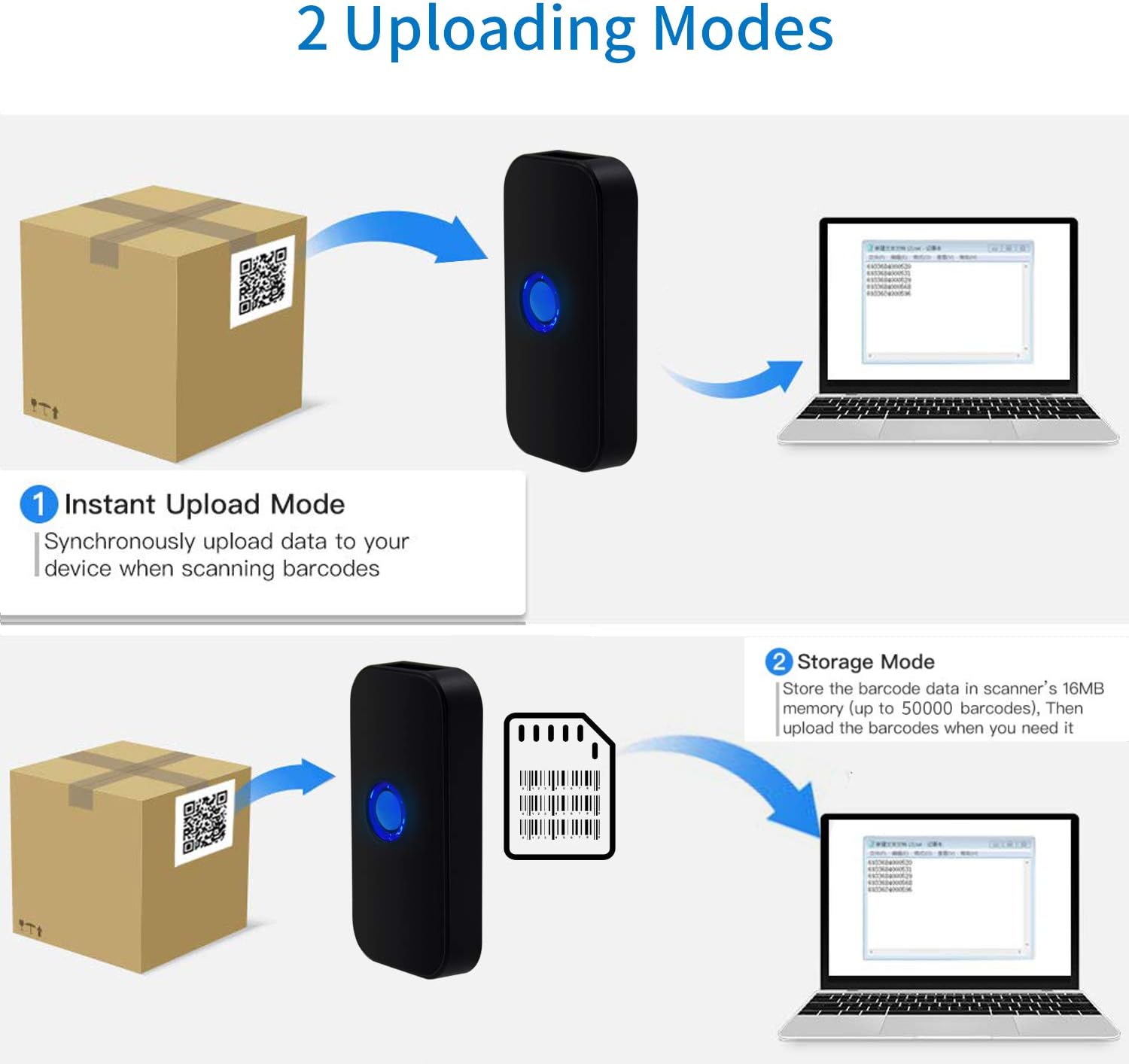
Image: Visual representation of the two data uploading modes. Instant Upload Mode sends data synchronously upon scanning, while Storage Mode saves up to 50,000 barcodes in 16MB memory for later upload.
5. 지원되는 바코드
The Symcode MJ-X5-2D scanner is capable of reading both 1D and 2D digital and printed barcodes:
- 1D 바코드: Code 128, EAN-13, EAN-8, Code 39, Code 93, UPC-A, UPC-E, Codabar, Interleaved 2 of 5, ISBN, GS1 DataBar, Matrix 2 of 5, Code 11, Industrial 2 of 5, MSI.
- 2D 바코드: Data Matrix, PDF417, QR code, Aztec, Maxicode, Hanxin.

Image: The scanner demonstrating its ability to read various 1D and 2D barcodes, including QR codes, from digital displays and printed labels.
6. 유지관리
스캐너의 수명과 최적의 성능을 보장하려면 다음 유지 관리 지침을 따르세요.
- 청소: 부드럽고 마른 천을 사용하여 스캐너 외부를 청소하세요. 스캔 창의 경우 보풀이 없는 천을 가볍게 두드리세요.amp순하고 연마성이 없는 세척제로 세척하세요. 강한 화학 물질이나 연마재는 피하세요.
- 저장: 스캐너는 직사광선과 극한의 온도를 피해 시원하고 건조한 곳에 보관하세요.
- 배터리 관리 : Avoid fully discharging the battery frequently. If storing for extended periods, charge the battery to about 50% and recharge every few months.
- 보호: 스캐너를 떨어뜨리거나 충격을 가하지 않도록 보호하십시오.
7. 문제 해결
If you encounter issues with your Symcode MJ-X5-2D scanner, refer to the following common problems and solutions:
- 스캐너가 켜지지 않음: 배터리가 충전되어 있는지 확인하세요. USB 케이블을 사용하여 스캐너를 전원에 연결하세요.
- 스캐너가 장치에 연결되지 않습니다.
- For USB wired: Check the cable connection.
- For 2.4G Wireless: Ensure the USB dongle is properly inserted and recognized by your computer.
- For Bluetooth: Confirm Bluetooth is enabled on your device and the scanner is in pairing mode. Re-pair if necessary.
- 스캐너가 바코드를 읽지 못합니다.
- Ensure the barcode is clean, undamaged, and within the scanner's reading range.
- 스캐너가 바코드 유형을 지원하는지 확인하세요.
- Verify that the scanner's lens is clean.
- Incorrect characters or unexpected behavior: This can sometimes occur with certain host devices or software configurations. Try resetting the scanner to factory defaults (refer to the full user guide for specific instructions). Ensure your device's input language settings are compatible.
- Scanner beeps/flashes 5 times and shuts off: This indicates a potential internal error or low battery. Try fully charging the device. If the issue persists, a factory reset might be required. Consult the full user guide for reset procedures.
If problems persist after attempting these solutions, please contact Symcode customer support.
8. 사양
| 상표 | 기호 코드 |
| 모델 번호 | MJ-X5-2D |
| 연결 기술 | 블루투스, 2.4G 무선, USB |
| 호환 장치 | Smartphone, PC, Laptop, Tablet |
| 전원 | 배터리 구동 |
| 배터리 구성 | 리튬이온 |
| 충전식 배터리 | 예 |
| 색상 | Scanner QR 2D (Black) |
| 한국어: | 791533381758 |
9. 보증 및 지원
For warranty information, technical support, or service inquiries, please refer to the contact details provided in the original product packaging or visit the official Symcode web사이트. 보증 청구를 위해 구매 증빙 자료로 구매 영수증을 보관하세요.