
1. 서론
Thank you for choosing the XTUGA ES USB/MP3/Bluetooth Professional Audio Mixer. This manual provides essential information for the safe and efficient operation of your mixer. Please read it thoroughly before use and retain it for future reference.
The XTUGA ES series mixers (ES802/ES1202) are designed for professional audio applications, offering features such as USB/MP3 playback and recording, Bluetooth connectivity, built-in digital effects, and +48V phantom power for condenser microphones. Its ultra-thin design and robust metal chassis make it suitable for various environments, including DJ setups, stage performances, and recording studios.
2. 안전 지침
- 전원 공급 장치: 지정된 전원 어댑터만 사용하세요. 볼륨을 확인하세요.tage는 귀하의 지역 전원 공급 장치와 일치합니다.
- 통풍: 환기구를 막지 마십시오. 과열을 방지하기 위해 장치 주변에 충분한 공기 흐름을 확보하십시오.
- 물과 습기: 믹서를 비, 습기 또는 액체에 노출시키지 마십시오. 액체가 담긴 물체를 믹서 위에 올려놓지 마십시오.
- 열원: 믹서를 라디에이터, 난방기, 스토브 또는 기타 기기(포함)와 같은 열원에서 멀리 두십시오. amp열을 생성하는 발전기.
- 청소: 마른 천으로만 닦으십시오. 청소하기 전에 전원을 차단하십시오.
- 서비스: 이 제품을 직접 수리하려고 하지 마십시오. 모든 서비스는 자격을 갖춘 서비스 담당자에게 문의하십시오.
- 접지: 감전을 방지하기 위해 올바르게 접지하십시오.
- 케이블 관리 : 전원 코드가 밟히거나 끼이지 않도록, 특히 플러그, 콘센트, 그리고 기기에서 코드가 나오는 부분에서 더욱 주의하십시오.
3. 제품 오버view
The XTUGA ES series mixer features a compact, durable design with a comprehensive set of controls for versatile audio mixing. It includes multiple input channels, a 3-band equalizer per channel, built-in digital effects, and various connectivity options.

그림 3.1: 앞쪽 view of the XTUGA ES Series Professional Audio Mixer, showing all input channels, faders, EQ knobs, and the central control panel with USB/MP3 display.
주요 특징:
- 채널: Available in 8 or 12 mono channel configurations with stereo inputs.
- 사전amp리퍼: High-quality microphone preamp정수기.
- 평준화: 3-band EQ on each mono channel for precise tone shaping.
- 연결성: USB/MP3 playback and recording, Bluetooth function for wireless audio streaming.
- 팬텀 파워 : 콘덴서 마이크용 +48V 팬텀 전원.
- 디지털 효과: 내장형 디지털 효과 프로세서.
- 모니터링: Headphone monitoring and dual 12-band main level display.
- 내구성 있는 디자인: Ultra-thin metal chassis for durability and portability.
4. 설정
4.1 전원 연결
- Ensure the mixer's power switch is in the "OFF" position.
- Connect the provided power adapter to the mixer's power input.
- 전원 어댑터를 적절한 AC 전원 콘센트에 꽂으세요.
- Turn the mixer's power switch to "ON". The power indicator will illuminate.
4.2 입력 연결
The mixer supports various input sources:
- 마이크: Connect microphones to the XLR inputs (MIC) on each channel. For condenser microphones requiring phantom power, ensure the +48V button is activated (see Section 5.2).
- 라인 레벨 장치: Connect instruments, keyboards, or other line-level devices to the 1/4" TRS/TS LINE inputs on each channel.
- 스테레오 입력: Use the dedicated stereo input channels for devices like CD players or external media players.
4.3 출력 연결
- 주요 출력 : 메인 스피커를 연결하거나 amplifier to the MAIN L/R outputs (XLR or 1/4" TRS).
- 헤드폰 출력: 모니터링을 위해 헤드폰을 PHONES 출력에 연결하세요.
- AUX 전송: Use the AUX SEND output to connect to external effects processors or monitor speakers.
4.4 컴퓨터 연결(USB)
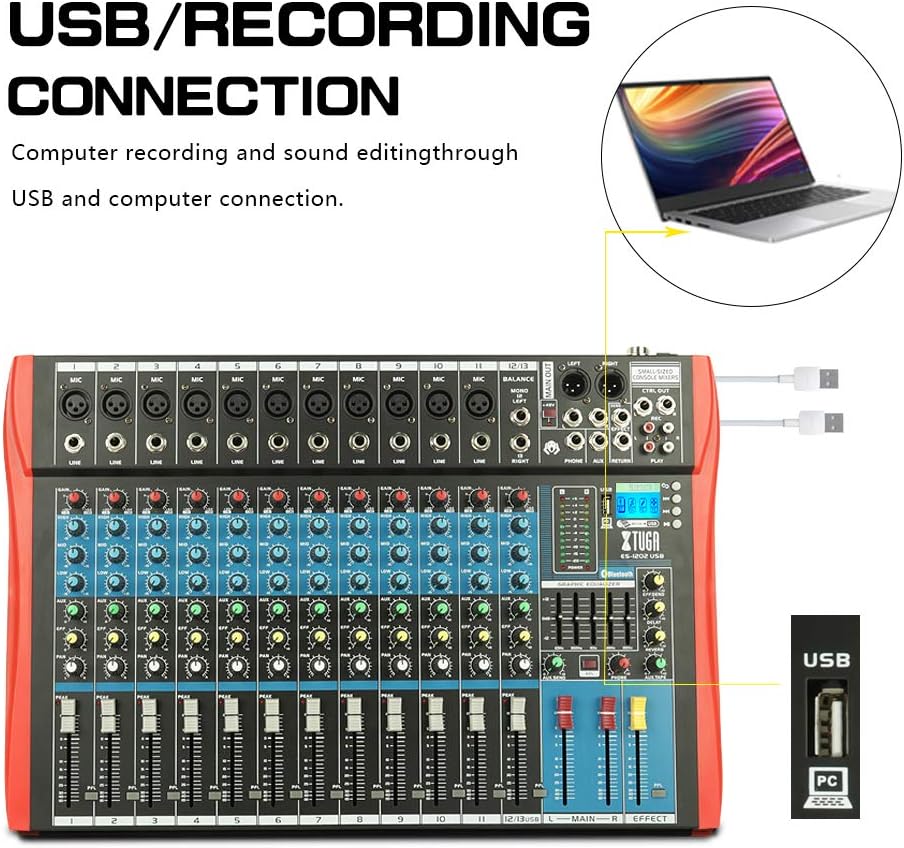
그림 4.1: Diagram illustrating the USB connection for computer recording and sound editing. Connect the mixer's USB port to your computer using a standard USB cable.
To use the mixer with a computer for recording or playback:
- 믹서의 USB 포트와 컴퓨터의 사용 가능한 USB 포트를 USB 케이블로 연결합니다.
- The mixer will typically be recognized as a standard audio device. No special drivers are usually required for basic functionality.
- Select the mixer as your input/output device in your computer's sound settings or digital audio workstation (DAW) software.
5. 사용 설명서
5.1 채널 제어
- 이득: Adjusts the input sensitivity for each channel. Set this to achieve a strong signal without clipping (the PEAK LED should only flash occasionally).
- EQ (고음, 중음, 저음): 3-band equalizer for shaping the tone of each channel.

그림 5.1: Visual representation of the 3-band EQ frequency response curves. The HIGH band boosts/cuts above 12kHz, the MID band sweeps from 250Hz to 6kHz, and the LOW band boosts/cuts below 80Hz.
- 높은: Adjusts frequencies above 12 kHz (±15 dB).
- 중간: Adjusts frequencies between 150 Hz and 3.5 kHz (±15 dB). This is a sweepable mid-range control.
- 낮은: Adjusts frequencies below 80 Hz (±15 dB).
- 효과: Sends a portion of the channel signal to the built-in effects processor.
- PAN : 채널 신호의 스테레오 위치(좌우)를 조정합니다.
- 채널 페이더: Controls the output level of each individual channel to the main mix.
- 피크 LED: 입력 신호가 너무 높으면 점등되어 클리핑 가능성을 나타냅니다. 이 LED가 자주 켜지면 게인을 줄이십시오.
5.2 +48V 팬텀 전원
The mixer provides +48V phantom power for condenser microphones. To activate:
- Ensure all channel faders and the main fader are set to their minimum positions.
- Connect your condenser microphone(s) to the XLR inputs.
- Press the +48V PHANTOM POWER button. An indicator light will confirm activation.
- Gradually raise the channel faders and main fader to the desired levels.
Caution: Do not activate phantom power when dynamic microphones or other devices not requiring +48V are connected, as this may cause damage.
5.3 블루투스 연결

그림 5.2: Close-up of the Bluetooth and MP3 control panel, showing the digital LCD display and control buttons.
블루투스 장치를 연결하려면:
- Press the "MODE" button on the MP3 player section until "Bluetooth" is selected on the digital display.
- On your mobile phone, tablet, or other Bluetooth-enabled device, search for available Bluetooth devices.
- Select "XTUGA MIXER" (or similar name) from the list to pair.
- 페어링이 완료되면 기기의 오디오를 믹서를 통해 재생할 수 있습니다.
5.4 USB/MP3 Playback and Recording
The mixer supports U-DISK MP3 playback and direct recording to a USB drive.
- MP3 재생: MP3가 포함된 USB 플래시 드라이브 삽입 files into the USB port. The mixer will automatically detect and begin playing the files. Use the control buttons (PLAY/PAUSE, PREV, NEXT) on the MP3 player section to navigate.
- 녹음: To record the main mix to a USB drive, ensure a formatted USB drive is inserted. Press the "REC" button on the MP3 player section to start recording. Press it again to stop.
5.5 디지털 효과
The mixer includes a built-in digital effects processor. Use the "EFFECT" knob on each channel to send signal to the effects. The main "EFFECT" fader controls the overall level of the effects return to the main mix. Adjust the effect type and parameters using the dedicated controls in the effects section.
5.6 모니터링
Connect headphones to the PHONES jack to monitor the main mix. The PHONES level knob controls the headphone volume. The main LED meters provide a visual indication of the main output level.

그림 5.3: Close-up of the main LED level meters, showing output levels for Left (L) and Right (R) channels, along with the USB and PC connection ports.
6. 유지관리
- 청소: 믹서 표면은 부드럽고 마른 보풀 없는 천으로 정기적으로 닦아주세요. 연마성 세척제, 용제 또는 왁스를 사용하지 마세요.
- 저장: 장기간 사용하지 않을 경우 믹서를 서늘하고 건조한 곳에 보관하고 직사광선과 극한 온도 변화를 피하십시오. 먼지가 쌓이지 않도록 덮개를 씌워 보관하십시오.
- 케이블 관리: Avoid bending or twisting cables excessively. Disconnect cables by pulling the plug, not the cable itself.
7. 문제 해결
| 문제 | 가능한 원인 | 해결책 |
|---|---|---|
| 사운드 출력이 없습니다 |
|
|
| 왜곡된 소리 |
|
|
| 블루투스가 연결되지 않습니다 |
|
|
| USB/MP3 not playing or recording |
|
|
8. 사양
| 특징 | 사양 |
|---|---|
| 상표 | 엑스투가 |
| 모델 | ES802/1202 |
| 채널 수 | 8개 또는 12개 (모델에 따라 다름) |
| 연결 기술 | 보조, 블루투스, USB |
| 전원 | 코드식 전기 |
| 주파수 응답 | Microphone line input to any output: ±1.5 dB, 20 Hz ~ 20 KHz |
| 총 고조파 왜곡 + 노이즈 | Sensitivity -30dB, Mix output +14dBu <0.02% @ 1 KHz or EQ (stereo input) |
| Crosstalk (1 KHz) | Channel mute > 90 dB, Fader off > 90 dB, AUX send port closed > 83 dB |
| Mono EQ (Q(MF): 1.5) | Low: 80Hz ± 15dB, Mid (sweepable): 150Hz-3.5KHz ± 15dB, High: 12 KHz ± 15 dB |
| Stereo EQ (Q(MF): 0.8) | Low: 80Hz ± 15dB, Mid: 720Hz ± 15dB, High: 12KHz ± 15dB |
| 전력 소비 | 35W 미만 |
| 작동 온도 | 5°C ~ +40°C |
| 오디오 입력 | XLR, Line, and Digital Inputs |
| 한국어: | 784124158662 |
| GTIN | 784124158662 |
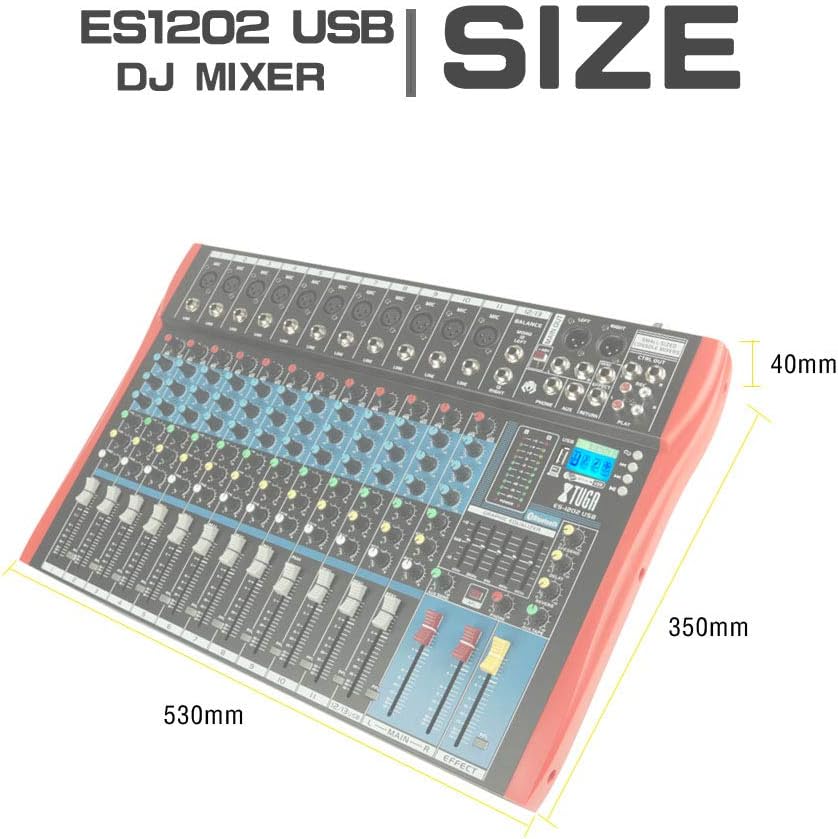
그림 8.1: Dimensions of the XTUGA ES1202 USB Mixer, showing approximate measurements of 530mm (width), 350mm (depth), and 40mm (height).
9. 보증 및 지원
9.1 보증 정보
XTUGA products are designed and manufactured to high-quality standards. For specific warranty terms and conditions, please refer to the warranty card included with your product or contact your local XTUGA distributor or retailer. Keep your proof of purchase for warranty claims.
9.2 고객 지원
If you encounter any issues or have questions regarding your XTUGA ES USB/MP3/Bluetooth Professional Audio Mixer that are not covered in this manual, please contact XTUGA customer support or your authorized dealer for assistance. Please have your model number (ES802/1202) and purchase information ready when contacting support.