
1. 서론
The JHS Pedals 3 Series Chorus is a versatile guitar effect pedal designed to deliver classic chorus and vibrato modulation sounds. Its straightforward controls allow for a wide range of tonal possibilities, suitable for various musical styles. This manual provides essential information for setting up, operating, maintaining, and troubleshooting your 3 Series Chorus pedal.
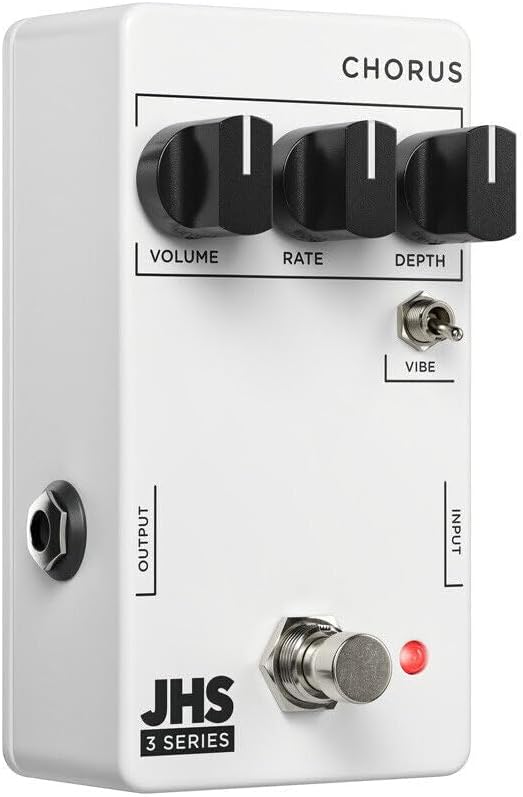
이미지 1: 앞면 view of the JHS 3 Series Chorus pedal.
2. 설정
Follow these steps to properly set up your JHS 3 Series Chorus pedal:
- 전원 연결: Connect a standard 9V DC negative center power supply to the power input jack. The pedal requires 70mA of current. Ensure your power supply meets these specifications to prevent damage.
- 입력 연결: 기타 또는 다른 악기를 표준 1/4인치 악기 케이블을 사용하여 페달 오른쪽의 INPUT 잭에 연결하십시오.
- 출력 연결: 페달 왼쪽의 OUTPUT 잭을 페달에 연결합니다. amp표준 1/4인치 악기 케이블을 사용하여 신호 체인의 다음 페달이나 리파이어를 연결합니다.
- 활성화: 풋스위치를 눌러 이펙트를 활성화하거나 비활성화할 수 있습니다. 이펙트가 활성화되면 빨간색 LED 표시등이 켜집니다.

이미지 2: 상단 view of the JHS 3 Series Chorus pedal, showing input and output jacks.
설정 종료view 동영상
비디오 1: 오버view of the JHS 3 Series Pedals, including setup and general features. This video provides a visual guide to connecting and understanding the basic operation of the 3 Series line.
3. 작동 제어
The JHS 3 Series Chorus features three primary knobs and one toggle switch for shaping your sound:
- 용량: This knob controls the overall output level of the pedal. Adjust it to match the volume of your bypassed signal or to boost your sound when the effect is engaged.

Image 3: Detail of the Volume control knob.
- 비율: The Rate knob adjusts the speed of the chorus or vibrato modulation. Turning it clockwise increases the speed, creating faster, more intense wobbles. Counter-clockwise movement slows the modulation for a more subtle, swirling effect.

Image 4: Detail of the Rate control knob.
- 깊이: This knob controls the intensity or depth of the modulation. A lower setting (counter-clockwise) provides a gentle, less pronounced chorus. Increasing the depth (clockwise) results in a more pronounced, seasick-like modulation.

Image 5: Detail of the Depth control knob.
- Vibe Toggle: This two-position toggle switch alters the character of the effect. When engaged (up position), the Vibe toggle removes the dry signal, transforming the chorus into a true pitch vibrato sound. In the down position, the pedal operates as a standard chorus effect, blending the modulated signal with your dry signal.

Image 6: Detail of the Vibe toggle switch.
4. 사양
| 상표 | JHS 페달 |
| 모델명 | 3 Series Chorus |
| 모델 번호 | 3SCHORUS |
| 스타일 | 합창 |
| 색상 | 하얀색 |
| 품목 무게 | 0.3 킬로그램 |
| 권tage | 9볼트 직류 |
| Amp에라 지 | 70밀리amps |
| 전원 | Corded Electric (9V DC Negative Center) |
| 오디오 출력 효과 | Chorus, Vibrato |
| 컨트롤 타입 | Knob (Volume, Rate, Depth), Toggle (Vibe) |
| 신호 형식 | 비슷한 물건 |
| 사운드 프로file | Warm, Musical, Chorus/Vibrato |
| 품목 치수 | 4 x 3 x 2 인치 |
| 한국어: | 650415212354 |
5. 유지관리
To ensure the longevity and optimal performance of your JHS 3 Series Chorus pedal, follow these maintenance guidelines:
- 청소: 페달 외부를 닦을 때는 부드럽고 마른 천을 사용하십시오. 연마성 세척제나 용제는 마감재와 내부 부품을 손상시킬 수 있으므로 사용하지 마십시오.
- 저장: 페달은 직사광선과 극한 온도 변화를 피해 서늘하고 건조한 곳에 보관하십시오. 장기간 사용하지 않을 경우 전원을 차단하십시오.
- 사이: 모든 케이블 연결 부위의 마모나 손상을 주기적으로 점검하세요. 잭에 먼지나 이물질이 없는지 확인하세요.
- 전원 공급 장치: Always use a regulated 9V DC negative center power supply that meets the 70mA current requirement. Incorrect power can damage the pedal and void the warranty.
6. 문제 해결
If you encounter issues with your JHS 3 Series Chorus pedal, refer to the following troubleshooting tips:
- 소리 없음:
- 모든 케이블 연결 상태를 확인하십시오 (기타와 입력 단자, 출력 단자 등). amp).
- Ensure the power supply is correctly connected and providing the specified 9V DC negative center power.
- 귀하의 악기와 amp페달을 우회하면 앰프가 정상적으로 작동합니다.
- Confirm the pedal is engaged (red LED illuminated).
- 약하거나 왜곡된 소리:
- Check the Volume knob setting on the pedal.
- Ensure your power supply is providing stable power. Low battery or an inadequate power supply can cause performance issues.
- 연결 불량 여부를 확인하기 위해 다른 케이블을 사용하여 테스트하십시오.
- 효과가 예상대로 작동하지 않습니다:
- Adjust the Rate and Depth knobs to explore the full range of the effect.
- Experiment with the Vibe toggle switch to understand its impact on the sound (chorus vs. vibrato).
- If the sound is too subtle, increase the Depth. If it's too fast or slow, adjust the Rate.
7. 보증 및 지원
The JHS Pedals 3 Series Chorus comes with a 4-year non-transferable warranty within the USA. Product registration is required to activate the warranty.
For warranty claims, technical support, or further assistance, please visit the official JHS Pedals website or contact their customer service department. Always refer to the official JHS Pedals resources for the most accurate and up-to-date support information.
공식적인 Web대지: www.jhspedals.com