
JHS Pedals 3SOVERDRIVE
JHS 3 시리즈 오버드라이브 사용자 설명서
Model: 3SOVERDRIVE
소개
The JHS Pedals 3 Series Overdrive is a versatile guitar effects pedal designed to provide a wide range of overdrive sounds. Its straightforward design allows users to achieve various tones, from clean boost and transparent low-gain overdrive to saturated, amp-like medium overdrive. This manual provides detailed instructions for the proper setup, operation, maintenance, and troubleshooting of your JHS 3 Series Overdrive pedal.

Image: JHS 3 Series product line banner, showcasing the minimalist design.
설정
Follow these steps to properly set up your JHS 3 Series Overdrive pedal:
- 전원 연결: The JHS 3 Series Overdrive requires a 9V DC Negative Center power supply. Connect a compatible power adapter to the 9V DC input jack on the pedal. The pedal consumes 12mA of current. Ensure your power supply meets these specifications to prevent damage.
- 입력 연결: 기타 또는 다른 악기를 연결하세요. 입력 jack on the right side of the pedal using a standard 1/4 inch (6.35mm) instrument cable.
- 출력 연결: 연결하다 산출 페달 왼쪽의 잭을 당신의 것에 연결하세요 amplifier or the next pedal in your signal chain using a standard 1/4 inch (6.35mm) instrument cable.
- 놓기: Place the pedal on a stable surface, such as a pedalboard, to prevent accidental movement during use.
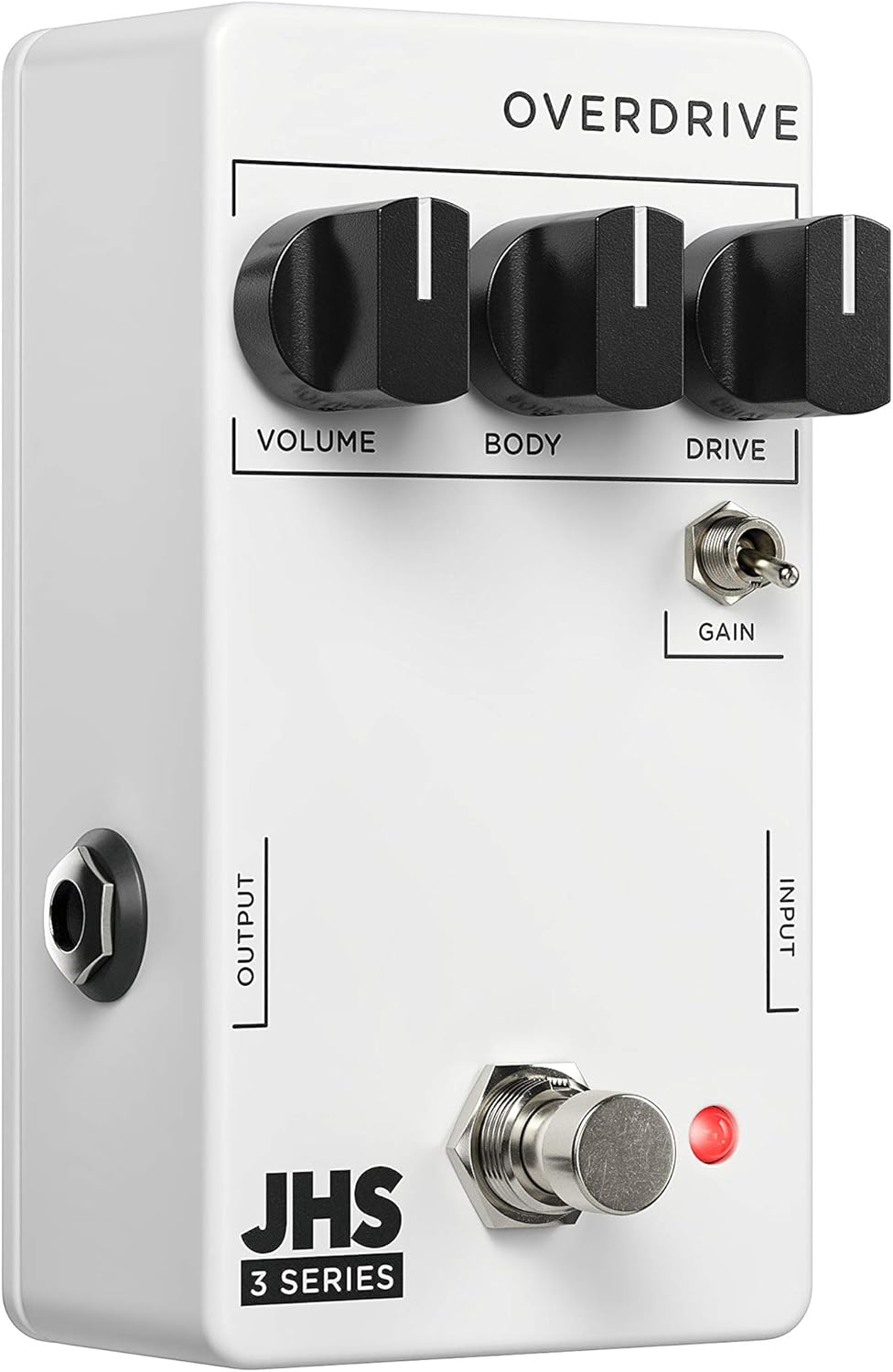
이미지: 각도 view of the JHS 3 Series Overdrive pedal, highlighting the input and output jacks for connection.
Operating the JHS 3 Series Overdrive
The JHS 3 Series Overdrive features three primary control knobs and one toggle switch, allowing for intuitive tone shaping.

이미지: 위에서 아래로 view of the JHS 3 Series Overdrive pedal, showing the layout of its controls.
통제 수단:

용량: This knob controls the overall output level of the pedal. Turn clockwise to increase the volume, and counter-clockwise to decrease it. Use this to balance the pedal's output with your amp앰프의 깨끗한 신호를 출력하거나 볼륨을 증폭하기 위해 사용됩니다.

Body (EQ): The Body knob acts as an EQ control, allowing you to shape the tonal character of the overdrive. Adjusting this knob will affect the mid-range and overall fullness of your sound, from thinner, brighter tones to thicker, warmer tones.

운전하다: This knob controls the amount of overdrive or gain. Turning it clockwise increases the saturation and distortion, ranging from subtle breakup to heavy overdrive. Experiment with this control to find your desired level of grit.

Gain Toggle: This two-position toggle switch alters the gain structure and dynamics of the pedal. In one position, it provides a more saturated and compressed sound, ideal for lead tones or heavier rhythm. In the other position, it offers a more open and crunchy dynamic, allowing for greater touch sensitivity and articulation. This switch significantly impacts how the pedal responds to your playing style.
To activate the pedal, press the footswitch. The red LED indicator will illuminate when the effect is active.
유지
- 청소: 페달 외부를 닦을 때는 부드럽고 마른 천을 사용하십시오. 연마성 세척제나 용제는 마감재나 내부 부품을 손상시킬 수 있으므로 사용하지 마십시오.
- 저장: When not in use for extended periods, disconnect the power supply and instrument cables. Store the pedal in a cool, dry place away from direct sunlight and extreme temperatures.
- 케이블 관리 : 케이블이 잭이나 케이블 자체에 손상을 입히지 않도록 모든 케이블이 올바르게 배선되어 있고 과도한 장력이 가해지지 않도록 하십시오.
- 전원 공급 장치: Always use a regulated 9V DC negative center power supply. Using an incorrect power supply can damage the pedal and void the warranty.
문제 해결
If you encounter issues with your JHS 3 Series Overdrive, try the following troubleshooting steps:
- 소리 없음:
- 모든 케이블 연결(입력, 출력, 전원)이 단단히 연결되어 있는지 확인하십시오.
- Verify that the power supply is correctly connected and providing the specified 9V DC negative center power.
- 기타와 amplifier are working correctly by testing them without the pedal in the signal chain.
- Check the pedal's footswitch and LED indicator. If the LED does not light up when pressed, there might be a power issue.
- 약하거나 왜곡된 소리:
- 조정하다 용량 그리고 운전하다 knobs. Ensure the Volume is not set too low and the Drive is not excessively high, which can lead to unwanted distortion.
- 실험해 보세요 몸 (EQ) knob to adjust the tonal balance.
- Check your guitar's pickups and volume/tone controls.
- 과도한 소음/험:
- 고품질의 절연 전원 공급 장치를 사용하고 있는지 확인하십시오. 노이즈가 심한 다른 페달과 전원을 데이지 체인 방식으로 연결하면 험 노이즈가 발생할 수 있습니다.
- Check for faulty cables. Try swapping out instrument cables.
- 접지가 제대로 되어 있는지 확인하십시오. amp리파이어 및 기타 장비.
If these steps do not resolve the issue, please contact JHS Pedals customer support for further assistance.
명세서
| 특징 | 사양 |
|---|---|
| 모델 | 3SOVERDRIVE |
| 전력 요구 사항 | 9V DC Negative Center |
| 현재 소비량 | 12mA |
| 치수 | 4 x 3 x 2인치(10.16 x 7.62 x 5.08cm) |
| 품목 무게 | 7.4온스(0.21킬로그램) |
| 커넥터 유형 | 1/4인치(6.35mm) 오디오 잭 |
| 신호 형식 | 비슷한 물건 |
Image: JHS 3 Series pedal shown with approximate dimensions for reference.
보증 및 지원
JHS Pedals products are known for their quality and reliability. For detailed warranty information and customer support, please refer to the official JHS Pedals web사이트를 방문하거나 고객 서비스에 직접 문의하세요. 보증 청구를 위해 구매 증빙 자료를 보관하세요.
추가 리소스 및 제품 정보는 다음을 방문하세요. 아마존에서 JHS 페달 스토어를 만나보세요.
Ask a question about this manual
Ask about setup, troubleshooting, compatibility, parts, safety, or missing instructions. Manuals+ will review the question and use this page’s manual context to help answer it.